How to Choose a Nonprofit CRM for Donor Management
Your donors give more than money. Find out how to choose a nonprofit CRM that captures every commitment and gives your team more time for relationships.


Your donors give more than money. Find out how to choose a nonprofit CRM that captures every commitment and gives your team more time for relationships.
Nonprofit fundraising is built on enduring donor relationships. But with 48% of Australian nonprofit teams struggling to manage workloads and 34% finding it difficult to recruit staff, finding the capacity to maintain strong connections with supporters isn’t always easy.
One way you can reclaim time for those interactions is by making supporter information easier to find and use. A customer relationship management (CRM) platform will bring your donor records and engagement history into a single shared view. This lets you:
The catch? CMOs and fundraising directors can’t settle for a generic sales setup. A CRM for nonprofits needs to track giving histories, future commitments, and shifting priorities across complex relationships that often span decades.
That calls for a far different set of features than you’d find in a standard platform. In this guide, we’ll show you what to look for in all-in-one charity software built for the way your organisation works.
A sales CRM is built to move prospects towards a purchase, with features that help teams track day-to-day pipelines, manage quotes, and turn enquiries into orders. That works well for commercial operations where the objective is almost always making a sale.
Nonprofits have a different agenda. Rather than encouraging a purchase, their goal is to sustain a mission through supporters’ ongoing generosity. Relationships can span years, with supporters donating their funds, time, and skills on a recurring or ad hoc basis. There’s no single route that everyone follows, and involvement can change as circumstances evolve.
| Aspect | Commercial sales relationship | Commercial sales relationship |
|---|---|---|
| Motivation | Driven by business needs: “Will this product solve our pain points and does the price match our budget?” | Driven by emotion, personal motivations and shared values: “Does this cause matter to me, and can I trust the organisation?” |
| Relationship | Transactional: While relationship-building matters, the product is the primary selling point. | Relational: Ongoing support depends on a connection to the cause and confidence in the nonprofit. |
| Audience | Clearly-defined target audience based on the product or service the business is providing. | Connected by a cause, with wide-ranging roles and motivations, from government agencies to local volunteers. |
| Pathway taken | Follows a predefined path, from identifying a need to agreeing terms and completing a purchase. | Open-ended: A gift might follow a single appeal, months of conversation, or even years of volunteering. |
| Contribution | Financial: Exchanging money for a product or service. | Contributions can come in the form of cash donations, volunteering, advocacy, and network introductions, and each needs its own records and follow-ups. |
| Context recorded | What the customer wants to buy, its price, past interactions, and the status of the agreement. | Received gifts, future contributions, contributions of time, motivations and interests, expressed intentions, and personal circumstances. |
| After the transaction | Attention turns to delivery, helping the customers get value and supporting future purchases. | Stewardship involves acknowledging the gift, explaining its impact, giving thanks, and maintaining ongoing, personal contact before the next fundraising request. |
The takeaway here is that nonprofits need to treat every supporter as anindividual with unique motivations and circumstances. Every commitment rests on a deeply personal connection to the cause; relationships can last minutes or span decades; contributions can come in any form; and involvement depends on active engagement between appeals.
That changes the scope of your investment. Your donor management software needs to preserve conversations across open-ended relationships, distinguish money received from future commitments, and connect each gift to the cause it supports. That starts with a specialised fundraising and charity CRM built for the way your business operates.
A nonprofit CRM should connect your donor records with fundraising activity and help your teams use that context to build enduring relationships. The following capabilities provide a starting point that you can use to find a solution built for your business.
| Feature | What to look for |
|---|---|
| 1. Unified donor, gift, and pledge management | The platform should let you build connected supporter profiles that can distinguish previous gifts from future commitments and track all the causes those gifts support. |
| 2. Fundraising campaign tracking from end to end | You should be able to tie donations to different appeals, then track the results over time. This lets you pinpoint the fundraising activities generating the most support. |
| 3. Database management that holds up at scale | Your CRM should make hundreds of thousands of supporter records easy to find and use. It should make importing data straightforward and help teams combine duplicate profiles without losing important details |
| 4. Consent settings that turn preferences into rules | Supporter preferences should control which messages they receive. The CRM should automatically enforce consent preferences as rules that apply across connected tools, rather than just sitting in a donor profile. |
| 5. Data protection that goes beyond basic security | The platform should let you limit who can view or change records. Look for controls that can flag or block suspicious activity and an audit trail that helps your teams stay on top of Australian compliance. |
| 6. Segmentation and personalised messaging | A first-time donor needs a different message than a long-standing supporter. Your CRM should help you group people by their interests and involvement so appeals reflect what matters to them. |
| 7. AI agents that turn donor insights into action | Look for the opportunity to deploy AI agents that can automate routine work like reminders and follow-ups. Those agents should use your donor context and follow the permissions and approval rules you set. |
Let’s take a closer look at how each feature should work for your team.
A nonprofit CRM needs to give your team a clear view of the entire donor relationship. That includes what the supporter has already given, what they’ve committed to give in the future, and where they want their gifts to go.
The defining capability of a not-for-profit CRM is the visibility and control it gives you over different types of giving. You should be able to track:
All of this information should be clearly visible in the same centralised place you store core donor details, like contact information and communication preferences.
As an example, Salesforce’s Nonprofit Cloud tracks giving history, recurring donations, pledges, and gift purposes, then turns that context into unified donor profiles. This lets teams see a timeline of every supporter relationship at a glance. You can even set up customised reminders for important events, such as a supporter’s birthday or an upcoming meeting.

Source: Salesforce
That granular control over donor details and donation types is what separates a sales CRM designed for short-term deal management from a true CRM for charities and nonprofits.
You know what your supporters have given, but which appeals brought those gifts in? If your annual appeal includes emails, direct mail, fundraising events, and social media posts, you need a way to understand how each activity performed. This will help you decide what to refine or put more budget behind next time.
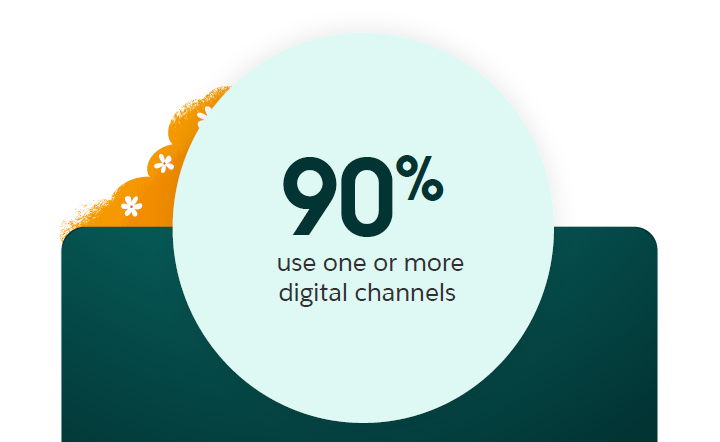
With 90% of nonprofits using one or more digital channels, it’s more important than ever to understand which channels turn outreach into donations.
Source: Salesforce, Nonprofit Trends Report (Seventh Edition)
Look for a platform that lets you connect donations to campaigns and break down the specific outreach behind each gift. In Nonprofit Cloud, for instance, CMOs can track individual appeals by campaign, giving channel, audience segment, and message, then turn that data into visual dashboards to inform future decisions.

Transform your company by infusing your data with AI and building a thriving data culture.

Source: Salesforce
The best part about our nonprofit management software is that it’s built to track support over the long term. Even if a supporter has given monthly for years, you can trace that history back to the initial appeal that sparked the relationship.
One challenge of running a nonprofit is that the same donor relationship can be captured in multiple ways. A supporter can be a donor, volunteer, and event attendee at the same time, with different colleagues recording each interaction separately.
Without a reliable way to match those records, one person’s involvement can end up scattered across profiles. That makes it difficult to understand where the relationship stands. For instance, if a colleague follows up on an outstanding pledge without seeing the payment already recorded on another profile, they may ask for money that’s already been given.
To avoid this, look for nonprofit software that keeps supporter records accurate and connected as new information arrives. It should offer:
In Nonprofit Cloud, Data 360, Salesforce’s native data engine, provides these capabilities. Data 360 will unify data across your business in real time, standardise it, and match information to the right donor profile. It also features zero-copy integration, and it can connect to your databases, legacy systems, and third-party tools through MuleSoft.

Data 360, the only data platform native to Salesforce, unlocks and harmonises data from any system — so you can better understand your customers and drive growth.
This gives fundraisers confidence that they can trust every supporter profile. Connected data is also the foundation for AI agents that can make every aspect of your nonprofit operation easier to manage. We’ll dive deeper into that later, but for now, let’s talk about consent.
Nonprofits can’t rely on blanket settings that apply the same rules to every supporter. If one donor welcomes impact updates but declines fundraising calls, those preferences need to be clearly visible in your donor profiles and consistently enforced as rules across your systems.
The gold standard here is a nonprofit CRM that makes this process automatic. For example, Salesforce Privacy Centre lets nonprofit teams create forms where supporters can choose how you contact them. Their responses will then automatically feed into your Nonprofit Cloud consent records, which you can use to control who receives each communication.
By connecting consent records to your nonprofit marketing tools, you can also set up automatic checks that flag when someone tries to send a donor a message they’ve opted out of receiving. This saves colleagues from checking preferences manually every time.
When you bring supporter information together, you also have a responsibility to protect it. Your CRM should help your team control who can access sensitive information and keep track of how it’s used.
Look for permissions that let you limit who can view, change, or export records. Colleagues should have access only to the information they need for their role, and leaders should be able to see who assigned or changed records and when.
You should also ensure your CRM has an integrated security solution like Salesforce Shield that can flag or block suspicious activity, encrypt sensitive data, and record activity. These controls support the Australian Privacy Principles (APPs) mandate to protect personal information and your notification obligations under Australia’s Notifiable Data Breaches (NDB) scheme .
If your youth mentoring program reaches a milestone or your animal welfare charity opens a new shelter, the supporters who funded those causes will want to hear about it. But finding everyone with that connection shouldn’t mean searching through donor profiles one by one.
Solving that problem starts with segmentation. Your CRM should let your team group supporters using data from donor profiles, then personalise your outreach based on the causes that matter to them. This is the key to sustaining donor engagement between appeals and helping supporters see the difference they’re making.
Nonprofit Cloud comes with a drag-and-drop segmentation tool. It lets your teams build audiences using criteria like giving history, location, motivation, and communication preferences. This means supporters receive tailored updates that resonate with their values, strengthening the relationship and supporting retention.
The most exciting part of connected donor context is how it opens the door to a much wider set of possibilities. Today, the opportunity is to put AI agents to work within your organisation to tackle routine work, keep donors engaged across channels, and give your staff more time for the human moments that build lasting trust.

See how you can create and deploy assistive AI experiences to solve issues faster and work smarter.
This is where the scope gets bigger. With Agentforce for Nonprofit Cloud, you can build and deploy agents that support your team from research to outreach. An agent could:
Every decision Agentforce makes is backed by your CRM data, grounded in your business rules and permissions, and secured by the Salesforce Trust Layer. An agent only uses the information it’s authorised to access.
This is how nonprofit teams keep moving towards their goal even as workloads grow and staff capacity is stretched. As Andrea Schiller, our Director of Product Marketing, put it at Dreamforce 2026: “What if your non-profit had unlimited capacity to deliver on its mission?”
Scaling Nonprofit Missions with AI | Salesforce Accelerator
Start by bringing fundraising, marketing, finance, and IT together to agree on what your CRM needs to deliver. Separate the essentials from capabilities you might want to add later, then use those priorities to compare vendors.
The questions below turn the core features we’ve already covered into a checklist you can use to assess donor management software during the demo stage. You don’t need to ask all of these — just take the ones that are important to your nonprofit and adapt them as needed.
| Nonprofit CRM feature | The questions to ask a vendor before you buy |
|---|---|
| Unified donor, gift, and pledge management | - Can we see what someone has given, what they’ve pledged, and what’s still due in one place? - Can we keep track of which programs donors want their money to support? - Can a colleague open a donor’s profile and see the entire giving and conversation history at a glance? |
| Fundraising campaign tracking from end to end | - Can we tell which appeal, channel, and individual message encouraged a gift? - If someone keeps giving for years, will we still be able to trace that support back to the original appeal? |
| Database management that holds up at scale | - Will everyday tasks still run smoothly if we scale to 100,000–300,000+ records? - What happens when two profiles have different contact details but belong to the same person? - If an import puts information in the wrong place, how do we spot the issue and fix it? |
| Consent settings that turn preferences into rules | - Can we set individual consent settings for each supporter profile? - What happens if someone opts out while an appeal is already queued to send? - What stops an employee from accidentally sending a supporter something they’ve opted out of? |
| Data protection that goes beyond basic security | - Will the platform let us define who can view, change, or download supporter information? - Which suspicious activities can you actually stop, rather than just alerting us about? - Can the platform help us create a clear audit trail for Notifiable Data Breaches compliance? |
| Segmentation and personalised messaging | - Can fundraising teams build and change audiences themselves without relying on IT? - How quickly do audience groups update when someone’s involvement changes? |
| AI agents that turn donor insights into action | - What can AI do for our team in this CRM? - How do we make sure the AI operates safely and doesn’t put sensitive information at risk? - Can you show an agent completing a task using real donor information? |
Some of these questions will be obvious from the landing page. For others, you’ll need to ask vendors to demo workflows. If a trial version is available, you can also give employees time to try everyday tasks themselves.
Once you’re ready to make the move, build an internal case around the improvements that matter to your stakeholders. Use what you learned in demos to show where teams could:
You can then weigh those benefits against the full cost of licences, migration, training, and ongoing support. Also assess whether a candidate offers any discounts for nonprofits. For instance, Salesforce’s Power of Us Program gives eligible nonprofits the opportunity to access discounted Salesforce technology.
Good Things Australia helps community organisations give people the skills and confidence to navigate the digital world. Its lean team of 20 supports a network of more than 4,000 partners, including libraries, community centres, and refugee organisations.
As you’d expect, keeping that network supported takes more than a shared contact list. To keep its mission of increasing digital inclusion on track, the charity uses Nonprofit Cloud to bring its partner records, grant management, and outcome reporting into one place.
Beyond giving employees a better way to see where partners need support, Good Things Australia has also built a connected partner portal that gives organisations a place to report their activities, find resources, and check when reports are due.
With Agentforce, we can better support our partners who are volunteering their time outside of business hours. It also frees up our team to focus on working with partners to build their capabilities and increase our collective impact.
Jess WilsonChief Executive Officer, Good Things Australia
The same foundation also supports “Grant”, Good Things Australia’s very own Agentforce agent. Partners can ask questions about their grants outside business hours and get a personalised response in seconds. If they need a person for a complex query, the agent will raise a case for the team to follow up on the next day.
Today, over 1,000 community organisations access the Good Things Australia portal, and the Grant AI agent helps over 100 organisations get online support 24/7. The result is fewer helpline calls, more informed partners, and more time for Good Things Australia’s team to focus on complex cases and strategic work.


CRM and fundraising software helps your team understand each supporter and build on the commitment they’ve already shown. When information is easy to find and routine work takes less time, colleagues have more time to put donor insights to use, make every conversation more personal, and show supporters the difference their contributions make.
Ready to see what that kind of connectivity can look like for your organisation? Try Nonprofit Cloud for free today and explore how unified data and AI agents can transform your mission.
A customer relationship management (CRM) platform for nonprofit organisations brings supporter records and fundraising activity into one place. Nonprofit buyers sometimes call this constituent relationship management, because the relationships include donors, volunteers, and partners rather than traditional “customers”.
Purpose-built nonprofit software records how people contribute, including individual donations, recurring gifts, and future pledges. This gives colleagues the context to manage the relationship more effectively and follow through on commitments.
A nonprofit customer relationship management (CRM) platform like Salesforce’s Nonprofit Cloud can support donor retention by helping teams maintain relevant, consistent contact with supporters. Three capabilities make that possible:
Together, these capabilities help supporters feel recognised and understand the difference they’re making, supporting retention. See Salesforce’s donor engagement guide for more practical ways to build that ongoing connection.
Salesforce provides eligible Australian nonprofits with 10 Nonprofit Cloud or Sales/Service Cloud licences at no cost through its Power of Us Program. Eligible organisations can also get discounts on additional licences. See the full eligibility criteria here.