
Customer service software: How to scale without adding headcount
Ticket volume increasing? Learn how customer service software can cut response times, automate triage, and scale service operations without adding capacity.


Ticket volume increasing? Learn how customer service software can cut response times, automate triage, and scale service operations without adding capacity.
Ticket volume can spike at any time for service teams. A new product launch brings a wave of new questions. A successful marketing campaign adds thousands of new customers. A product bug sends frustrated users straight to your support team.
Meanwhile, customer expectations are rising. According to our latest State of Service report, 82% of service professionals say customer expectations are higher than they used to be.
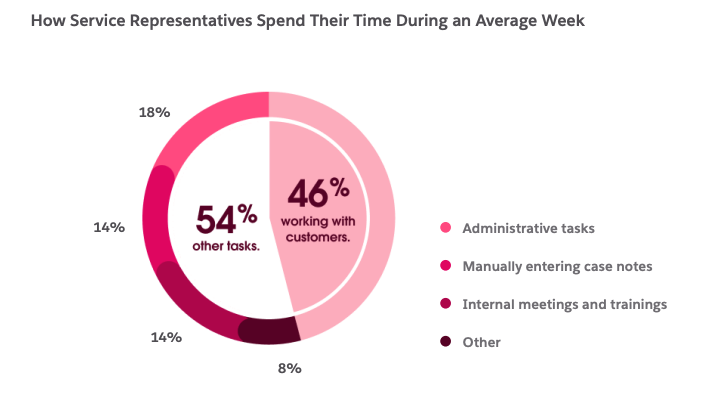
When ticket volume outpaces capacity, it can affect those expectations: response times slow, backlogs build, and agents spend more than half their time on manual admin tasks instead of solving customer problems.
Source: Salesforce, State of Service report
Hiring more agents adds capacity, but it doesn’t fix the processes creating the pressure. This is where scalable customer service software helps leaders take a different approach by increasing capacity without increasing headcount.
The right software can help teams consolidate channels, automate triage, and streamline workflows to take on smaller, repetitive tasks while giving agents time back to focus on the higher-value interactions.

You can scale your customer service with the power of generative AI on a unified foundation of trusted data. See how this technology improves efficiency and generates revenue from the contact centre to the field.
This guide walks you through how to scale customer service operations sustainably, with practical guidance on using customer service software to handle growing demand, improve response and resolution times, and optimise your existing team.
Start by bringing every customer conversation into one service operation
Save agents from triaging every ticket
Reduce case resolution times with self-service
Design your service operation to scale with demand
Give agents the work only they can do
How State Trustees of Victoria scaled customer service with automation
When your response times start to slip, look at how your service teams are managing customer conversations. If customers can reach you by phone, email, and chat, and each channel has its own queue, workflow, or system, then your agents are likely spending most of their time managing these queues instead of resolving tickets.
When your agents have to switch between systems, piece together customer histories, and monitor multiple queues, it’s harder for them to respond and resolve tickets quickly and consistently. That’s an environment ripe for increased agent burnout and decreased customer satisfaction.
Bringing communications channels into an omnichannel call centre software operation removes some of that friction. Instead of managing each channel separately, a unified queue gives agents clear visibility to prioritise and respond from one place.
When customer interactions live in one place, agents can pick up a conversation in email without needing to ask the customer to repeat information they’ve already provided over the phone.
This is already a priority for service leaders, with 88% of service heads prioritising tech integration to bring data together, eliminate silos, and support AI customer support software. An omnichannel queue can be part of that foundation.

Transform your company by infusing your data with AI and building a thriving data culture.
The right customer service software should turn separate channels into one coordinated service operation.
Here’s what to look for when evaluating platforms to unify phone, chat, and email handling:
Bringing your channels together into a customer service solution is the first step. But a unified queue only solves part of the problem if agents still need to manually read, classify, and route every ticket.
In a manual setup, every ticket that comes into a service queue starts with an agent. They read the issue, work out what the customer needs, assess its priority, and decide whether to resolve it themselves or assign it to another agent.
Customer service software can reduce first-response times across phone, chat, and email by automating first-line triage within one service operation. Incoming interactions can be captured within the platform, classified, and routed to the right workflow, queue, or agent.
When service teams can reduce the manual workload between receiving a ticket and resolving it, they’re one step closer to improving their first response times.
When channels are consolidated, incoming tickets can all be assessed using the same rules, regardless of where they come from. A ticket can be classified by factors such as intent or urgency and assigned to the appropriate service agent or queue.
When this happens automatically, agents can start working on the cases that need their expertise earlier, rather than spending time deciding where each case should go. For example, Service Cloud, Salesforce’s customer service product, can automate workflows to route tickets to the right agent, based on their skills and availability.
The shift towards this AI-powered model is already underway, as 79% of service leaders say investing in AI agents is essential to meeting business demands. The result is a service operation where a rise in ticket volume can be handled without increasing the amount of manual work. And when a customer gets the right answer or resolution in the first interaction, they’re less likely to need to reach out to the support team again.
Fewer repeat contacts mean less demand flows back into the queue, helping service teams reduce both response times and backlog.
Getting tickets triaged correctly and automatically can reduce the admin workload, but once a ticket is assigned, an agent still needs to resolve the issue. That involves looking for information, following processes, handling repetitive requests, or potentially passing the case on to another team.

Reduce costs and improve operational efficiency while providing fast, personalised service customers love.
As ticket volumes grow, all that extra work adds up. Service teams can cut case resolution times without adding agents by removing the unnecessary work from the resolution workflow.
Customer support software can help, from automating routine requests through to guiding agents on common issues.
| Focus area | How it helps resolution time | Example |
|---|---|---|
| Self-service | Uses AI to resolve predictable and simple requests without needing agent input | Order status, password resets, returns |
| Customer context | Gives agents the information they need without having to search across systems | Customer history, previous interactions, account details |
| Standardised resolution workflows | Gives agents a consistent process to follow for handling issues | Guided steps, AI knowledge hubs for recurring queries |
| Automated admin tasks | Reduces time spent on repetitive work around each case | Updating records, logging information, automated notifications |
Let’s look at each focus area in a little more depth.
Use tailored AI self-service tools like chatbots to resolve predictable, low-complexity tickets, such as order status updates and password resets, without sending every case to an agent.
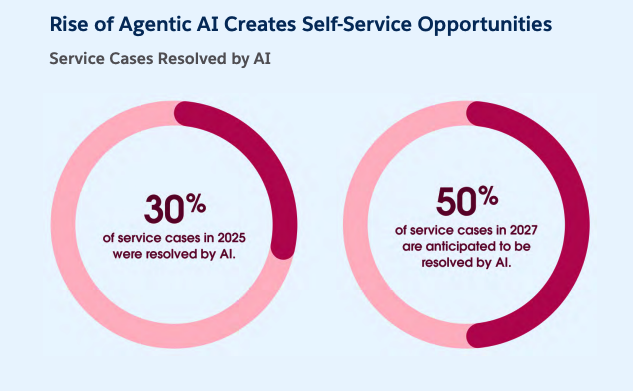
This approach is gaining momentum. Sales professionals say they expect AI to resolve 50% of service cases by 2027, up from 30% in 2025.
Source: Salesforce, State of Service report
Use connected customer service software to help teams surface all relevant customer information, interaction history, and account details before an agent even touches the issue.
When agents don’t need to switch between tools and systems (or ask customers to repeat information they’ve already provided) for context, they have more time to solve the issue.
Use AI help desk software solutions to build processes and workflows for common or recurring issues so agents can follow simple steps to resolve the issues without needing to start from scratch.
When you standardise common resolution workflows, agents have a consistent path to follow for common issues, helping teams resolve similar cases the same way.
Automate routine tasks, such as case updates or ticket status changes, so agents can spend less time on administrative tasks and more time on cases that need human input.
Together, these levers reduce the amount of work needed to resolve each case. AI keeps straightforward requests out of agents’ queues, while better routing, standardised workflows, and customer context help agents resolve the cases that do reach them more efficiently.
Reducing cases faster can help clear the queue. But if customers have to come back time and again with the same issue, that queue continues to grow. When a customer has to make multiple contacts to get an issue resolved, these interactions create more work for the service team. A case that could have been closed in one interaction can balloon out to three or four contacts, adding to queue volume and taking agent capacity away from other customers.
Improving first contact resolution (FCR) helps break the cycle by resolving customer issues completely the first time. Give service agents the information, knowledge, and workflows they need to resolve an issue completely when they first touch it. For routine requests, AI services like chatbots can eliminate the need for agent interaction.
For more complex cases, automatic routing to the right teams, along with a clear customer history and standardised guidance, can help a service agent resolve a ticket sooner. Over time, reducing these repeat interactions can take pressure off the queue and give agents more capacity for new tickets.
As ticket volumes climb, service leaders need a way to increase capacity without relying on a proportional increase in headcount.
That means changing what scales. Instead of adding more people to process tickets, service leaders can redesign how tickets enter a queue, move through it, and get resolved.
Customer support management software offers the infrastructure for that shift from manual workflows to scalable architecture that can adapt to higher ticket volumes.
Traditionally, service teams have scaled manually to address the increase in ticket demand. With customer service software, teams can now meet the demand by using AI agents, tools, and more efficient workflows to automate triage and resolution.

Deliver personalised customer service at scale. Bring all of your support needs onto one platform so you can decrease costs while increasing efficiency.
To get there, service teams can take a progressive approach to moving work out of the manual queue in a few steps:
A service operation that can take on more tickets through automation and consolidation has room to sustain growth without relying on the same manual processes at a larger scale.
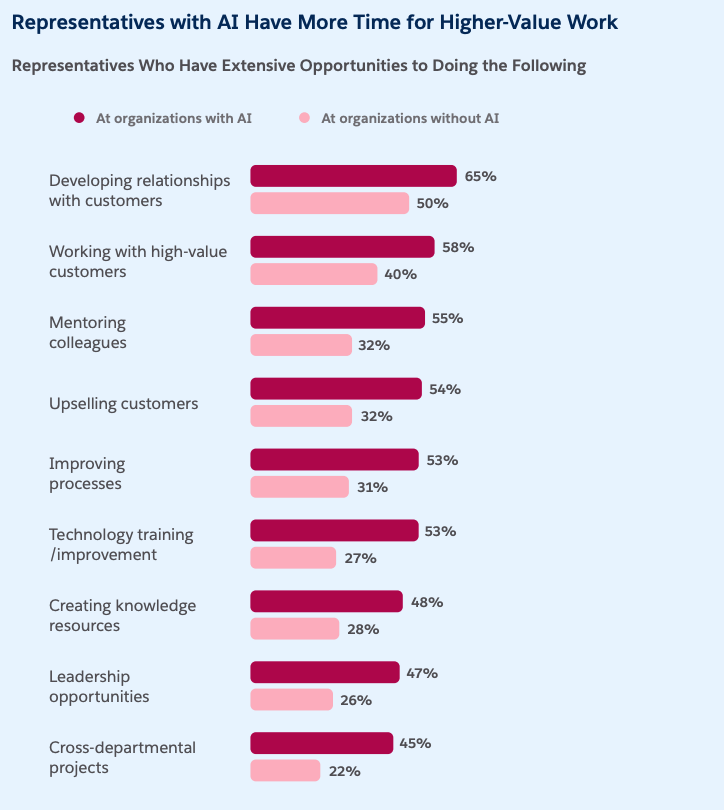
Scaling with call centre software doesn’t just benefit resolution times or backlogs; it also gives agents time back to use their skills, expertise, and judgement in the areas that matter most.
The benefits also extend to the agents themselves, with 83% experiencing enhanced career opportunities and 82% acquiring fresh skill sets in workplaces where AI is integrated into the business.
Source: Salesforce, State of Service report
Service leaders are also preparing for this shift in frontline roles. Nearly 80% of organisations plan to transition some agents into new roles, where complex or emotionally sensitive interactions require human expertise, according to a Gartner survey . The same survey found that 84% of leaders intend to expand the skills required for the agent role and revise hiring profiles to match.
This indicates a different role for service agents, shifting from managing tickets to solving the ones that need a human touch the most.
State Trustees of Victoria wanted to simplify how service requests were managed and give its team a clearer view of client interactions across channels.
The organisation turned to Salesforce to help meet their goal. With Salesforce, the organisation reduced 17 individual email inboxes to one and introduced automated triage, with AI now classifying 53% of incoming requests.
Instead of adding more people to monitor its inboxes and sort through requests, the organisation now uses customer service software to identify and direct client responses before they reach a person, freeing up time for service agents to better support clients and help them achieve their goals.
Rising ticket volumes don’t automatically mean proportional headcount growth. The service organisations adapting to higher ticket volumes are changing how the work moves through their operation instead of hiring more agents.
For benchmark data on how service organisations are using AI to redesign their service workflows and systems to scale sustainably, read our State of Service: AI Agents Edition report.
Ready to put your service operation to work? Explore Salesforce’s Service Cloud platform to see what’s possible when your team has more capacity to focus on customers, not queues.


Try Service Cloud free for 30 days. No credit card, no installations.
Tell us a bit more so the right person can reach out faster.
Service leaders should look for customer service software that brings phone, chat, and email into a unified service operation while supporting automated routing, AI workflows, and shared customer context.
Customer service software can reduce case resolution times by removing the manual work from the process. The right platform can solve routine requests without agent input, route cases to the right teams, and surface customer knowledge to speed up time to resolution.
Service teams can scale by using customer service software to increase the number of tickets their existing operation can handle instead of relying on adding more agents to a team. The right platform will help reduce the amount of manual work created by each additional ticket through AI and automation.


