
Decision models are having a moment. In mid-September, TypeSafe AI came out of stealth with Jev, a model built to pick from a set of options. A month later, OpenAI made its Decisions API generally available, and several other AI companies have released decision models of their own.
Salesforce has used decision models for years, including HyperClassifier, which routes requests inside Agentforce, sending each inquiry to the part of the agent built to handle it. For example, when a customer asks a service agent, “Where’s my package?” this routing model sends the message to the part of the agent that handles shipping and delivery. Other parts handle FAQs, current promotional offers, and escalations. Decision models help agents quickly determine the right next step, whether that’s selecting the appropriate workflow, making a yes-or-no decision, or assigning a score, without relying on a larger, more expensive AI model for every task.
This month, we’re introducing the next version of our HyperClassifier model, Koa Decisions. Building on HyperClassifier’s proven capabilities, Koa Decisions dramatically expands where and how decision models can be used across Salesforce. The result is a more versatile model that brings fast, efficient decision-making to a broader range of workflows and applications.
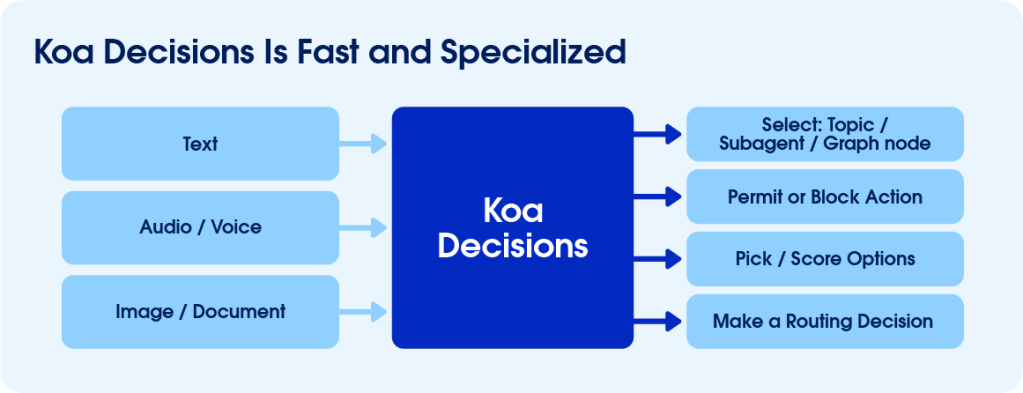
Koa Decisions reads a request and a list of categories you define, then makes a decision in a single step, in milliseconds. Our data science team built it by applying novel training techniques to Google’s Gemma, an open-weight model. Among other advances, it adds multimodal support for images and audio.
We plan to extend it well beyond routing, into flows, Apex, and prompt templates for Salesforce builders, plus an API for developers. Koa Decisions joins the Koa family of Salesforce models, which also includes a separate reasoning model built with NVIDIA.
Why decision models matter for enterprise agents
A large language model (LLM) generates text, but much of an agent’s work is simply making choices, such as which team gets a request or which knowledge article to show. That’s what a decision model does: It returns a choice, like one option from a list, a yes or no, or a score.
Say a customer types “I can’t log in to my account” into a company’s chat window. Should the request go to engineering, accounts, or sales? A general-purpose LLM can interpret the request, but it isn’t purpose-built to make these quick, targeted decisions, and it can take more than a second to work through the question.
A decision model, by contrast, is designed for exactly this task. Given the same request and options, it identifies “accounts” in milliseconds, returning a clear answer and confidence score without the overhead of a larger, general-purpose model.
An answer like that is often a single token, the basic unit of text an AI model processes, about the size of a word. An LLM writes its answer one token at a time, with each new token based on the ones before it. A decision model reads the whole request at once and produces its answer in one step. A short answer takes less computing to produce, and other software can act on it right away.
When we measured routing requests in Agentforce, we found that our decision model took roughly 26 milliseconds, compared with about 1.4 seconds for a general-purpose LLM. For a closer look at how Koa Decisions works, read our team’s research paper.
See for yourself
You can test-drive a decision model even if you aren’t a Salesforce customer. Sign up for a free Trailhead account, then run the Koa Decisions demo.
- Click Route a support request and click the gray arrow. The model routes the default request to engineering, accounts, or sales and shows a confidence score for each option.
- Under Choices, add a fourth option, like “Returns.” You can get creative and add fun or personal options here, like “Healthcare” or even “Daycare.” To lock it in, click back in the Input field.
- In the Input field, change the request to something relevant to the choice you added, like “I need to send back the order that arrived yesterday,” and click the gray arrow again. Check which option the model picks now.
- Paste a similar written request and list of options into an LLM-based chat assistant. Compare the length and format of its answer with the decision model’s.
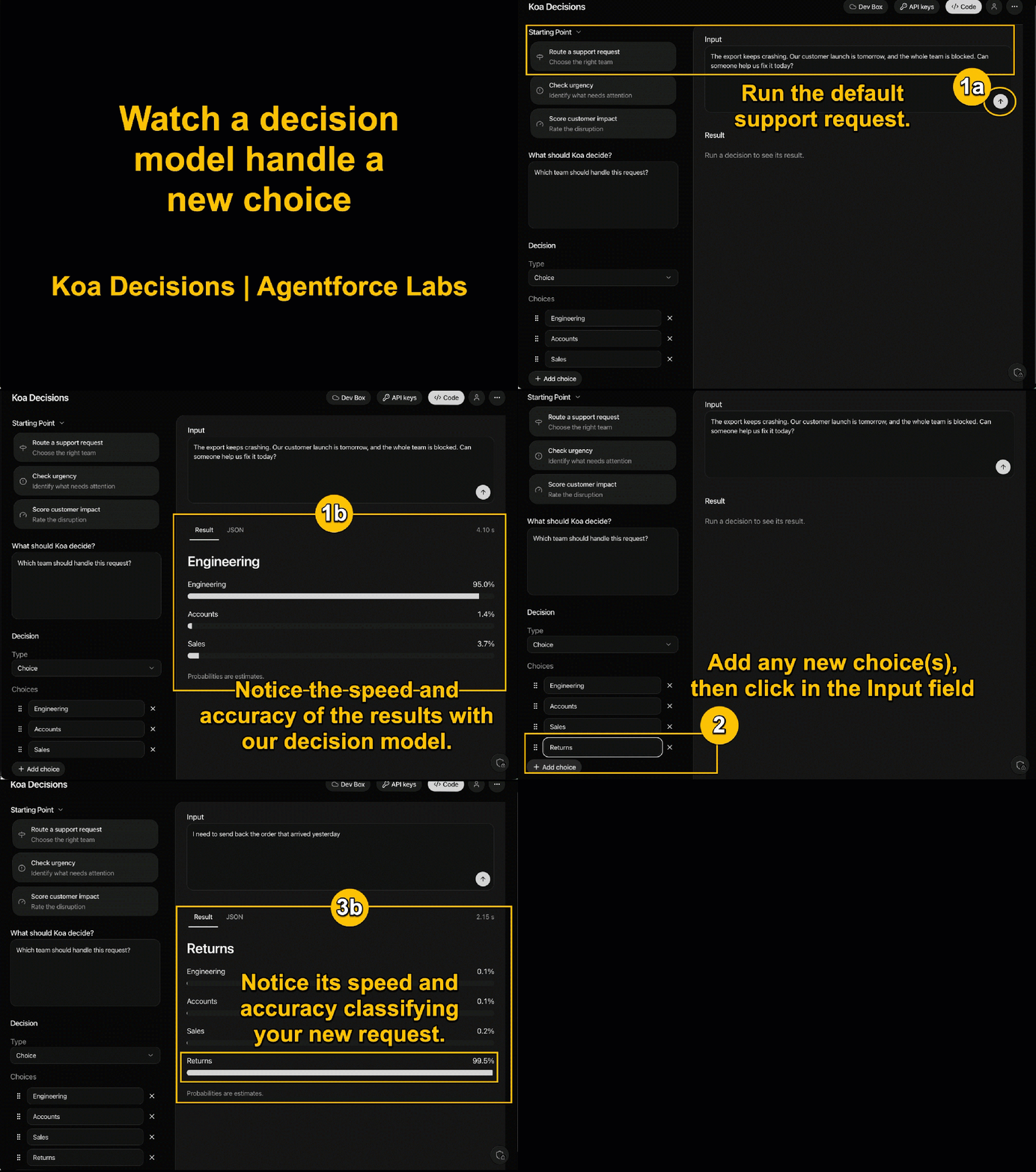
In step 3, the model picked returns as soon as you added it, with no retraining. Software has classified requests for decades, but that used to take a custom predictive machine learning model. Teams defined the outcome, gathered and labeled data, trained the model, checked its accuracy, and repeated. For many enterprise customers, getting from idea to production took months. A decision model starts from a language model that has already learned, from large amounts of text, how “send back the order” relates to “returns.” A team can add the category and sometimes reach production in hours.
Efficiency built into Salesforce
Koa Decisions is built to make the quick calls that keep work moving across Salesforce, saving LLMs for writing and reasoning. Customers get a more efficient process without having to manually select a model for a particular job.
For example, when a sales deal starts to slip, a decision model can flag the risk and pick which team should step in, and an LLM can summarize what changed. By the time anyone opens the record, the right team already knows.
To learn how Koa Decisions fits into everyday business processes, from a Sales Cloud record to a Slack alert, watch this demo video.

Pricing and packaging are subject to change. Availability may vary by region and is governed by customer agreements. Customers should base purchasing decisions on products and services currently available.