



Data is arguably an organisation’s most valuable asset, but is often dense, complex, and difficult to decipher. To transform this information into a strategic asset, organisations must master the art of visual storytelling. Data visualisation is the graphical representation of information, using visual elements such as charts, graphs, and maps to provide an accessible way to see and understand trends, outliers, and patterns.
Why Chart Selection Impacts Business Decisions
The primary goal of visualisation is to make data easier to understand. When a business leader looks at a dashboard, they should be able to grasp the core message within seconds. If a chart is poorly chosen, it can obscure the truth, lead to misinterpretation, and ultimately result in poor decision-making.
Choosing the correct types of data visualisation ensures that the narrative remains clear. Visuals allow the human brain to process information much faster than spreadsheets. By highlighting the most relevant metrics through the right format, businesses can identify bottlenecks, spot emerging market trends, and pivot their strategies with confidence. Organisations using Tableau saw a 33% increase in insights-driven decision-making and a 26% decrease in time spent analysing information. The right chart, applied to the right data, is what makes that possible.
Effective visualisation does not just show what is happening; it explains why it matters to the bottom line.
Types of Data Visualization for Comparison and Ranking
Comparison is one of the most common requirements in business analytics. Whether you are comparing sales performance across different regions or ranking products by popularity, clarity is essential. When exploring various data visualisation types for comparison, the bar chart remains the gold standard.
- Bar Charts and Column Charts: These are perfect for comparing distinct categories. The length or height of the bar represents the value, making it easy for the eye to rank items quickly.
- Stacked Bar Charts: These are useful when you need to compare the total values across categories while also showing the composition of each category (the “part-to-whole” relationship).
- Bullet Charts: Often used in performance tracking, bullet charts compare a primary measure (like year-to-date revenue) against a target or benchmark, providing context for whether a goal is being met.
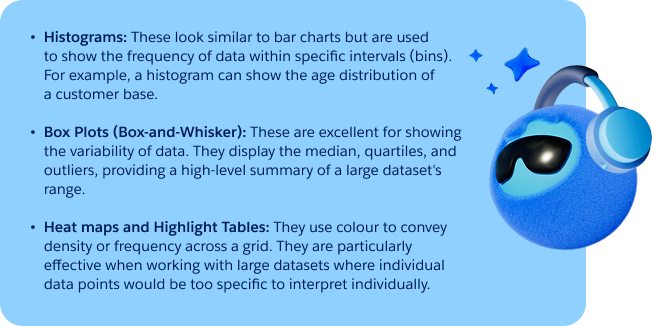
Showing Distribution and Variability
Understanding the “spread” of your data is vital for risk management and operational efficiency. Distribution charts help you see how individual data points are clustered and whether there are significant outliers that could skew your averages.
Understanding Relationships and Correlation
Business success often depends on understanding how one variable affects another. For instance, does an increase in marketing spend directly correlate with an increase in web traffic? To answer this, you must look at different types of data visualisation designed for relationships.
- Scatter Plots: This is the most effective way to visualise the relationship between two quantitative variables. If the points form a line or a curve, a correlation exists.
- Bubble Charts: A bubble chart adds a third dimension to a scatter plot. The size of the bubble represents a third value, such as the total market share of a specific data point. This allows for a more nuanced view of complex relationships.
Tracking Change Over Time
Time-series data is the backbone of financial and operational reporting. Trends over weeks, months, or years provide the context necessary to predict future performance.
- Line Charts: These are the most common data visualisation types for showing trends. By connecting data points with a line, you can easily see the progression, dips, and peaks over a continuous period.
- Area Charts: Similar to line charts, area charts fill the space beneath the line with colour. This is particularly effective when you want to show the total volume (such as total energy consumption) over time rather than just the trend.
Visualising Complex and Multi-dimensional Data
As datasets grow in size and complexity, standard charts may no longer suffice. Advanced types of data visualisation are required to represent hierarchical data or high-density information without overwhelming the viewer.
- Geospatial visualisations: These include choropleths and heat maps layered onto geographic areas. They allow organisations to see where patterns are occurring, not just that they are occurring.
- Treemaps: These are used to display hierarchical data using nested rectangles. The size of each rectangle represents its value, allowing you to compare parts of a whole across multiple levels of a hierarchy.
- Sankey Diagrams: These are specialised charts that show the flow of information or resources from one state to another. They are often used in supply chain management or to track the “path” a user takes through a website.
Tableau’s extensive visualisation library supports all of these formats, including geospatial insights, enabling teams to build multi-dimensional views that go well beyond basic charts and graphs.
Choosing the Right Type of Data Visualization for Your Business Objective
Selecting the right chart is not an aesthetic choice; it is a functional one. To determine which types of data visualisation to use, you must first define your objective.
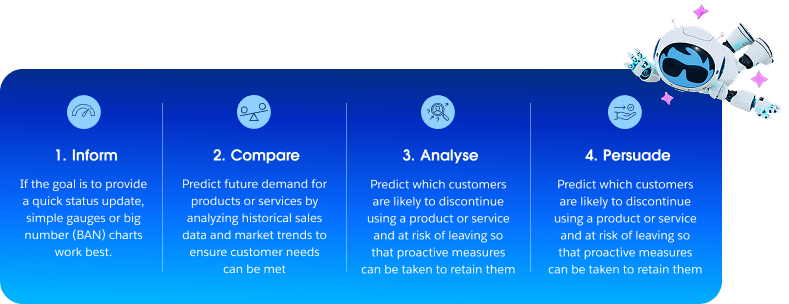
Matching the chart type to the business objective rather than defaulting to a familiar format is what separates effective data storytelling from noise. This is the core principle underpinning the selection all sound data visualisation types.
Building Consistent and Governed Dashboards at Scale
Individual charts serve a purpose, but organisations need more than a collection of visuals. They need governed, consistent dashboards that everyone can trust. This means ensuring that the data behind each visualisation is accurate, up to date, and traceable. Different types of data visualisation should be organised into a unified “data language.”
A governed dashboard approach ensures that the data being visualised is accurate and up-to-date. Tableau addresses this through deep integration with Salesforce Data 360, ensuring a single source of truth across the entire enterprise. Coupled with Tableau’s data management capabilities — which cover governance, security, and data preparation — teams can build dashboards that are not just visually clear, but analytically reliable.
Turning Insights into Action with Salesforce Data Visualisation Software
To truly master the various types of data visualisation, businesses need powerful, intuitive tools. Salesforce offers industry-leading solutions that help users transform complex data into actionable insights.
Tableau provides an intuitive drag-and-drop interface, an extensive visualisation library, and AI-powered features through Tableau Pulse — which delivers personalised metric digests and answers follow-up questions in plain language. On the other hand, CRM Analytics brings visual analytics and AI-powered predictions directly into the Salesforce platform, enabling teams to act on insights without switching between tools.
Together, these capabilities ensure that the right visualisation reaches the right person at the right moment — turning data into decisions, and decisions into results. Whether you are a small team or a global enterprise, choosing the right visualisation is the first step toward a more informed, data-driven future.