A Security Architecture Guide to Event Monitoring



Master the architectural patterns and Splunk configurations to ingest and analyse Salesforce Shield Event Monitoring data for better security.


Enterprise security teams rely on a unified view to effectively detect, investigate, and respond to threats. While Salesforce is a critical component of the business, its security logs and events must be seamlessly integrated into established Security Information and Event Management (SIEM) solutions to ensure comprehensive observability.
This technical article, provides a practical guide for architects and security engineers on how to leverage Salesforce Shield Event Monitoring as well as out of the box (OOTB) log sources to power advanced security use cases within Splunk platform,where customers will be able to improve their overall ability to detect and respond to security events impacting their Salesforce instance.
Building directly on our previous post, “An Architect’s Guide to Event Monitoring”, which detailed the available log sources and formats (including EventLogFiles and Event Log Objects), this guide moves from theory to implementation. You will learn the necessary architectural patterns, API integration methods, and Splunk configurations required to ingest, parse, and analyse critical Salesforce event data. Maximising the value of your Shield Event Monitoring investment is crucial for reducing organisational risk, strengthening your overall security posture, and streamlining threat detection within your existing Security Operations Centre (SOC) workflows.
Introduction
In today’s threat landscape, where sophisticated threats and attacks continue to rise and target Salesforce environments, establishing robust security observability has never been more critical for organisations; as noted in the State of IT: Security report 75% of organisations are anticipating an increase in their security budgets over the next year to address these escalating challenges➚.
Security observability extends far beyond traditional monitoring—it represents a paradigm shift toward proactive threat detection, rapid incident response, and comprehensive security posture management. For customers leveraging Salesforce as a critical business platform, this translates into the ability to detect anomalous behaviour, reduce Mean Time to Detection (MTTD), and maintain continuous visibility into user activities that could indicate compromise or policy violations.
Traditional enterprise security teams excel at monitoring network perimeters, endpoint devices, and on-premises infrastructure. However, Salesforce’s cloud-native, API-driven architecture presents unique challenges that existing security tools often struggle to address effectively. This creates what security practitioners commonly refer to as a “blind spot”—a gap in security visibility where critical business data and processes operate outside the purview of traditional SIEM solutions. The consequences of this visibility gap are significant:
- Detection Delays: Without proper monitoring, suspicious activities such as bulk data downloads, unusual login patterns, or privilege escalations can go undetected for extended periods
- Incident Response Limitations: When security incidents do occur, teams lack the granular event data needed for effective forensics and impact assessment
- Compliance Blind Spots: Regulatory requirements often mandate detailed audit trails that standard Salesforce logging cannot provide
In this two-part blog series, we will provide a practical guide for architects and security engineers on how to leverage Salesforce Shield Event Monitoring as well as out of the box (OOTB) log sources to power advanced security use cases within Splunk platform, where customers will be able to improve their overall ability to detect and respond to security events impacting their Salesforce instance.
4th Edition State of IT Report: Security
Insights and trends from 2,000+ security, privacy, and compliance leaders in the agentic AI era.


Shield Event Monitoring: The Foundation of Salesforce Security Observability
Salesforce Shield Event Monitoring emerges as the foundational solution for addressing these challenges, providing organisations with access to a large number of different event types and real-time monitoring capabilities. Unlike basic Salesforce audit trails, Shield Event Monitoring captures granular details about user behaviours, system interactions, and potential security threats in a format designed specifically for security analytics. This comprehensive logging capability enables security teams to:
- Monitor High-Risk Activities: Track report downloads, data exports, login anomalies, and privilege changes in real-time
- Enable Forensic Investigation: Access detailed event logs that provide the “who, what, when, and where” of security incidents
- Support Compliance Requirements: Generate audit trails that meet regulatory standards for data protection and access monitoring
The strategic importance of Shield Event Monitoring becomes evident when considering the current threat landscape. Recent guidance from Salesforce Security emphasises the critical need for organisations to improve Event Monitoring configuration to be prepared to analyse high-risk user behaviours and ensure that real-time events are configured for storage to support timely detection and investigation.
Bridging the InfoSec-Salesforce Divide
One of the most significant challenges organisations face is integrating Salesforce security monitoring into their existing security operations workflows. Traditional InfoSec teams operate with established SIEM platforms, incident response procedures, and threat hunting methodologies that weren’t designed with Salesforce’s unique data model in mind.
Shield Event Monitoring addresses this integration challenge by providing standardised log formats and streaming capabilities that allow security teams to ingest Salesforce events directly into their existing security infrastructure. This capability enables organisations to maintain their preferred security tools while gaining comprehensive visibility into Salesforce activities.
As we delve deeper into this architectural approach, we’ll explore how organisations can implement a comprehensive security observability strategy that not only reduces MTTD but also transforms Salesforce from a security blind spot into a fully integrated component of their enterprise security posture. The journey toward effective Salesforce security monitoring requires careful consideration of technical architecture, organisational processes, and the evolving threat landscape—all of which we’ll address in the sections that follow.
Integration Architecture
When integrating Salesforce Event Monitoring with a SIEM tool, two major configuration areas come into play – one within Salesforce and another within the SIEM environment. Some SIEM platforms simplify this process by offering pre-built connectors for Salesforce. Therefore, it is always recommended to consult your SIEM provider to confirm whether such a connector or official integration guide exists.
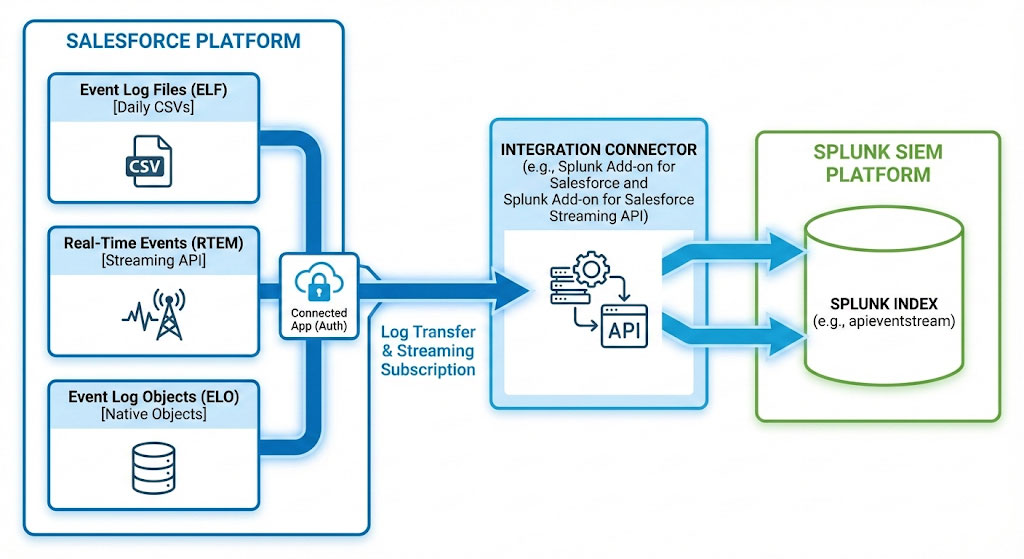
Before configuring the Salesforce side, it is important to understand that Event Monitoring data can be exposed through three distinct architectures:
- Event Log Files (ELF):
Daily log files covering 70+ event types, stored as CSV files. ELFs are retained in Salesforce for up to one year and power native Analytics App dashboards through Analytics Studio, offering ready-to-use visualisations. - Real-Time Events (RTEM):
Streaming events covering 20+ event types, including 5 Threat Detection events. These enable real-time alerting and can trigger Transaction Security Policies (TSPs). - Event Log Objects (ELO):
Standard Salesforce objects representing 37+ event types. Because they are native objects, they can be queried, reported on, and visualised like any other Salesforce data. Salesforce continues to expand native visualisation options for these logs.
Depending on the SIEM’s capabilities, it may be possible to ingest one, a combination of, or all three log types.
Salesforce Configuration Steps
- Establish a connection with the SIEM tool – typically via a Connected App. (With the introduction of External Apps, there may be updates to this approach in the future.)
- Enable streaming events (for Real-Time ingestion) by navigating to Event Manager and activating the desired event types.
SIEM Configuration Steps
1. Establish a connection with Salesforce
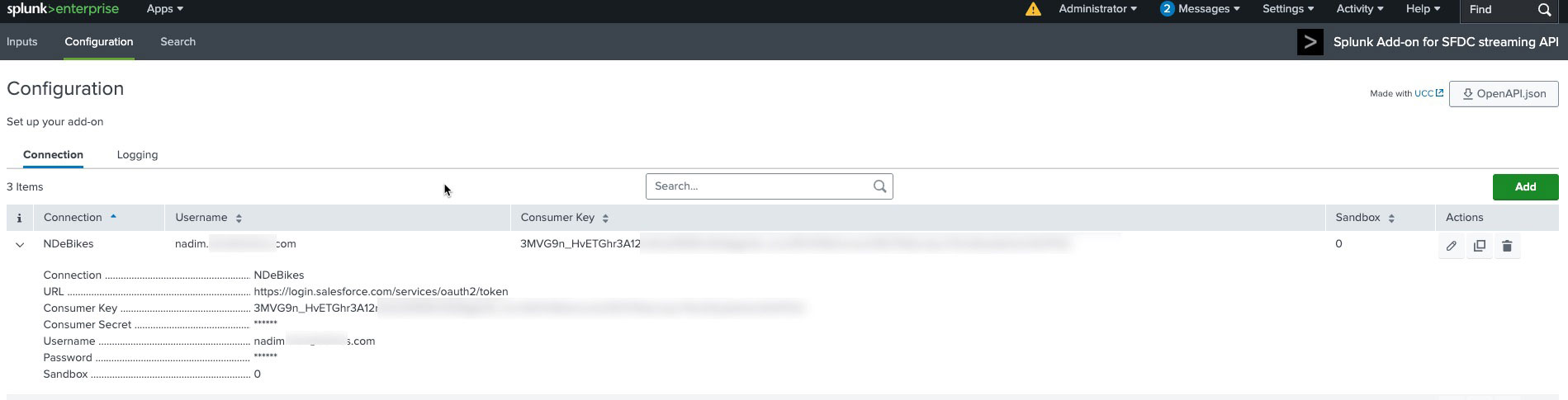
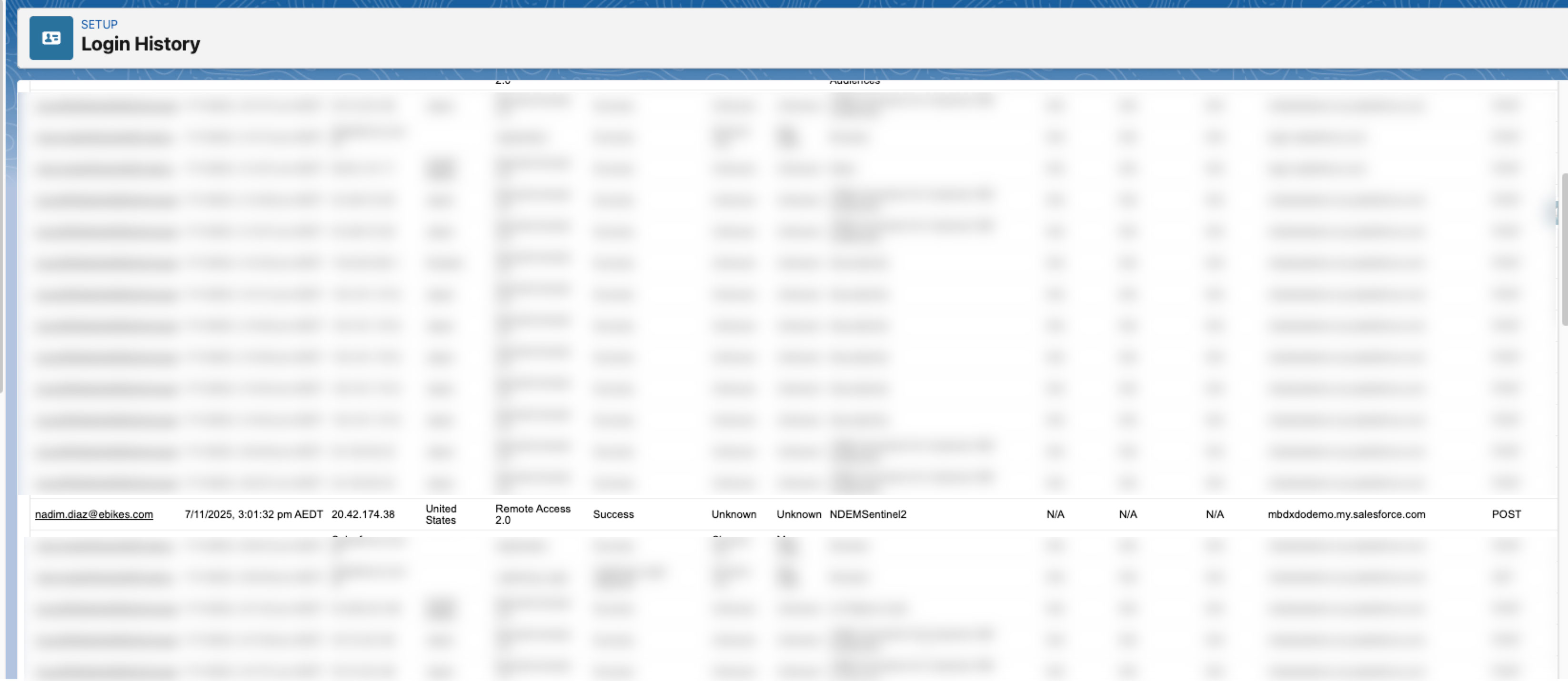
Most SIEM vendors provide detailed setup instructions for connecting Salesforce. For example, Splunk offers two published connectors designed specifically for Salesforce Event Monitoring: Salesforce Monitoring App for Splunk and Splunk Add-on for Salesforce Streaming API. Each connector has a tab describing the installation / connections steps.
Once the connection is established, verify that the integration has successfully authenticated by checking Login History in Salesforce. A successful login entry indicates the SIEM is connected and authorised.
2. Ingest the events
Whitin Splunk, you can explicitly define which inputs should be ingested from Salesforce. The configuration example below illustrates how the APIEventStream can be set up. In this scenario, we assume that an index named apieventstream has already been created in Splunk.
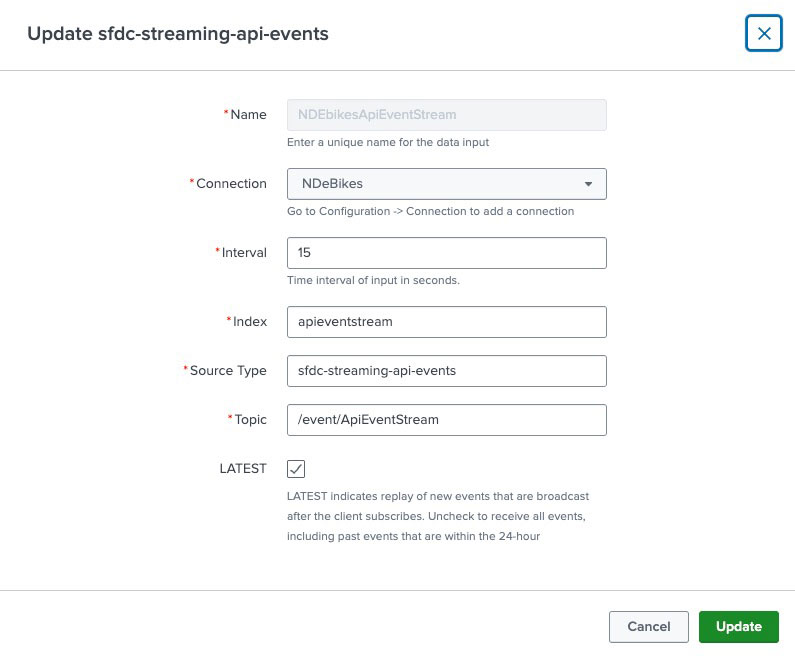
To confirm successful ingestion, you can query the relevant event type, for example, APIEventStream when Real-Time Streaming is enabled, and verify that the corresponding entries appear within the SIEM by running:
index=”apieventstream” sourcetype=”sfdc-streaming-api-events”
This query validates that Salesforce Real-Time Event data has been correctly ingested and indexed under the defined source type and index, confirming that the integration pipeline between Salesforce and Splunk is operating as expected. You can further refine this query by filtering on fields such as CreatedDate, or UserId to verify specific event activity or monitor ingestion consistency over time.
For testing and troubleshooting, tools such as Streaming Monitoring can be used to ensure events are being published correctly before focusing on the SIEM-side analysis. For non–real-time events, remember that each time the SIEM tool ingests data, the integration user logs into the system and performs the API query.
Monitoring Salesforce Security
Building on the security observability foundation, implementing Salesforce Event Monitoring with Splunk provides organisations with a robust, enterprise-grade solution for detecting, analysing, and responding to security threats in real-time. This section outlines a strategic approach to operations, focusing on practical implementation steps and proven monitoring strategies.
Starting with the Basics: Out-of-the-Box Monitoring Capabilities
Before diving into advanced Event Monitoring configurations, organisations should leverage Salesforce’s native auditing capabilities as their foundational security layer. These built-in features provide immediate value while serving as stepping stones to more comprehensive monitoring:
Setup Audit Trail serves as your first line of defence for configuration changes. This feature tracks when modifications are made to your Salesforce orgs’ configuration, capturing critical administrative activities such as user creation and permission changes. Login History provides comprehensive visibility into authentication patterns for the past six months. This includes both successful and failed login attempts, complete with timestamps, IP addresses, and geographic locations—essential data for identifying potential account compromise or unauthorised access attempts.
While these native capabilities offer valuable insights, they represent only the beginning of what’s possible with comprehensive security monitoring. The limitations become apparent when security teams need to answer sophisticated questions about user behaviour, data access patterns, and potential insider threats.
The strategic value of Event Monitoring becomes evident when examining the types of security questions that cannot be answered through standard Salesforce auditing alone.. These critical security scenarios highlight the need for granular event tracking:
Data Exfiltration Detection:
“Which users have downloaded more than 50 reports in the past 24 hours?”
“What specific records were accessed before a user’s employment was terminated?”
“Which files were shared externally, and with whom?”
Insider Threat Analysis:
“Who is accessing customer data outside of normal business hours?”
“Which users are viewing records they don’t typically work with?”
“What’s the pattern of API usage for automated vs. human users?”
Compliance and Forensics:
“Can we reconstruct the exact sequence of actions leading to a data breach?”
“Which reports containing PII were run by unauthorised personnel?”
“What was the scope of data accessed during a security incident?”
Performance and Adoption Security:
“Are there unusual patterns in report execution that might indicate automated scraping?”
“Which custom applications are generating unexpected API traffic?”
“Are users bypassing standard workflows in ways that create security risks?”
These questions require access to Event Monitoring’s comprehensive event catalog, which includes over 80+ different event types ranging from login forensics to detailed API usage patterns.
Slack Integration for Security Operations
Modern security teams require real-time notification capabilities that integrate seamlessly with their communication workflows. While specific configuration details vary by organisation, the strategic approach involves creating dedicated Slack channels for different alert severity levels and stakeholder groups.
With this integration option, Security Operations teams can route critical alerts to dedicated SOC channels where security analysts can immediately begin investigation and coordinate response activities. The integration supports rich messaging formats that include relevant context, such as affected user information, suspicious activity details, and recommended response actions.
In this scenario, high-severity incidents can trigger notifications to leadership channels, ensuring that business stakeholders maintain awareness of security events that could impact operations or require strategic decision-making. Technical alerts related to API usage anomalies or application behaviour integrate with development team channels, enabling rapid response to potential security issues within custom applications or integrations.
The key architectural principle involves treating Slack as an extension of the security monitoring infrastructure rather than a separate communication tool, ensuring that security events flow seamlessly from detection through response and resolution.
Conclusion
The integration of Salesforce Shield Event Monitoring into Splunk represents a critical maturity milestone for any enterprise security team looking to expand the security monitoring coverage while leveraging Salesforce’s native technology. As we have explored, the ability to correlate Salesforce user activity with broader enterprise security events eliminates critical blind spots and drastically reduces the Mean Time to Detection (MTTD) for incidents involving data exfiltration and account compromise, for instance.
While the technical setup — configuring API access, ingestion of events, and setting up Slack alerts — requires initial effort, the payoff is immediate and substantial. You are no longer relying solely on stale logs and audit reports; you are operating with real-time situational awareness and ready-to-use information. We encourage you to take these architectural patterns and adapt them to your specific environment, ensuring that as your Salesforce usage scales, your security visibility scales with it.
In the second part of this series, we will explore how Transaction Security Policies, as part of Shield Event Monitoring, work as proactive security controls to enhance the security posture of your Salesforce rollout.
4th Edition State of IT Report: Security
Insights and trends from 2,000+ security, privacy, and compliance leaders in the agentic AI era.