

Editor’s Note: This post is part of a series written by Tableau product managers who build the product and solution engineers who work with Tableau customers every day. Each blog shares real-world examples of solving data problems and best practices learned along the way. The opinions shared are our own — and written without AI.
Choosing the right agent, for the right use case
Recently, we were working with one of our large enterprise customers in a highly regulated industry, who had set out to rethink how their people get answers from data. For years, the routine at the company had been the same: log in to Tableau, find the right project, open a dashboard, and use dynamic filters and parameters to answer a question. While dashboards still have their place, user expectations are shifting, and agents are fundamentally changing how people expect to engage with data.
Tableau Cloud and Server are often the source of truth for enterprise data, including the last-mile logic business users add in Tableau (calculations, groups, descriptions, etc.) that rarely makes it into the warehouse. Tableau MCP lets an agent query that data and logic, and external tools allow that same agent to act on what it finds. That raises the stakes on trust and governance, especially in a regulated industry where taking action on a wrong answer can become a compliance issue. It’s a concern many organizations share: in McKinsey’s 2026 AI trust survey, 74% named inaccuracy as a highly relevant AI risk, and nearly two-thirds said security and risk concerns are the top barrier to scaling agentic AI.
Before any development work began with this customer, we first collaborated with their engineering team to decide what type of agent to deploy, and for which use case. Tableau offers several ready-to-use agents, such as Tableau Agent for preparing data and exploring dashboards and Tableau Agent in Pulse for asking questions of defined metrics. These agents are tightly scoped to improve accuracy out of the box, and for broad Q&A inside Tableau, they’re a great place to start.
But this specific customer needed more, due to specific requirements:
- Specialized workflows: They needed agents that answer a very specific subset of questions, where accuracy was paramount.
- Agentic workflows: Users needed to act on what they found in Tableau without leaving the agent. Our first agent dealt with supply chain delays: spotting a delayed part, then locating alternate suppliers. That only works if Tableau and the ERP share the same definitions and identifiers.
- Embedding outside Tableau: Their users lived in a purpose-built application, so the agents had to operate within that environment.
- Full control and oversight: Their developers wanted more fine-grained control. They wanted to control what data each agent could see, which tools and prompts it used, and which questions it should answer or refuse.
- Proof before production: In the highly regulated industry they operate in, probably right wasn’t good enough. Every agent had to be tested and proven before it ever reached the end users.
This led us to build custom agents with Tableau MCP. This gave the customer control that a ready-to-use agent couldn’t, but that control also demands more rigorous testing, tighter governance and ongoing monitoring. The six practices below are what helped take the customer’s agents from prototype to production.
Step 1: Prepare the data model
This step applies to any agent, ready-to-use or custom, and everything else builds on top of it. Any agent can only be as accurate as the data model it reads. Optimizing the data model, cleaning up metadata, and adding business logic improves agent accuracy, reduces token spend, and speeds up response time.
Before configuring an agent, we recommend these steps:
1. First, decide where the logic should live: For each piece of business logic, we recommend putting it as close to the data as possible.
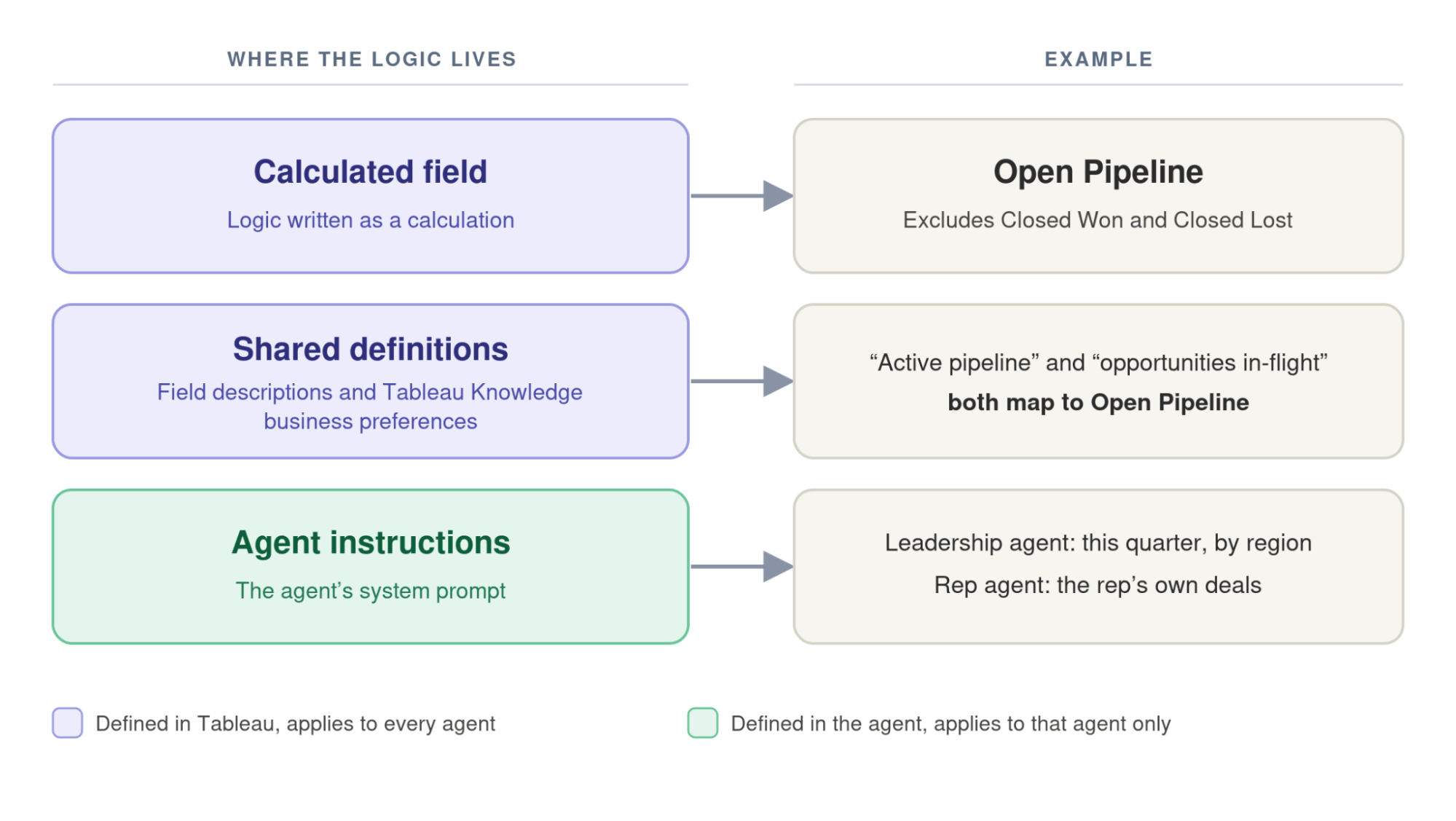
- If the logic can be written as a calculation, write a calculated field so it gives the same answer each time and isn’t left to agent interpretation. For example, Open Pipeline should be IF NOT [Stage] IN (‘Closed Won’, ‘Closed Lost’) THEN [Opportunity Amount] END.
- If it’s logic that every agent should know, put it within Tableau Knowledge business preferences, or within field descriptions. For example, “active pipeline,” and “opportunities in-flight” should both map to Open Pipeline.
- If it’s logic that only applies to a single agent, put it in that agent’s system instructions. For example, an agent exclusive to sales leadership might default to this quarter’s Open Pipeline by region, while a rep-facing agent on the same data defaults to the rep’s own deals.
2. Remove any field duplicates: Oftentimes, analyst experimentation when modeling data leads to duplicative fields. Make sure you keep only one version of each measure or dimension, and hide or delete the rest.
3. Describe the fields: Descriptions are what an agent reads when it decides which field to use. We recommend adding short descriptions with units, grain and caveats, such as whether Net Revenue includes returns.
4. Name fields based upon the business logic: Use field names people refer to (e.g., “Net Revenue”), not database names (e.g., “rev_net_adj”) or slang.
5. Hide irrelevant fields: Extraneous fields including IDs, join keys, and duplicative calculations only give the agent more ways to go wrong.
6. Certify the data source: Mark the data sources the agent is allowed to rely on.
New: Automate your metadata with the TDS Edit API. Available in Tableau Cloud (October 2026) and Tableau Server 2026.3, the new TDS Edit methods in the Tableau REST API let you add and update field and table descriptions in code.
Step 2: Define the agent’s role
An open-ended agent pointed at a broad schema necessitates both understanding the question and finding the data source that holds the answer. Removing the second step reduces the risk of a wrong answer and can speed up agent response time.
Before any agent went into production, we challenged the customer to answer four questions:
- What problem is it solving? For example: Operations managers currently spend hours each week pulling site performance from several dashboards.
- What domain is it serving? For example: Site operations, using the certified operations performance Published Data Source.
- What can and can’t it answer? For example: It should only answer questions related to site targets, output and downtime. It should refuse questions related to HR, finance or individual employees.
- How should it answer? For example: This is for operational purposes. Report only the numbers and provide no interpretation.
The answers then decide which data and tools the agent gets, and form the core of its system prompt.
New in 2026.3: Tableau MCP supports embedded data sources. Your agent can now also query a data source embedded within a workbook. That means the agent can reuse the calculations, parameters and groups your analysts have already built and validated.
Step 3: Follow the principle of least privilege
It is tempting to expand an agent’s capabilities by leaving extra tools enabled and connecting additional data sources, but each added capability brings new failure modes. The principle of least privilege is a long-standing security practice: give a system access to only what it needs to do its job, and nothing more. This principle is critical when using agents, as an agent decides at runtime which tools to call, and every tool you leave enabled is one it can use, or be talked into using, in ways you didn’t plan for.
So once we had defined the agent’s role, we then removed every tool it didn’t need, starting with list-datasources. The list-datasources tool lets an agent browse every data source on the site. Instead, we gave it the specific ID of the data source it should use in its system prompt. This matters for three reasons:
- Accuracy: the agent doesn’t risk querying a similar, yet incorrect, source to answer a question.
- Speed and cost: every tool the agent doesn’t call saves a step and the token consumption that comes along with it.
- Governance: the agent can only reach the data you’ve approved for its role.
We then enforced those limits within Tableau MCP itself, so a user can’t get around them by pasting a different data source ID into the chat. Tableau MCP’s tool scoping settings control which tools and data sources an agent can reach. Where you set them depends on how you run Tableau MCP:
- Self-hosted Tableau MCP (Tableau Server, or Tableau Cloud if you run your own): set the values shown here as environment variables on your MCP deployment.
- Hosted Tableau MCP (Tableau Cloud): a site admin applies them through site settings, as described here.
Note: If your agent uses an embedded data source, scope it by project or tag instead, since INCLUDE_DATASOURCE_IDS blocks embedded data sources entirely.
Step 4 (optional): Load metadata into the system prompt upfront
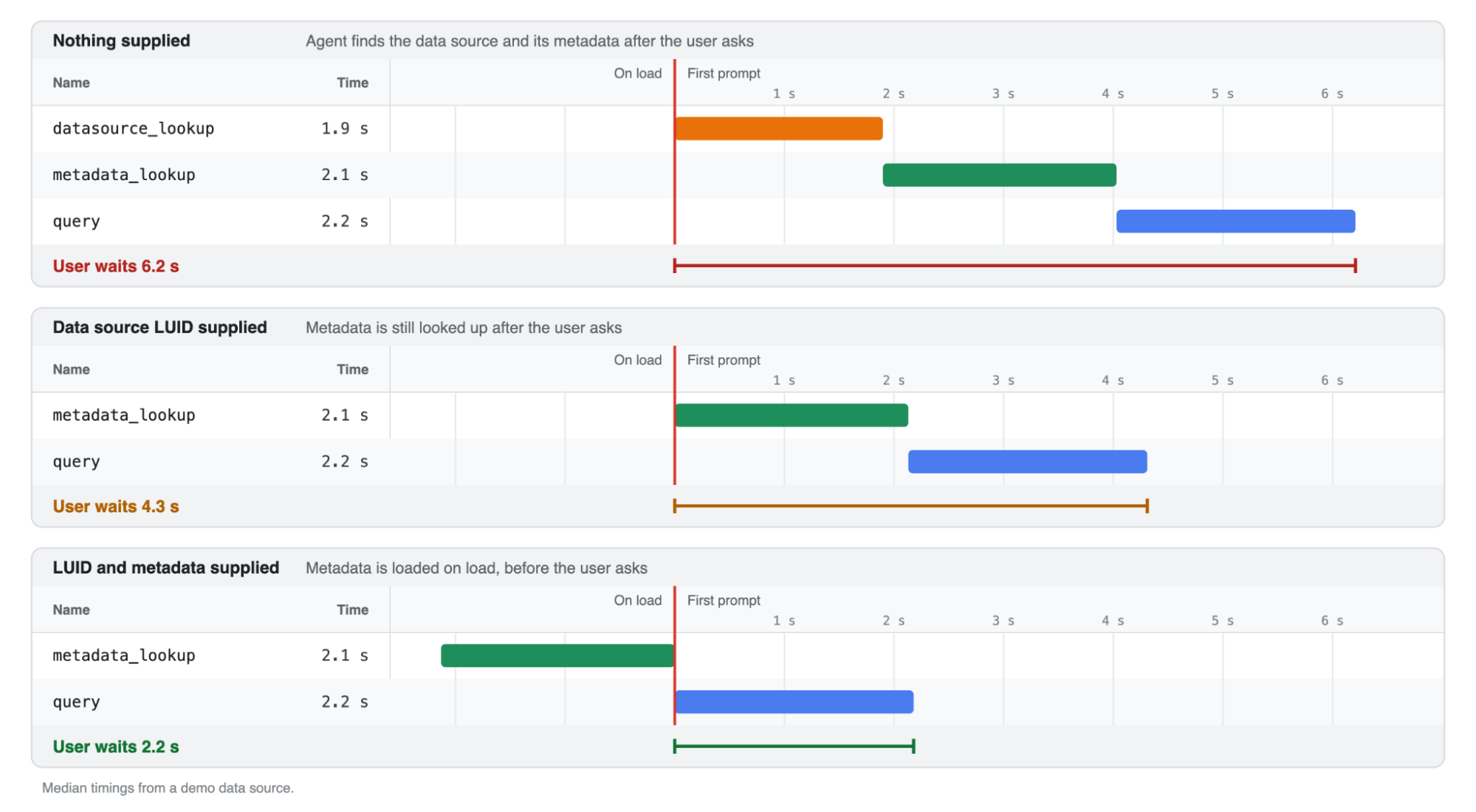
We noticed that the agent knew which data source to use, but still called the get-datasource-metadata tool at the start of each session. This lookup added noticeable latency.
To combat this, we borrowed a technique from our internal Tableau MCP demos inside Slack, which involves using a skill containing the data source LUID and a snapshot of the field-level metadata. This greatly reduced the time to respond to our initial queries and stopped our agent from veering off-course with an incorrect dataset. The problem is that while the technique works great in a one-off demo, it is not so great in production, as field-level metadata can change at any time.
To improve the response time and remove the risk of a stale snapshot, we pulled the metadata from Tableau when the agent started, inserted it into the system prompt dynamically, and removed the get-datasource-metadata tool altogether. This means the agent now starts every question already knowing the current fields, which reduced our response time by almost 50%.
This approach worked for our use case, but it has trade-offs. The main one is how tightly scoped your agent is. If an agent has access to more than one or two data sources, it likely makes more sense to restore the get-datasource-metadata tool, so that it can resolve field-level information at runtime. A given question usually needs only one data source, and loading the full schemas of four or five sources upfront adds token consumption and latency to every request.
The other, smaller trade-off is freshness. Because the metadata is loaded into the prompt when the agent starts, a mid-session change to the data source leaves the agent working from a stale copy, and you’ve removed its ability to fetch updates. For us, that risk was negligible: the data source was locked, and any modification had to go through a well governed process, so the metadata couldn’t change unexpectedly. Yet, if your metadata changes frequently, consider keeping the get-datasource-metadata tool available, with strict instructions to use it only when something looks wrong.
Step 5: Pre-build queries for known questions
Once the customer’s agents were in use, we noticed many of the same questions coming up repeatedly. Each time, this required the agent to rebuild the query, choosing the appropriate fields, filters and calculations, which consumed unnecessary tokens and opened up another chance for error.
For these known questions, we recommend not relying on the agent to build the query at all. A developer can write and test the query once and add it to the agent as a custom tool. So when an employee asks a common question like “How many days off do I have left?”, the agent calls that tool with the signed-in employee’s ID, and the model only has to explain the result. That improves accuracy and cuts down extraneous token usage.
How far to take this is a judgment call that depends on the stakes. We ultimately recommend against chasing 100% accuracy from an agent. If a question needs that level of certainty, like an FP&A figure that feeds a financial report, build a dashboard. If you want breadth and agility, like an AE building a sales plan, build an agent, pre-build queries where possible, and accept some level of ambiguity.
Step 6: Build an agent evaluation and monitoring framework
Unlike a deterministic dashboard, an agent doesn’t always give the same answer the same way each time. A small change, such as rewording the system prompt, switching models, or adding a tool, can fix one answer and quietly break another. In this customer’s case, due to regulatory scrutiny, the team wanted to ensure they could catch any errors before an agent ever reached production. This led to a governance framework that can be broken down into several steps:
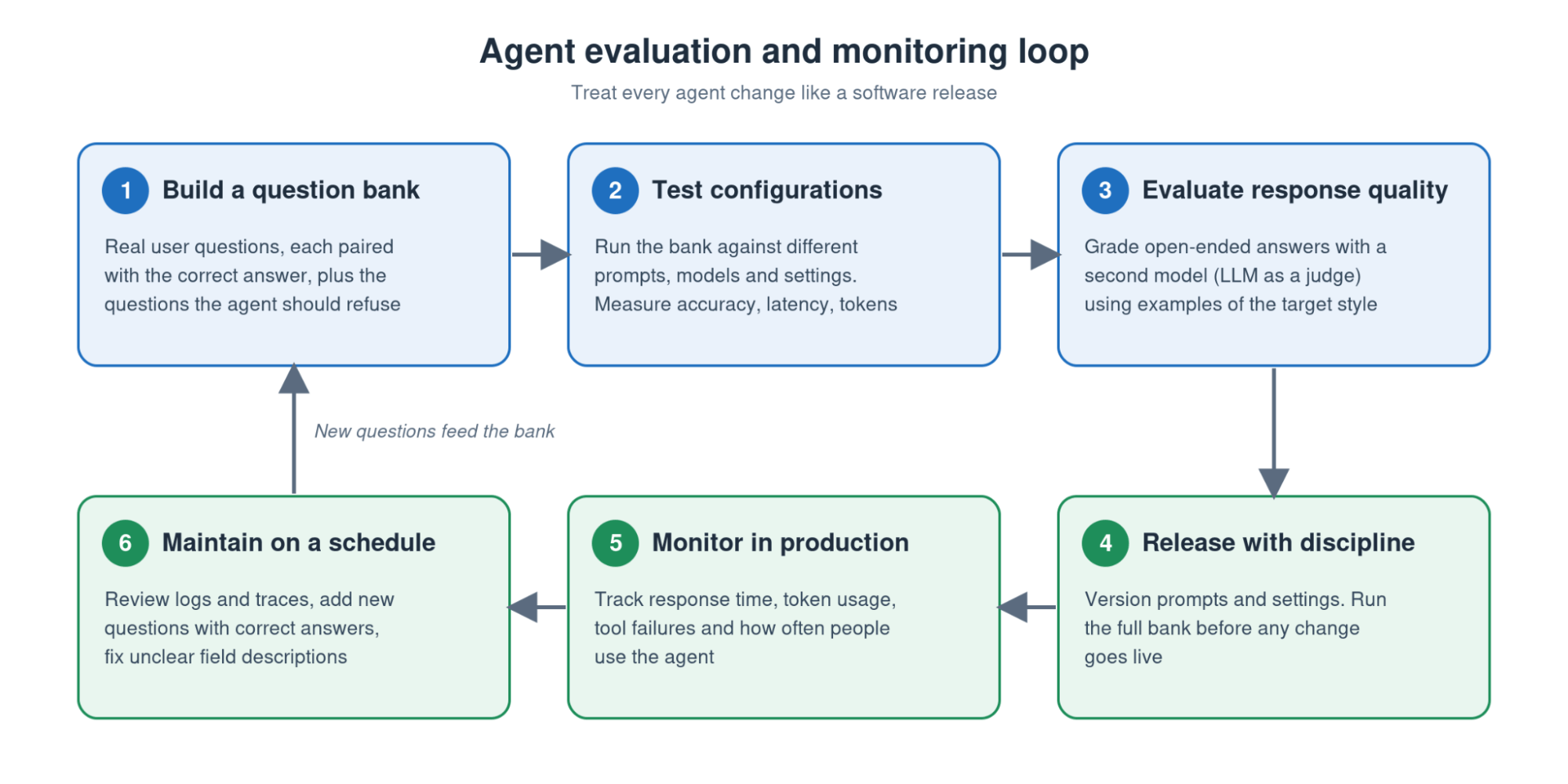
- Start with a question bank: We developed a list of questions users were asking, each paired with the correct answer. In this case, we started with the questions the team defined in step 2 above, and the questions it should refuse.
- Test configurations: Using an evaluation tool, such as LangSmith, we ran the question bank against different versions of the agent, including different prompts, models and settings. Each run measured the accuracy, latency and token usage. For this specific customer, accuracy was the priority, but other teams may decide to trade long instructions covering every edge case, for an agent that is faster and cheaper to run.
- Evaluate response quality: With accuracy testing in place, we began grading answers for less deterministic questions like, “How is my territory looking this quarter?” or, “Is there anything I should worry about with tomorrow’s outgoing shipments?” For this, we used the common approach of an “LLM as a judge” where we used a second model to evaluate the quality of the response, when given examples of the chosen style and format. Small classification models like Jev are a fast, low-cost option for this type of evaluation.
- Treat every change like a software release: We versioned the prompts and settings, and ran the full bank of questions before any change went live. In many ways this mirrors the way developers run tests before shipping code.
- Monitor in production: We then ensured we could track response time, token usage, tool failures and how often people use the agent. If the agent becomes mission-critical, we’d advise considering high availability and disaster recovery, as you would for any other critical enterprise application.
- Establish an ongoing maintenance process: Users will inevitably ask questions the bank doesn’t cover. We made sure there was a regular review of what users were asking using the agent’s logs or traces, and then added new questions to the bank along with their correct answers. When a wrong answer comes from an unclear field, fix the field’s description in the data source and run the bank again.
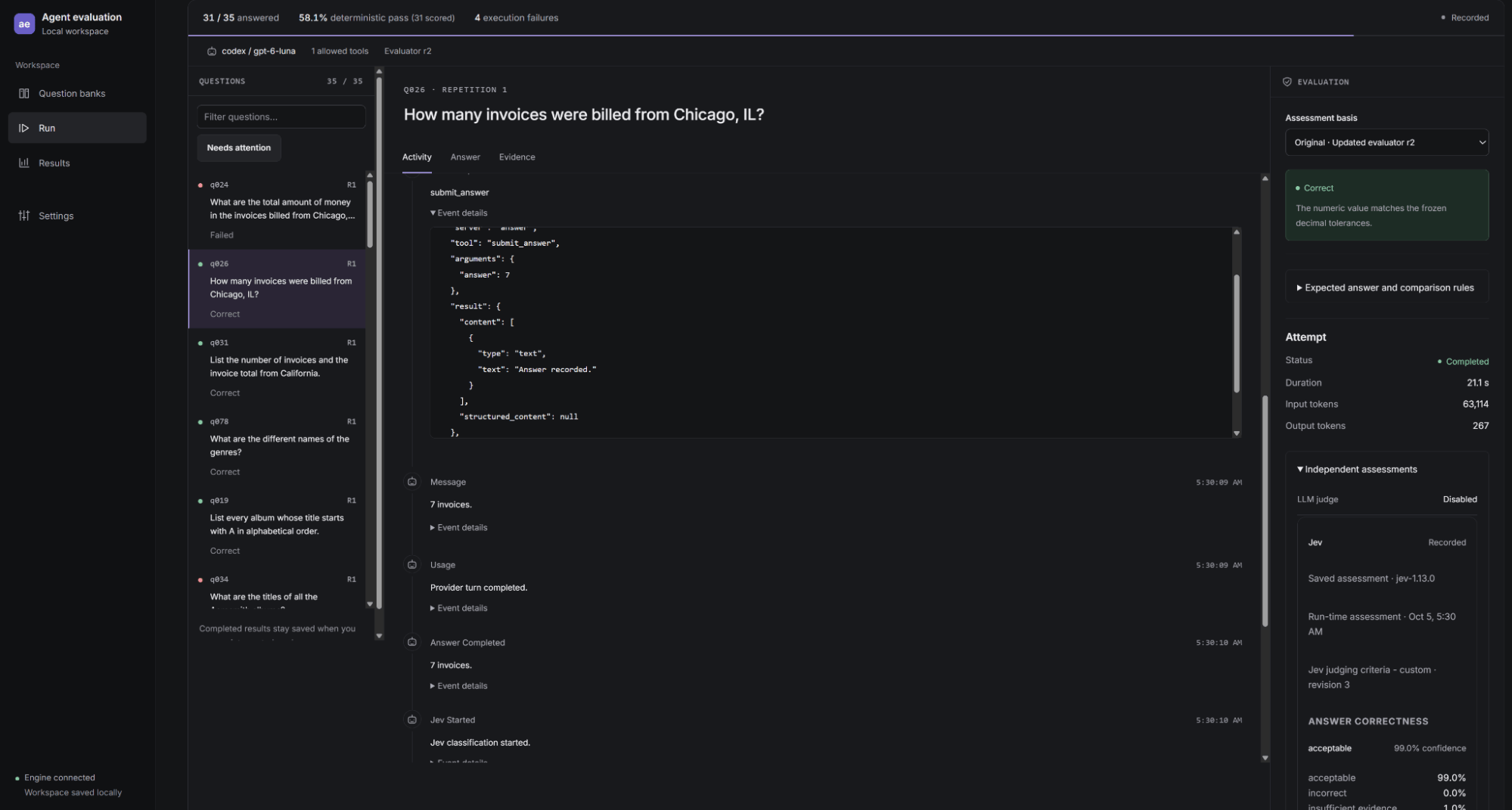
Above is a screenshot of the harness we built to test and improve agents tasked with using Tableau MCP. It turned out to be far more complicated than we originally anticipated. For that reason, we recommend using an established agent observability platform.
What we learned
Going through this process reinforced several key principles:
- It starts with the data model. Tableau customers already have valuable logic in their published data sources and workbooks. Putting that logic in the right place, and keeping the data model clean, is paramount to letting agents work reliably.
- Setup matters more than the model. An agent’s accuracy depends far more on how it’s set up, configured and maintained.
- Narrow scope improves accuracy. Limiting the data an agent can access, the tools it uses, and the questions it answers makes it more accurate.
- Production agents need enterprise discipline. Like any other enterprise application, an agent needs versioning, testing and ongoing monitoring.
None of these principles is difficult on its own. The harder part is the ongoing maintenance: updating field descriptions as the data changes, adding new questions to the bank, and monitoring how the agent performs in production. Teams that treat an agent as a product to maintain, not a project to ship, are the ones whose agents stay accurate.
Tableau MCP gives you the trusted foundation to build on. It brings the data, semantics and governance that teams have already built in Tableau to any agent, within any application. To learn more, explore the Tableau MCP documentation, including hosted Tableau MCP and tool scoping.
Stay tuned — additional articles in this series are coming soon.