


Almost every business accumulates massive amounts of behavioral data in their search for rich and actionable customer insight, yet they often miss the most critical signal: the duration of actual attention rather than just the fact of a click. A click is merely a binary data point, whereas true engagement is a qualitative judgment that exists in the intervals between actions. This distinction is vital on pages like product details or pricing tables, where a thirty-second deliberate time spent indicates a completely different level of intent than a two-second bounce.
“Time on page” metric measures how well the brand has captured the user’s attention, which can be directly attributed to product/content affinity or interest. Most analytics platforms, the major heatmap tools emit a 15-second heartbeat while the tab is foregrounded and call the sum “engagement.” That’s presence, not attention. A tab open in the background and a shopper actively reading a $200 product page look identical in the dataset.
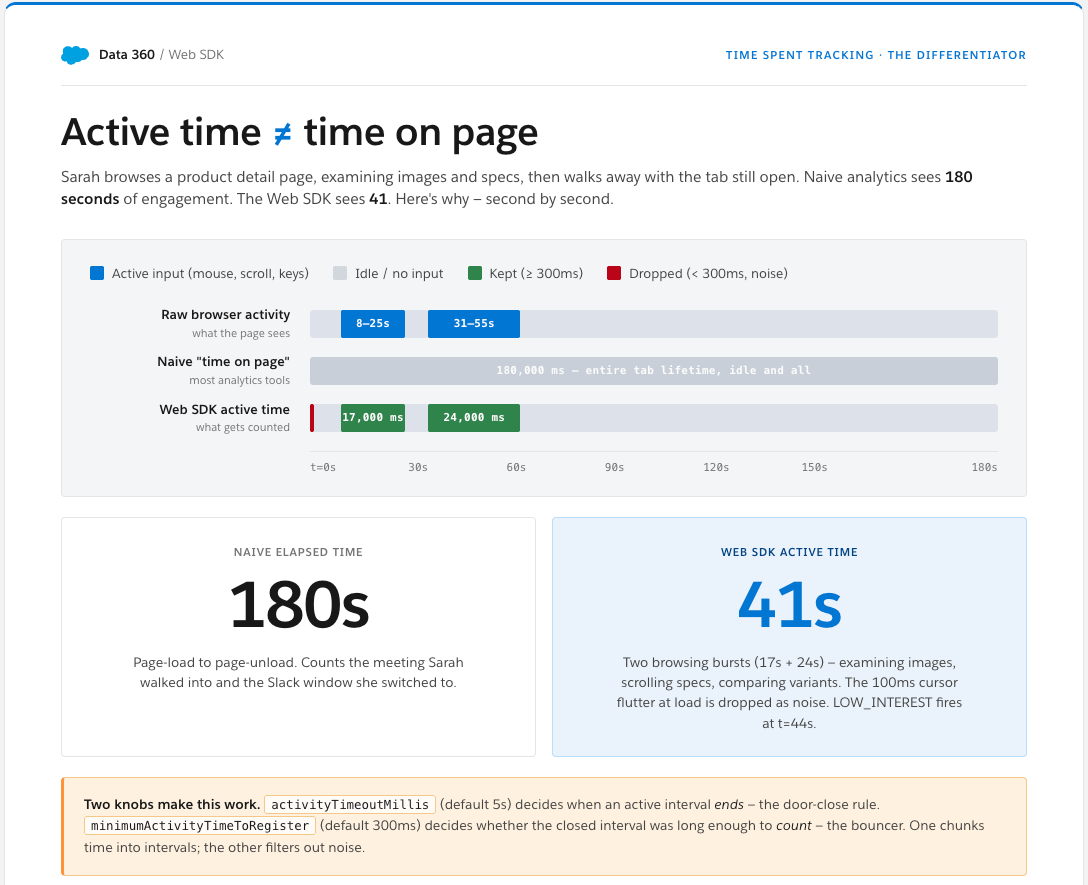
Page load and unload times lead to accurate arithmetic but flawed conclusions. For instance, a page that loads at t=0 and unloads at t=240 is recorded as four minutes of user attention , regardless of whether the user was actually present. That user might have opened the tab and immediately stepped away, kept it open while browsing competitors, or simply fallen asleep. Without the ability to separate active browsing from a forgotten tab, businesses cannot reliably ground the downstream decisions that depend on engagement data.
If your engagement signal can’t separate a forgotten tab from a deliberate read, every decision built on it — segmentation, journey enrollment, recommendations, intent scoring — inherits the same flaw. To win today, your data must distinguish presence from attention.
Introducing Time Spent Tracking in Data 360 Web SDK
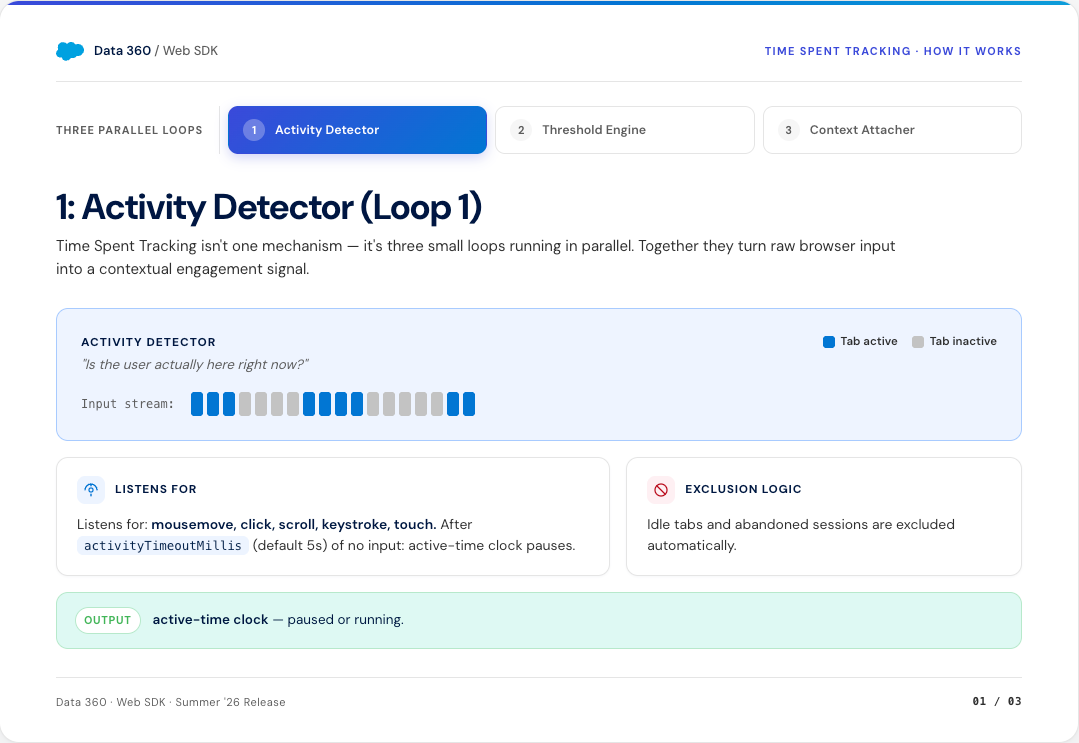
To solve this, Data 360 Web SDK introduces Time Spent Tracking — an opt-in capability that promotes engagement from a proxy metric to a behavioral signal that you can act on. The shift is from total elapsed time to total active time. The SDK runs an internal clock that only advances while the user is producing input: mouse movement, scroll, keystroke, or touch. Idle tabs, background windows, and abandoned sessions drop out on their own.
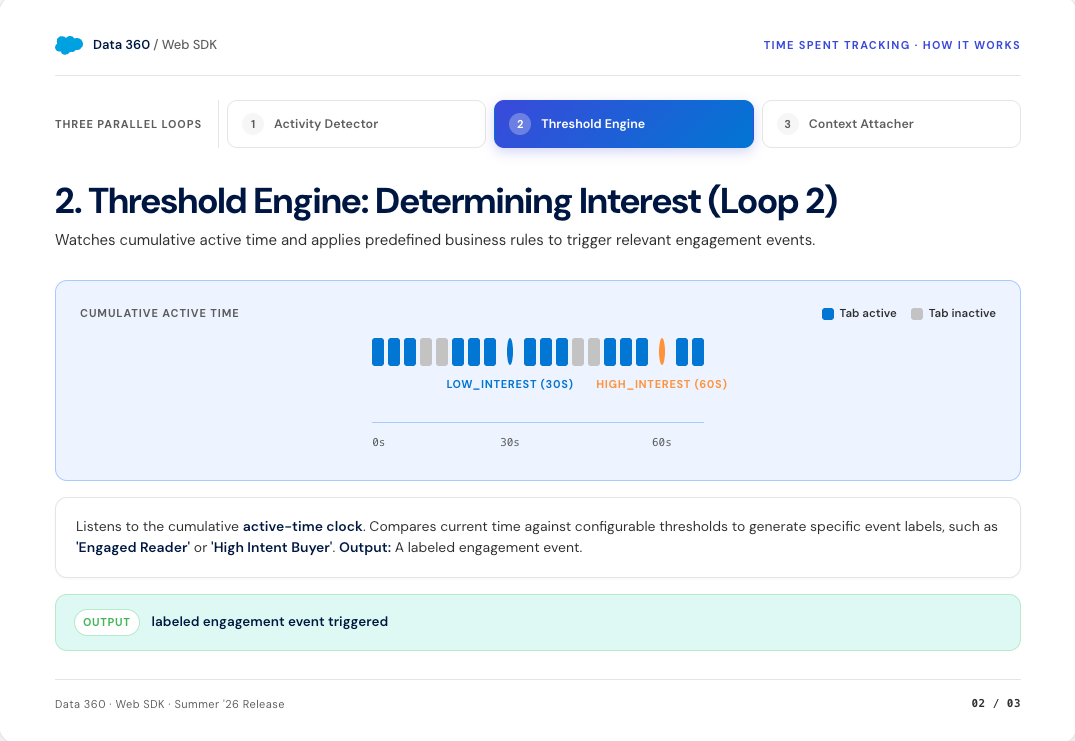
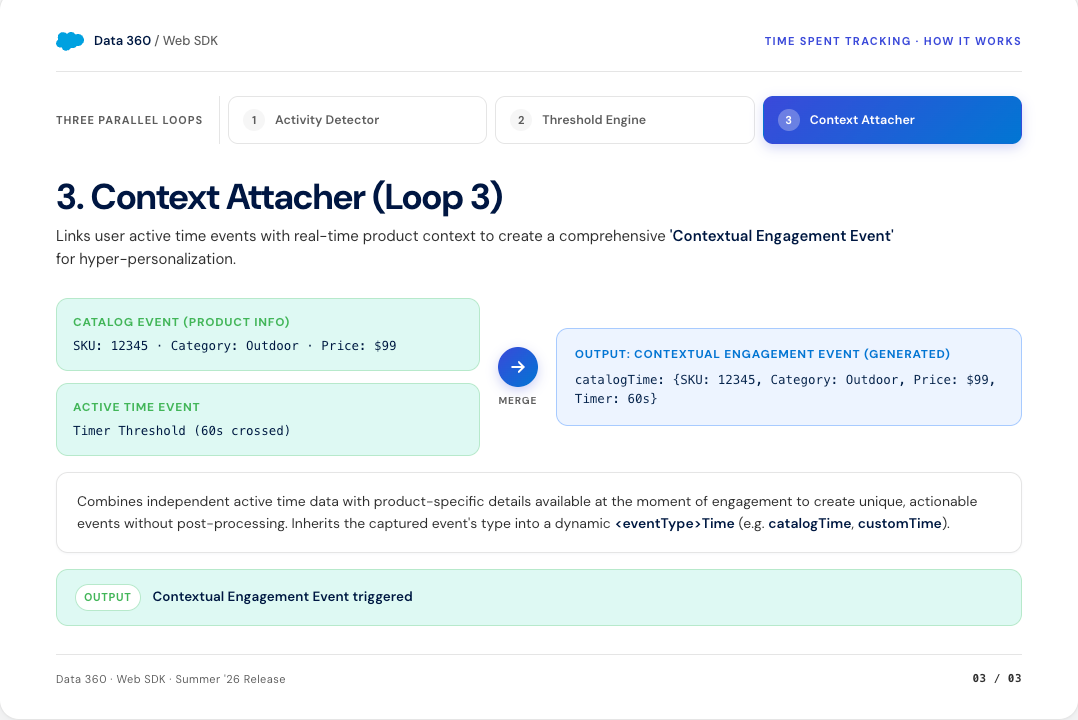
When cumulative active time crosses a configurable threshold, the SDK fires an engagement event already enriched with the catalog context — Product SKU, category, price, the works. A thirty-second event isn’t “engagement on /products/widget-x” — it’s “thirty seconds on Product SKU 12345, category Outdoor, price $99.”
That changes what’s possible downstream:
- Instant segmentation. A shopper who crosses sixty seconds of active attention on an Outdoor product moves into the “high-intent Outdoor” segment in real time — no batch job, no nightly recompute, no waiting for the next batch window.
- Instant product-affinity scoring. Engagement time becomes a live input into per-category affinity, so the next page, email, or ad can react to intent that’s still warm.
- Less data movement, lower cost. No streaming pipeline to join time pings against page-view tables. No lookback windows to pay storage on. The signal arrives activation-ready.
Fast data, lower cost, and a behavioral signal that’s worth segmenting on.
There’s no new endpoint, no new SDK to install, and no new tag to deploy. It’s a config block in the existing SalesforceInteractions.init() call, off by default, to prevent accidentally burning of data credits in production.
What Real-Time Total Active Time Unlocks
The capability was built around three customer scenarios:
- Trigger an offer when interest passes a threshold. Sportswear retailer: a shopper who actively reads the $129 hiking-boot Product detail page for sixty seconds (above the defined threshold) gets a real-time chat invite or a free-shipping nudge — a casual 25 sec visitor doesn’t. The engagement event fires the moment the threshold is crossed, so the offer lands while intent is still warm. The offer budget goes to live attention and potential purchasers, not to noise.
- Enroll users into journeys based on real engagement.Financial services: the “mortgage explorer” journey only enrolls visitors who spend at least thirty seconds of total active time on the interest rates calculator — not anyone who happened to land on the URL. Instead of “viewed the page,” the branching condition becomes “engaged for at least thirty seconds with this catalog item.” Audience precision goes up, suppression rules get tighter, and the model downstream is fed a sharper signal.
- See which content earns attention, not just clicks. Content team and merchandiser: aggregated active-time per category exposes which collections earn attention and which ones look popular only because of accidental clicks or SEO-driven bounces. Clicks tell you traffic and bounce rate tells you something left; total active time tells you additional important metrics to evaluate visitors’ interest. That’s the input merchandising and editorial teams need to have better merchandise and content strategy.
How Does It Work?
How It Is Configured in Web SDK
Time Spent Tracking is configured entirely through the Data 360 SDK of SalesforceInteractions.init().
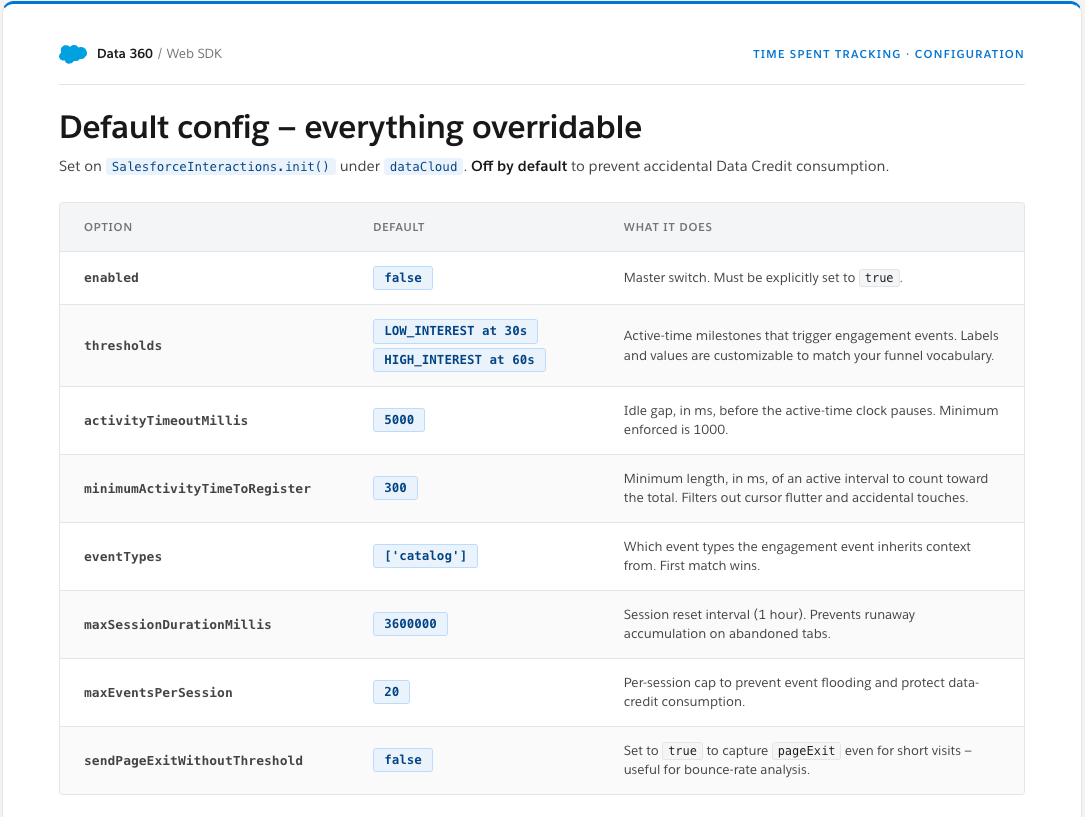
The two knobs most worth understanding together are activityTimeoutMillis (when does an active period end?) and minimumActivityTimeToRegister (was that period long enough to count?). One closes the bucket; the other decides whether to keep it. Together they contribute to “total active time” that separates from naive elapsed time.
Each engagement event the SDK fires carries a stable pageViewId (UUID v4, your join key), a pingSequence counter for ordering, the threshold label that was crossed, the cumulative totalActiveTime, and ISO 8601 timestamps for pageStartTime and lastActivityTime. Plus every non-required field from the captured context event, copied straight in. That’s what makes the event immediately usable downstream.
A few important details worth knowing before you add the feature to your SDK bundle:
- The generated eventType is dynamic — catalogTime, customTime, etc. — and it only fires after a context event has been captured on the page.
- Time Spent Tracking respects consent. The SDK begins observing activity at page load, but no event is sent until consent is granted.
- A programmatic kill switch is available: SalesforceInteractions.DataCloud.stopTimeTracking(). Once stopped, the service cannot be restarted without reinitializing the SDK.
- Make sure maxEventsPerSession is at least thresholds.length + 1, so every threshold plus pageExit has room to fire.
Where This Sits in the Landscape
Engagement-time measurement isn’t new — it just hasn’t been actionable. Most analytics platforms and CDPs treat time-on-page as a reporting metric: average session length, time-per-visit, numbers that appear in a dashboard long after the visitor has left. Where active-time tracking exists at all, it’s a custom implementation — a homegrown plugin, a heartbeat timer someone wired up in a sprint and never fully maintained — and the output still lands in a data warehouse, not in a real-time decision engine.
The gap is between analysis and action. Knowing that visitors who read your pricing page for sixty seconds convert at 3× the rate is useful. Knowing about the visitor who is on your pricing page right now — and being able to enroll them in a journey, adjust a recommendation, or fire a chat invite before they leave, is something entirely different.
Time Spent Tracking is built for the second scenario. The engagement event fires the moment a threshold is crossed, already enriched with the catalog item, product attributes, and page context the SDK was capturing anyway. No pipeline join. No lookback window. No post-processing step before the signal is usable. It arrives activation-ready — the same instant the attention is earned.
Ready to Measure What Matters?
Time Spent Tracking is a single configuration block that changes what your engagement data can do. Instead of a metric you read after the session, you get a signal that acts during it — enriched with catalog context, fired at the moment of intent, and ready for segmentation, journeys, or recommendations without any post-processing. If your analytics stack can’t tell the difference between a forgotten tab and a deliberate read, now it can.
Get started with Data 360 Web SDK →







