How to Modernise Omnichannel Customer Service at Scale

Learn how to modernise omnichannel customer service at scale, from unified infrastructure to embedded AI, and what to look for in a platform.

New and exciting artificial intelligence (AI) features are regularly introduced to the market, and the pressure for businesses to innovate is constant. Both explain why so many contact centres often bolt features onto their platforms to increase efficiency, lower costs, and provide a more personalised customer experience.
Over time, all those integrations become a burden. Processes get clunky. Reps lose time bridging one siloed feature to another. Performance metrics, such as average handling time (AHT) and first-contact resolution (FCR), stall. So do those efficiency dreams.
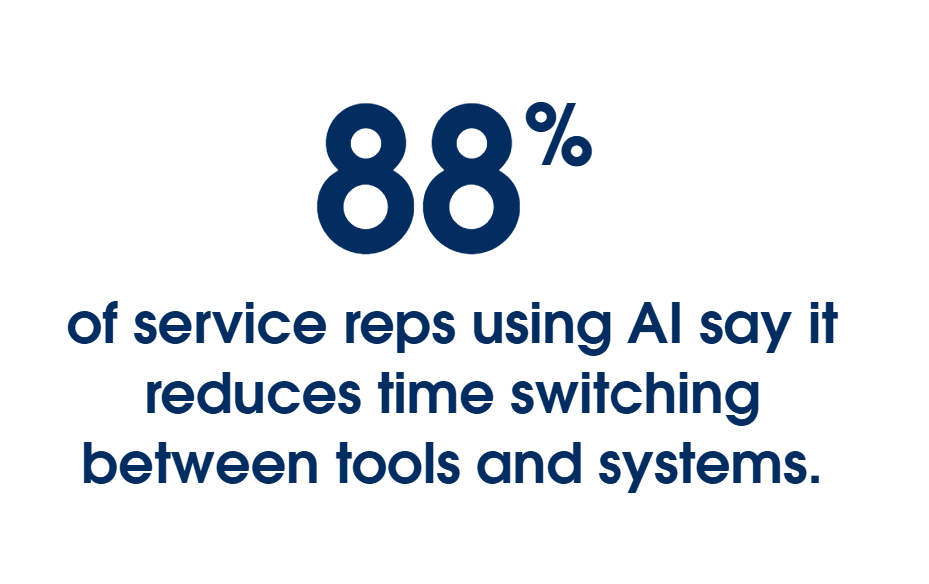
The good news is, neither your AI nor your reps are letting you down. Fragmented systems are tangling them up. And with 88% of service leaders prioritising tech integration to support AI initiatives, you’re not the only one feeling the pinch. The first step towards optimising key metrics is to detangle those systems.
Our guide provides a practical framework for modernising your contact centre infrastructure. We’ll cover omnichannel scalability, legacy-to-cloud migration pathways, and agent desktop consolidation to make the process a little easier.
Key Takeaways
Read the latest in customer service research.
Top service teams are using AI and data to win every customer interaction. See how in our latest State of Service report.
The infrastructure gap quietly killing your metrics
As call centres evolved, technology stacks evolved with them. At first, it was simple systems for phone support. Then came the digital transformation: self-service phone menus, email support, social media responses, live chat communication. Each siloed channel got thrown onto a legacy system not built to withstand it.
That creates lag. There are too many features to keep up, too many fields to use. Symptoms get worse, and everyone feels it:
- Reps rekey system data: Every repeated keystroke adds time to calls, inflating AHT
- Customers repeat themselves: With no context, calls take longer, and reps struggle to solve problems, lowering FCR and growing AHT
- Supervisors fly blind: Without real-time data, supervisors can’t optimise operational efficiency and customer experience decays
And now, the AI era delivers even more additions, like agentic experiences, chatbot integration, and higher customer expectations. The problem is, bolting everything onto a lagging platform slows everything down. It’s time to rethink the infrastructure.
That’s not to say your stack needs a complete breakdown. There are ways to use AI features to complement what you already have, and they can be used across:
- Communication channels
- Customer relationship management (CRM)
- Learning management system (LMS)
- Workforce management (WFM)
- Quality management (QM)
- Business analytics
Ultimately, contact centre AI should help staff solve problems quickly, make data-driven decisions, and streamline the customer service experience. But to bake it in requires change. This is where modernisation starts: moving from siloed multichannel systems to unified omnichannel.
Moving from multichannel to omnichannel
Your customers expect consistent service, no matter the contact method. Multichannel systems make that difficult. With no cross-channel visibility or continuity, reps are left scrambling for context while customer frustration builds.
This is why the omnichannel customer experience is so successful. It brings all those contact points together into one unified view. This shared context means reps keep the conversation flowing, whether that’s from a phone call to live chat, email, and beyond.
It’s the ideal solution when volumes are low, but the real test comes at scale. Will your system handle peak capacity? When the pressure is on, your call routing, load, and service consistency need resilience.
Features that support omnichannel at scale
When volumes rise, so too should your platform’s capabilities. Flexing support up or down is how your reps and customers stay connected. When it comes to scalability, you’ll need features that work in tandem, not in parallel, with your platform.
Unified conversation history
At low volumes, reps have the time to manually update contact records. At scale, it’s impossible. The beauty of omnichannel is its reduced need for manual labour from one conversation to another. Everything is already there.
Unified communication history is the crux of this, the ‘load-bearing wall’ of a customer engagement strategy. Every interaction, whether it’s a call, chat, email, or social message, is housed within a central record. Even conversations in other languages can be logged and housed properly, thanks to AI live transcription and translation.
Intelligent routing and interactive voice response (IVR)
The ‘press-1-for-sales’ routing method had its place. It ensured all calls were answered (even if by a robot) and placed in the right queue. It still solves a problem, but it needs to get smarter. Customers aren’t willing to wait behind 12 other callers. So in times of high volume, routing decisions must pivot to keep up with ever-changing expectations.
Intelligent call routing and IVR flips the script, so to speak. It uses natural language processing and understanding, so it’s smart enough to understand who the customer is, what they’ve already tried, and how urgent their call is. It skips the ‘please hold’ stage and sends them straight through to the right rep, not just whoever is available.
Shared knowledge layer
If a chatbot shares one policy rule, and a rep shares another, the inconsistency can create frustration for customers and leave a bitter taste in their mouth.
How does this happen? Fractured reference data. If a policy has been updated and rolled out to service reps, but it hasn’t been updated everywhere, those AI systems are left in the dark, with only old material to reference.
A shared knowledge layer stores correct information in one place. When AI is the first contact, it will tap into that core resource to understand parameters and provide answers or guidance based on that knowledge.
Real-time analytics
The need for real-time visibility is critical at any time, but especially at scale. A repeated conversation here or a routing issue there quickly snowballs into clogged queues and customer complaints. It’s frustrating for teams and devastating for AHT and FCR metrics.
Real-time analytics shifts the game from reactive to proactive. Instead of reporting on problems the next day, managers see them as they happen. It allows for swift conflict resolution, reduced friction, and pattern recognition.
Comparison: Multichannel vs. omnichannel
| Multichannel | Omnichannel | |
|---|---|---|
| Context | Each channel keeps its own record, even when conversations are related | One cross-channel record follows the customer, regardless of where the conversation started |
| Routing | Rules apply per channel in isolation | It considers the interaction history and current load across all channels |
| Representative experience | Reps toggle between separate systems and tabs, often having to find context themselves | Reps see one unified view, regardless of where the conversation was before |
| Customer effort | A customer repeats themselves every time they switch channels | A customer can switch channels without repeating anything |
When a platform integrates the right features, the focus shifts from volume to maintenance. It also alleviates the pressures to be omnipresent.
But these are all behind-the-scenes solutions. What about the reps who handle customer interactions? How can their contribution be modernised and made easier with AI?
Cleaning up the service rep’s workspace
When things fall down, those at the coalface feel it first. When chatbots defy logic or customer documentation disappears, reps rush to find a lifeline. They’re both your customer guide and your coalmine canary.
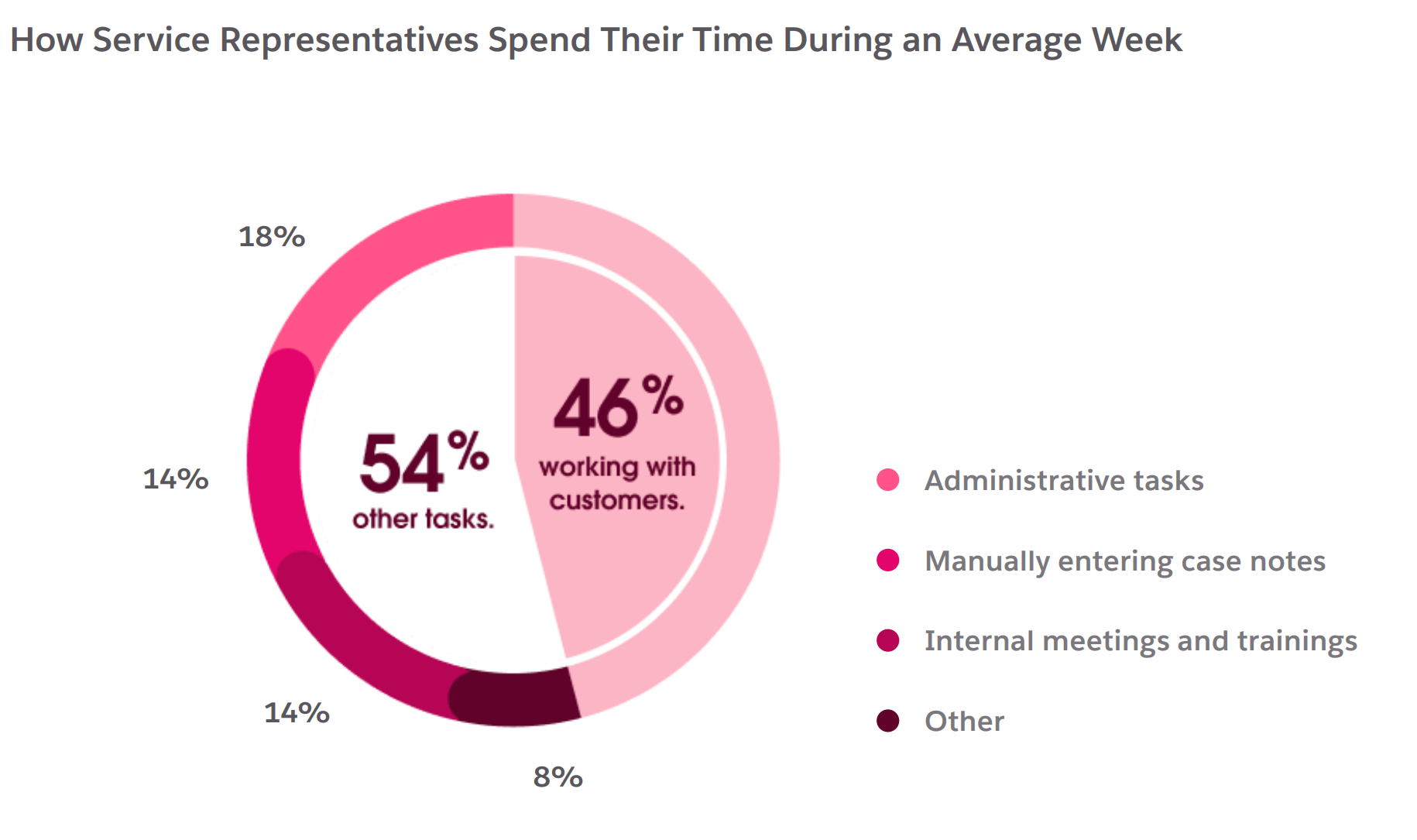
So, when reps report that they spend just 46% of their time with customers, it’s clear that repetitive manual and admin tasks require too much attention, especially when AI can alleviate those processes.
Cleaning up their workspace is a no-brainer. And no, this isn’t about their desk. It’s about their desktop: the methods, workflows, and processes they use to optimise customer experience and the day-to-day responsibilities that come with it. They need a more comprehensive solution to minimise repetitive workload and reduce point-to-point friction.
Enter the unified workspace, your highest-leverage fix. It’s a central point to cover all bases (customer history, case context, next steps) in one consolidated system. That means less searching and rekeying and more first-case resolutions.
Balancing AI within your rep’s workspace
Customer service is innately human, so it makes sense for AI to ride shotgun. Instead of steering the conversation, it reads the map and offers shortcuts, such as:
- Grounded reply suggestions: It helps your reps generate replies they can adjust and send
- Auto-generated case summaries: It writes summary notes from the conversation for the rep to confirm
- Surfaced answers: It finds exact answers from a knowledge base to answer the customer’s question or for the rep to reference
Of course, AI needs guardrails to ensure it knows and stays within its boundaries. It should only draw information from approved knowledge banks, respect existing permissions and customer data, and always escalate to a human when cases become complex.
So, a unified workspace makes things more efficient, and those efficiencies multiply with integrated AI.
That’s one big friction point covered. There’s likely more to visit for your modernisation journey. So, let’s map them out. It will form the basis of your platform migration roadmap.
Mapping current-state friction points
Writing and acknowledging issues isn’t fun, but it’s necessary. You need a realistic picture of what’s falling down to build it stronger. Audit your system. Start with the key metrics that matter most. These could be:
- Average handle time (AHT)
- First contact resolution (FCR)
- Transfer rate
- Case reopen rate
- Backlog
- Customer and rep effort
- Customer satisfaction (CSAT)
Choose your metric and identify key failure trigger points, whether they’re customer-facing, workflow-specific, or related to failing architecture. Then rinse and repeat for each metric. This will help you find more friction points as you flow through each journey.
Trigger points for friction can include:
- Contact channels
- Customer hand-offs
- Data sources
- Workspace tools
- Integrations
- Reasons for repeat contact
- Peak volume pressure points
From here, gaps should become more obvious. This is your foundation for building the right architecture, your business case, and your migration sequence.
With those problems mapped, you’re armed with required solutions. It’s time to pit those problem-solution cases against platform promises. The next step towards your modern contact centre infrastructure is to compare suitable platforms.
Take the first step with Service Cloud.
Deliver personalised customer service at scale. Bring all of your support needs onto one platform so you can decrease costs while increasing efficiency.

What to ask when comparing platforms
Modernising your contact centre is a big decision, and the ability to roll back is limited. Even if there’s pressure to decide quickly, the choice demands time and consideration. The best way to start is by asking the right questions.
Where do customer, case, and interaction data live?
This question should have a quick, clean answer. If the platform provider can’t tell you, it’s a no. Protecting and storing your business data is too important to gloss over.
For many contact centres, legacy system data storage is neither quick nor clean. It’s spread across CRMs, phone systems, and old tools. Service teams have no choice but to tolerate it, as collating fragmented enterprise data is a resource-heavy exercise.
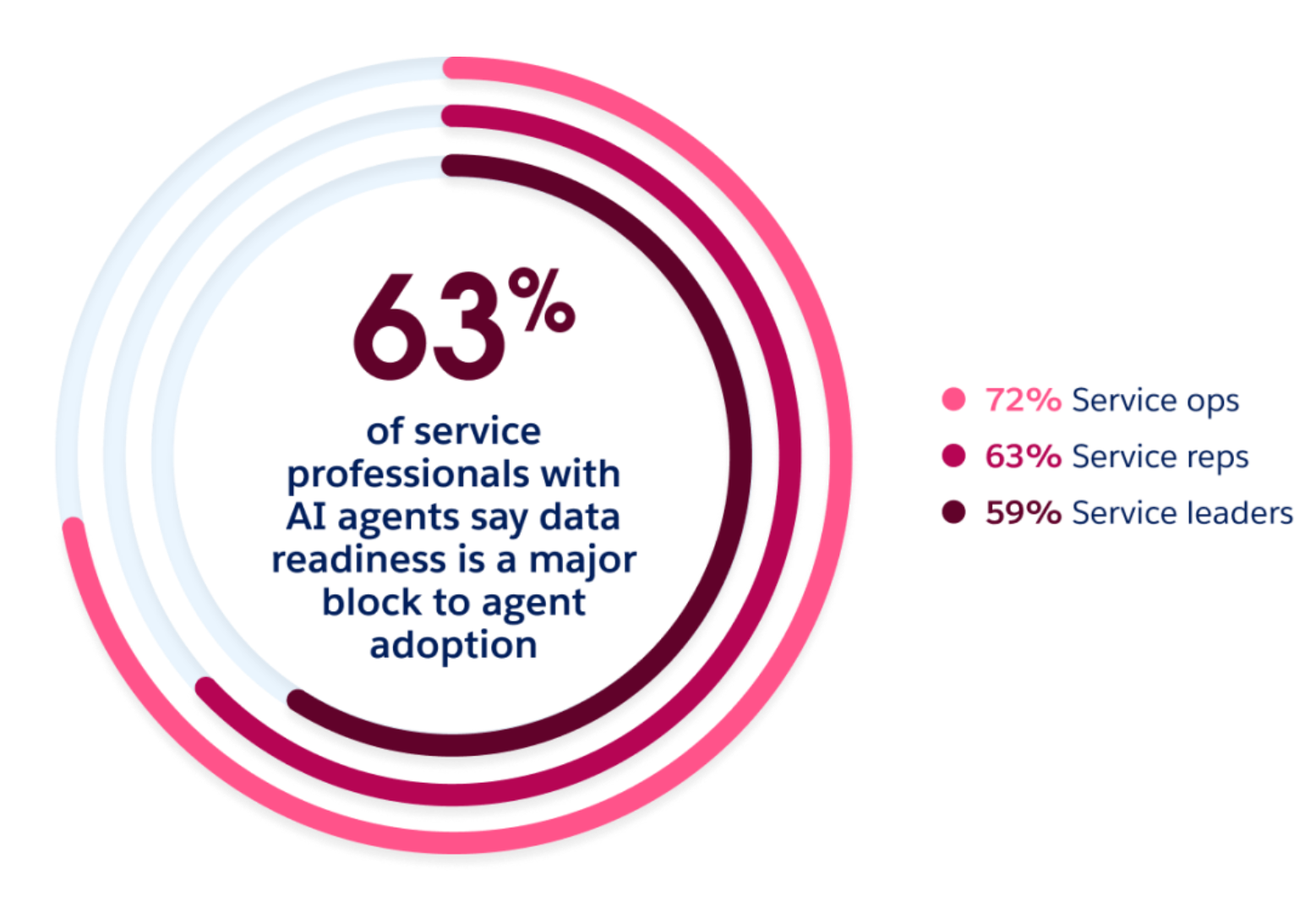
That’s why engines like Data 360 offer a ‘plug and play’ solution, connecting each point to a centralised profile without all that heavy lifting. It’s something worth considering for your final decision.
Are your workflows connected?
Multichannel systems fragment the customer journey. While the systems are there, they’re just not talking to each other. If the platform doesn’t have the capability, you’re moving further away from your end goal.
You’ll need a platform that allows a dedicated layer built specifically for it. For example, Agentforce MuleSoft is purpose-built to integrate seamlessly with third-party systems, allowing for integration and service automation at scale. It’s how contact centres can alleviate hurdles without re-inventing the entire system.
Will it make our service reps’ experience easier?
There’s no point migrating to a customer experience platform that does nothing for your service reps. Some tools may seem like they’ll provide a single source of truth, when in reality they just add another fragment to manage. Ask your reps to assess the platform’s usability and limitations. This could include asking questions such as:
- Is the platform usable?
- Do workflows properly support how reps work?
- Does it cut repetitive admin?
- Does it provide real-time visibility for supervisors?
These questions identify gaps in vendor platforms, so you can rule those out early.
Does it allow for trusted AI?
Integrating trusted AI can be a blocker if not done correctly. In fact, 83% of Australian service professionals say regulatory requirements hold back their AI deployment. AI needs to work within the proper guardrails for trusted support to happen. To scope this, ask questions like:
- Does it work within approved business data?
- Does it respect permission controls?
- Is manual quality control possible?
- Can it be audited?
- Does it follow set escalation paths?
Is it scalable?
Scalability is fundamental for any business. It’s no different for your infrastructure. Rising pressure can break brittle systems, so you need to identify whether a platform can handle peak-time volumes. To get a good idea of its capacity, ask:
- Can it be updated or tweaked without the need for a specialist team?
- Can it expand into new channels seamlessly?
- Does it allow for growing teams?
- Can it handle peak load without downtime?
- What happens to performance (and cost) as data volume increases?
That’s a lot of information to take in. Here’s a quick breakdown for each capability, mapped to its impacts on AHT, FCR, and customer effort.
Platform capability impact on key metrics
| Capability | AHT impact | FCR impact | Customer effort impact |
|---|---|---|---|
| Data storage and housing | Reduced search time across systems | Provides full contact to resolve on first contact | Information is already on file, no need to repeat themselves |
| Connected workflows | Removes manual system handoffs, reduces delays | Prevents cases from stalling or being closed due to missing context | Smoother experience between channels |
| Service rep experience | Reduces time lost to manual admin | Allows focus on resolution instead of navigation | Faster, less strained interactions |
| Trusted AI | Less time verifying AI output | Prevents AI from causing repeat contact | More accurate and consistent answers |
| Scalability | Prevents AHT creep as things scale | Maintains consistent resolution quality under growth | Consistent experience regardless of scale |
With your vendors tested, checked, and demonstrated, you’re ready to make a final decision. Next comes the biggest part: migrating that old legacy system to the new cloud infrastructure.
A realistic migration plan from legacy to cloud
Stakeholders will want the migration done yesterday. But service modernisation touches every point of the system architecture, and it can’t be rushed. Set the right expectations with a migration plan, so everyone is across it.
You’ve already done some of the work. Now you just need to put actionable steps around it. Since every contact centre platform looks different, take what you need from the steps below to create your own migration plan.
Audit and map the current environment
Yes, you’ve done this at a smaller scale, but this time you’re going to cover all facets of the system architecture. Revisit your friction point map and scope the remaining requirements by covering:
- Inventory channels
- Data sources
- Integrations
- Workflows
- Case types
- Knowledge content
- Legacy dependencies
This allows you to identify issues early, such as quality control gaps, duplicate records, and inconsistent case categories.
Define the target service architecture
You know what’s not working, so it’s time to define what will. Build out your best use case for each aspect of your ideal infrastructure, such as:
- Future customer journey
- Service models
- Data requirements
- Governance needs
- Success metrics
Each facet should be sorted into one of four piles: remain, integrate, retire, or replace. Now you have a clear list of what to keep vs. what gets archived.
Choose a problem to test your migration
Start the migration where the win is quick and easy to measure. Target one high-volume, high-friction journey that will alleviate pressure quickly. You can move on to more complex problems once the test case is proven.
Migrate, integrate, and pilot
Take a considered approach for your migration rollout. Avoid launching everything at once: this will get messy if integrations go wrong. Stagger your rollout so you have time to test, refine, and solve.
Prepare the foundation
Doing the groundwork ensures your launchpad is rock-solid. Map what data exists and where, cleanse it, test integrations, set role-based permissions, and carefully migrate your knowledge base.
Run new and legacy systems in parallel
This gives you a safety net for any unexpected breakages. Operations keep moving unaffected. It also gives you a direct comparison of how both systems perform in the same situations.
Pilot before scaling
Choose a focus group to test the system before a full rollout. Gather their feedback, compare outcomes, and measure against existing AHT and FCR benchmarks to determine the next steps.
Scale and optimise
Once your pilot proves its place, it’s time to expand. You’ve covered your main friction points. Now it’s time to manage those areas outside of platform control.
Change management
People are adverse to change. It’s in our nature. There will be questions, concerns, and pushback. The solution is clear communication, so be transparent about the process. Tell them in advance and explain what they can expect.
Rep training
Once they’re across what’s changing, they’ll need to know how it impacts their workflow and how to use it to their advantage.
Supervisor coaching
Real-time data can come with a steep learning curve. Support supervisors by coaching them on how to access the right data and how they can use it to make the right call as things happen.
Knowledge ownership
A centralised knowledge base is only as helpful as its last update. Add in AI governance, system design, and integrations, all protected by clear product ownership.
You’ve run the pilot, seen some success, and scaled it across the rest of your support infrastructure. The next question is: Has it moved the needle?
Measuring modernisation success
The whole point of modernisation is to connect the contact cycle and improve KPIs. Once you’re using AI to reach those goals, you need to be across the business impact. That’s why 66% of service organisations measure AI accuracy and resolution rates to gauge their AI’s true success.
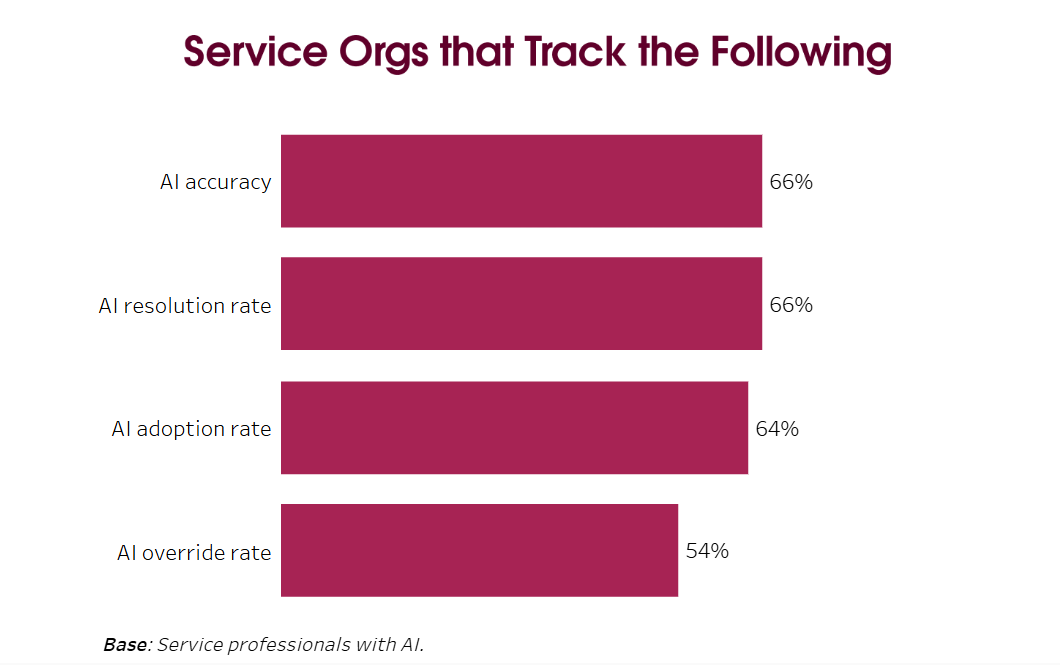
When migration is complete and things are ticking, it’s time to let the data do the talking. Compare your data to pre-migration numbers to get results that turn assumptions into proof.
Reading metric movement: What to expect
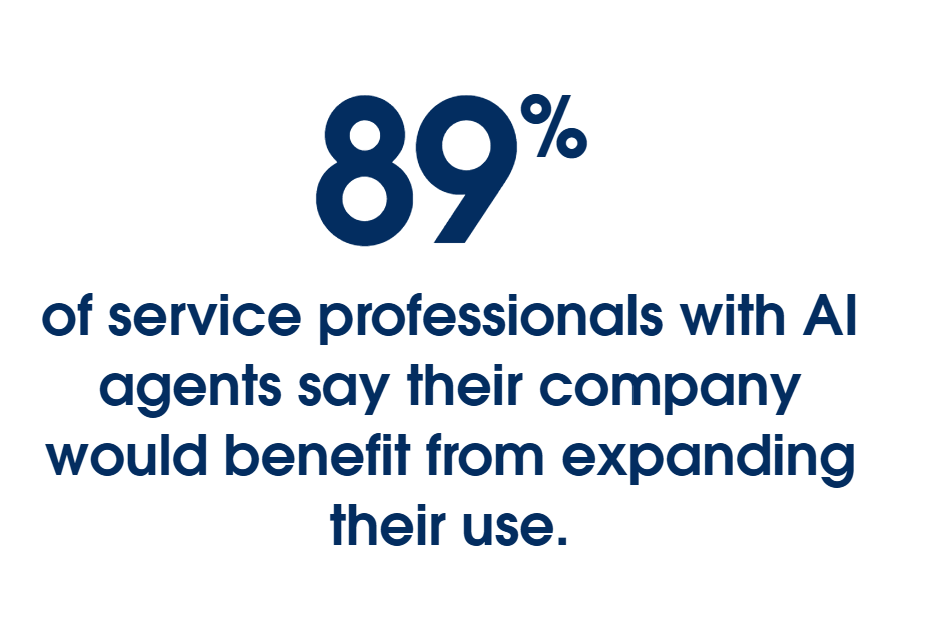
Overall, service professionals with AI agents report noticeable improvements across key KPIs, including customer satisfaction, AHT, and FCR.
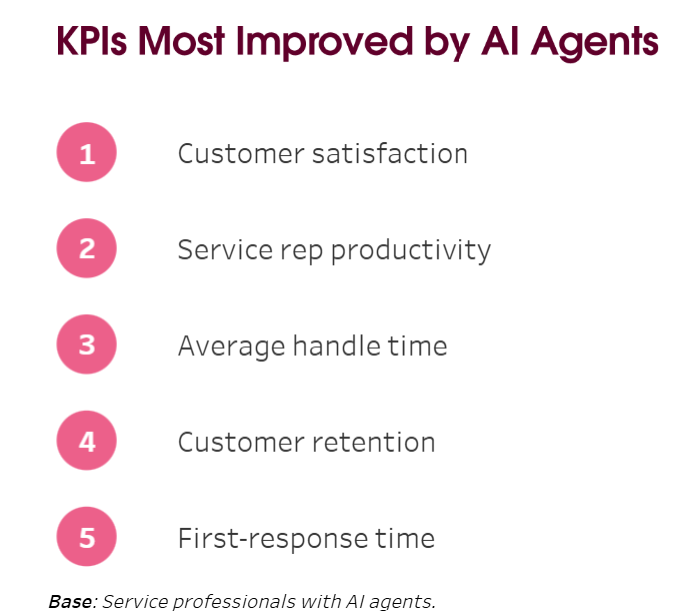
Movement post-migration is to be expected. But increases, declines, and stalls all mean different things, depending on the metric.
Metric increases can signify things are working, but it’s important not to celebrate off the bat.
For example, AHT dropping right after launch is a good early signal and should be monitored with cautious optimism.
When a metric declines, it’s not necessarily a bad thing. For example, FCR dipping is common as reps adjust to their new workflows. Once the learning curve passes, it may bounce back.
Stalled metrics are just as important to note as those in flux, as they signify lingering points of friction. For example, if AHT improves but customer satisfaction stalls, it means the reps are handling cases faster, but customers aren’t feeling it.
All these points work for project scoping and building a plan.
Join the Serviceblazer Community.
Learn, connect, and grow with fellow service and field service professionals. Network and get answers in real time.


Real-world omnichannel customer service infrastructure
This all sounds good in theory, but what does it mean in practice? What sort of results can an enterprise business achieve with a connected, AI-assisted omnichannel system?
One NZ is a good example of omnichannel customer service at scale. It doesn’t get much bigger than scoping for over a million customers. Each needed simplified plans, so it became impossible to keep up with customer demands. So, the company decided to create a self-service agent that customers could trust to guide their decisions.
Grounded in real-time Data 360, One NZ created these purpose-built agents with Agentforce in just five weeks. The result? Customers can now check, compare, and switch plans anytime at their leisure, without needing manual support.
It just goes to show how much AI integrations, using the right data within protective guardrails, can assist service reps and their customers.
Advanced support for service teams and customers
Your contact centre is only as efficient as the platform that runs it. Centralised databases, omnichannel service, smart AI integrations, and real-time analysis are all important pieces of the puzzle. To modernise legacy architecture is to clear the path for customers, service reps, and wider teams.
With your migration plan outlined, setting it up is the logical next step. If you’re looking to modernise your contact centre, contact our team today to discover how Service Cloud can help you build and iterate safely, connect apps to your workflows, and provide that critical centralised viewpoint.
See what’s possible with Agentforce today.
FAQ
The difference between multichannel and omnichannel is how contact channels integrate. Multichannel has a siloed view for each channel, making it difficult to track customer journeys and support them properly at every point. Omnichannel offers a fully connected view for all channels, so service reps can track the customer journey no how they contact the business.
A modern cloud contact centre needs to do one thing well: help customers at all stages of their journey. To do this, there are five main features a customer service platform should include:
- Unified conversation history, to keep all customer interactions housed in one place
- Intelligent routing, to send customers to the right agent based on context
- Shared knowledge centre, to keep answers consistent across every channel
- Real-time analytics, to provide proactive visibility and deal with problems as they arise
- Embedded AI assistance, to quietly work alongside service reps while improving efficiency and flow
Contact centre AI is the set of capabilities embedded into your service platform. This can include reply suggestions, process automation, live transcription, case summaries, intelligent routing, and real-time data analytics. When implemented properly, AI works alongside your reps to resolve cases faster, more accurately, and with less effort.