



There’s a well-known scenario that pops up a lot in analytics. A new dashboard goes live, everyone nods in approval at the initial meeting and the report rarely gets a second look.
This doesn’t happen because the insights aren’t valuable. Instead, those insights are getting lost in a labyrinth of metrics. Teams don’t want to squint at 15 multi-coloured graphs to see whether their marketing campaign is landing. They want instant answers and rapid insights that help them make real-time decisions with confidence.
So, how do you give the people what they want?
One option is a data visualisation platform. Rather than sending analysts on a digital scavenger hunt, the right solution will help teams surface what matters, dig deeper to learn more, and act on what they’ve learned, all in a single flow of work.
In this guide, we’ll explore how a data visualisation tool can help your business, the steps you need to take before you invest in a tool, and how to implement a platform that your teams will be excited to use.
Get the State of Data and Analytics report.
See why improving data quality is the #1 priority for leaders. Get this and other strategic insights from 10,000+ business, analytics, and IT professionals.
The value’s already in your data. You just need to unlock it.
All businesses are sitting on a goldmine of insights. The real opportunity lies in making those insights easy to see, explore, and act on.
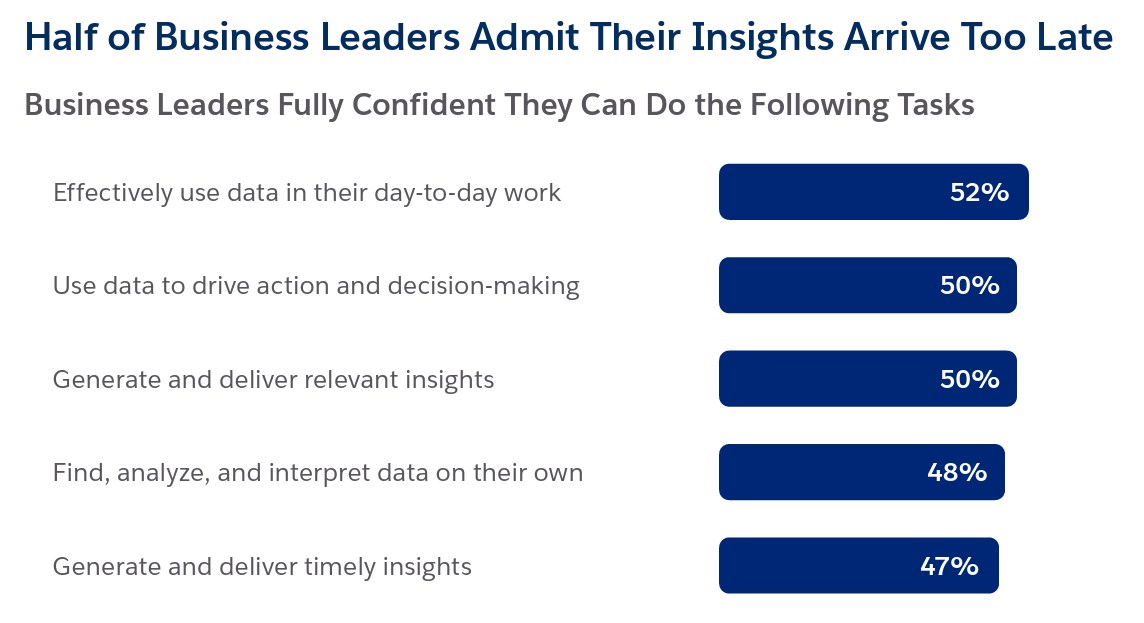
But that’s the big challenge. Just 50% of leaders are confident they can generate and deliver relevant insights, and fewer (47%) feel they can deliver them on time.
We tend to break this challenge down into two main areas:
- Data quality: Leaders estimate that 26% of their organisation’s data is untrustworthy, and only 47% of data and analytics leaders fully trust their business’s data accuracy. If you can’t trust your data, you can’t trust your analytics.
- Accessibility: Your data is valuable. But if it’s trapped in unstructured formats or scattered across systems, how can you hope to turn it into real-time insights your teams can rely on?
Now for the good news: a well-implemented data visualisation solution can solve both of these problems.
With Tableau, for example, you can unify your CRM, operational, and third-party data in one place, standardise that data so it’s reliable, and then explore it through intuitive dashboards.
From there, your teams can dig deeper into trends, receive AI recommendations and personalised digests directly in the tools they already use, and act on insights they can trust, all without needing to hop between tabs or switch tools to find the answers they need.
Do more with your data with scalable insights from Tableau
As the world’s leading AI-powered analytics platform, Tableau makes it easy to see, understand and act on data wherever you work.


Better visibility makes every team stronger
Once you have the right data connected and visible, its value will show up in how people work. A strong, integrated visualisation platform can:
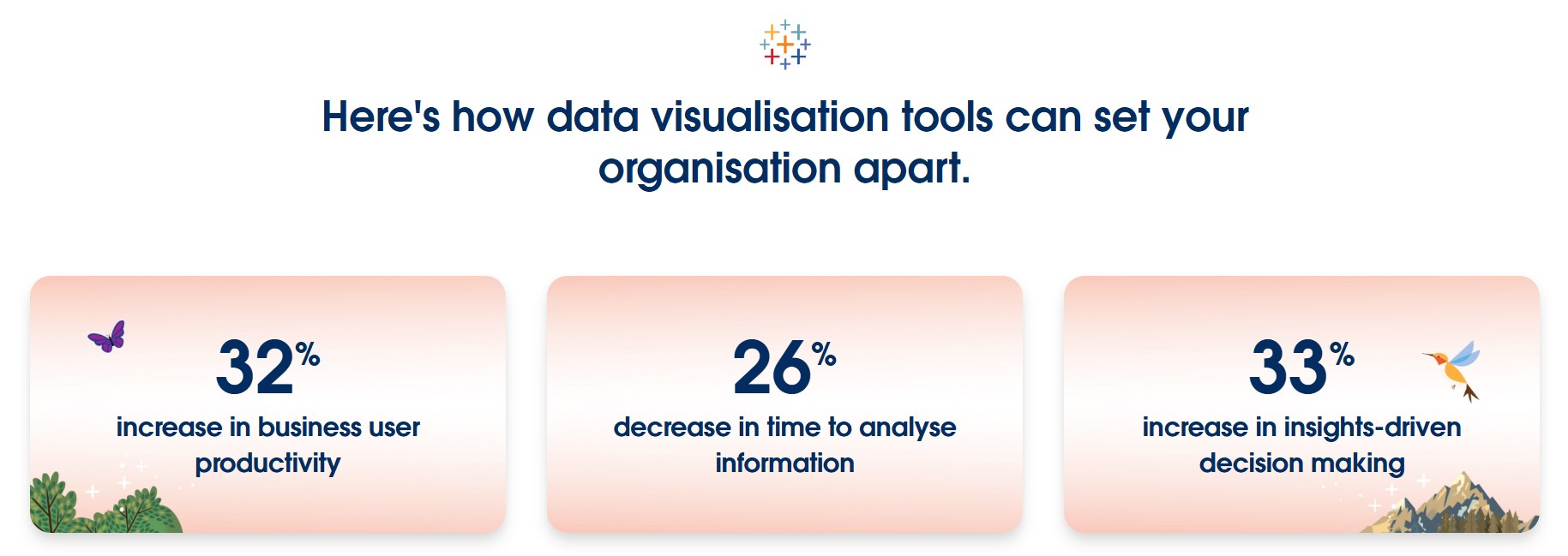
- Increase business user productivity by 32%,so teams spend less time wrestling with reports and more time putting insights to work.
- Decrease time to analyse information by 26%, shortening the gap between asking questions and getting trusted answers.
- Increase insight-driven decision making by 33%,making it easier for leaders and teams to turn data into strategy.
- Give leaders trust in the metrics they’re viewing, with a clearer view of where data came from and how it’s changed over time.
- Empower teams with self-service analytics so people can explore trends independently without waiting for support from analytics teams.
In practice, this means people spend less time chasing answers and more time using them. Leaders get a clearer view of performance. Teams can explore trends without waiting for manual reports. Analysts have a pathway to turn insight into action.
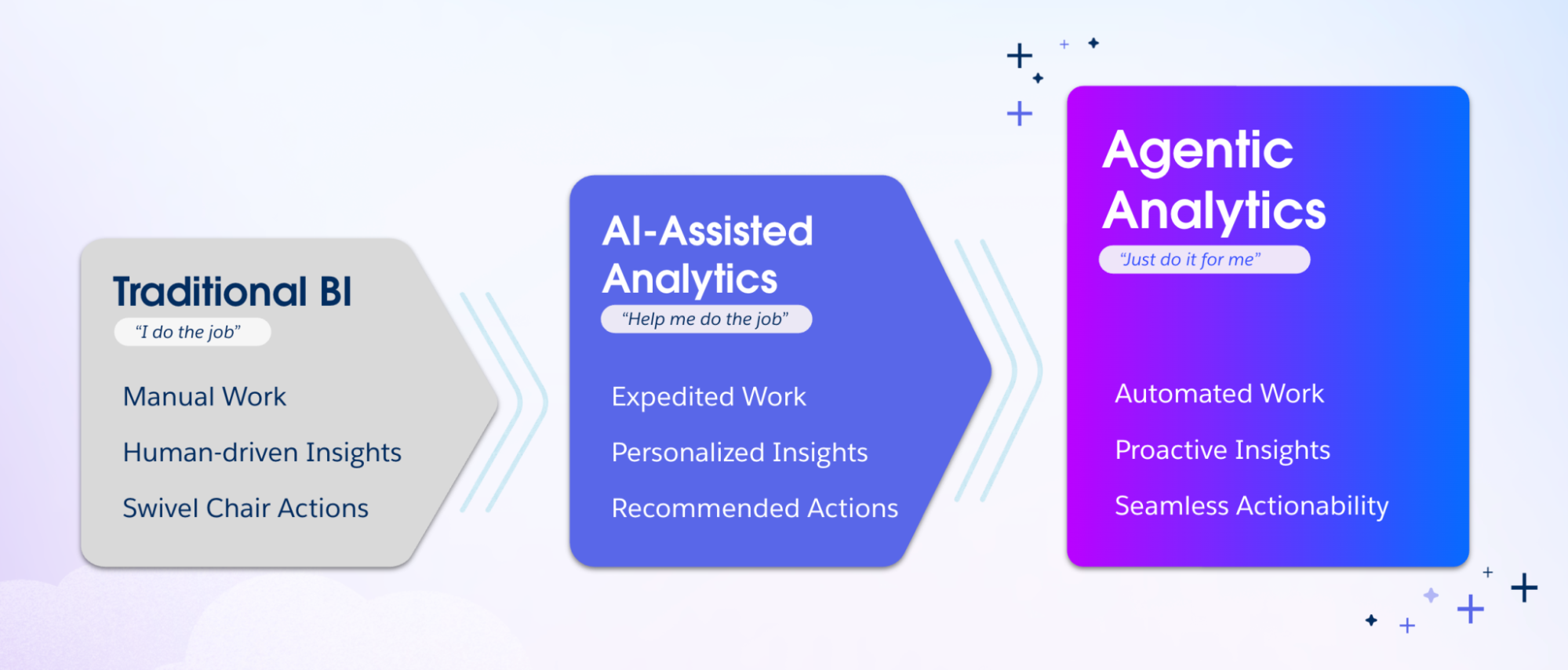
This foundation becomes even more valuable as businesses bring agentic AI deeper into everyday workflows. With access to grounded, trusted context, AI agents can surface proactive insights, automate tasks, explain trends, and recommend next steps directly in the flow of work. This helps businesses scale without losing trust in the data that informs their decisions.
Bringing agents, humans, and data together sets the stage for the agentic enterprise, giving businesses the tools to move from static reporting to proactive, insight-led action.
See how PepsiCo is using Agentforce and Data 360 to better serve its teams and customers.
Don’t rush the rollout. Lay the foundations first.
A data visualisation tool can do brilliant things for your business. But you need to lay the groundwork before you can start using your data.
Below, we’ve outlined three essential steps you should take before you roll out a solution. Getting these right will help you implement with clarity, build trust in your data from the start, and choose a platform that aligns with your current and future goals.
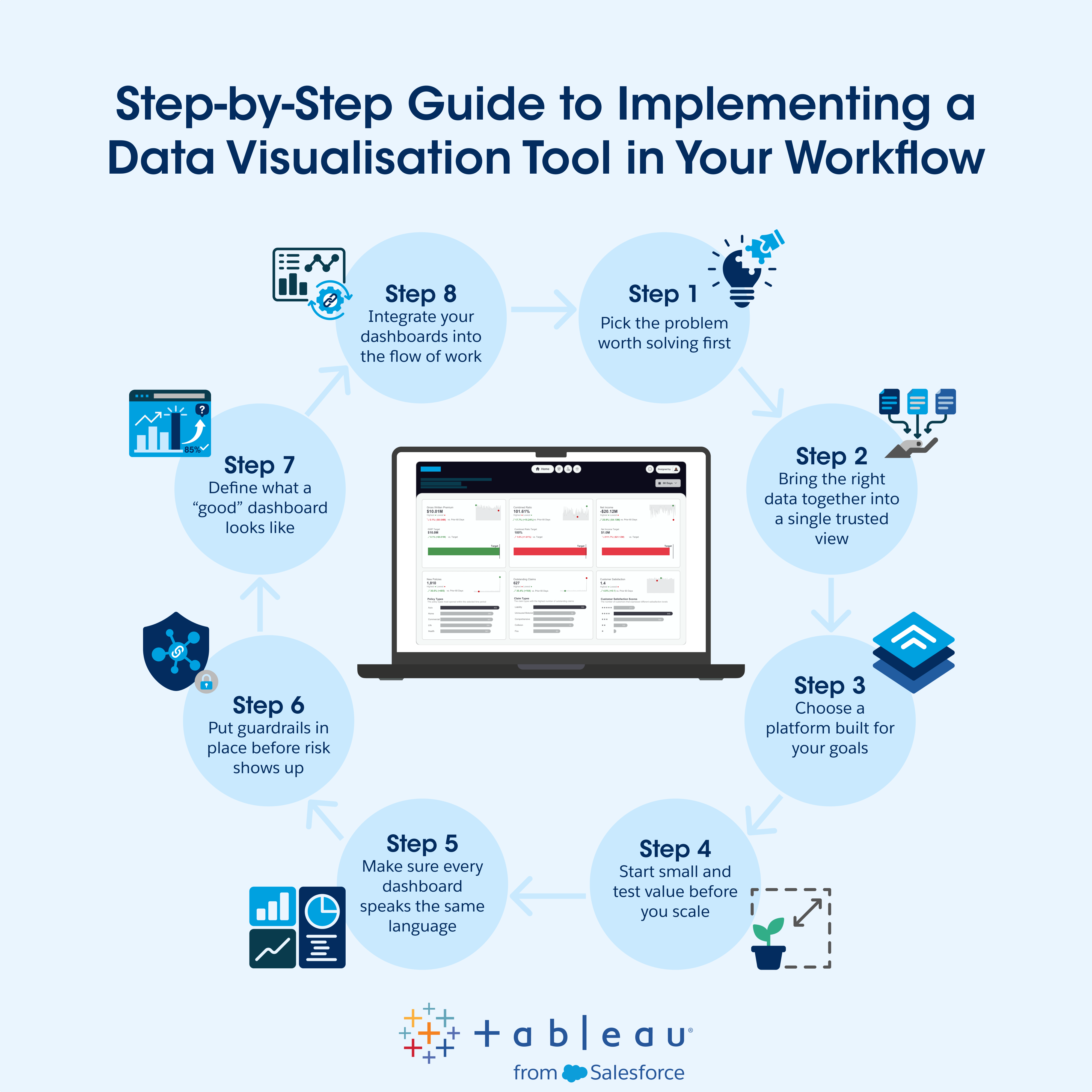
Step 1: Pick the problem worth solving first
One of the strengths of a data visualisation platform is that it can scale across teams, workflows, and decisions. But this versatility also makes it important to start small until you have guardrails and consistent rules in place.
A common challenge with early rollouts is “reporting sprawl”. Everyone wants visibility. Teams build their own dashboards with the data they have on hand. Before long, you have multiple versions of the truth, and you’re spending too much time debating whose version of a donut chart has the right numbers.
Forty-two per cent of business leaders worry their data strategies don’t fully align with business objectives, and 63% struggle to drive business priorities with data. Having access to more information is exciting, but without clear rules, definitions, ownership, and governance, it can be hard to turn that information into one clear business view.

This is why we recommend setting a clear goal before you implement your tool, such as “giving leadership a clear view of revenue” or “creating a single source of truth for marketing campaign performance”.
What matters is that the use case is straightforward and relevant to your organisation. To land on the right starting point for your business, ask yourself:
- Where would faster visibility improve decision-making in our business?
- Which team is feeling the most pain from slow or conflicting reporting?
- Which KPI or workflow would benefit from a single, trusted view?
The aim here isn’t to box yourself into a narrow use case. Data visualisation tools can, and should, benefit every aspect of your business decision-making, given time. The point is to give your rollout a clear focus early on while you lay down the basics.
If you can set a clear vision, scaling becomes much easier because you’re expanding from a single use case that your teams already trust.
Step 2: Bring the right data together into a single trusted view
You now know what you want your visualisation platform to achieve. The next step is making sure you have the data to support that goal.
This is one of the big visualisation challenges, and it’s worth tackling early. As we’ve mentioned, leaders estimate that 26% of their organisation’s data is untrustworthy. Seventy per cent say their most valuable insights are trapped in unstructured data. Without a clear way to connect and structure that information, reporting can quickly become inconsistent.
Connecting and standardising your data early bridges this gap, ensuring every report you generate is grounded in reliable, consistent data. This lets teams explore trends, compare performance, and make decisions with confidence.
The goal here isn’t to boil the ocean. Focus on the systems that support your initial use case. If your first priority is revenue visibility, that might mean CRM and finance data. For campaign performance, you might need web analytics and ad platform data.
Whatever your starting use case, a platform like Data 360 can help you bring data together into a single source of truth. From there, Tableau makes it easy to prepare, refine, and structure that data for visualisation, with AI-augmented analytics that let you describe the transformations you need intuitively in natural language.
As well as improving report quality, this standardised foundation also sets the stage for embedded agentic AI. Eighty-six per cent of IT leaders agree AI outputs are only as good as their data inputs. When your data is connected, standardised, and easy to trust, agents are in a much better position to surface insights and recommend next steps in the flow of work.
This is the point when visualisation starts moving from a reporting layer to becoming part of a much broader decision-making ecosystem.
Step 3: Choose a platform built for your goals
Now that you know what you want to visualise and which data needs to support it, you’re ready to choose a platform that can handle your use cases now and in the future.
Basic reporting tools can work well for simple dashboards and one-off reports. But if you want to roll out self-service visualisations across teams, unify data, keep insights trusted as you scale, and embed agentic analytics in the flow of work, you need a stronger foundation.
Below, we’ve quickly outlined some of the features to consider when choosing a data visualisation platform, including what they are and why they’re important.
Top features to look for in a data visualisation tool
| Feature | What it is | Why it’s useful |
|---|---|---|
| Data connectors | Connectors that pull data from CRM, finance, marketing, service, and third-party systems into one analytics environment | Lets teams make decisions from a single source of truth |
| Built-in data prep | Tools for cleaning, joining, reshaping, and standardising data so it’s ready for visualisation | Improves data quality and helps keep reporting valuable as you scale up |
| Semantic layer | A governed layer that lets users standardise how metrics like revenue, churn, or pipeline are defined | Ensures every dashboard follows the same underlying logic, keeping outputs consistent across teams, users, and workflows |
| Interactive exploration | The ability to drill down into metrics, isolate different areas, and investigate trends without building new reports each time | Turns analytics into something teams can explore for themselves rather than waiting for an analyst’s input |
| Natural language analytics | Features that let users talk to AI agents in natural language, ask questions, and explore data intuitively | Makes analytics more accessible for non-technical users and shortens the distance between questions and answers |
| Proactive insights | Automated notifications, weekly digests, and anomaly notifications powered by AI | Helps teams spot shifts and opportunities earlier without ever leaving the flow of work |
| Embedded analytics | The ability to place real-time dashboards directly inside other business tools and workflows | Reduces context-switching and makes it easier for teams to act on insights where they already work |
| Governance and security | Permissions, audit trails, certification, and access rules that control who can see, access, and edit data | Protects the integrity and privacy of sensitive data and ensures the platform remains trustworthy as usage scales |
The features you see as important will vary depending on what you need from your rollout.
For instance, if you’re starting with a single executive dashboard built on a clean dataset, embedded analytics might be less urgent than strong data prep and a shared semantic layer. On the flipside, if you’re planning to integrate analytics across multiple teams and workflows, an advanced analytics solution like Tableau will give you more room to scale.
That said, it helps to plan ahead. Embedded analytics and proactive AI insights can look like “down the line” priorities when you’re focused on a first rollout, but they have the potential to revolutionise your analytics efforts over time.
When insights reach people where they actually work, and teams can ask follow-up questions in natural language, teams have more time to put their insights to use. This is the kind of shift that moves organisations from static reporting to a connected, proactive way of working, providing the foundation for the agentic enterprise.
If you’d like to find out more about how data, agents, and humans can work together, see Salesforce and Xero discuss what it means to become an agentic enterprise at our 2026 Agentforce World Tour in Sydney. Watch the full keynote and many more at Salesforce+.
How to move from a rollout to reliable insights
Once you’ve laid the groundwork, you’re on your way to a successful implementation. The next step is launching the platform in a controlled way so you can scale confidently once you’ve proven value. Here are the next steps to take:
Step 4: Start small and test value before you scale
A focused pilot will give you the chance to turn your vision into a strategy, prove value, gather feedback, and work out what you need to refine before you scale up. It also lets you avoid the dreaded “reporting sprawl” that throws projects adrift.
The key is to keep your pilot small enough to manage but meaningful enough to matter.
You already chose your use case in the first step. Now you need to define how that release will look in practice. Look to pinpoint:
- A clearly-defined user group so it’s clear who your initial rollout will serve
- A known set of data sources so teams are visualising from a trusted foundation
- Success metrics like “time saved”, “reporting consistency”, or “overall adoption”
In essence, there are a few things you need to know. Are people using the platform? Do they trust what they’re seeing? Has manual reporting decreased? Are decisions happening faster?
Answer “yes” to all of these questions, and you have an impactful early-stage rollout that your teams can rely on.
Step 5: Make sure every dashboard speaks the same language
Once you’ve run a successful pilot, you’re ready to start scaling. Now, the challenge becomes consistency. Before you roll out to wider teams, you need to make sure every new dashboard will be standardised, consistent, and easy to trust.
A good place to start is with semantics. This is the shared logic that determines how different metrics will be defined and calculated across each report. This is vital because teams often look at the same business problem in different ways. Take churn, for instance:
- A customer success team might define it as any account that cancels a contract.
- A product team might flag churn when usage drops away well before a contract ends.
- A finance team may only count churn once revenue actually leaves the books.
All of these approaches are valid, but they answer the question in different ways. Without clear definitions and naming conventions like “churn (customer success)” and “churn (finance)”, teams can end up comparing two different metrics as though they’re the same.
Tableau Semantics will help you turn raw data into a shared business language so dashboards, users and AI all work from the same definitions. If you’d like to learn more, watch the video below to see how Tableau keeps reporting consistent as you scale.
Step 6: Put guardrails in place before risk shows up
Governance often gets pushed down the priority list when a new platform gets rolled out because it feels less urgent than getting tools live. But this is exactly where risks can start. In Australia, only 43% of analytics leaders have formal data governance policies, even though 88% agree AI demands new approaches to governance and security.
This governance gap can create real risk. If a team (or AI agent) pulls from an unapproved data source or exposes sensitive information, the result can quickly become a compliance issue.
The good news is that this is avoidable with the right preparation. Prioritise governance before you deploy your platform by starting with a few simple standards:
- Set access controls: Decide who can view, edit, access, and publish dashboards, and who can update the semantic layer.
- Role-based protection: A local manager may only need to see NSW performance, whereas an executive often needs a national view in the same dashboard.
- Approve trusted data sources: Make it clear which systems and data sources your teams can report on.
- Be clear on privacy: If a dashboard includes personal data, teams need to know how that data is handled under the Australian Privacy Act.
Governance is what sets basic BI tools apart from enterprise-grade platforms. In Salesforce, for instance, data governance is supported by granular access controls and auditability within Data 360 + Tableau. And for security, the Agentforce Trust Layer brings encryption, data masking, and audit logging to keep every aspect of visualisation secure.
If you can get this part right early, everything that follows will be easier. Your dashboards will be easier to trust, your teams will be more confident using them, and your full-scale deployment will be better positioned to succeed without introducing risk.
Step 7: Define what a “good” dashboard looks like
Now, you need to set benchmarks for what your internal dashboards should look like.
A strong dashboard should make the data points obvious. You want a leader or team member to be able to open it, understand what’s changed, and know where to look next without needing a walkthrough from your data analysts. A few practical rules include:
- Start with one clear purpose: Each dashboard should focus on a specific business question rather than trying to cover every angle at once.
- Choose chart types that fit the question: Use bar charts or bar graphs for comparisons, line charts or graphs for time series trends, and a stacked bar chart when you need to show both totals and composition in one view.
- Use complex data visualisations sparingly: Bubble charts, heat maps, and other niche interactive visuals can be useful in the right context, but only if they make the insight easier to understand. Keep it simple when you can.
- Be careful with pie-based visuals: Pie charts or donut charts can work for simple composition views, but if you’ll end up with a rainbow of slices, bar charts usually provide a cleaner way to tell the story.
- Keep the layout easy to scan: Lead with the main KPI. Use one or two supporting charts to explain the drivers behind it. Then, use filters and drill-downs to help users explore the next logical question without overcrowding the page.
- Declutter the page: Remove unnecessary labels, decorative effects, and anything else that stops the signal from standing out.
In essence, your teams should be able to squint at a dashboard, understand the main message, and know where to look next. If they can’t see the data they need from a quick glance, simplify the design and bring the insights to the front.
Put data at the centre of every decision.
Transform your company by infusing your data with AI and building a thriving data culture.
Step 8: Integrate your dashboards into the flow of work
Integrating your dashboards into the systems your teams already use turns them from a reporting add-on into a source of real-time guidance. This reduces the time it takes to go from questions to decisions to actions.
For instance, with Tableau, you can embed insights directly in your CRM, business systems, or messaging apps (such as Slack). This means, rather than asking teams to stop what they’re doing, open a new system, and scour the data for insights, your teams will simply receive AI-driven updates directly in their workflow with no context-switching required.
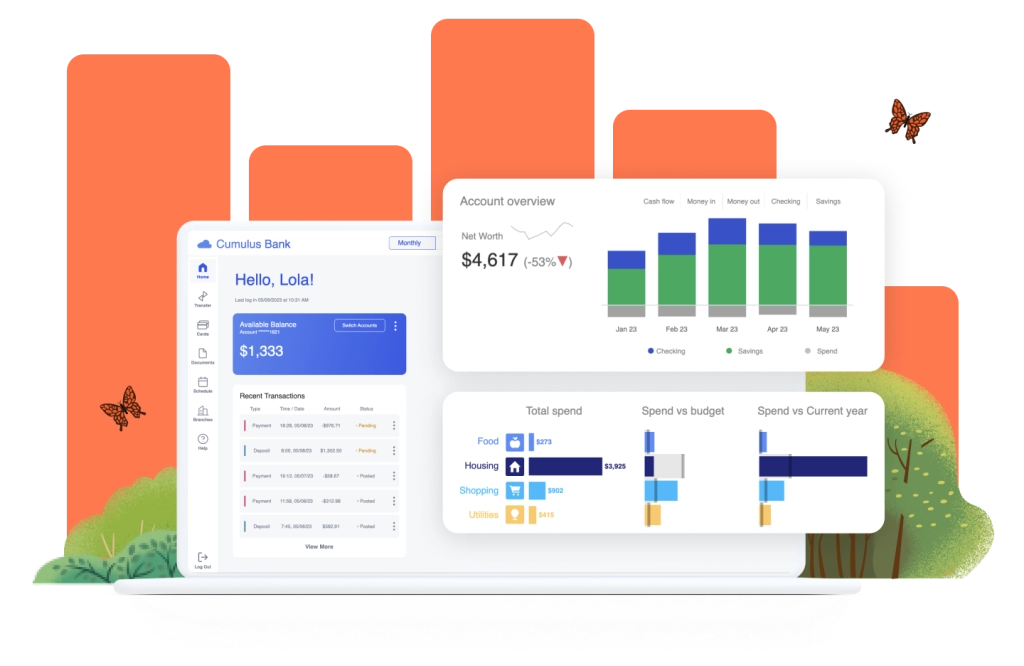
On top of this, Tableau Pulse sends personalised digests and AI-powered summaries to users in Slack, email, and Salesforce, letting teams stay on top of KPIs and follow trends without leaving the systems they already use.
This is the stage that turns analytics from “pull”, where teams have to hunt analytics themselves, to “push”, where the analytics arrive on their doorstep. If you’d like to learn more, see how Indeed uses Tableau to bring data and analytics directly into the flow of work.
How the Australian Department of Health and Aged Care uses Salesforce to turn data into insights
As the Australian Department of Health and Aged Care worked to improve outcomes for older Australians, it faced a challenge many enterprises will recognise:
“Sure, the data exists. But how do we bring it together into a single view?”
Without a way to unify the information they held, the department lacked a way to improve visibility, consistently support providers, and create a connected experience across the aged care ecosystem. On top of this, the agency also wanted to give the wider community an easier route to deliver feedback.
To solve this, the department deployed Tableau and MuleSoft, among other Salesforce solutions, to create a more connected aged care data environment. Tableau helped the team turn service data into visualised reports and dashboards, making it easier to spot patterns, surface trends, pinpoint catalysts, and refine their feedback system over time. MuleSoft supported that foundation by integrating third-party systems, helping the department reduce paper forms, spreadsheet uploads, and manual data entry.
Altogether, this partnership has helped the Australian Department of Health and Aged Care move toward a more connected, transparent model of service delivery while freeing up time for teams to focus on the human-first design that improves citizen experiences.
How Salesforce + Tableau turn insights into action
Data visualisation will bring enormous benefits to your business, but getting the best results means laying a strong foundation. Start with a clear use case, define goals, and unify your data. After that, choose a platform that can support your needs as they grow.
Salesforce helps teams move from scattered reporting to connected, trusted, governable analytics. Our platform brings together AI-powered insights, embedded experiences, and unified data foundations to help teams explore data, build intuitive visual dashboards, and act on what they’ve learned within the same workflow. Here’s how our solutions can help:
- Tableau Pulse to surface personalised metrics and AI summaries in the flow of work
- Tableau Semantics to keep every team working from the same definitions
- Tableau Next to power your transition to proactive, agentic analytics
- Embedded Analytics to bring insights into the systems your team uses every day
- Augmented Analytics to let teams ask AI for answers in natural language
- CRM Analytics to deliver built-in dashboards and insights into the Salesforce CRM
- Data 360 to unify your business data and build a trusted analytics foundation
If you’d like to learn more, join Tableau’s Southard Jones and Rekha Srivatsan as they discuss how Tableau can help you unlock the power of your data, make trusted decisions, and fuel agentic experiences within your organisation.
And, if you’re ready to get started, watch the demo today to see what’s possible, or get connected with an expert to start bringing your data visualisation goals to life through the #1 Agentic Enterprise Platform.
FAQs
The best visualisation tool is the one that will meet your needs. Look for a platform that speeds up your analytics without compromising the trustworthiness of your insights. This means strong data connectors, clear governance, and the ability to explore data in the flow of work. For enterprise-level datasets, Tableau is a strong option. It can handle massive visualisations in seconds, giving you the tools to scale up your analytics efforts without sacrificing trust or control.
Insights only create value when people can understand them quickly enough to act. Data storytelling helps teams move beyond charts and numbers to see the patterns that matter, understand what changed, and know where to go next to learn more.
Yes, if the platform is built for self-service. Great visualisation tools offer intuitive interfaces and natural-language features to help non-technical users dig into data and answer questions for themselves. Tableau, for instance, features drag-and-drop analytics, visual prompts for data prep, and AI support that lets users ask questions in plain language and explore insights more easily.