The AI Development Guide to Choosing the Right Sandbox



There’s a sandbox for each step of the AI agent and application development process — from ideation to testing, here’s how to choose the right environment.

In the age of AI, speed is everything — but quality is just as important.
Nearly 40% of all new applications already include AI features, and project requests to implement AI in new and existing tools continue to rise. In parallel with the pressure to deploy quickly is the heightened risk brought by AI’s dynamic behavior. Because AI agents and apps are constantly learning, inherently dynamic, and require continuous iteration — environment management is especially critical.
That’s where sandbox environments come in: they are an isolated space to build, test, and fine-tune new features, code, and integrations — all without disrupting any live operations.
There’s a sandbox for that
Sandbox environments are not one-size-fits-all. While some are full replicas of production, others are purposefully ‘bare bones’ — but each has its place. Choosing the right sandbox for each stage of the agent and application lifecycle management (ALM) process is vital. This decision dictates your available testing data and how frequently you can refresh the environment to align with production.
Salesforce offers four sandbox types:
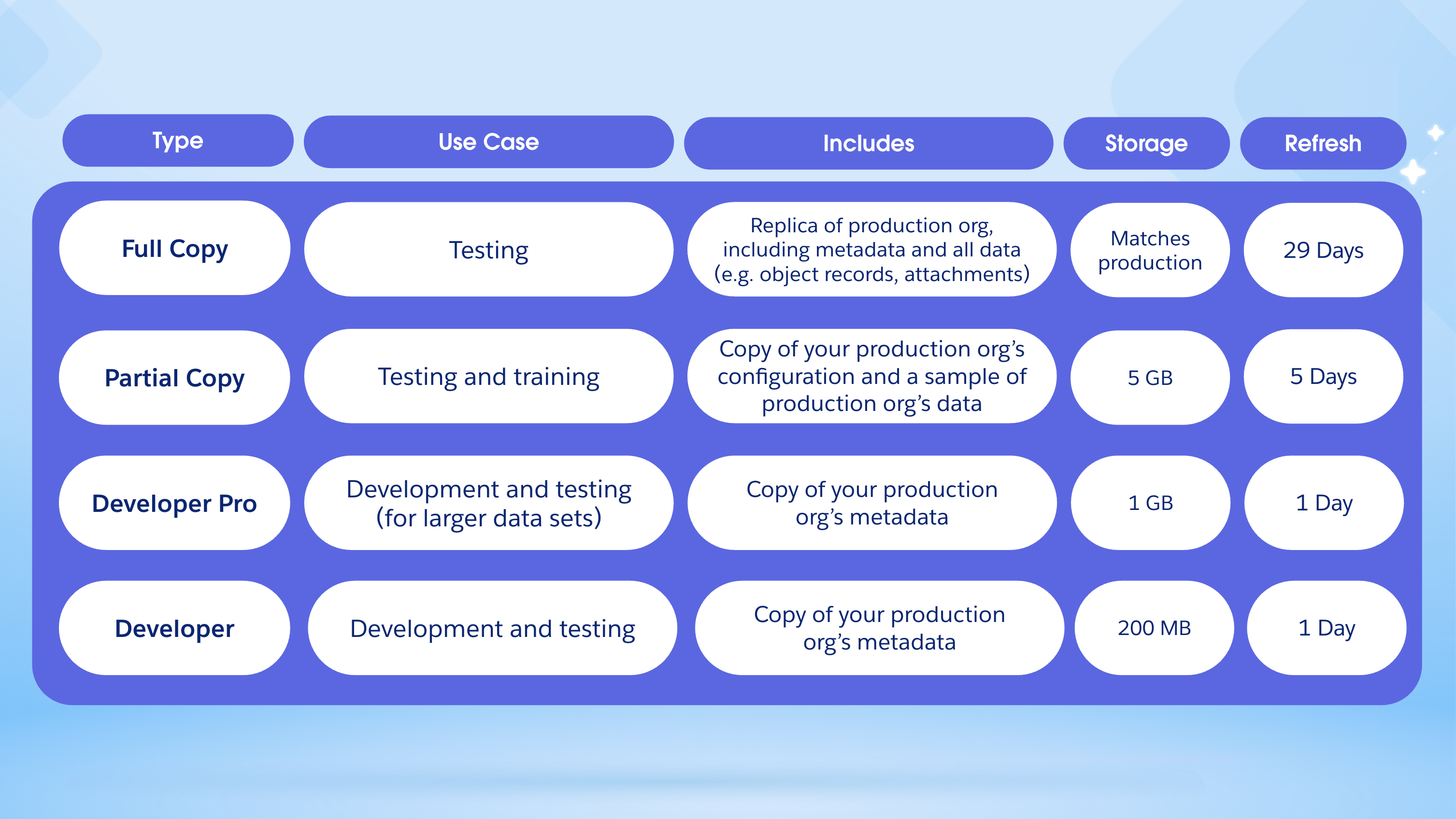
- The Developer Sandbox is your most agile environment, designed for coding and testing in isolation. It provides 200 MB of data storage, and copies only your metadata — meaning it starts with empty records, like Accounts or Contacts. In turn, this environment has a quick one-day refresh cadence, making it ideal for individual development and unit testing.
- The Developer Pro Sandbox serves as a level up by hosting larger data sets than a standard Developer sandbox. While it also only copies metadata and refreshes daily, it provides an increased storage capacity of 1 GB. This makes it the preferred choice for integration testing, user training, and more robust QA tasks.
- The Partial Copy Sandbox is a hybrid environment that balances data realism with refresh agility. It includes all your metadata plus a sample of your production data defined by a Sandbox Template. Developers can pick specific objects to copy with its 5 GB storage capacity. This type of Sandbox has a 5-day refresh interval, making it the standard for User Acceptance Testing (UAT) and quality assurance (QA).
- The Full Copy Sandbox is a high-fidelity replica of your entire production org, including all metadata and all data (such as object records and attachments). It has a strictly controlled 29-day refresh cycle due to the scale of the data copy. Since it is a mirror image to production, this is the only sandbox type that can thoroughly support performance testing, load testing, and staging.
Sandboxes are a pivotal part of the ALM process. By having an intentional environment strategy, it’ll ensure your apps and agents are getting from ideation to deployment quickly, efficiently, and securely.
Here’s how to choose the right sandbox type based on your current development objectives:
For ideation and planning
Successful AI agents and apps require alignment and proper planning. Early on, ideas can come quickly, and you’ll need an environment that can keep up.
For a lean, bare bones environment, a Developer Sandbox is sufficient. This lightweight environment type provides a metadata-focused workspace that can be refreshed every 24 hours. Because they are so easy to spin up, they are an ideal starting point, allowing teams to isolate individual features before they are merged into a shared branch.
For collaborative, integrated building
Building AI agents and apps requires a space that is agile enough for rapid iteration, but robust enough to handle data-heavy experimentation. With these requirements, a Developer Pro Sandbox is the ideal environment.
AI agents require diverse datasets to verify grounding and prompt accuracy. The Developer Pro Sandbox offers more storage capacity compared to the Developer Sandbox, which is necessary to host larger sample datasets and complex file structures without the wait time of creating a full production replica. Here, developers can code, configure, and innovate safely.
For robust testing
AI is non-deterministic — meaning that AI won’t always produce the exact output, even with the same prompt. This fluctuating nature makes rigorous testing non-negotiable before a release.
For Quality Assurance (QA) and Integration testing, Partial Copy Sandboxes provide a hybrid environment populated with a representative sample of production data. They offer an efficient platform for quick validation and user training without the lengthy refresh cycles of larger environments.
To effectively test your AI’s behavior and security rigor, you’ll need more than a handful of sample records. To assess how your AI reacts to volume and complexity, a Full Copy Sandbox is the answer. As a mirror image of your production environment, the this type of environment allows for comprehensive utilization and performance testing. In turn, you can verify that your deployments meet performance, security, and brand standards.




For continuous improvement
Unlike traditional apps, you can’t simply “deploy it and forget it”. Inevitably, AI will shift and change as it takes in new data and learns. In fact, deployment is just the beginning.
When monitoring tools in production flag a hallucination, a slow response, or a gap in knowledge, that scenario can be quickly replicated and addressed in a sandbox. You might start by isolating the issue in a Developer or Developer Pro Sandbox to quickly fine-tune system instructions or adjust agent logic in an agile, high-speed environment. If the issue is rooted in complex data relationships, you can then move those changes to a Full Copy Sandbox to verify the fix against a more realistic or complete production record set.
This continuous loop ensures your AI remains accurate and helpful without risking the integrity of your live operations.
Securing your sandbox
Data governance is baked into each step of the agent and application lifecycle management (ALM) process. The beauty of a Full Copy Sandbox is that it is a mirror image of production — but that also means that any sensitive data from production is also replicated.
To ensure you’re prioritizing trust and meeting compliance standards at each step of ALM, you can use data masking tools, such as Data Mask & Seed for Salesforce Sandboxes. With these solutions, you can protect sensitive data by transforming it into realistic, non-identifiable values that behave like the real thing but keep private details hidden.
A Guide to Data Masking & Seeding
Building fast shouldn’t mean risking your data. Discover how to streamline data seeding, mask sensitive information, and scale confidently across your environments.



Building Agentforce for Salesforce
Agentforce powers help.salesforce.com, which has handled over 2 million conversations since launching last year. From reducing response time, resolving routine inquiries, and guiding users to the best solution — Agentforce has helped resolve over 75% of visitor issues. And it all started in a sandbox.
To ensure Agentforce could properly communicate with customers and get their issues resolved, internal teams relied on Salesforce Sandboxes. In an interview with Salesforce Director of IT, Harini Palanachi, she says “A full copy sandbox allowed us to simulate these real-world scenarios with unparalleled accuracy, ensuring our agent wasn’t just theoretically correct, but practically robust and reliable”.
Successful, rigorous AI solutions like these all share a silent partner: sandboxes. These isolated environments provide a playground to refine and perfect your deployments before they meet your customers.
Take control of your environment management
Sandboxes are at the heart of the ALM process. Each step of ALM requires different environment needs. Whether you’re looking for speedy sandbox creation or a production-like environment, with the Agentforce 360 Platform, you can manage your sandbox environment seamlessly.
The platform offers built-in tools to simplify sandbox creation, configuration, and refresh cycles. Learn more about Salesforce Sandboxes.