How to Scale Salesforce for 1 Million Concurrent Users


Learn how architects design for massive scale, using a prime-time televised guessing game as the challenge.

Imagine you’re an architect handed this brief: a prime-time televised guessing game, launching in weeks, expected to hit 8 million total registrations and 1 million concurrent users. It runs on Experience Cloud. It needs a conversational agent. It cannot go down, especially during the televised peak.
This is the scenario we worked through in the latest Think Like an Architect episode. In Think Like an Architect, we solve scenarios live so you can build the mental muscles needed to evaluate requirements, weigh options, and justify a solution direction instead of simply reviewing a finished architectural design. This recap walks you through each step of the scenario and the thinking behind it.
The What/How/Why Approach
To design scalable solutions, we use a repeatable three-step method to move from raw business requirements to justified architectural decisions:
- What: Highlight key phrases in business requirements to paraphrase the essence of the problem into concise High-Level Requirements (HLRs). This ensures you solve the right problem from the start.
- How: Align technical solution options directly to your HLRs. Use live diagramming to visualize options and digital sticky notes to capture questions, assumptions, and decisions.
- Why: Capture your rationale to create an Architectural Decision Record (ADR). This ensures stakeholders and your future self understand the “why” behind a specific direction.
Think Like an Architect: Scaling for the Big Game
Step inside the architecture behind a high-stakes, large-scale digital experience designed to handle millions of users in real time. Use the What/How/Why method to diagram Big Game–level scale challenges and learn how the team tackled extreme volume considerations and lessons learned.



What: Formulate High-Level Requirements (HLRs)
In the “What” step, let’s look at the specific challenge from this episode.
We start with a raw business requirement and use highlighting to indicate the key parts, as shown below.
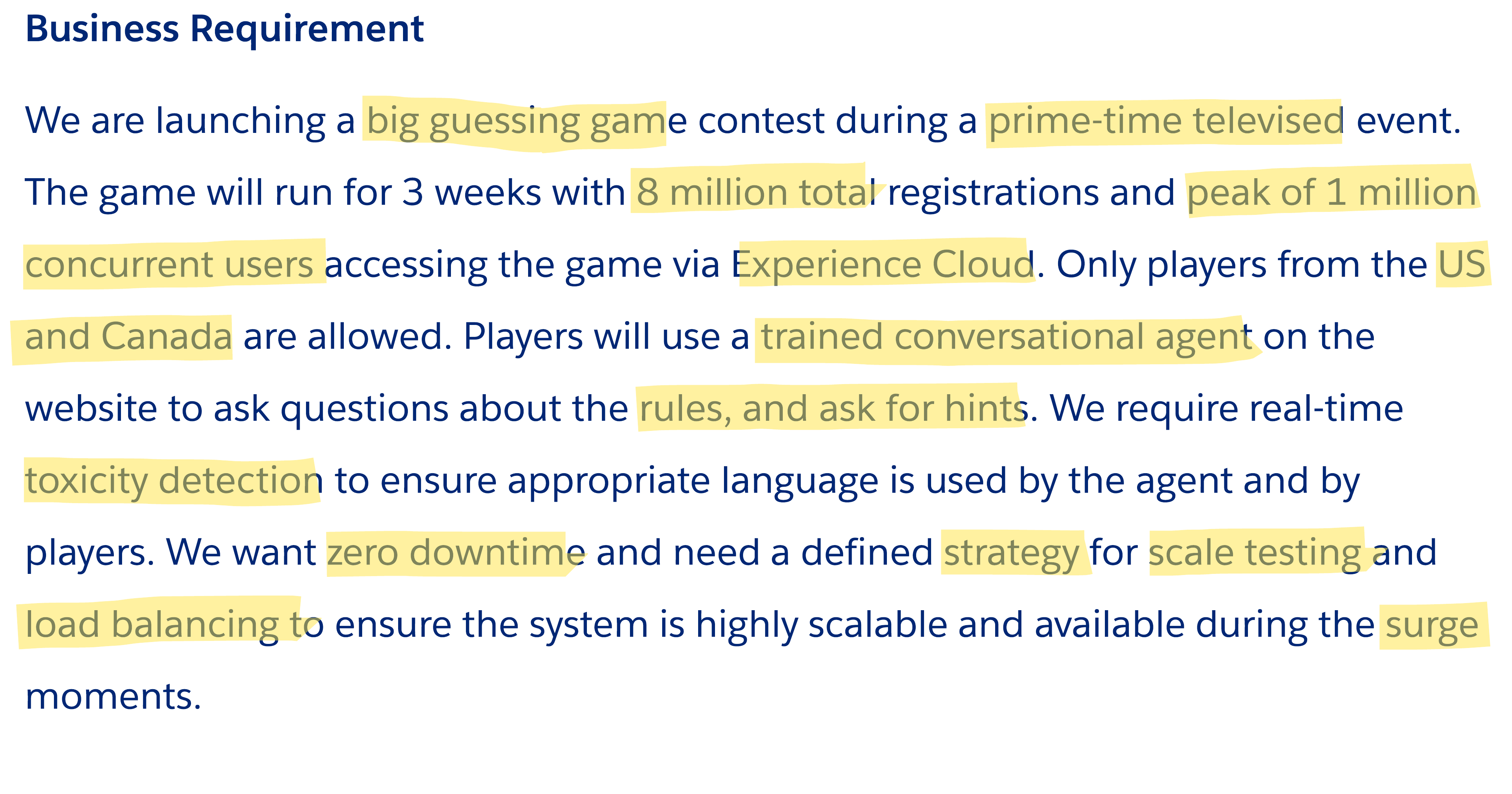
From those highlights, four High-Level Requirements emerge:
- Support 8M total registrations and 1M concurrent users on Experience Cloud, US and Canada only.
- Conversational agent to answer questions on rules and provide hints.
- Real-time toxicity detection.
- Zero downtime and a defined strategy for scale testing and load balancing.
Note that HLRs paraphrase rather than use the exact words from the business requirement. This is essential in validating with the business stakeholders that you understood the intention of their requirement.
Two groupings made sense as we moved into the “How” step. HLRs 2 and 3 are closely related as toxicity detection needs to happen in the conversational layer. HLR 4’s load balancing concern belongs with HLR 1, because you can’t talk about supporting 1 million concurrent users without talking about how they’re distributed. So we tackle HLR 1 + load balancing together, then HLRs 2 + 3 together, then the scale testing and zero-downtime strategy.
To continue with evaluating solution options, let’s move into the “How” step by following the trail of questions, assumptions, and decisions captured during our live session.
How: Aligning Solutions to Your HLRs
In the “How” step, we evaluate solution options for the HLRs. To keep your thinking organized, track your Questions, Assumptions, and Decisions alongside drawing the system landscape piece by piece.
HLR 1 + Load Balancing: Supporting 8M registrations and 1M concurrent users
The first question that comes to mind is: what’s the org strategy? Closely tied to that is the license strategy, because different Experience Cloud license types have very different scalability implications.
The requirement doesn’t suggest advanced sharing or complex permission models — it’s a public game. That points to a CC (Community Cloud) license. But even with a CC license, the platform has limits on both total users per org and concurrent users per org. At 8 million registrations and 1 million concurrent, a single org won’t work. We’re in multi-org territory.
- Decision: Multi-org with CC licenses.
- Reasoning: Platform limits on concurrent and total Experience Cloud users per org mean the volume can’t be handled in a single org. Multiple orgs distribute the load.
With multi-org confirmed, the registration question comes next: what are the registration considerations? Three assumptions surface:
- Data Manipulation: Creating millions of users generates significant DML load, user creation is an especially heavy DML operation, even in a distributed org model. So we need to ensure this is well distributed.
- IP Detection to Ensure Eligibility: Only US and Canada players are allowed. That check needs to happen before the user reaches the org.
- Low Latency for Static Content: Rules, terms, hints are static pages that need to load fast for millions of users also during peak.
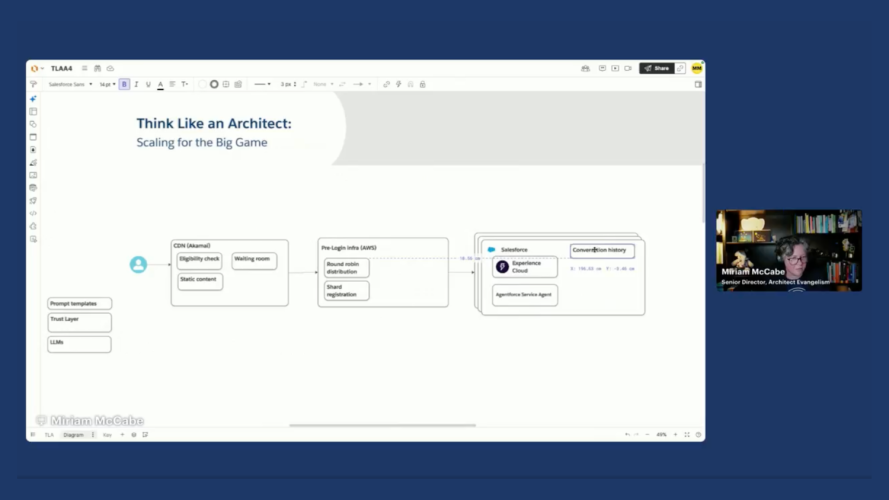
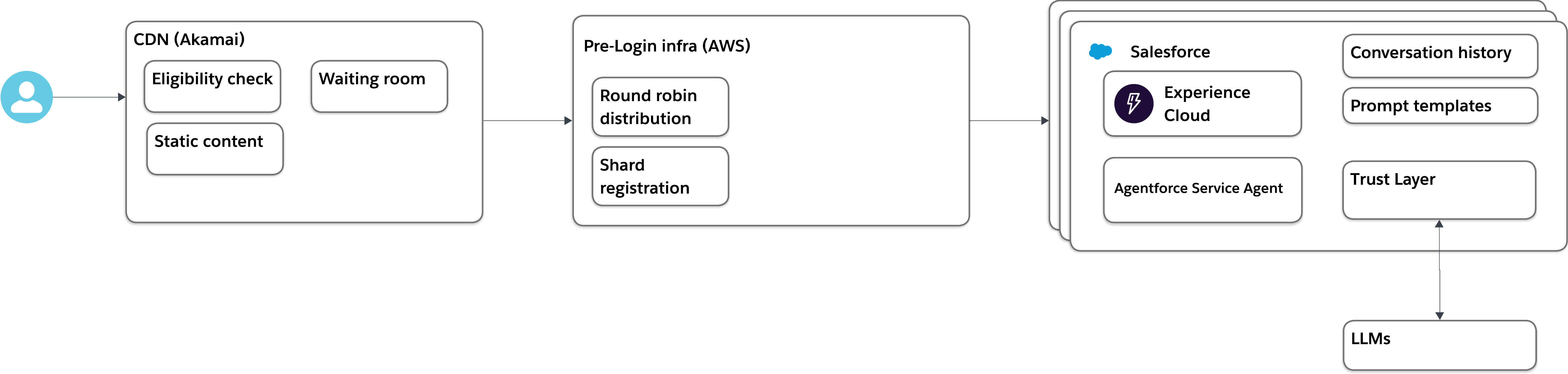
These assumptions point to a CDN. Akamai is the decision here, sitting in front of the orgs and handling three things: IP-based geo-filtering for US/Canada eligibility, fast delivery of static content, and a waiting room to manage traffic spikes at peak.
- Decision: CDN (Akamai) in front of Experience Cloud.
- Reasoning: Handles IP-based eligibility checks, serves static content with low latency, and provides a waiting room to gracefully manage surge traffic rather than letting load hit the orgs directly.

The next question is: how do we route users to the correct org? New users need to land in an org that has capacity for their registration. Returning users need to be routed back to the specific org where their account lives also known as what we call shard registration.
The decision is a pre-login infrastructure layer hosted on AWS. This is a natural fit because AWS shares a trust boundary with Salesforce. For new users, round-robin distribution ensures registrations are spread evenly across orgs. For returning users, a shard registry stored in AWS DynamoDB maps each user to their org so they’re routed back correctly on every subsequent visit.
- Decision: AWS pre-login infrastructure with DynamoDB for shard registration.
- Reasoning: Provides round-robin load distribution for new registrations and persistent shard mapping so returning users are always routed to the correct org. AWS shares a trust boundary with Salesforce.

HLR 2 + 3: Conversational agent with real-time toxicity detection
With the scale and routing architecture in place, we move to the agent. The first question is: what kind of agent?
In an Experience Cloud context with a public-facing site, not an employee portal, the answer is an Agentforce Service Agent. It’s designed for external engagement, and it lives where the users are.
Next question: where does the knowledge live? Two categories of knowledge matter here. The rules and hints need to be consistent across all orgs. The conversation history is per-user, so it lives naturally in whichever org the user is registered in that’s already solved by the multi-org routing layer.
For the rules and hints, the simplest approach is a prompt template deployed to all orgs. The assumption here is that the rules and hints are not enormous documents but bounded content that fits cleanly into a template.
- Decision: Agentforce Service Agent with a prompt template deployed across all orgs for rules and hints knowledge.
- Reasoning: Prompt templates are the lightest-weight knowledge distribution mechanism. Deploying the same template to each org keeps knowledge consistent without building a separate cross-org knowledge service. Conversation history is stored per org and is already scoped correctly by the shard registration layer.
For toxicity detection, the answer is already built in. The Agentforce Trust Layer handles bidirectional content filtering — it applies to both what the agent says and what players type. This is out-of-the-box behavior, not a custom build.
- Decision: Agentforce Trust Layer (OOB) for real-time toxicity detection.
- Reasoning: The Trust Layer is already part of the Agentforce platform and operates bidirectionally, covering both agent outputs and user inputs. No custom integration required.
HLR 4: Zero downtime and strategy for scale testing
This is a prime-time televised event, so the core question is: how can we have assurance that this will scale? The answer is to test at 3x the expected peak. If the architecture holds at 3x, you have a meaningful safety margin for game day.
- Assumption: 3X peak capacity as the scale testing target.
- Decision: Use Scale Test to validate the architecture at 3x peak capacity before launch.
When you run a scale test at that volume, you will find things. That leads to the next question: when findings come in, how do you tackle them? This is where Scale Center and Apex Guru come in. Scale Center provides observability meaning that you can see where the system falls apart and holds under pressure. Apex Guru gives you targeted recommendations for Apex code that needs to be rewritten or optimized to perform at scale.
- Decision: Scale Center for observability + Apex Guru for Apex optimization.
- Reasoning: Scale Center surfaces bottlenecks across the platform layers. Apex Guru translates those findings into specific code-level recommendations, turning insights into actionable fixes rather than guesswork.
Last question for this HLR: what’s the environment strategy? Given that we’re already in a multi-org setup at this scale, the only meaningful testing environment is a Full Copy Sandbox. The 3x target makes this clear as well, you need a production-grade environment to validate production-scale load.
- Decision: Full Copy Sandboxes for scale testing.
- Reasoning: A standard sandbox doesn’t reflect production infrastructure. Scale Test is available as an add-on to Full Copy, and Salesforce will inflate the sandbox to production grade so the test results are accurate.
Why: Justify Your Design with ADRs
During the live stream, we emphasized that an architect’s value is not in the solution, but in the rationale. The questions, assumptions, and decisions you capture during the “How” step are the raw material for an Architectural Decision Record that explains your thinking to stakeholders, to other architects, and to yourself six months from now.
A few specific ADR principles worth internalizing from this episode:
- Tie assumptions to decisions: If an assumption proves wrong, the decision may need to change. In this architecture, the prompt template decision assumes that rules and hints are bounded in size. If that assumption is later invalidated, the knowledge management approach needs to shift eg toward a knowledge base instead.
- Document why you ruled things out: During the discussion with the experts, we talked about how we considered platform cache for user registration handling but then decided on Platform Events instead. That is the type of information that matters for the next architect who looks at this design.
- Scale testing cost is an architectural decision: The cost of a 3x scale test on an AI-heavy solution isn’t trivial as it involves LLM calls at 3x volume. A good architect estimates that cost upfront, brings it to stakeholders, and gets buy-in. The alternative is a much more expensive outcome if the project fails.
For a step-by-step guide to building ADRs, including how to use LLMs to help, see this blog on how to create an Architectural Decision Record with the help of LLMs.
Expert Q&A
Joining us for this episode were Karishma Lalwani, Salesforce Certified Technical Architect and Senior Director of Product at Salesforce, and Sebasten Raffal, Certified Technical Architect and Director AI Architect at Salesforce. Here’s a selection of the questions from the session.
Agent design
Should you use one big agent action that handles multiple steps, or multiple smaller actions? Multiple smaller actions is the better design. It gives the agent more flexibility to orchestrate and makes each action reusable across multiple contexts. As Sebasten noted, consumption-based licensing in Agentforce is tied to what you use, not how you structured the actions so there’s no architectural penalty for composability.
Would you consider a standby conversational agent on a different LLM vendor as a failover? Salesforce already handles this within the platform. Every conversation goes through the LLM gateway, and within that gateway, Salesforce has load balancing and failover infrastructure across LLM vendors.
Scale and Multi-Org
Why can’t a single org handle 8M users? The total number of Experience Cloud users a single org can support is in the hundreds of thousands, not millions. The concurrent user limits compound this further. Multi-org isn’t a preference or a default, but based on the scale of the solution, it is the only viable architecture.
What are the governance implications of a multi-org strategy? The primary complexity is release management. You need to ensure the same deployment packages, configurations, and customizations go out to every org consistently. In this scenario, each user belonged to exactly one org and no data sync between orgs was required beyond the prompt template. For a long-lived multi-org deployment, the administration overhead is more significant. Packaging the Experience Cloud definition and deploying it uniformly across orgs (as mentioned by audience participants during the session) is the right approach.
What about aggregating data across orgs to create a leaderboard? This requires an aggregation layer outside the individual orgs. One approach used successfully in practice: MuleSoft extracts data from each org on a scheduled basis and writes it to a central repository org. Tableau or CRM Analytics on top of that gives you the dashboard, and you can expose it externally if needed.
What are some other real-world uses of org sharding? Karishma shared from direct experience. During the COVID-19 vaccination rollout, multiple states and countries used Salesforce as their booking platform, implementing the same CDN + waiting room + org sharding pattern to manage sudden surges in traffic. She also talked about how this is a common experience that she encountered as a consumer when ordering international soccer tickets. These aren’t edge cases and any scenario with high-burst, time-sensitive public access hits these architectural constraints.
Waiting rooms and user experience
Isn’t a waiting room a frustrating user experience? It’s an industry-standard pattern for high-burst scenarios, and users have come to recognize it. The alternative of showing an error page when the system is overwhelmed is a much worse experience. A waiting room that tells you “your turn in 9 minutes” is manageable. One pre-registration strategy can reduce waiting room friction significantly: register users ahead of the event opening. If they’ve already completed the OTP flow and account setup in advance, the surge at launch is much smaller, because the high-cost part of registration is already done.
Bot prevention
How do you ensure applicants are real people? The defense is layered. Akamai handles the first gate with IP-based filtering and traffic pattern detection. AWS has built-in threat detection for request blasting from single IPs. Inside Salesforce, an email-based OTP flow adds another verification step. In previous real deployments, users were also asked to upload verifiable identity documents. Each layer catches something the others don’t and the combined strategy is what makes it robust.
Scale testing cost
How do you handle the cost reality of 3x scale testing with AI in the mix? Testing at 3x volume on an AI-heavy solution means 3x LLM calls, and that has a real cost. The right framing is that this is an investment in derisking the launch. Estimate it upfront, bring it to stakeholders with context, and let them make an informed decision. The comparison to make: what does one minute of downtime cost during a live televised event? Karishma cited analysis showing that for high-stakes launches, this can be in the thousands of dollars per minute in lost customer acquisition.
Scale testing doesn’t need to be weeks-long. For most projects, the strategy is one x volume for the bulk of testing, then a dedicated three- to four-day scale test budget to stress the full end-to-end stack in this case Akamai, AWS, Salesforce app layer, database, LLM gateway. This is especially important for recurring peak events like Black Friday, tax season, or major sporting events, where a quarterly or annual scale test cadence makes sense.
Final wrap-up
An important takeaway for any architect is to first solve the problem with the simplest, most standard tool or functionality available, then prove why it won’t work before moving to more custom or made-to-measure solutions. In this architecture, that principle shows up repeatedly, such as leveraging prompt templates before Salesforce Knowledge, and Platform Events before Kafka.
- Next Episode: Join us on May 28, same time, same channel, for the next Think Like an Architect.
- Vote on future episodes: Help us shape the future of the series. Tell us what topics you want to see and how we can provide more value to you.
Subscribe to the Salesforce Architect Digest on LinkedIn
Get monthly curated content, technical resources, and event updates designed to support your Salesforce Architect journey.