


Two organizations can ingest the same documents and receive dramatically different AI responses. The difference may not be the model. It can be how the content was parsed, divided, enriched, indexed, and retrieved.
Our previous article, Powering AI with Salesforce Data 360 and Unstructured Data, introduced the journey from enterprise content to grounded AI. Now, let’s look closer at one key step in that journey: how content is split into smaller pieces before it is vectorized and indexed.
How content is divided – a process called chunking – can influence whether retrieval returns a clear instruction, an isolated sentence, or a passage containing several unrelated ideas. Fortunately, you don’t have to set up all these boundaries manually. Intelligent Context in Data 360 can generate an initial search-index configuration using smart defaults. From there, define what useful retrieval looks like, inspect the generated context, and refine the configuration when necessary.
Think in Answerable Units
A useful chunk is a passage that can answer a meaningful question without losing the context required to interpret it.
Consider a troubleshooting guide. A paragraph describing how to restart a device may be incomplete without the product name, error condition, prerequisites, or warning that precedes it. On the other hand, keeping the entire manual together can introduce several unrelated procedures into the same retrieved result.
The goal isn’t simply to make chunks smaller or larger. It is to produce answerable units that retain the context required to make sense on their own.
Before evaluating a configuration, list a few common questions your users might ask, then check:
- What information makes up a full, complete answer?
- What warnings, conditions, or exceptions are necessary?
- Which heading or section title gives this passage its meaning?
- Does the passage make sense if read independently?
- Can you easily trace it back to an authoritative source?
These questions provide the criteria for judging chunk quality – whether the initial chunks are generated through Intelligent Context or configured through advanced setup.
Start with Intelligent Context
Intelligent Context provides an AI-powered workspace for processing unstructured data and creating search-index configurations tailored to business context. You can upload representative files, use smart defaults to generate a configuration, and preview the resulting chunks before publishing.
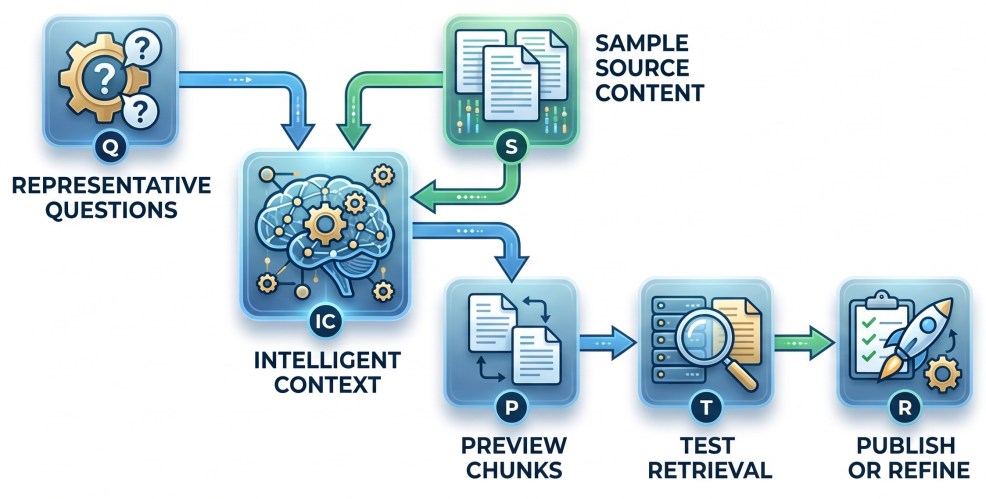
Figure 1: Intelligent Context provides a guided starting point that you can test and refine.
For complex documents, Intelligent Context also supports LLM-based parsing to extract text, images, and other visual elements. After chunks are generated, you can compare them with the source files, test representative questions in the Agentforce pane, and modify the parsing or processing configuration when the initial results don’t meet the use case.
Smart defaults reduce the need to begin with low-level settings. They should be treated as a strong starting point rather than a guarantee that the first configuration is optimal for every source and question.
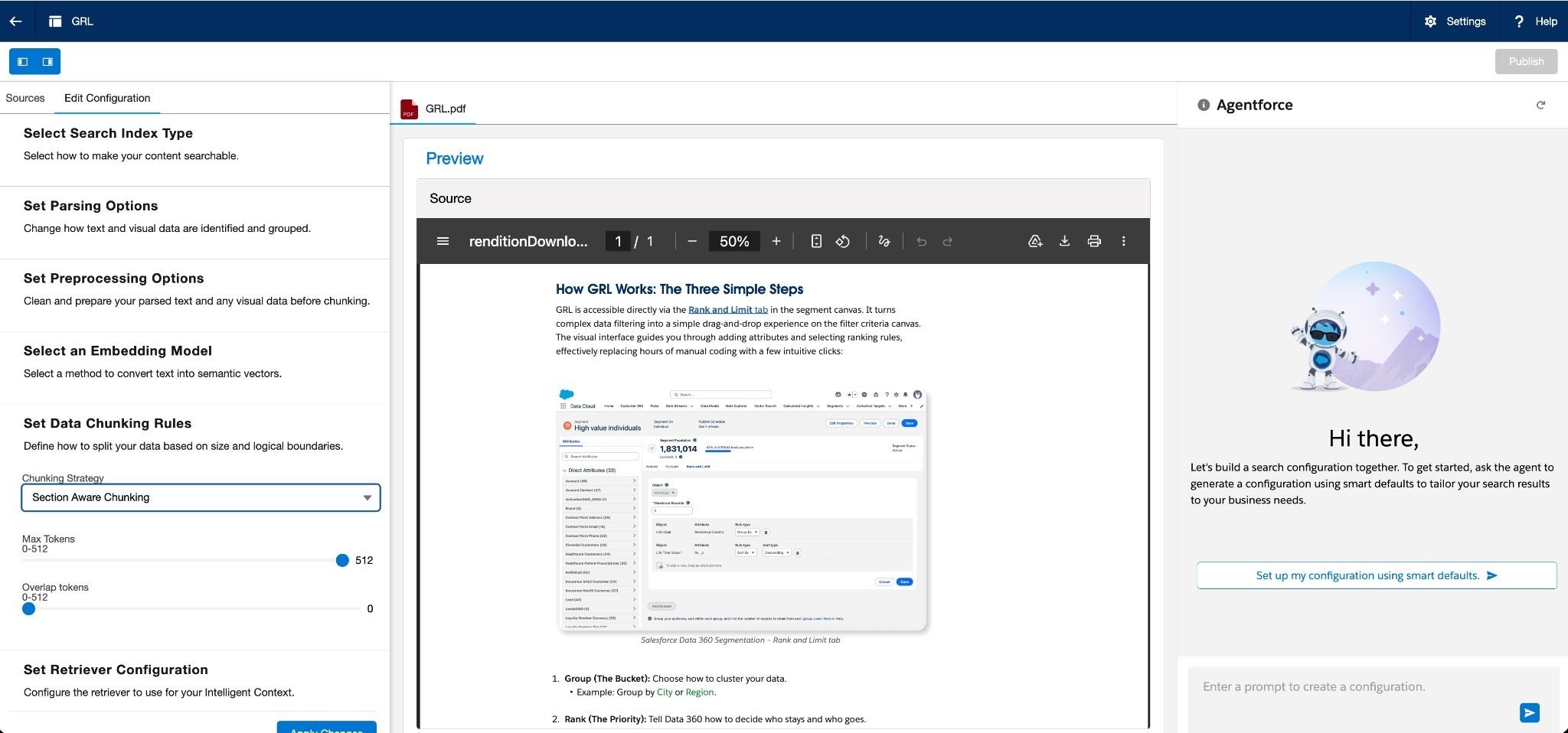
Salesforce’s Intelligent Context implementation guide documents this generate, preview, test, and iterate workflow.
Recognize Common Chunking Failures
The need for refinement becomes clearer when you can describe what is wrong with a retrieved passage. Four patterns are particularly useful.
Orphaned context
The chunk contains relevant information but lacks the heading, product, policy, or category that explains what it applies to.
For example, an instruction like “Restart the service and wait 30 seconds” is only helpful if the AI also knows which service and software version it applies to.
Fragmented answers
Information required for one answer is distributed across multiple chunks. A procedure, list, exception, or explanation may cross a boundary, leaving no individual passage with sufficient context.
Overloaded chunks
A chunk covers several topics or procedures. The correct information may be present, but unrelated material makes the retrieved context less focused.
Consider a product-support manual ingested into Data 360.
Before — overloaded chunk:
A single chunk contains the causes and recovery procedures for error codes E104, E205, and E310, followed by general maintenance instructions. A search for “How do I recover from E104?” retrieves the correct steps, but also supplies unrelated procedures for two other errors.
After — answerable unit:
The E104 heading, affected product, prerequisites, recovery steps, and warning are retained together as one focused chunk. The E205 and E310 procedures become separate units. The retrieved passage now contains the evidence required to answer the E104 question without unrelated instructions.
A policy document can expose the same problem.
Before — overloaded chunk:
One chunk combines eligibility rules for employees and contractors across the United States, India, and Germany, along with several effective dates and regional exceptions. The answer to “Does this benefit apply to contractors in India?” is present, but surrounded by rules for other worker types and regions.
After — answerable unit:
The policy name, India section heading, contractor eligibility rule, effective date, and applicable exception remain together. When Data 360 retrieves the passage, the relevant rule is easier to interpret and trace without competing regional content.
Previewing generated chunks against representative questions helps determine whether the initial configuration produces sufficiently focused units or requires refinement.
Untraceable passages
The chunk contains useful information but lacks the metadata needed to identify its origin. This can make it harder to present citations, resolve conflicting information, or determine whether the source remains authoritative.
These patterns turn a general observation such as “search isn’t working” into a diagnosable problem. You can determine whether the issue is missing context, a fragmented boundary, excessive content, or inadequate source metadata—and then refine only the part of the Data 360 configuration associated with that failure.
Use Document Structure as a Signal
Document structure can help identify meaningful boundaries. Headings, sections, paragraphs, lists, tables, code blocks, and transcript turns can indicate which information belongs together.
Salesforce recommends tuning parsing and chunking to the format and shape of the source. Long or densely structured documents can require different choices from short, clearly sectioned web pages.
In one documented website-grounding pattern, Salesforce uses section-aware chunking, maximum tokens, zero overlap, and title prepending with Salesforce Embedding V2 Small. This configuration is an example rather than a universal default; appropriate choices depend on the content, expected questions, and selected embedding model.
Prepending titles directly onto chunks helps maintain essential background context. Letting chunk boundaries slightly overlap can help when information regularly crosses chunk boundaries, though too much overlap can create redundant results. Testing real queries will show what works best.
See Create a Search Index and Retriever for Salesforce’s complete example.
Include Metadata to Enhance Retrieval
Chunk text is only part of a useful retrieval unit. When appropriate fields are included in the search-index and retriever configuration, metadata can help distinguish similar passages, narrow searches, and maintain traceability.
Useful context can include:
- Document and section titles
- Source URL or file path
- Page number
- Product, region, or content category
- Publication or effective date
- Transcript speaker and timestamp
Each field should serve a purpose: establish meaning, support filtering, distinguish authority, or lead the user back to the source.
In Salesforce’s documented website-grounding pattern, the retriever is configured to return URL, title, and chunk fields, with citation settings enabled so the agent can show its sources. This example illustrates why citation requirements should be considered alongside chunk design: a useful passage should remain traceable to its supporting source.
Refine the Strategy Only When Needed
After reviewing the generated chunks and retrieval results, you can determine whether smart defaults meet the use case or whether refinement is warranted.
Advanced search-index configuration provides control over choices such as parsing, chunking, overlap, prepended fields, filtering fields, and vectorization. The objective is not to adjust every available setting. It is to change the specific setting associated with an observed retrieval problem.
For specialized document structures, Data 360 Code Extension lets developers write custom chunking logic. A custom function receives document elements and available metadata before vectorization and indexing, allowing you to define domain-specific boundary, context, and citation rules.
Custom code should address a documented requirement — not serve as the default starting point.
Validate Chunks with Real Questions
A successfully generated search index establishes that content is available for retrieval. It doesn’t establish that the retrieved passages will contain complete and relevant answers.
Salesforce recommends reviewing generated chunks alongside source documents. You can test quality by keeping a list of realistic sample questions.
For each question, check the retrieved passages and ask:
- Did the expected source appear?
- Does the passage contain enough information to answer completely?
- Is important context missing because of a chunk boundary?
- Does unrelated content reduce the passage’s focus?
- Are relevant titles and metadata available?
- Can the passage be traced to its original source?
When making adjustments, change only one setting at a time — like chunk size, overlap, or prepended titles — and test the same questions again. This helps you pinpoint exactly what improves your search quality.
A Practical Chunking Checklist
Before publishing a configuration, confirm that:
- Representative questions and expected sources have been identified.
- Smart-default or configured chunks have been compared with the source documents.
- Chunk boundaries preserve the information needed for complete answers.
- Chunks don’t combine unrelated topics unnecessarily.
- Useful titles and source metadata remain available.
- The selected embedding model supports the configured chunk size.
- Retrieval has been tested with realistic questions and edge cases.
- Manual refinement addresses an observed retrieval problem.
- Custom chunking is used only when a specific requirement justifies it.
Chunking is sometimes treated as a technical setting between ingestion and indexing. In practice, it shapes the evidence an AI application can retrieve.
Intelligent Context helps you get started quickly with smart defaults instead of starting from scratch. By combining this guided starting point with representative questions, chunk inspection, and targeted refinement, you can build a stronger foundation for reliable search and grounded AI with Salesforce Data 360.








