


Consider the following scenario: You try to delete an unused field on Account, but it is referenced in an obsolete flow version from eighteen months ago that nobody remembers building. You open the flow, scroll its version history, and start deactivating and removing flow versions one at a time. In an org with hundreds of flows and thousands of accumulated flow versions, this stops being a task and becomes a tax you pay on every cleanup, refactor, and deployment.
To help clear that type of backlog at scale, I built and open-sourced a Flow Version Cleaner, a tool that uses the Tooling API to prune obsolete flow versions safely. What I expected to be a weekend project became a sequence of lessons about how the Tooling API behaves beyond the happy path, where everything works as expected.
This post covers those lessons, which include identifying assumptions that break at run time, tackling dependencies and unexpected requirements, maintaining reliable state across asynchronous executions, and designing destructive operations to fail safely.
1. Define requirements before designing
The Flow Version Cleaner follows three key requirements:
- The active flow version should never be deleted. Deleting the active flow version would interrupt the automation that depends on the active version. Salesforce also rejects deletion of the active flow version, so attempting it wastes a Tooling API request on a guaranteed failure.
- Flow versions newer than the active one should be retained since they may be under review or staged for release. Flow versions newer than the active version represent forward work that may contain an enhancement or a bug fix. The Flow Version Cleaner tool treats them as protected versions and not as obsolete or draft versions eligible for deletion.
- A configurable number of the most recent inactive flow versions that are older than the active version should also be retained, so there is always something to fall back to. This reduces risk by providing a known fallback if the active version causes issues and supporting quick recovery. The count is configurable because each organization has different release and retention needs.
Defining requirements is also an iterative process. For example, only the retention rule was a requirement at the start. The two other requirements came out of the build, once the object model made it clear that flow version numbers alone do not say what is safe to remove.
To understand how the three requirements work together, consider a flow with seventeen versions, where version fourteen is active and the retention rule specifies two inactive versions. The tool retains versions fifteen through seventeen as versions newer than the active version and versions twelve and thirteen as the most recent inactive versions. Only versions one through eleven qualify for deletion.
2. Choose the correct API before you write the code
Before writing any code, compare APIs. In this project, I evaluated the Apex Metadata namespace, the Metadata API, and the Tooling API against what this tool needs to do:
- Delete specific inactive flow versions
- Choose the flow versions to keep at run time via retention rules
- Run on a schedule, at the user’s option
- Continue processing even if a failure is encountered
The Apex Metadata namespace supports only custom metadata records and layouts, and it cannot delete flow versions at all. The Metadata API with a destructive changes manifest can delete, but the manifest is written before the deploy, and the tool cannot know its targets until it has queried each definition and applied the retention rule. Also, a deployment rolls back on error, so one flow version owned by an installed package can fail the whole run.
The Tooling API treats each flow version as its own resource with its own DELETE call. The list is built at run time, and a failure stays on that one version. The cost is that it is reached over HTTP, so the job has to authenticate a callout.
These needs led me to the Tooling API because it provides fine-grained, queryable access to individual flow versions and supports deleting each eligible version independently at run time.
Learn about the Tooling API
Learn how the Tooling API represents metadata and which operations each object supports, so you can model your data correctly before designing metadata automation.



3. Design authentication and authorization
Authentication comes first. A tempting shortcut is to put the running user’s session ID in the Authorization header. The session ID borrows whatever identity launches the job and can be null in asynchronous processing. A tool that deletes metadata should not inherit its permissions from whoever started it, so the job needs a credential of its own.
This became clear when moving from synchronous testing to asynchronous execution. The initial implementation authenticated to the Tooling API with the running user’s session. Switching to Named Credentials separated the endpoint and authentication parameters from the Apex code and allowed Salesforce to manage authentication for the callouts.
Successful authentication also does not guarantee that the cleanup can be completed. The configured identity must have permission to perform every operation, including deleting flow interviews before deleting eligible flow versions. This makes permissions for each operation an important design requirement.
The broader lesson is that authentication is part of the architecture, not just a configuration step. When an application invokes APIs from the same org, the authentication strategy should be determined by the execution context and validated in the environment where the code actually executes, not solely through synchronous testing.
4. Understand the API object model before designing against it
The platform rarely exposes the full structure through the UI, and the Tooling API makes that obvious on day one. For example, in Setup, a flow looks like one record with a version history. Underneath, it has three separate components: a flow definition that represents the flow and tracks which flow version is active, a flow has a record for each flow version, and a flow interview that represents a single paused or waiting run of a flow version.
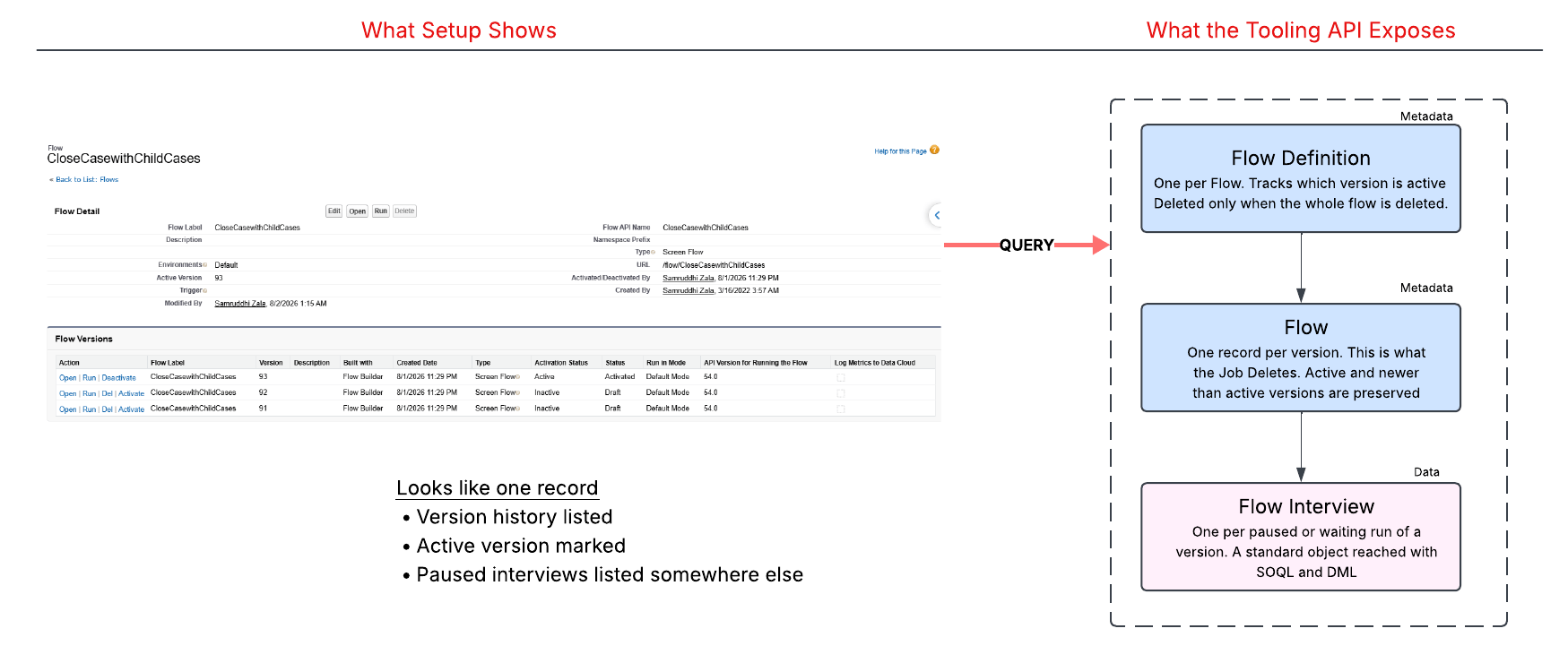
Two of these objects are metadata and one is data. The flow definition and flow record are metadata, accessed through the Tooling API. The flow interview is data, a standard object queried with SOQL and deleted through the standard REST API. One cleanup operation therefore spans two different interfaces, which leads to the next lesson.
5. Understand system boundary dependencies
System boundaries are where integration dependencies can emerge. An integration is rarely confined to a single API or data model, and in this project, a critical dependency did not exist within the Tooling API itself.
Delete flow interviews before flow versions
The platform does not let you delete a flow version while flow interviews are attached to it, so you need to delete the flow interviews first. Apex does not allow a callout after DML in the same transaction, so you cannot delete the flow interviews with DML and then make a callout. To make this work, you need to use callouts for both steps: the Composite REST API deletes the interviews, and the Tooling API deletes the flow versions.
Respect managed package ownership
Ownership introduced another constraint. Not every flow version is eligible for deletion, even when it meets the cleanup criteria. Flow versions that belong to installed managed packages are owned by the package namespace, and the Tooling API enforces that ownership by preventing subscriber organizations from deleting metadata they do not author.
6. Make your state survive asynchronous handoffs
Once you distribute work across transactions, preserving state becomes an architectural concern rather than an implementation detail. When a stateful batch serializes a complex object graph, custom inner-class fields can arrive empty on the other side, populated in the first batch and null in the second, with no exception and no indication that state has been lost.
Pass an explicit payload between jobs
Build a payload deliberately in the first job and read it in the second, instead of trusting the platform to carry a live object graph across. In this implementation, annotating the inner class with @JsonAccess(serializable='always', deserializable='always') helped ensure fields, including DateTime values, became part of that payload rather than depending on what survives by default.
Use one snapshot for decision and action
You could carry nothing across and let the second job query again. However, this approach introduces two concerns. It repeats work the first job has already done, and it lets the second job act on a different picture of the org than the one the first job used to make its decision. For a job that deletes, the decision and the action should rely on the same snapshot of the org’s state.
7. Build safeguards into destructive automation
Deleting metadata introduces risks that require additional architectural consideration. Unlike deleted records, deleted metadata cannot be recovered from the Recycle Bin.
Destructive automation can remove the wrong flow versions, leave a cleanup partially complete, or make it difficult to determine what the tool changed. The Flow Version Cleaner tool mitigates these risks by executing in dry-run mode first through a configurable flag, retaining protected versions, recording every flow and flow version eligible for deletion, and isolating failures so one unsuccessful deletion does not stop the remaining work. These safeguards make each decision reviewable, contain failures, and leave the org in a known state.
Explore Automation Patterns from the Operational Excellence pillar
Learn the governance principles behind safe automation, which support the destructive-operation guardrails pattern.
Apply these lessons to your next automation
The Tooling API becomes much easier to work with when you approach it as an external system that you need to design for. Authenticate to it deliberately, model its objects, find its boundaries, understand the implications of going asynchronous, and govern every destructive path.
Explore the Tooling API in a non-production environment before designing the solution. Read the object reference for the metadata you intend to change, query those objects, and set up the credentials required for your first callout. Finally, let the object model of the tooling you want to control shape your design.