Architecting Secure Agent Connectivity: A Guide to Choosing Between MCP and APIs
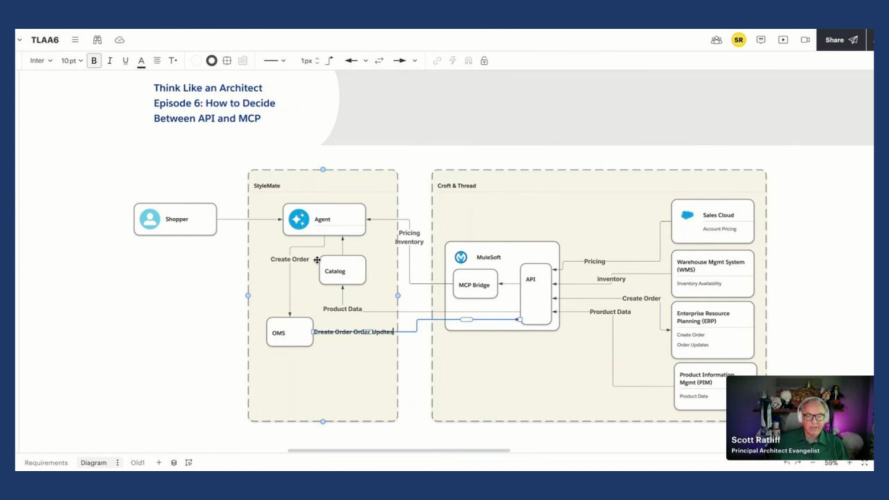


A recap of episode six of the Think Like an Architect series, breaking down the technical complexities of securely exposing enterprise data to a third-party AI agent.

When you are architecting agent connectivity, the choice between Model Context Protocol (MCP) and a traditional API has real consequences. As the architect, you are responsible for designing a solution that provides the external agent with reliable access to critical business data without sacrificing performance, security, or interoperability.
Consider the challenge of Croft & Thread, a legacy B2B apparel brand partnering with a leading agentic AI personal shopper platform to open a new direct-to-consumer sales channel.
In episode six of Think Like an Architect, we reconstruct the architectural thinking process for this scenario. Rather than looking at the completed solution, walking through this thinking process helps build the mental muscles needed to evaluate requirements, weigh trade-offs, and justify your integration approach.
Use the “What, How, and Why” Approach
To design scalable solutions, we use a repeatable three-step method to move from raw business requirements to justified architectural decisions:
- What: Highlight key phrases in business requirements to paraphrase the essence of the problem into concise High-Level Requirements (HLRs). This helps ensure you solve the right problem from the start.
- How: Align technical solution options directly to your HLRs. Use live diagramming to visualize options and digital sticky notes to capture questions, assumptions, and decisions.
- Why: Document your justifications. Creating an Architectural Decision Record (ADR) ensures that stakeholders, and your future self, understand the rationale behind a specific direction.
Learn about the Think Like an Architect series
Design future-ready solutions in this interactive livestream series. Break down real-world scenarios, join live Q&As, and vote on the topics you want to see next.



What: From Business Requirements to HLRs
In the “What” step, let’s look at the specific challenge from episode six. We start with a raw business requirement and use highlighting to indicate the key parts, as shown below.
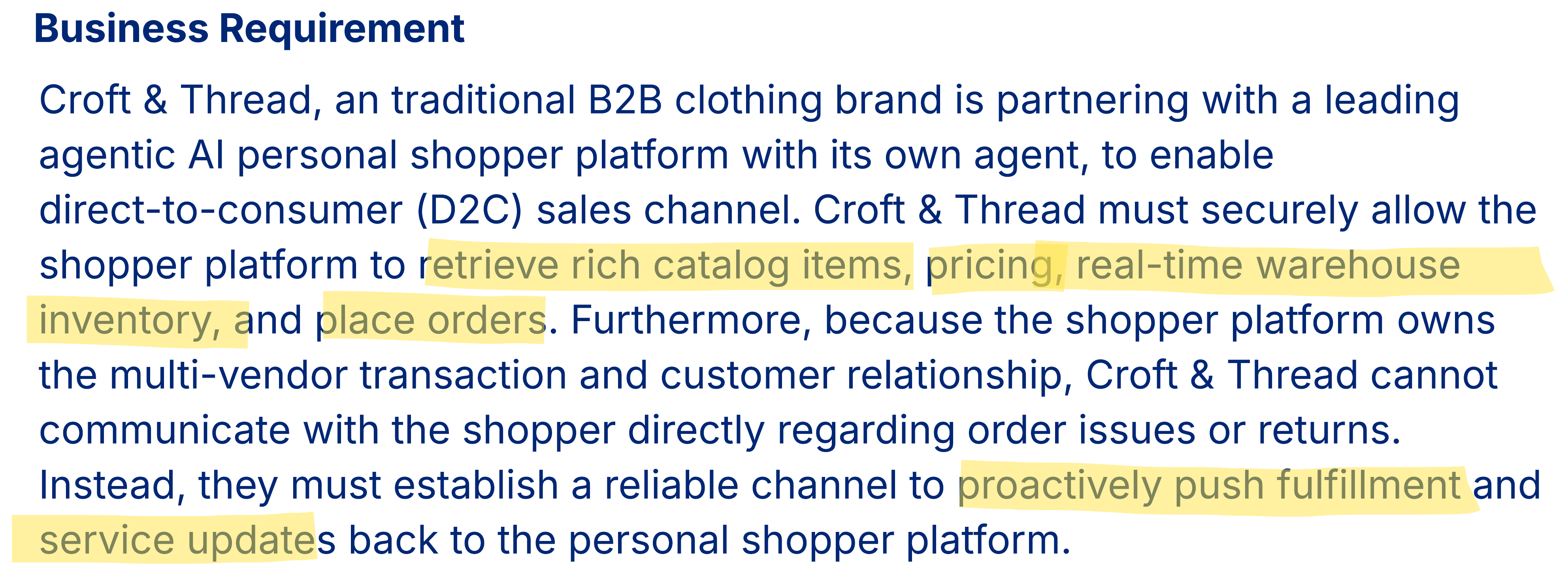
Paraphrase into HLRs
By highlighting key phrases, we filter out the business narrative to ensure we address the core problems from the start. Based on the third-party agent scenario, we establish five distinct HLRs:
- Retrieve rich product data for the agent.
- Securely expose pricing to the external agent.
- Provide real-time warehouse inventory lookups.
- Enable the agent to place orders on behalf of the customer.
- Proactively push fulfillment and service updates back to the personal shopper platform.
Note that the HLRs paraphrase rather than use the exact words from the business requirement. This is essential for validating with business stakeholders that you understood the intention of their requirements.
To continue with evaluating solution options, let’s move into the “How” step by following the trail of questions, assumptions, and decisions captured during our live session.
Architect the Agentic Enterprise with MuleSoft
Discover how to build secure, scalable integrations for AI agents. This guide explores the foundational principles of using MuleSoft to power your agentic enterprise.
How: Aligning solutions to your HLRs
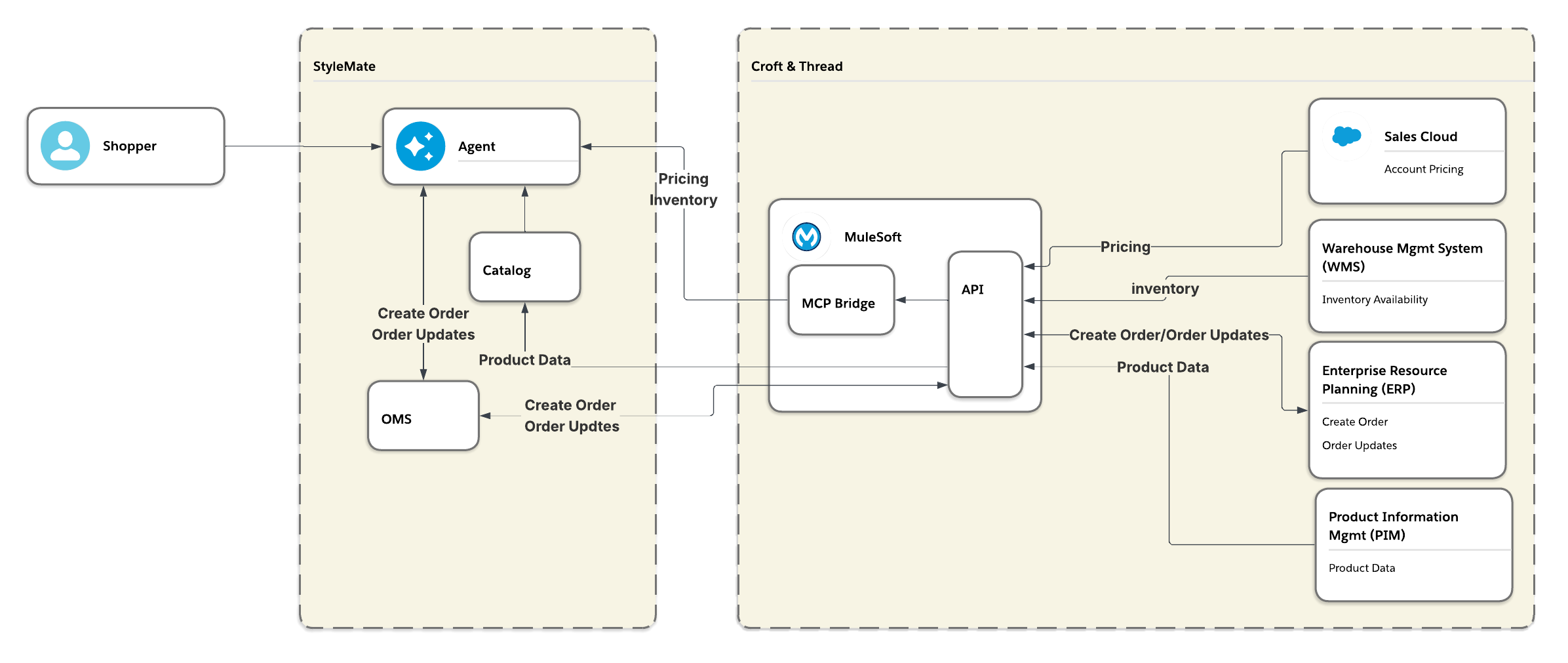
In the “How” step, we evaluate solution options against the HLRs. To keep our thinking organized, we track questions, assumptions, and decisions alongside our technical diagram.
Evaluating HLR 1: Retrieve rich product data
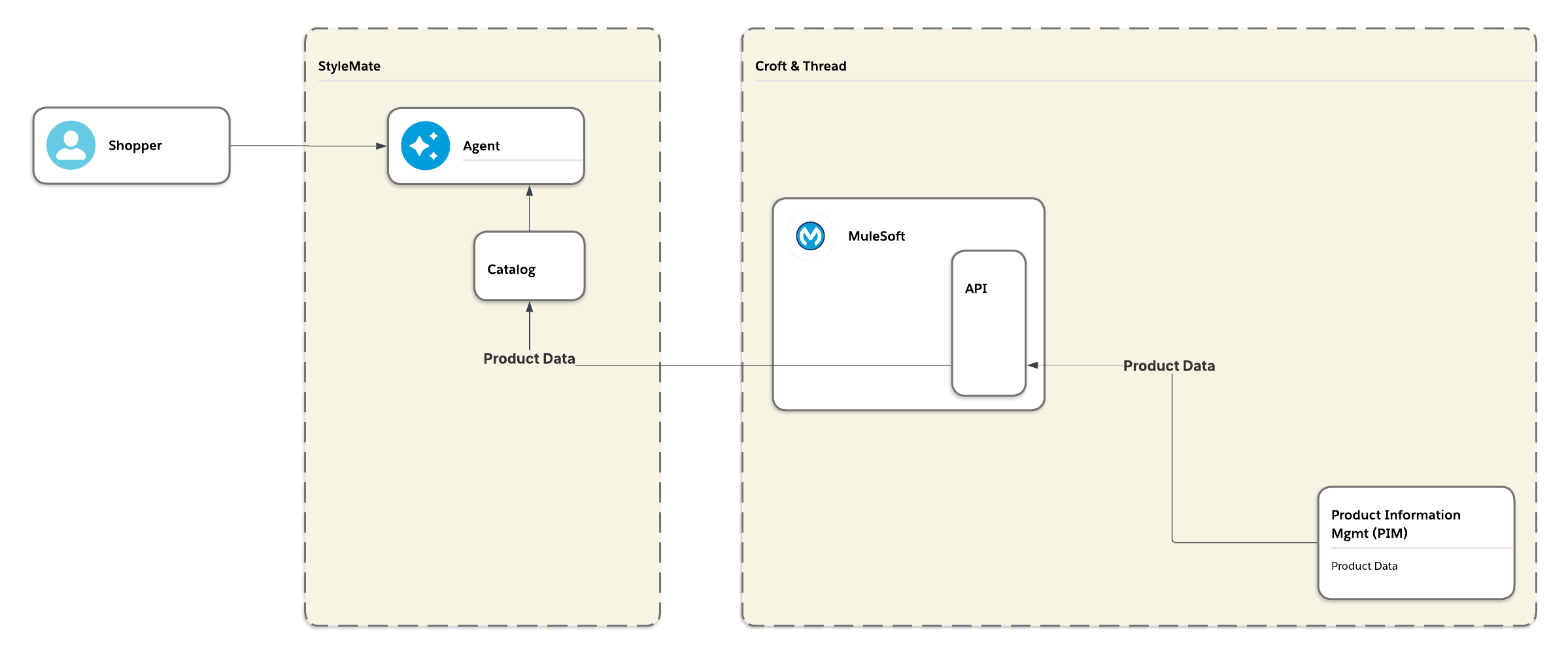
We start by asking where that rich product data lives, and we assume that a Product Information Management (PIM) tool is the best source of that data. Next, we must determine how to send the data to the external agent platform. We make two key assumptions here: first, since the agent platform works with multiple vendors, it maintains its own product catalog rather than querying each vendor in real time; second, Croft & Thread’s catalog data is relatively static. We decide to implement a daily scheduled batch job via API to push these catalog updates. Finally, we decide to route this integration through MuleSoft to provide an essential layer of abstraction and ensure future flexibility should the integration ever need to transition to FTP or other alternative feed methods.
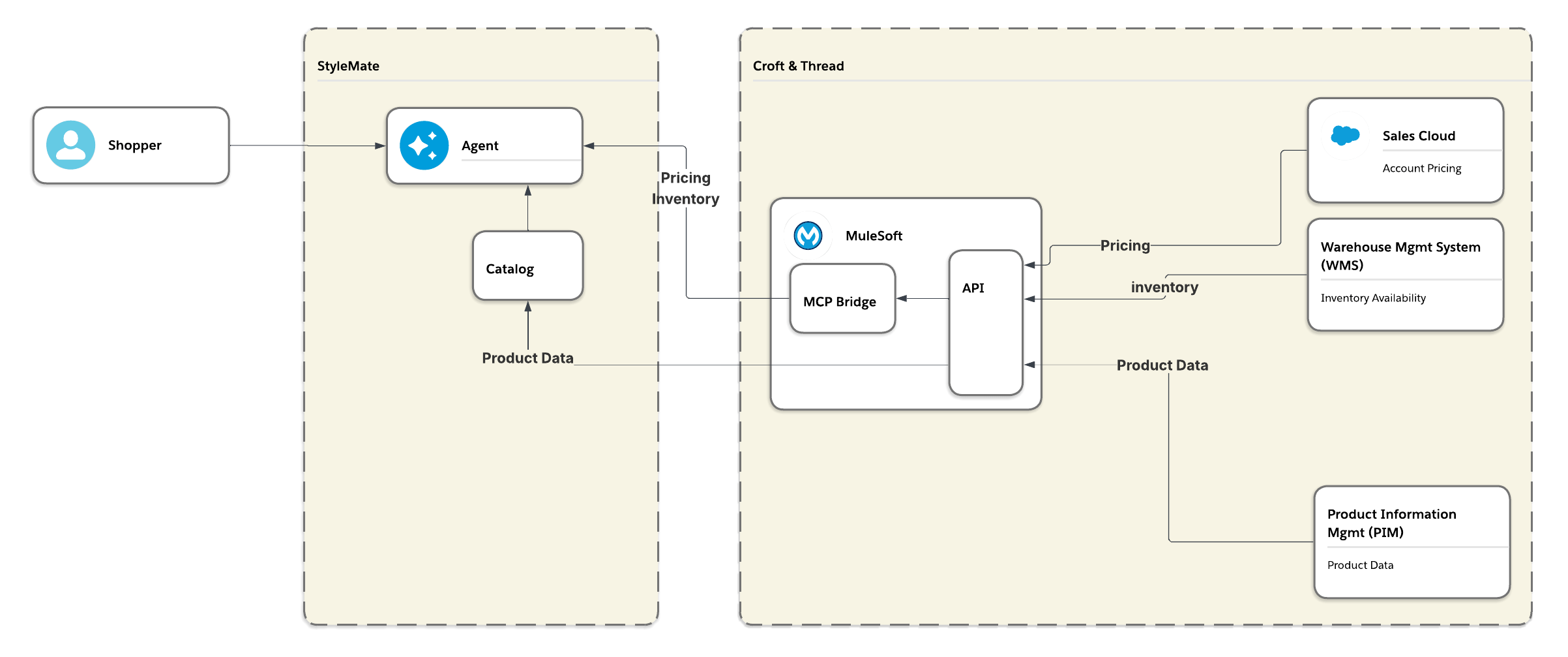
Evaluating HLR 2 and 3: Securely exposing pricing and real-time inventory
Next, we need to securely expose pricing to the agent. We assume that Salesforce is the source of account pricing and that there are no external users provided in Salesforce. While Headless360 is an option for agent connectivity, we note a current limitation: it provides limited support for service accounts due to the authentication mechanism. Based on this, we decide to use an API instead, with a service account,so that we can use an established machine-to-machine integration pattern to expose Salesforce pricing. We then decide to route this API access through MuleSoft’s MCP Bridge to securely translate Salesforce pricing to the agent through an MCP tool. This allows the agent to dynamically interact with pricing data without the limitations of strict, deterministic REST constraints.
To provide real-time inventory availability to the agent, we assume Croft & Thread’s Warehouse Management System (WMS) serves as the system of record, as it manages fulfillment across their multiple warehouse locations. This assumption drives our decision to expose the real-time inventory call via the established MCP Bridge. Using this unified layer centralizes our agent connectivity strategy, allowing the agent to securely query both pricing and live inventory through a single MCP server.
Evaluating HLR 4 and 5: Placing orders and pushing fulfillment updates
Lastly, we work on placing orders and sending order status back to the agent platform as our final two requirements. Starting with order placement, we assume their platform has its own Order Management System (OMS) to track multi-vendor orders. We also assume that an established company like Croft & Thread has an Enterprise Resource Planning (ERP) system for its core operations. This ERP would be the system of record for orders. We decide to route order submissions to the ERP instead of passing through Salesforce to minimize intermediate steps and eliminate potential points of failure. We also decide to handle this system-to-system routing via API calls through our integration layer, MuleSoft, because we have already established it as the integration layer for the agentic platform based on the other requirements.
To address the order status updates, we assume an API push notification is the best path to provide real-time status changes because the agentic platform would want the most up-to-date information for their customers. However, the architecture requires a reliable mechanism to handle failed notifications, for example, if there is a network outage. MuleSoft provides guaranteed delivery capabilities, making it the best choice to manage these outbound push notifications.
Why: Justify your design with ADRs
In the “Why” step, you justify your direction to stakeholders and your future self. During the livestream, we emphasize that an architect’s value is not in the solution, but in the rationale. With the qu
estions, assumptions, limitations, and decisions we captured, we can apply the guidance in the Architectural Decisions: A Human-Led, AI-Powered Approach blog post to create an ADR using LLMs. We use the notes we took in the “How” step to:
- Tie assumptions to decisions: A decision may need to change if an assumption is later proven incorrect. For example, if the assumption that the agentic platform has its own Order Management System (OMS) is incorrect, the decision to use a system-to-system API pattern for order creation might need to shift to a different approach.
- Document the “thinking work”: Whether you present a complex diagram or a simple slide, the most important part is that the thinking work, including questions, assumptions, and decisions, is documented.
Expert Q&A
During the session, Ross Belmont (Product Management, Integration) and Gulal Kumar (Software Engineering Architect) joined us to dive deeper into the technical nuances of MCP and integrations.
Understanding MCP vs API (and skills)
- How do you decide between MCP and traditional APIs? If you have an MCP client (like an agent), you should connect using an MCP server. Sidestepping MCP to target REST APIs means missing out on capabilities designed specifically for agents that deterministic REST clients cannot handle. For system-to-system integrations without an agentic client, stick to traditional APIs.
- In essence, between MCP vs API, is the answer to make it both? Several technical factors influence this decision. If you have a ready-built MCP server that handles all of your agent-specific integrations, traditional APIs are unnecessary for those particular interactions. API integrations only enter the picture for agents as a fallback when MCP servers aren’t readily available. In those scenarios, the decision often comes down to where you want the integration effort to sit: building an MCP server requires work on the source side, while pointing an agent at a traditional API shifts the burden to the consumer side.
- Is MCP the first go-to for an agent now rather than skills? Skills are a fantastic way to instruct an agent on how to accomplish a task, but when it comes to fetching data from downstream systems, MCP or APIs are usually a better fit, although APIs require additional configuration. The best approach is often combining them: writing a skill that calls an MCP tool or an API to retrieve the data, and then having the skill process it. If extra processing is needed or if an existing MCP server is lacking, the skill + API combination works well.
- Does using MCP make sense during prerelease API development (where things can change), or should you design the API upfront? Starting with MCP makes a lot of sense when there are still many unknowns, as it can help hide underlying volatility from the agent to get started quickly. On the other hand, an API-first approach remains highly effective because tools like MuleSoft allow for API stubbing. This makes it easy to build mock endpoints for testing while you work toward a deeper understanding of the integration. Ultimately, the direction depends on the agent development team’s preferences and how they plan to orchestrate routing, especially if they end up dealing with many different vendors running their own MCP servers with identical tools.
Security and the role of MuleSoft
- Why use MuleSoft instead of direct APIs? If underlying systems retire or API contracts change, MuleSoft provides an abstraction layer that protects the integration. MuleSoft acts as a gateway, providing out-of-the-box policies for cost management, security, governance, and observability, while handling “last mile ugliness” for legacy systems lacking modern APIs.
- If I don’t need MuleSoft for a broader integration, can I just wrap existing Apex callout logic into an Invocable method and expose it through a Salesforce-hosted MCP server? This works if your integrations are predominantly within your company, but you would still need a user in Salesforce for the hosted MCP connection. If you want to avoid building out an MCP server entirely, a short-term solution is to use a standard API alongside some custom logic (or skill) on the agent side.
MCP servers and authentication
- When should you use out-of-the-box MCP servers versus custom MCP servers? Salesforce offers out-of-the-box servers for core CRM data, Data Cloud, and Tableau. Custom tools are often built for security reasons: administrators may not trust AI agents with the same broad access as a human user, so custom tools can tightly constrain the agent’s permissions. Custom servers are also valuable for reframing external system data (like raw DocuSign envelopes) into customer-centric CRM terms.
- How does authentication work with MCP currently? Today, popular MCP clients (like Claude) require per-user interactive OAuth, meaning a human must click to grant access. While it is technically possible to wire a custom agent to use machine-to-machine authentication (like JWT bearer flows or certificates), it currently requires significantly more implementation effort.




Final wrap-up
An important takeaway for architects is to prioritize the simplest and most standard tool available. Start with traditional APIs for system-to-system integrations and use MCP for direct agent interactions before considering specialized solutions like the MCP Bridge. As your architectural landscape grows more complex, utilizing MuleSoft becomes vital. Its robust governance and observability capabilities provide the necessary guardrails to keep integrations secure, manageable, and transparent.
- Next episode: Join us for the next episode on July 30th, where Miriam will return to talk about navigating trade-offs and saying no with confidence.
- Vote on future episodes: Help us shape the future of the series. Tell us what topics you want to see and how we can provide more value to you.