

Following the primer on investigating Salesforce security incidents, customers have asked for more details on how to correlate logs to reconstruct what happened. The Salesforce Log Analysis Guide provides a general overview with links to related resources. While Salesforce’s core platform remains robust, threat actors continuously evolve their techniques to gain unauthorized access and steal sensitive data. Using a fictitious security incident scenario, this blog post demonstrates how to leverage Salesforce Shield Event Monitoring and Transaction Security Policies (TSPs) to detect, investigate, and defend against such threats.
The examples in this article are mainly focused on events stored in Event Log Files (ELFs) as part of Event Monitoring, but Salesforce also provides a robust set of services to monitor system and user activity as part of its standard editions. Other sources of Event Monitoring logs, such as Real-Time Events (RTEM) and low-latency Event Log Objects (ELO) also contain relevant information for detecting and investigating security incidents as discussed in the primer. After experiencing a security incident, some customers invest in Event Monitoring to take advantage of the ELO “look back” feature that enables organizations to query those logs from the prior 30 days. Organizations that do not have the Event Monitoring add-on can request retrieval of certain logs from up to 30 days in the past with the Historical Event Logs Process.
Illustrative Incident: Suspicious Activity with Emma Martin’s Account
On August 29, suspicious activities were observed in Shield Event Monitoring involving the user account of an employee, Emma Martin. Login event logs revealed multiple logins from non-approved IP addresses, immediately raising a red flag for InfoSec. Upon contacting Emma Martin, it was confirmed that these logins were not legitimate.
| # | Timestamp | User Id | User Name | Client IP | Login Key | Login URL | Login Status |
| 1 | 2025-08-29T11:35:55.000Z | 005Hn00000HvwCWIAZ | Emma Martin | 83.98.57.94 | 2+lGfKbFHsHZoqu0 | login.salesforce.com | LOGIN_CHALLENGE_ISSUED |
| 2 | 2025-08-29T11:37:30.000Z | 005Hn00000HvwCWIAZ | Emma Martin | 139.99.88.165 | MqCliSn2LJuTNY9s | dfirscenario.my.salesforce.com | LOGIN_NO_ERROR |
| 3 | 2025-08-29T11:39:12.000Z | 005Hn00000HvwCWIAZ | Emma Martin | 51.68.140.104 | 0rd0xNj1TS/Pa+Nx | dfirscenario.my.salesforce.com | LOGIN_NO_ERROR |
| 4 | 2025-08-29T11:43:22.000Z | 005Hn00000HvwCWIAZ | Emma Martin | 83.98.57.94 | A0vf4w6xsWTmChma | login.salesforce.com | LOGIN_NO_ERROR |
| 5 | 2025-08-29T11:55:34.000Z | 005Hn00000HvwCWIAZ | Emma Martin | 83.98.57.94 | DwO9oPCqkS/8sO1b | login.salesforce.com | LOGIN_NO_ERROR |
| Practitioner’s Tip: The actual name “Emma Martin” associated with a User Id is not stored in Login event logs, and is obtained from the User object. To correlate all events in a given login session across various Salesforce event logs, use the Login Key field (for example, “DwO9oPCqkS/8sO1b”) which is mapped to a login time and client IP via the login event. This enables reconstruction of a comprehensive view and timeline of activities during an incident. In addition to the Login Key, you can also use the following to track the activities happening across the various events: The user’s 18-character User Id is used throughout event queries to isolate the relevant entries.The Session Key, which tracks all activity across a particular session.The Request Id is a unique identifier for API calls and other operations within Salesforce. Since this identifier can be set by the external system making the API call (using the X-SFDC-REQUEST-ID HTTP header), it can help correlate the Salesforce logs with those in the external systems. The Login Key is a string that ties together all events in a given user’s login session, starting with a login event and ending with a logout event (or the session expiring). A Login Key may be associated with multiple Session Keys. |
The team initiated an investigation to determine the extent of the compromise and the data accessed by the threat actor.
The “Who Sees What (WsW) explorer” in Security Center makes this much easier and faster. By navigating to “Users” and searching for “Emma Martin”, the team could view all permissions assigned to the compromised account. This revealed that Emma Martin had Modify All Data permissions, a critical finding indicating the potential for widespread data manipulation. The WsW explorer also shows the reason this user has the permission, in this case because the “SalesSuperPerms” was assigned.
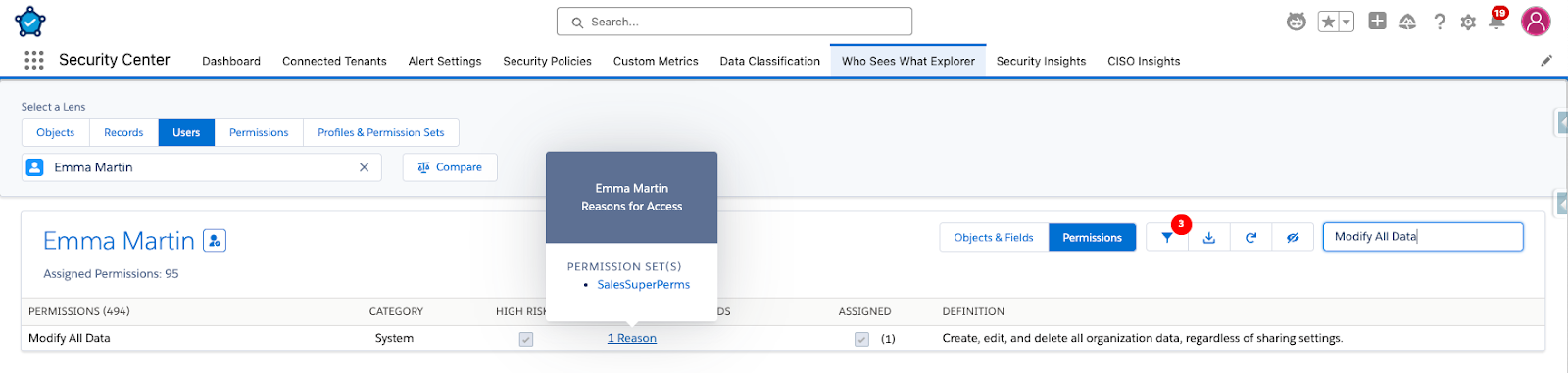
Alt Text: Who Sees What Explorer being used to examine permissions assigned to a user.
Keep in mind that permissions assigned to a user at the time of investigation may differ from those at the time of the suspicious activity. To understand when these elevated permissions were granted, the team examined the Setup Audit Trail. This confirmed that the Modify All Data permissions had been assigned to Emma Martin on July 3 by Traci Barrett, a Salesforce Admin. This established that the compromised account possessed critical permissions during the incident.
| # | Created Date | User Name | Action | Display |
| 1 | 2025-07-03T11:57:21.000Z | Traci Barrett | PermSetCreateNoLicense | Created permission set SalesSuperPerms: with no license |
| 2 | 2025-07-03T11:58:34.000Z | Traci Barrett | PermSetEnableUserPerm | Changed permission set SalesSuperPerms: Modify All Data permission was changed from disabled to enabled |
| 3 | 2025-07-03T12:01:05.000Z | Traci Barrett | PermSetAssign | Permission set SalesSuperPerms: assigned to user Emma Martin (UserID: [005Hn00000HvwCW]) |
Determining Data Access and Alterations
Further investigation was performed to determine precisely what data the threat actors accessed and altered using the compromised Emma Martin account. API event logs from August 29 showed that the threat actor updated 593 contacts. This critical discovery indicated data integrity had been compromised and necessitated a data restoration effort. It is important to note that all of these changes occurred through a single request, but the client split it into three requests. Therefore, correlation of API log entries cannot rely solely on the Request Id, or relevant information might be missed.
| # | Timestap | User Id | User Name | Client IP | Login Key | Request Id | Method | Entity | Rows Processed |
| Summary | – | – | – | – | – | – | – | – | 593 |
| 1 | 2025-08-29T11:57:10.000Z | 005Hn00000HvwCWIAZ | Emma Martin | 83.98.57.94 | DwO9oPCqkS/8sO1b | 55-uuJ3oZ2eYc7FL2AJXB- | update | Contact | 200 |
| 2 | 2025-08-29T11:57:12.000Z | 005Hn00000HvwCWIAZ | Emma Martin | 83.98.57.94 | DwO9oPCqkS/8sO1b | 55-uuTMk3WW6U-0X1lqr3- | update | Contact | 193 |
| 3 | 2025-08-29T11:57:12.000Z | 005Hn00000HvwCWIAZ | Emma Martin | 83.98.57.94 | DwO9oPCqkS/8sO1b | 55-uuSQLuq-22V0X1lqtJ- | update | Contact | 200 |
| Practitioner’s Tip: Field Audit Trail (FAT) can provide full details about what was changed on key tracked fields in an easier manner than analyzing event logs. |
Data integrity is paramount because incorrect or corrupt information can disrupt mission critical services and result in erroneous outcomes. Salesforce Backup & Recover proved invaluable here. By comparing backup jobs, the team could pinpoint exactly what had changed, enabling precise restoration of only the altered records to their original, good state, thereby avoiding further data loss.

UniqueQuery event logs revealed that the full contact data set was queried, effectively stealing information about every individual. This highlighted a significant data exfiltration event. These log entries are from the Event Log File. As demonstrated in the Forensic Primer blog post, Real-Time Event Monitoring (RTEM) logs (ApiEventStream) have more details, including the record identifiers that were obtained by the query.
| # | Timestamp | User Id | Query Identifier | Event Type | Query Type | Session Key | SQL Id | Login Key |
| 1 | 2025-08-29T11:55:40.000Z | 005Hn00000HvwCW | SELECT Name, Phone, Id FROM Account WHERE Id IN (:id, :id, :id) | UniqueQuery | SOQL | FTUOli2Tbg8GUKyh | cnmafj84dnr26 | DwO9oPCqkS/8sO1b |
| 2 | 2025-08-29T11:55:40.000Z | 005Hn00000HvwCW | SELECT PromptVersionId, LastDisplayDate, LastResult, LastResultDate, TimesActionTaken, TimesDismissed, StepCount, StepNumber, TimesDisplayed, SnoozeUntil FROM PromptAction WHERE (UserId = :id AND PromptVersionId IN (:id, :id, :id)) | UniqueQuery | SOQL | FTUOli2Tbg8GUKyh | 28pprd547c230 | DwO9oPCqkS/8sO1b |
| 3 | 2025-08-29T11:55:53.000Z | 005Hn00000HvwCW | SELECT Id FROM Contact | UniqueQuery | SOQL | uf/+bql8pXw6f7wz | 4v6q4ctdsma09 | DwO9oPCqkS/8sO1b |
| 4 | 2025-08-29T11:55:53.000Z | 005Hn00000HvwCW | SELECT Id FROM Contact | UniqueQuery | SOQL | uf/+bql8pXw6f7wz | 5vbndc4aa860m | DwO9oPCqkS/8sO1b |
| 5 | 2025-08-29T11:56:02.000Z | 005Hn00000HvwCW | SELECT FIELDS(ALL) FROM Contact LIMIT 200 | UniqueQuery | SOQL | uf/+bql8pXw6f7wz | 9nftw39tz0xs6 | DwO9oPCqkS/8sO1b |
| 6 | 2025-08-29T11:56:26.000Z | 005Hn00000HvwCW | SELECT Id FROM contact WHERE Contact_Status__c = Inactive | UniqueQuery | SOQL | uf/+bql8pXw6f7wz | 7awffu016c13a | DwO9oPCqkS/8sO1b |
Real-Time Defense
In addition, the intruder ran numerous reports in the Salesforce user interface.
| # | Timestamp | User Id | Report Name | User Name | Client IP | Origin | Request Id | Login Key | No. of Columns | Row Count |
| 1 | 2025-08-29T11:38:15.000Z | 005Hn00000HvwCWIAZ | – | Emma Martin | 139.99.88.165 | ReportRunFromClassic | 55-tsOD8AP-iRNFL2AEc– | MqCliSn2LJuTNY9s | 20 | 64 |
| 2 | 2025-08-29T11:39:26.000Z | 005Hn00000HvwCWIAZ | All Active Contacts | Emma Martin | 51.68.140.104 | ReportRunFromClassic | 55-twLrhTz0YWcFL2AOY7- | 0rd0xNj1TS/Pa+Nx | 13 | 10,808 |
| 3 | 2025-08-29T11:40:07.000Z | 005Hn00000HvwCWIAZ | All Open Customer Service Cases | Emma Martin | 51.68.140.104 | ReportRunFromClassic | 55-tyDgudI8JQcFL26Hr3- | 0rd0xNj1TS/Pa+Nx | 17 | 99,660 |
| 4 | 2025-08-29T11:40:07.000Z | 005Hn00000HvwCWIAZ | All Open Customer Service Cases | Emma Martin | 51.68.140.104 | ReportRunFromClassic | 55-tyTNc9NYP8sFL2ANmc- | 0rd0xNj1TS/Pa+Nx | 17 | 99,660 |
| 5 | 2025-08-29T11:40:39.000Z | 005Hn00000HvwCWIAZ | All Open Customer Service Cases | Emma Martin | 51.68.140.104 | ReportExported | 55-u-PBGDe56m7FL26BxZ- | 0rd0xNj1TS/Pa+Nx | 17 | 99,660 |
| 6 | 2025-08-29T11:43:27.000Z | 005Hn00000HvwCWIAZ | My Pipeline | Emma Martin | – | ChartRenderedInEmbeddedAnalyticsApp | 55-u9Y0uaJG0NV0X1lqr3- | – |
Fortunately, a configured TSP played a crucial role in blocking report exports, mitigating further damage. The following log shows that the report “All Open Customer Services Cases” was blocked for export via a TSP. This demonstrates the power of TSPs to prevent unwanted actions in real time.
| # | Timestamp | User Id | Client IP | Login Key | Session Key | Policy Id | Result | Request Id |
| 1 | 2025-08-29T11:40:38.000Z | 005Hn00000HvwCWIAZ | 51.68.140.104 | 0rd0xNj1TS/Pa+Nx | niVvD3K6ztkSaOZP | 0NIHn000000GmdNOAS | TRIGGERED | 55-u-PBGDe56m7FL26BxZ- |
TSPs can be configured to your specific Salesforce environment. For instance, a TSP can be set to block reports with more than 10,000 data rows from being exported. This proactive measure can prevent large-scale data exfiltration.
| Practitioner’s Tip: The real-time event that triggered a Transaction Security Policy populates the Policy Outcome field and provides additional information for forensic reconstruction. To obtain this information, query the Report Event object by EventDate & UserId (one of the only real-time events that has a secondary index on UserId). An example SOQL query against the Report Event object (the Big Object which acts as the store for the real-time report events): SELECT EventDate,Operation, Report.Name, DisplayedFieldEntities, RowsProcessed, PolicyOutcome from ReportEvent where UserId = ‘005Hn00000HvwCWIAZ’ AND EventDate = 2025-08-29T11:40:38.000Z |
The result of the above query:
| EventDate | Operation | Report.Name | DisplayedFieldEntities | RowsProcessed | PolicyOutcome |
| 2025-08-29T11:40:38.000Z | ReportExported | All Open Customer Service Cases | Account,Contact,Case | 99660 | Block |
User Activity Timeline
Use dashboards in Analytics Studio to view and filter additional event logs, and gain broader visibility into other user activities. Lightning Event logs showed that the threat actor viewed all Accounts List View, providing further insight into their reconnaissance activities within the compromised org. You can also filter the Threat & Access dashboards to focus on a specific user, answering the question, “What did a specific user do during that time?” and obtaining details needed to develop a timeline of events.

Strengthen Your Security Posture
This illustrative incident investigation demonstrates the use of Salesforce Guardian products for real-time incident response and forensic investigation of security incidents. Event Monitoring provides tools and relevant information to investigate security incidents, while TSPs offer real-time alerting and blocking capabilities to prevent unwanted actions.
By proactively implementing and configuring these tools, organizations can significantly strengthen their security posture, protect sensitive data, and respond effectively to evolving cyber threats. Additional TSPs could have been in place to block exfiltration of large numbers of records via API and other unwanted actions in order to prevent data theft.
Salesforce Security Made Simple with Foundationals, Configurables and Enhanceables
Salesforce Security Made Simple with Foundationals, Configurables and Enhanceables
Want a fun, approachable way to explain security best practices to your admin and dev networks? Listen to the latest episode of Awesome Admins!