Agents Can Mimic Good Design. Ours Know Why It Works
We give coding agents the knowledge to make sound decisions and turn ideas into accessible, production-ready experiences.

Key Takeaways
Coding agents for product design have gotten very good at producing UI that looks plausible. Ask one for a settings page, and you get a settings page: cards, toggles, a save button, the works. But when you look closer, the cracks show. The spacing is inconsistent. The empty state is missing. The error copy is a placeholder someone will “fix later.” Two screens that should share the same headline size don’t. What’s happening is that the agent copied the shape of good design, but doesn’t understand the reasons behind it.
That’s a real gap with coding agents. Your codebase shows an agent what shipped. It doesn’t show why one component became the standard, why a particular phrase is the one you use, or why a flow is ordered the way it is. Those reasons live in people’s heads, in design reviews, in research readouts, and in a thousand Slack threads. An agent can’t find them, so it guesses.
Closing this gap means giving coding agents for product design more than examples to copy. They need the standards, evidence, and reasoning behind every decision. Vercel wrote a great post about this topic. They built a product design skill that gives their agents the context, linters, and a review loop to make better front-end decisions. We have been building along the same lines at Salesforce, and then some.
This post covers what we do in our approach, and the parts that go further: not just reviewing what an agent produces, but generating the design end-to-end, grounding it in real research, testing it with users, and handing engineering a package where every decision traces back to why it was made.
Here’s what we’ll cover
Build the knowledge layer, then put it to work
Treat design knowledge like code
Don’t treat a design request as one task
Teach your agents to find the why
Use judgment for the hard calls, linters for the rest
Evals keep skills in check
The system keeps learning, so the guidance must, too
Four tiers, one system that scales
Don’t just review the design, generate it
From plausible design to defensible design
Design systems change and the knowledge has to move with them
Meet the decisions where they’re made
Build the knowledge layer, then put it to work
Two systems do this work. Design Intelligence is the knowledge layer: the guidance, structured data, skills, and linters that teach an agent about our design system and standards.
Experience Operating System (XOS) is the pipeline built on top of it: it takes a problem from an idea to a production-ready, engineer-ready design, all while using Design Intelligence. Design Intelligence is roughly the layer Vercel described. XOS is the layer above it that many teams haven’t built yet.
@design-intelligence/packages/skills/
      ↓
Universal (platform-agnostic, always present)
      ├─ designing-experiences   	(process & thinking)
      ├─ applying-patterns       	(implementing patterns)
      ├─ designing-in-figma      	(Figma operations)
      └─ validating-designs      	(quality evaluation)
      ↓
Platform (swappable per product area)
      ├─ designing-for-salesforce   	(SLDS, Cosmos, Pearl)
		├─ designing-data360
		├─ designing-tableau
		├─ designing-sales-cloud
└─ more...
      ├─ designing-for-slack        	(Slack Kit, Block Kit)
      ↓
Distribution
      ├─ Claude Code
      ├─ Codex
      ├─ Copilot
└─ Other agent platforms supporting the Anthropic Skill SpecTreat design knowledge like code
We treat design knowledge the way we treat code. It lives in a repository, is versioned, is reviewed, and ships to the tools that consume it.
There are four parts:
- Guidance is channel-agnostic markdown. It’s the prose an agent reads to understand how to build something correctly: how to use styling hooks, when to reach for a blueprint versus a base component, how to lay out with utility classes, which icon means what. It’s written once and consumed everywhere, by agents, by the docs site, by IDE tooling.
- Metadata is the same knowledge in a machine-readable form. Prose tells an agent how to think. Structured data tells it exactly what exists. For our design system today, that’s 473 styling hooks, 1,147 utility classes across 27 categories, 85 component blueprints, and 1,732 icons across five categories, all in JSON and YAML that the agent can query directly. An agent that has the token index doesn’t guess a hex value or invent a spacing token. It looks up the right one.
- Skills are the packaged, step-by-step instructions for specific design tasks: applying the design system, migrating an old component to the current version, validating a component’s compliance, extracting a brand into tokens, and running the full design process. Each one is a focused set of steps plus the guidance and metadata it needs.
- A visualizer browses all of it and, importantly, shows the coverage gaps: the places where the knowledge is thin or missing. You can’t improve what you can’t see, and a map of what the agent doesn’t yet know is as useful as the knowledge itself.



Don’t treat a design request as one task
A design request isn’t a single task. “Build me a form” is different from “review this form,” which is different from “write the empty-state copy for this form.” If a skill treats them the same, it blends their behaviors and performs poorly on all of them.
So the first thing a skill does is resolve what’s actually being asked. Are we shaping something new, implementing against a spec, reviewing existing work, or hardening a rough prototype for handoff? Routing keys off both the task and the surface loads only the focused guidance the task needs, rather than dumping the whole library into context.
Two rules sit underneath all of it. Start with the user’s job, not the pixels. And decide from evidence, not taste. When guidance conflicts, there’s an explicit order of authority:
- the user’s goal first,
- then verified research,
- then the repository’s documented standards,
- then accepted past decisions,
- and only then general heuristics.
An agent that knows the pecking order doesn’t stall on a judgment call, and it doesn’t quietly promote its own preference above a documented standard.
Salesforce skill frontmatter and structure:
---
name: designing-experiences
track: design
category: universal
metadata:
version: "1.4"
description: > Guide designers through the Double Diamond (Discover, Define, Develop, Deliver) and produce a Design Intent for downstream design and platform skills. Use for starting or scoping a design, synthesizing existing research, generating ideas before selection, concept, process or AI-interaction critique, design briefs, feedback on unbuilt concepts, and design-principle questions.

Research methods use research-and-insights. Built visual craft uses validating-designs; accessibility compliance uses a11y_expert:accessibility-code-review when that plugin is installed, and real-user usability uses research.

Triggers include "help me design", "define the problem", "run Hexagon of Ideas", "force broader directions", "what other needs could this capability serve", "explore UI and non-UI approaches", "critique this concept", "compare these completed candidate cards", "UX principles", "why does this feel cluttered", "information hierarchy", and "audit this AI interaction loop". Not for visual-craft review or agent persona/voice.
---

# Designing Experiences

Universal design process and thinking skill. Platform-agnostic — works for Salesforce, Slack, Tableau, Informatica, or any other product surface. The job of this skill is to slow the designer down enough to make good upstream decisions before committing pixels or code.

## Route before doing work

**Mandatory first step — route before producing anything.** This skill owns upstream experience *definition* and *synthesis*: framing problems, synthesizing evidence, exploring and critiquing concepts, applying design principles, auditing the human–AI interaction loop, and producing a Design Intent. Three adjacent jobs belong to peers. If the request is one of them, hand it off *before* doing the work — do not produce the peer-owned artifact here.

| If the request is about… | Do not produce it here | Route to |
|---|---|---|
| Choosing a research method, designing a study, or writing a test/usability plan | a research plan or test protocol | `plan-research` |
| Scoring the rendered visual craft of a screenshot, Figma frame, coded prototype, or live UI | a visual-craft or pixel-level critique | `validating-designs` |
| An AI agent's identity, voice, tone, or persona encoding | a persona or voice spec | `designing-agent-persona` |

**Mixed requests.** When a request blends in-scope synthesis with peer-owned work, do only the in-scope part (frame the problem, synthesize the evidence, produce or update the Design Intent) and explicitly hand off the peer-owned portion by name. Never silently absorb the out-of-scope half.

**Worked deferrals**

- **Research method → `plan-research`.** Request: "Design a usability test for this checkout flow." Response: frame the decision the test must answer and the success criteria as a Design Intent, then hand method selection and the test protocol to `plan-research`. Do not write the test plan here.
- **Rendered visual craft → `validating-designs`.** Request: "Here's a screenshot — is the spacing and contrast right?" Response: pressure-test the *concept* and its rationale, but route the pixel-level spacing/contrast/hierarchy scoring to `validating-designs`. Do not score the rendered artifact here.
- **Persona/voice → `designing-agent-persona`.** Request: "Write the personality and tone for our support agent." Response: define the interaction loop and the job the agent does (a Design Intent), then hand the identity, voice, and tone encoding to `designing-agent-persona`. Do not author the persona here.

## Contents

- [Route before doing work](#route-before-doing-work)
- [When to use this skill](#when-to-use-this-skill)
- [When NOT to use this skill](#when-not-to-use-this-skill)
- [The Double Diamond at a glance](#the-double-diamond-at-a-glance)
- [Progressive disclosure — which reference to load](#progressive-disclosure--which-reference-to-load)
- [Guided mode — upstream checks and downstream handoffs](#guided-mode--upstream-checks-and-downstream-handoffs)
- [Producing the phase-appropriate artifact](#producing-the-phase-appropriate-artifact)
- [Cross-skill handoff](#cross-skill-handoff)
- [Core principles of this skill](#core-principles-of-this-skill)
- [Stance — how the agent partners](#stance--how-the-agent-partners)
- [Agent rules](#agent-rules)
- [Validation Checklist](#validation-checklist)
- [References](#references)

## When to use this skill

- Starting a new design from a prompt, brief, or vague idea
- Scoping or reframing a problem before generating solutions
- Synthesizing research you already have into a problem frame
- Ideating and evaluating candidate solutions
- Using structured divergence to generate multiple directions before selecting one
- Preparing for or running a concept or process critique before build
- Answering "why does this feel off?" with reasoning, not just taste
- Auditing the full human–AI interaction loop
- Producing a Design Intent artifact for implementation, review, or handoff

## When NOT to use this skill

- Reading or creating Figma files → use an installed Figma capability; if none is available, say so
- Evaluating visual craft or felt quality of a built design → use `validating-designs`
- Checking accessibility compliance → use `a11y_expert:accessibility-code-review` if the `a11y_expert` plugin is installed; if not, state the gap
- Learning whether real users can use a design → use the `research-and-insights` plugin
- Defining an AI agent's identity, voice, tone, or persona encoding → use `designing-agent-persona`
- Implementing the design → use an installed skill or tool for the target platform; ask for the target stack when it is unknown or no matching capability is installed
- Extracting brand tokens from a site → use the platform skill's theming reference
- Planning, running, or analyzing user research (methods, interviews, screeners, studies) → use the `research-and-insights` plugin (`/research-and-insights:plan-research`)
- Packaging a design for review or engineering handoff → invoke `operationalizing-design`, then use its Review & Handoff phase
- Making a Salesforce idea-viability or investment decision → when available, optionally offer `validating-design-ideas`

## Cross-skill handoff

Branch from the Design Intent based on the next job. Do not treat these branches as a sequential implementation chain:

```text
designing-experiences (Design Intent)
  ├─ create in Figma → installed Figma capability
  ├─ implement → installed target-platform skill or tool
  ├─ evaluate rendered craft → validating-designs
  └─ package review/engineering handoff → operationalizing-design
```

For Figma creation, first discover whether a suitable capability is installed. For implementation, ask for the target stack when it is unknown, then use the matching installed skill or tool. If no matching capability exists, state the gap instead of inventing a peer or routing creation through `operationalizing-design`. Use `operationalizing-design` only for review and handoff operations.

Any skill can be an entry point. This one is most valuable when the designer is starting from a prompt or ambiguous requirements.

--- Lots of other skill instructions go here ---

## Validation Checklist

Before declaring a Design Intent "ready to hand off", confirm:

- [ ] Problem statement is one sentence, framed as a user/job-to-be-done, not a feature request
- [ ] Users named with enough specificity to disqualify "everyone" (role + context, e.g. "AP clerk closing month-end")
- [ ] Requirements split into must / should / won't (forces tradeoffs)
- [ ] Success criteria is measurable (a future state someone can check)
- [ ] Constraints listed (technical, regulatory, brand, time)
- [ ] Open questions captured where decisions were deferred (rather than guessed)
- [ ] Hierarchy decisions justified by a foundation principle (Selective Attention, Hick's Law, etc.) when reviewers are likely to push back
- [ ] For an AI interaction, all eight loop steps are audited or explicitly justified N/A
- [ ] For an AI interaction, the consent, authorization, data minimization, and confirmation/reversibility gates all pass — consent covers monitoring, personalization, sensitive/passive collection, and model-improvement use, with any exception recorded as a documented authorization or lawful basis and a justified N/A

## References

- `references/discover.md` — framing what's known + routing research methodology to the `research-and-insights` plugin
- `references/define.md` — problem framing, requirements, success criteria
- `references/develop.md` — ideation, exploration, critique patterns
- `references/hexagon-ideation.md` — optional structured divergence before direction selection
- `references/deliver.md` — Design Intent artifact shape, handoff
- `references/feedback-frameworks.md` — structured critique protocols
- `references/design-principles.md` — entry point to foundations/
- `references/foundations/` — cognitive, core, frameworks, interaction, ai-interaction, laws, surfaces, visual
Teach your agents to find the why
A rule an agent can’t source is a rule an agent will eventually break. Every piece of guidance carries a stable identifier and cross-references to related guidance, so a decision can point back to exactly where it came from. When an agent proposes a change, it can cite the hook, the blueprint, or the accessibility criterion behind it rather than asserting that the change is “more consistent.” Design Intelligence holds an authoritative position on decisions and also tracks decision history and context.
These traceable identifiers are the backbone of everything downstream. If you can’t trace a decision to its source, you can’t review it, test it, or trust an agent to make it unattended.
---
name: documenting-design-decisions
track: operational
category: universal
metadata:
  version: "2.1"
description: >
  Synthesize and maintain a project's DECISIONS.md — an append-only rationale
  doc — from git history, Figma comments, Slack threads, PR descriptions, and
  Claude Code transcripts. Captures WHY each design or product choice was made,
  what was traded off, and when to revisit. Use when asked to "document
  decisions", "build a DECISIONS.md", "extract decisions from chat", "log this
  decision", "summarize design rationale", "trace why we chose X", or a "drift
  report / what did we decide this week". Do NOT use for design creation or
  critique (use designing-experiences), or for review/handoff packaging and
  release notes (use operationalizing-design).
---Use judgment for the hard calls, linters for the rest
Some design rules are judgment calls. Many aren’t. “Never hardcode a color; consume the token” is not a matter of taste, and it’s wasteful to spend an agent’s reasoning on it every time. Those rules belong in a linter, where they run instantly and deterministically.
We check for hardcoded values that should be tokens, exactly one active theme in a build, accessibility attributes that must be present, and more using linter tools. When the linter can settle a rule reliably, it does. We save the agent’s judgment for the decisions that actually need it: the layout that serves the task, the copy that fits the moment, the state nobody remembered to design. Fast deterministic feedback on the mechanical rules, human-grade judgment on the rest.
When code is checked into production repositories, it must pass a series of tests for code quality, security, and other criteria. One of those tests is the SLDS Linter which involves analyzing your code and highlighting issues in it, then proposing fixes. All Salesforce code must pass this test before being checked in.
npx @salesforce-ux/slds-linter@latest lint --fixEvals keep skills in check
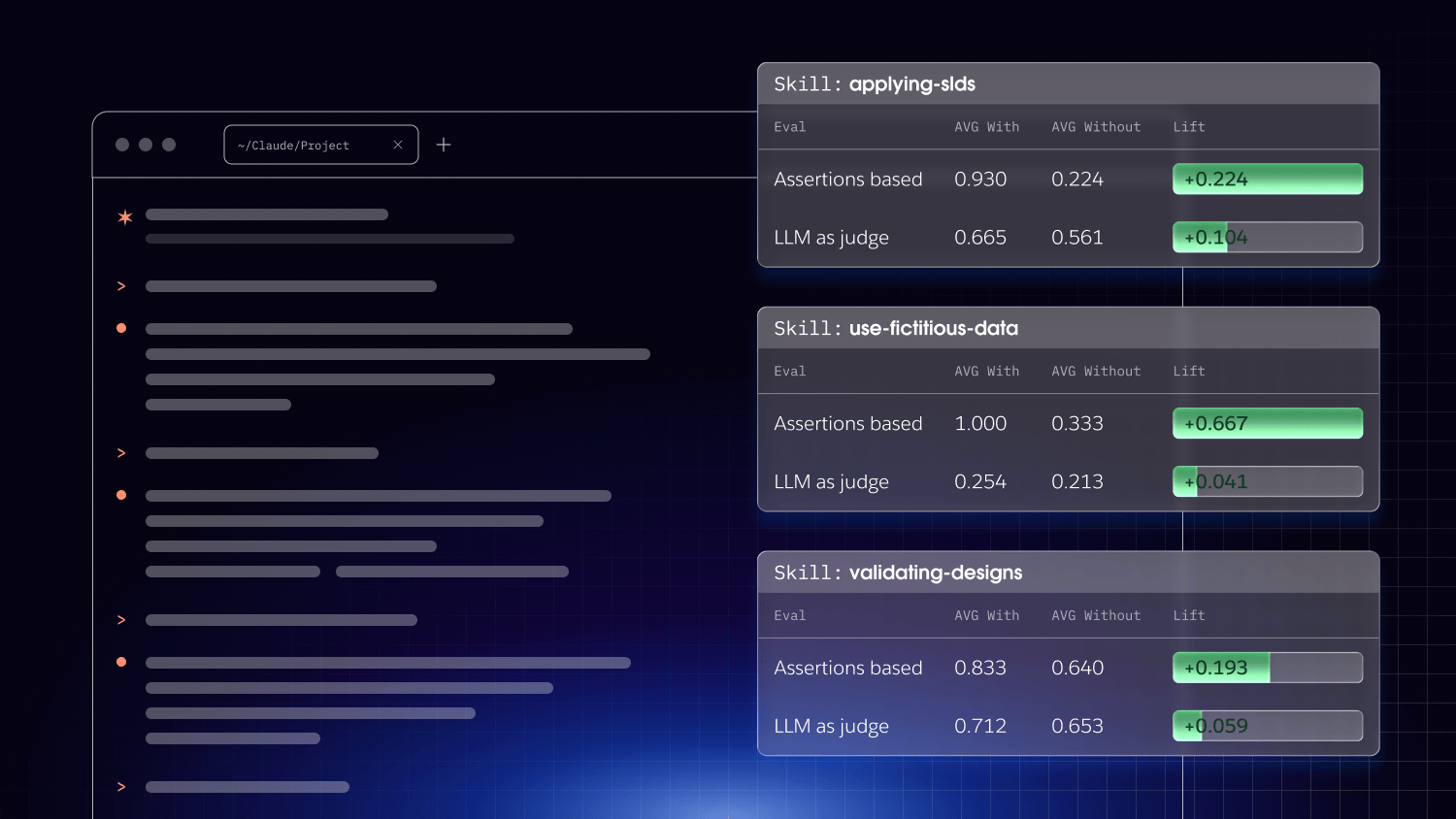
Guidance is only worth shipping if it improves the agent. The way you find out is by measuring it with evaluations.
We run a skill twice on the same task, once with the guidance loaded and once without, and score the difference. A skill that doesn’t move the result isn’t earning its place in context. We test against examples the guidance has never seen, so we are measuring whether it generalizes rather than whether it memorizes. And the skills themselves go through a review pipeline before they ship, a set of staged checks for format compliance, spec compliance, and a head-to-head quality comparison, run with an unpinned model so a skill can’t pass by overfitting to one.
The point is that none of this is vibes. A skill earns its keep with evidence, and when it stops earning it, the evals say so.
The system keeps learning, so the guidance must, too
A system is never finished, and neither is the knowledge about it. New patterns get decided in reviews and Slack long before anyone writes them down. If the guidance doesn’t keep up, the agent slowly drifts back to guessing.
So there’s a contribution pipeline that pulls evidence in and a clear separation between collecting it and deciding what to do with it. Evidence is gathered without judgment first. Then a human decides whether a candidate becomes new guidance, a lint rule, a new example, or a new eval. The coverage-gap view in the visualizer highlights where knowledge is thin, so the next contribution goes where it is needed most, rather than where it is easiest to write.
Everything to this point maps roughly onto what a lot of other design-forward AI companies describe as their design agent tooling set: a skill, linters, evals, and an evidence loop. At Salesforce, our approach goes further.
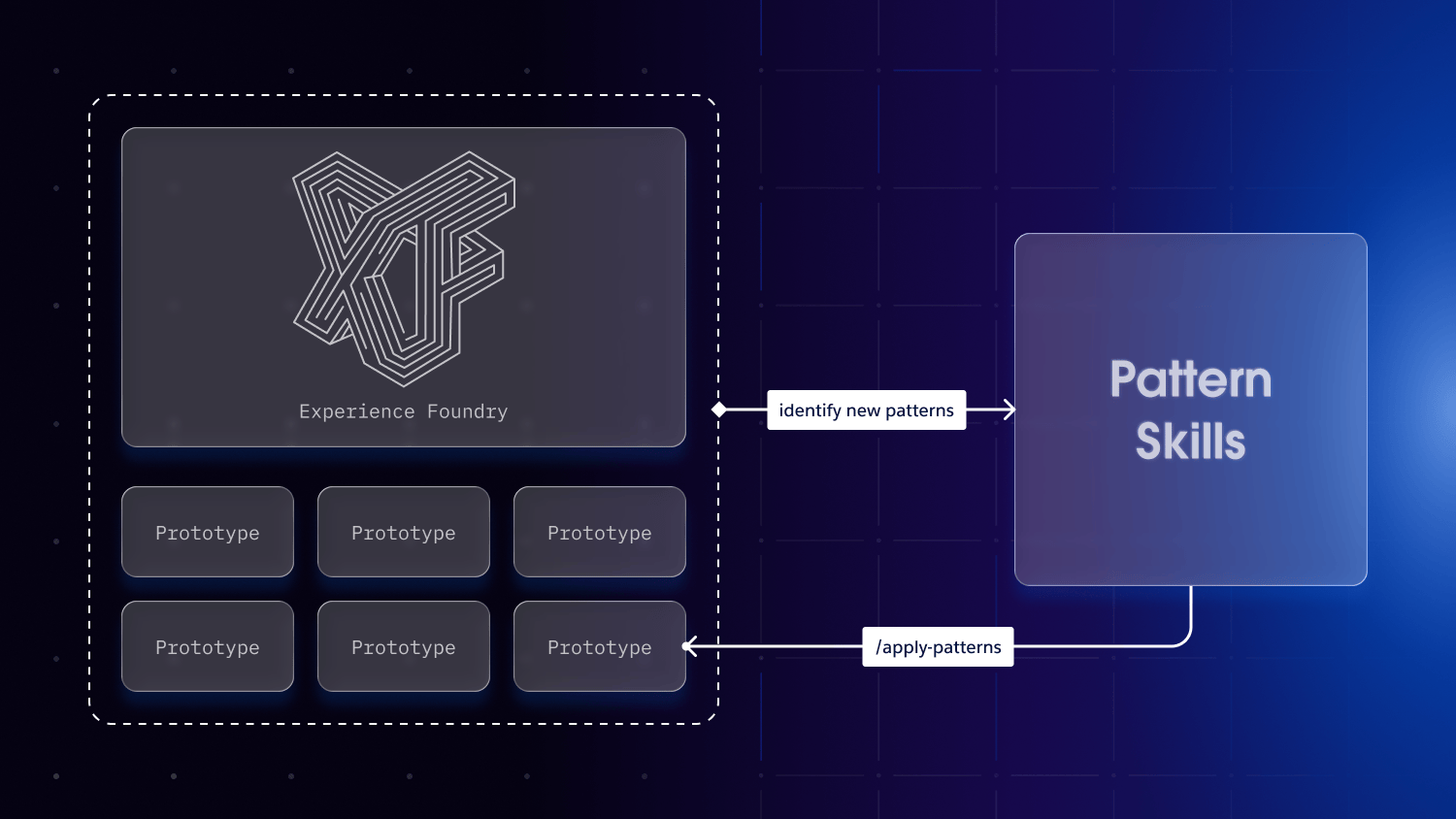
One example includes an internal tool called Experience Foundry that hosts a searchable gallery of design prototypes from production features to future visions. Design Intelligence can extract interaction patterns from prototypes, identify existing or new patterns, context in which they were used and for which personas, and their trends. The design work becomes the training and evolution of the pattern skill. This skill is then used to apply those patterns to future work as part of a living system.
Four tiers, one system that scales
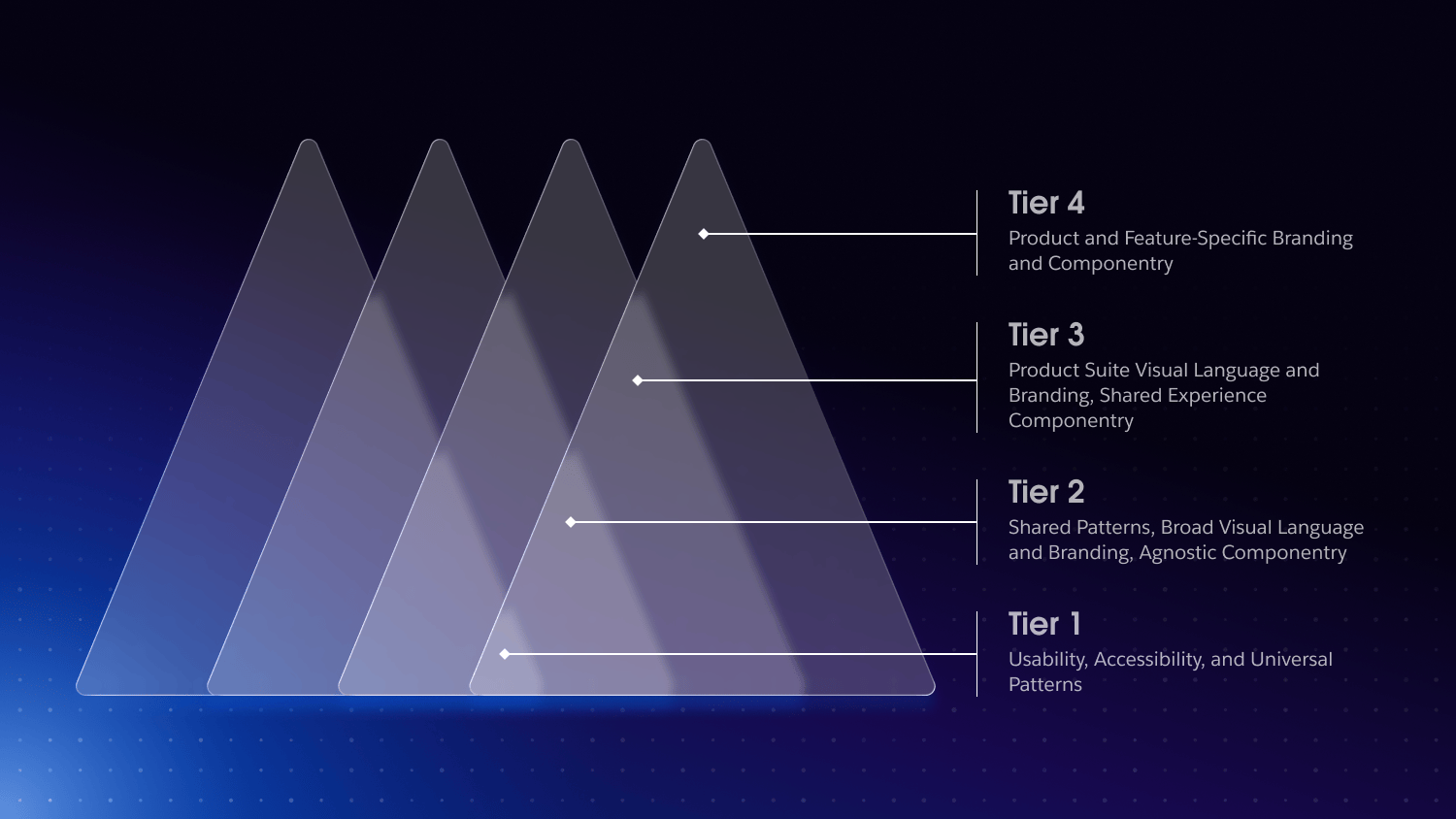
Not everything an agent needs to know applies everywhere. Accessibility and core usability patterns are universal: they hold for every product Salesforce ships. A product suite’s visual language holds for fewer, and a single feature’s branding for fewer still. So we organize the knowledge in tiers. Broad at the foundation, narrowing as it moves up toward a specific product. This helps support multiple product experiences, design systems, and branding.
The base tier of the design intelligence architecture is the usability, accessibility, and universal patterns that every experience inherits. Above it sit shared patterns, a broad visual language, and brand-agnostic components; then a product suite’s visual language and its shared experience components; and at the top, the branding and componentry specific to a single product or feature.
Because the agent knows which tier a decision lives in, it uses progressive disclosure to apply the shared foundation everywhere while deferring to each product when product-specific autonomy actually matters. That’s how one knowledge layer scales across many products and design systems: a common architecture and a consistent experience at the base, room for products to express themselves at the top.
Don’t just review the design, generate it
Most design skills improve an agent’s front-end work. Ours does that, and then does the design itself – something few others in the market have done successfully. That’s Experience OS.
It runs the full design process as a pipeline, orchestrating Design Intelligence at each step, and you can enter it at any point. Bring an idea, a brief, a product requirements document (PRD), a Figma file, or a working prototype, and it picks up from there and back-fills the earlier artifacts so you still end with a complete trail. There are seven phases that XOS guides a user through in their favorite AI coding tool:
- Intake turns whatever you brought into a clear problem statement and a design brief.
- Research grounds the work in real evidence about the user and the problem.
- Multi-agent design generates up to 10 distinct design directions in parallel as clickable prototypes, rather than a single safe answer.
- Interactive review launches a live server where you and your team can leave pinpoint comments directly on the prototypes.
- Iterate on folds that feed back into the work, so every change traces back to the comment that prompted it.
- User testing runs simulated user sessions against the designs before a single engineer gets involved.
- Deliver the engineering handoff package.
Reviewing what an agent produced is useful. Generating ten grounded directions, narrowing them with your team, and pressure-testing the winner before handoff is a different level of leverage. The design skills from Design Intelligence are what every one of these phases is built on, so the output is compliant and tokenized by construction, not cleaned up after the fact.
Generating 10 grounded directions with sub-agents is also an opportunity to leverage AI for tasks where humans are prone to bias. Asking a designer to create 10 different iterations will often result in one or two directions, with the rest being subtle variations within those directions. This human bias directly influences a lack of diverse options to choose from.
From plausible design to defensible design
Effective agents need observable decisions, not adjectives like “clean” or “intuitive.” We agree, and we push it one step further: the evidence an agent designs from should include real research, not only design-system rules.
The pipeline is wired to actual customer research and voice-of-customer data, and to a research process that it can run when the evidence isn’t there yet. Salesforce’s research team maintains research skills.
Similar to how Linear’s design agent works, Salesforce’s research skills follow a structured design method rather than going straight to screens: understand the problem broadly, define it sharply, explore many solutions, then converge. When the agent decides to order a flow in a certain way, the reason can be a research finding rather than a hunch. That’s the difference between an agent that produces plausible design and one that produces defensible design.
Design problem defined
↓
Research, Voice of the Customer
↓
Design Intent, Documented Design Decisions, Design Patterns
↓
Generated Design
Accessibility as a gate, not a nicety.
Accessibility is where “looks fine” and “is correct” diverge most sharply, and it’s exactly the kind of thing agents skip when it isn’t enforced. So we make it a first-class, testable gate rather than a review comment.
Every design targets WCAG 2.2 AA. There are skills dedicated to accessibility review, and real accessibility tests, both unit-level and full-browser, that reproduce and verify violations rather than just flagging them by eye. Salesforce accessibility experts create these skills and maintain them. An agent can query a known accessibility issue, find the exact component it points at, and confirm the fix actually resolves it. Accessibility stops being a promise and becomes something the pipeline checks.
Find the dead ends before engineering does
The cheapest bug to fix is the one you catch before an engineer touches it. Before hand off, the pipeline runs user testing with both humans and synthetic job performers against the design directions, surfacing confusion and dead ends. At the same time, they’re still cheap to change. Synthetic job performers are agent personas built from over 15 years of research. It isn’t a replacement for testing with real people. You can run real human testing, too, but it catches a whole class of problems in minutes rather than after a sprint.
Handoff usually loses the “why.” Here it’s the deliverable
The end of the pipeline isn’t a pretty picture. It’s a package with working production code that an engineer can build from without a meeting to decode it. It includes:
- the validated final prototype
- an engineering spec covering layout, every UI state and keyboard behavior
- a design-token map
- accessibility notes; a definition-of-ready checklist
- The full artifact trail: brief, research, feedback, and rationale
Every decision in the final design traces back to its rationale. Handoff is usually where the “why” evaporates. Here, it is the deliverable.
Handoff Package:
📐Engineering spec
🎨Design token map
♿Accessibility notes
📝UI copy
📣Release notes
✅Definition of ready
📦Component bundle
🖥Prototype
🗂Artifact trailDesign systems change, and the knowledge has to move with them
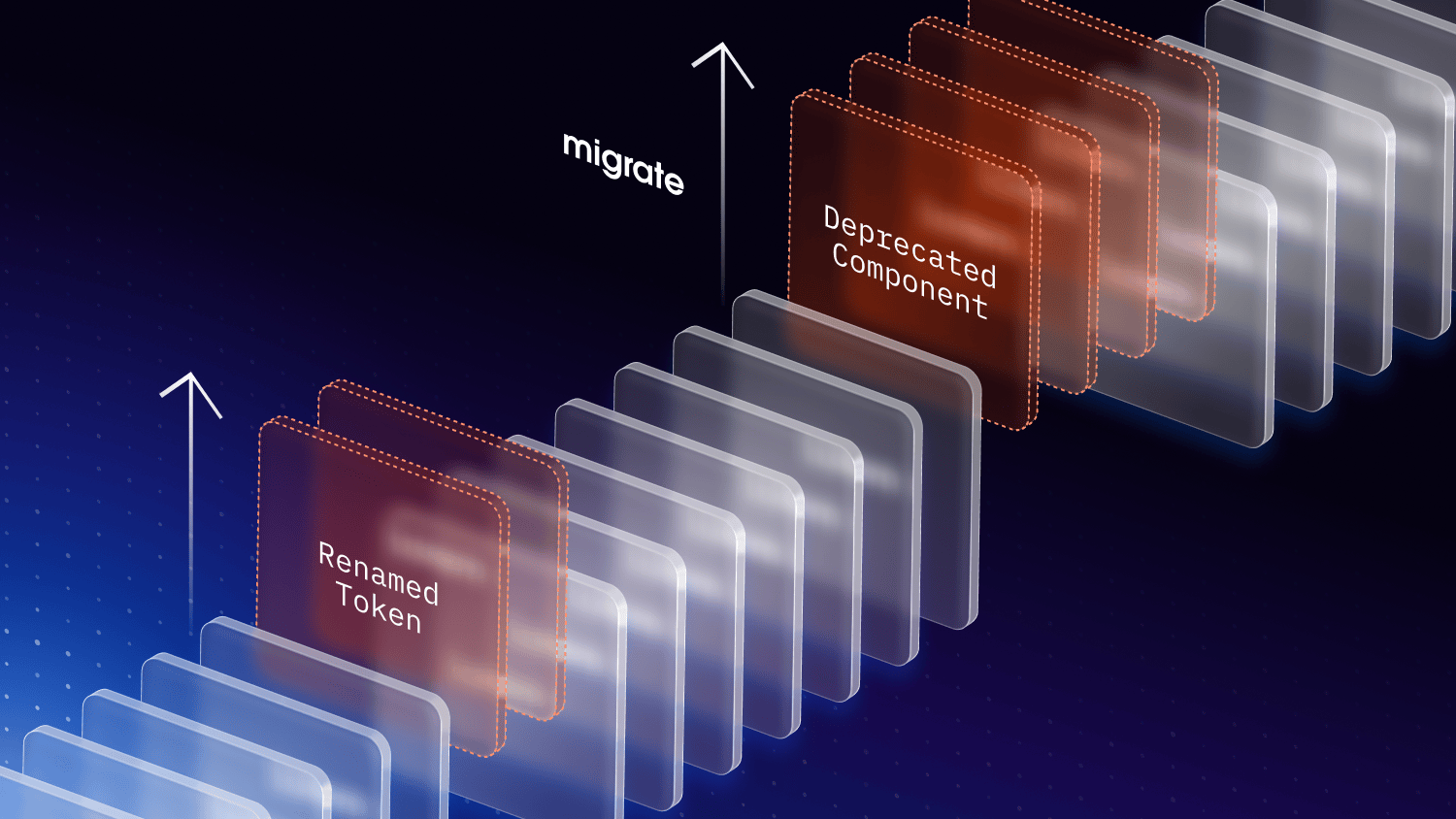
Salesforce has an ecosystem of design systems. At our scale, design systems are neither static nor a single set of components for all products. There are multiple components across multiple frameworks and systems.
Components get deprecated, tokens get renamed, and a whole new version of the system ships. So we treat migration as its own skill, one that moves an existing component onto the current system correctly. And we support bringing your own brand or theme into the same pipeline.
This helps our customers migrate, too. It extracts into tokens, registers it, and validates designs against it through the same checks the built-in themes use. The knowledge layer is built to evolve, because the thing it describes always does.
Get the why out of people’s heads and into the agent
The reasons behind your design decisions already exist. Someone knows why the primary action goes bottom-right, why that empty state reads the way it does, and why two screens share a headline size. The only real question is whether that knowledge lives in someone’s head where an agent can’t reach it, or somewhere an agent can find it, act on it, and be measured against it.
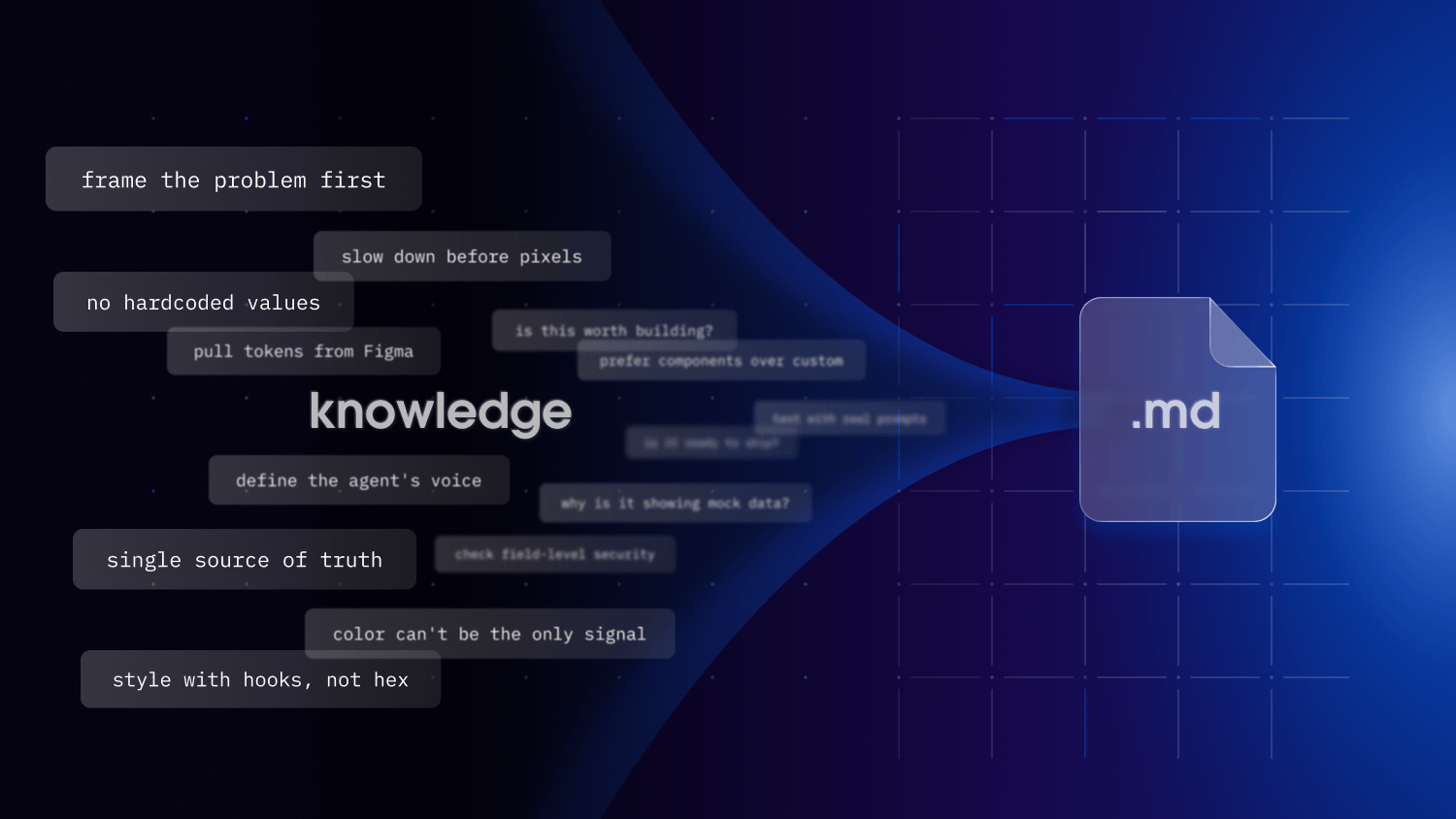
When skills and knowledge work well for a use case and could help others, we encourage folks to contribute them to our org’s skills library.
Get it out of people’s heads into a place agents can use, so they stop copying the shape of good design and start producing the real thing. Then, once it can do that reliably, let it do the whole job: research the problem, generate the options, test them, and hand-engineer something they can build with every decision traceable to why it was made. That’s the part most teams haven’t reached yet. It’s closer than it looks.
Meet the decisions where they’re made
This story started with a problem: the reasons behind good design were scattered across design reviews, research readouts, and a thousand Slack threads with design decisions and tradeoffs. Well, that’s exactly where we’re headed next. Anthropic’s Claude Tag and Slack Code have changed what’s possible in the place where you work most, Slack.
Tag @claude to open a code channel where your whole team can view, edit, and direct Claude’s work in a multiplayer environment. So we’re building a Slack app that kicks off the Experience OS workflow right in that channel, calling the Design Intelligence skills each design problem needs. Your team frames the problem, generates directions, and reviews them together, all within the tool they already live in. And Slack turns out to be the richest context an agent could ask for since it includes the arguments, the tradeoffs, and the reasons. They were there the whole time. Now Claude is, too.
Credit for this awesome work Shelby Hubick, Keith Vaz, Kishore Nemalipuri, Cliff Seal, and Adrian Rapp.