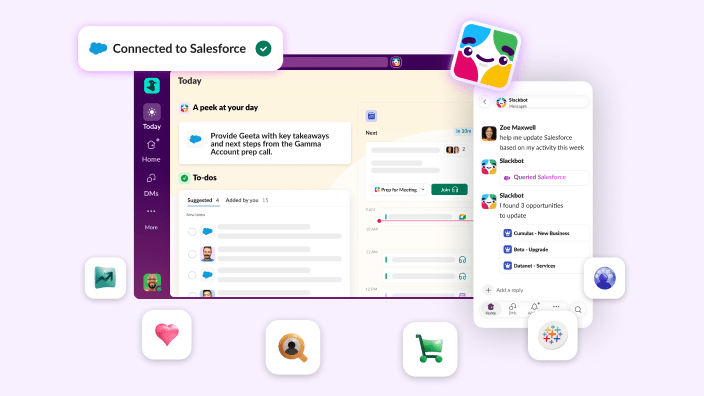

Sales and service teams that spend their days toggling between team chats, CRM, and tools are losing more than just time — they’re losing the context needed to close deals, solve cases, and serve customers. And for AI to actually work, customer data and conversations cannot live in different places. They need to live in one AI work platform, where data, apps, and agents all come together and work side by side with people. Today, we are making that a reality with Slack as the modern, conversational interface for Salesforce.
We’re moving beyond simple integration to a unified experience, and making it easier than ever for every Salesforce customer to take advantage of the Slack platform with zero setup and at no extra cost, so teams can stop hunting for data and start acting on it. Here’s what’s new:
- Every new Salesforce customer now starts with a free Slack workspace, already connected to their CRM data. The moment your Salesforce instance is created, a Slack workspace is as well, which is automatically connected, at no additional cost. Teams can start working together in Slack with all their connected CRM data and context right there with them. And better yet, when it’s time to update the CRM, your teams can do that right from Slack.
- Once in Slack, every Salesforce customer can get access to Slackbot, your ultimate AI teammate. It allows your teams to surface Salesforce records right where they’re working. Slackbot Skills elevate how your teams work, giving your team the ability to build and share reusable workflows that run across every tool you depend on. Slackbot can now send messages, create channels, and start workflows on your behalf. With email and calendar actions, you can handle the work that used to live in other tabs, without ever leaving Slack. Soon, that extends to your CRM — log a call, update an opportunity, or move a deal forward, all through conversation.
- Slack’s newest productivity features keep reps focused on revenue, not noise. Two new capabilities in Slack bring a kind of focus that’s only possible when everything is connected. The new Today view surfaces exactly where you need to focus: priority messages, your calendar, and your most pressing tasks across Salesforce and other apps. The new Activity tab streamlines action items into a single, filtered view of everything that needs your attention.
Slack unifies CRM, people, and agents from day one
Starting this summer, the moment a new Salesforce instance is created, a free-tier Slack workspace is too. It’s automatically linked to your CRM data, there’s no setup or IT project required, and it all comes at no additional cost.
Already a Salesforce customer? Just connect Slack in your admin setup for the same zero-cost access. Your Salesforce permissions carry over, your data stays where it is, and your team’s workspace is ready to go.

In Slack, Salesforce is woven into the way work gets done. A dedicated Salesforce section in your sidebar gives you instant access to every record, list, and deal alert, so you can easily keep an eye on your entire book of business. Bring data and team dialogue together in Salesforce channels, with every insight shared in conversation captured on the record it belongs to. Your CRM and daily work, finally in the same place.
Sales teams can discuss deal strategy knowing that every decision and learning shared is automatically connected to the Salesforce record. Service teams can swarm on a case with every case detail, teammate, and agent working together.
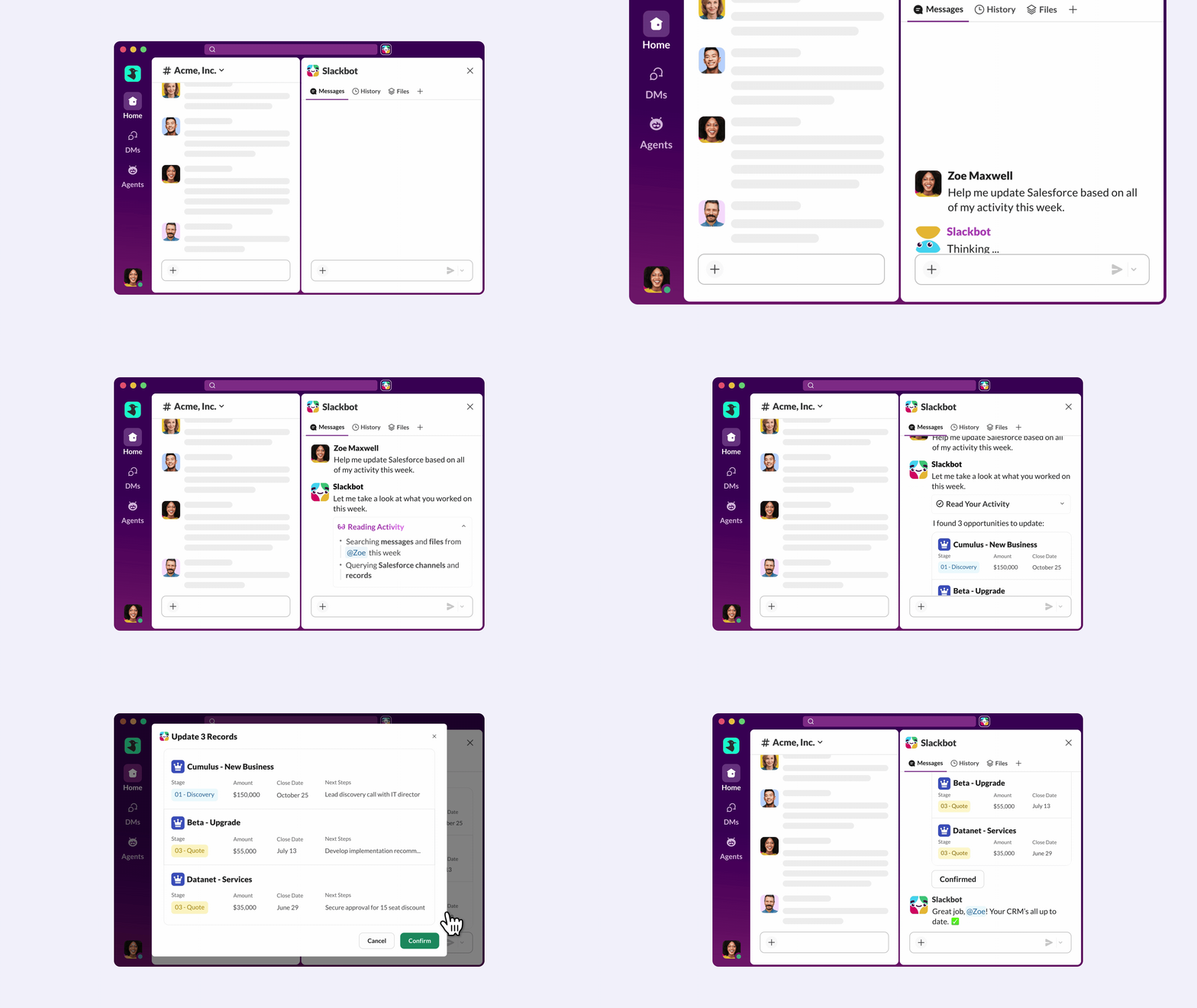
And next month, Slackbot will take it even further: log a call with a voice note, update an opportunity, research an account before a meeting, or route a service case. All in conversation, without switching tabs or losing context between where your team talks and where your business runs. When managing customer data becomes as simple as asking a question, your data can work harder for everyone. This is Slack as the conversational interface for Salesforce.
This is more than a convenience; it’s a competitive advantage. Within Salesforce, the impact of shifting processes to Slack has led to internal teams resolving service cases twice as fast and sales reps responding 21% faster. By removing the time wasted switching tabs, teams using Slackbot save up to 20 hours a week, with a 96% user satisfaction rate.
But most organizations don’t rely on CRM alone. They run on dozens of tools and employees still have to hunt across all of them, tab by tab. Slackbot is how that changes.
Slackbot, the ultimate teammate is here, and it’s just getting started
Connecting Slack to Salesforce puts your CRM data, your Agentforce agents, and your entire AI investment in one place. Slackbot is how you actually work with all of it.
The same AI teammate that knows your Salesforce data now works across every other tool your team depends on. That means Slackbot doesn’t just help you manage your CRM. It helps you manage everything connected to it. Here’s what’s new:
- It takes action across Slack. Slackbot can send messages, create channels, start workflows, and organize your sidebar. It’s the difference between an AI assistant and a true teammate that moves work forward.
- It handles what used to live in other tabs. Draft and send emails. Create calendar invites. Schedule meetings. All through conversation, without leaving Slack.
- It works on your behalf. Skills are reusable, multi-step workflows your team can build, share, and run on demand. And you don’t have to start from scratch. Slackbot ships with a library of out-of-the-box Skills ready to use on day one: account research and deal summaries for sales, campaign briefs for marketing, case escalation snapshots for service, sprint recaps for product, and contract summaries for legal. Use them as-is, customize them, or build your own. They don’t just surface information. They take action, pulling from Salesforce, and any connected app your team depends on. Combine that with scheduled automations and Slackbot isn’t waiting to be asked. It’s already working.
- It knows your context. Whether you’re reviewing a Salesforce record, working through a channel, or scanning a list, Slackbot understands where you are and responds accordingly. No need to re-explain what you’re looking at, context in mind.
- It shows its work. A redesigned Thinking Steps view lets you follow Slackbot’s reasoning in real time so you always know what it’s doing and why. Full transparency, no black box.
- It reads anything. Large PDFs, complex tables, image-heavy documents. Slackbot can summarize a contract, extract pricing terms, or pull key clauses. No copy-paste required.
The result is an AI teammate that understands your business, shows up where you are, and gets sharper with every interaction, using the security and access controls you already have in place. Slackbot is available to all Business+ and Enterprise plan customers. Over the coming weeks, all eligible Slack Pro Plan customers will get to try Slackbot, bringing enterprise AI to teams of all sizes.
As Slackbot connects to more tools and agents, it becomes the one place your team goes to get anything done.
Slack streamlines your day to drive productivity
When everything lives in one place, the hard part is no longer accessing information. It’s knowing what to act on, before the noise of the day takes over. Across all of your Salesforce apps and data, your Agentforce agent alerts, and your channel unreads and threads, where do you start? That’s exactly why we built the Today view, to tackle the fatigue of the activity feed.
Today is an intelligent daily briefing inside Slack that surfaces your priorities, your calendar, and your most pressing tasks from every connected app. Instead of hunting through tabs to see which deals are slipping, you get a curated list of the work that actually matters: the qualified leads that need attention, the meetings that need preparation. From Salesforce activity to account channel summaries, you’re up to speed before the day starts.
Early results from customers like Xero and Wayfair show that this isn’t just more data, it’s better data: AI-suggested action items are accurate 97% of the time, and messages surfaced as worth attention hit 88% effectiveness. No more noise. Just the right signals.
The new Activity tab takes it further, transforming what used to be a feed of replies and mentions into a single place to see everything coming at you. Filter down to your Salesforce channels and get instant clarity on every conversation happening around an account, a deal, or a customer. No mental gymnastics. Just a clear view of what’s in motion and what needs your attention.
It all works together: Get the lay of the land in seconds with Today. Triage notifications in Activity to stay organized. Then act on your tasks with Slackbot. Start by knowing what matters, then get to work.
Every AI investment you’ve made has been building toward this
Whether you’re new to Salesforce or deep into AI, the answer to “where does work actually happen?” has always been the same: where your people are. These three announcements make sure that place is Slack, connected to your data, your agents, and everything your team depends on, from day one.
Pricing and availability
- Slack now comes with every new Salesforce org: Free Slack workspaces are automatically created for new Salesforce customers starting May 15. Already a Salesforce customer? Connect Slack today.
- Slackbot Salesforce actions: Rolling out mid-May for all customers with Slackbot access and a connected Salesforce org. Available on Business+ V2, Enterprise+ V2, Enterprise Select (AI add-on) and Enterprise Grid (AI add-on) plans.
- Slackbot Situational Awareness, Thinking Steps, PDF Reader, AI-skills, Scheduled Automations and Slack Actions (send DMs, create channels, organize sidebars and start workflows): Rolling out over the coming weeks to workspaces on Business+ V2, Business+ V1 (AI add-on), Enterprise+ V2, Enterprise Select (AI add-on) and Enterprise Grid (AI add-on) plans.
- Slackbot Calendar and Email actions: Available now for select connected apps on Enterprise+ V2, Enterprise Select (AI add-on) and Enterprise Grid (AI add-on) plans.
- Slackbot for Free and Pro Slack plans: Customers on Free and Pro plans will get a trial of Slackbot, rolling out over the next few weeks. To unlock full access, upgrade to Business+ or Enterprise.
- Today view (daily briefing): Available in beta starting May, rolling out to all Slack customers through the month.
To learn more, visit www.salesforce.com/slack/ or connect with your account representative.
The previous information is intended for informational purposes only, and not as a binding commitment. Please do not rely on this information in making your purchasing decisions. The development, release, and timing of any products, features, or functionality remain at the sole discretion of Slack, and are subject to change.