How to Design a High-Scale Multi-Cloud Incident Journey


Learn how to design personalized customer engagement using Salesforce with MuleSoft, Agentforce, and Agentforce Marketing.

Choosing the right integration pattern for a high-scale incident journey isn’t always straightforward. Imagine severe weather hitting your country or region so hard that it leads to outages across the power grid. Now imagine that as an architect, you are on the hook to design the architecture that helps deal with the fallout of such a crisis. You must identify affected parties across multiple systems and trigger automated, personalized notifications based on real-time data.
In this recap of episode three of Think Like an Architect, we reconstruct the architectural thinking process for this scenario, which was originally done in real time during the livestream. Rather than just looking at a finished architectural design, following along with this process will strengthen the mental muscles you need to evaluate requirements, weigh options, and justify a solution direction.
Use the “What, How, and Why” approach
To design scalable solutions, we use a repeatable three-step method to move from raw business requirements to justified architectural decisions:
- What: Highlight key phrases in business requirements to paraphrase the essence of the problem into concise high-level requirements (HLRs). This ensures you solve the right problem from the start.
- How: Align technical solution options directly to your HLRs. Use live diagramming to visualize options and digital sticky notes to capture questions, assumptions, and decisions.
- Why: Capture your rationale to create an architectural decision record (ADR). This ensures stakeholders and your future self understand the reasoning behind a specific direction.
Think Like an Architect: Design a High-Scale Multi-Cloud Incident Journey
Watch Salesforce Architect experts apply the What/How/Why approach to unify data, route work to the right teams and create a proactive and personalized multi-channel service experience.



What: Paraphrase requirements into clear HLRs
In the “What” step, let’s look at the specific challenge from episode three. Start with a raw business requirement and use highlighting to indicate the key parts, as shown below.
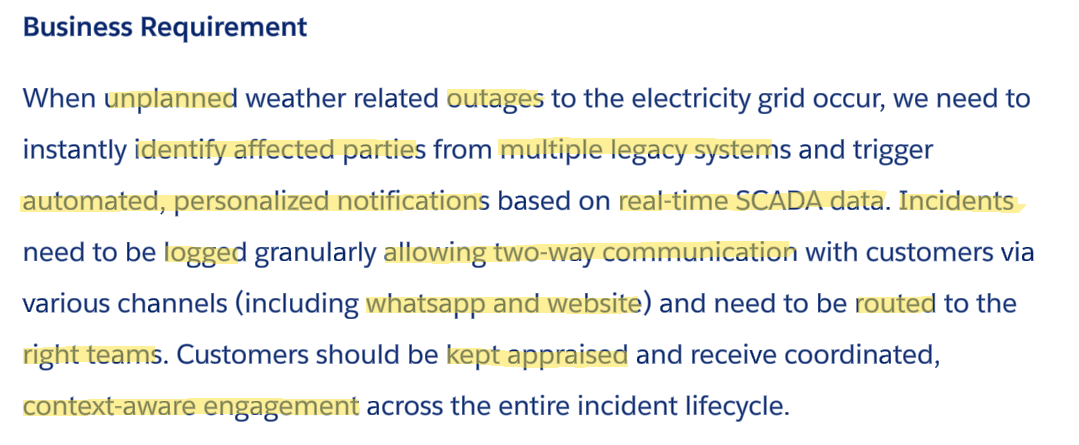
By highlighting key phrases, we strip away the business narrative to ensure we are solving the right problems from the start. Based on the electricity grid outage scenario, we arrive at five clear HLRs:
- Detect unplanned outages and notify Salesforce instantly.
- Identify affected parties across multiple legacy systems.
- Send automated, personalized notifications based on real-time SCADA data.
- Log incidents, allow for two-way communication, and route to the right team.
- Provide context-aware engagement throughout the lifecycle via WhatsApp and the web.
Note that the HLRs paraphrase rather than use the exact words from the business requirement. This is essential in validating with the business stakeholders that you understood the intention of their requirement.
To continue with evaluating solution options, let’s move into the “How” step by following the trail of questions, assumptions, and decisions captured during our live session.
How: Aligning solutions to your HLRs
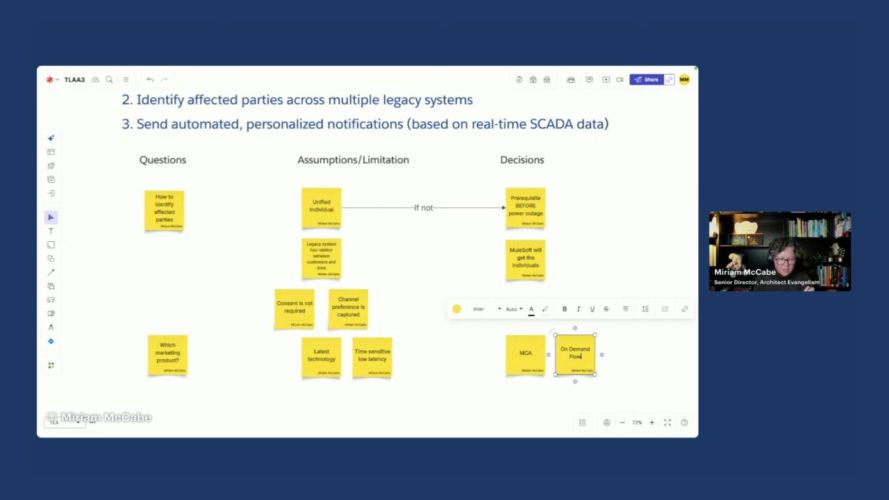
In the “How” step, we evaluate solution options against the extracted HLRs. To keep our thinking organized, we track questions, assumptions, and decisions alongside our technical diagram.
Evaluating HLR 1: Detect unplanned outages and notify Salesforce instantly
The first assumption is that the SCADA system that is part of the landscape is able to detect status events via connected sensors on the grid. The next assumption is that SCADA is able to publish status events in the case of an outage. Because the scenario requires low latency for high-volume events, we select MuleSoft as the middleware to consume these status events.
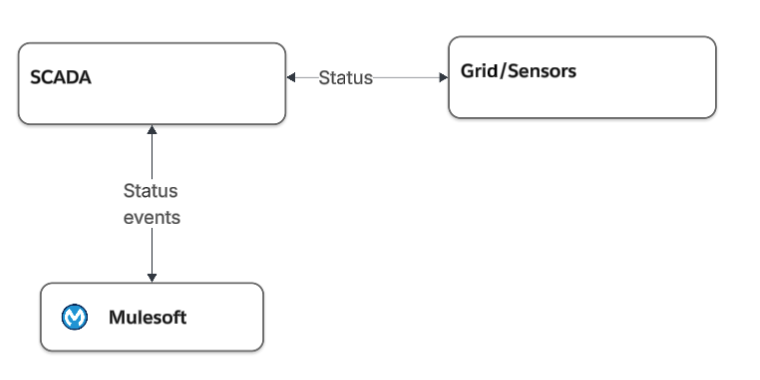
To notify Salesforce, we assume that MuleSoft connects to the Salesforce org. Let’s not draw that into the architecture until we tackle the result of that integration when we reach the requirement to log the incident(s) corresponding to the event.
Solving HLR 2 and 3: Identifying who is impacted and notifying them of the outages
We solution HLR 2 and 3 together as we need to identify the affected parties to be able to send them personalized notifications. To tackle the first requirement to identify who is affected, we ask the question how to identify the individuals and assume that work has already been done to resolve identities into Unified Individuals across the legacy systems in the landscape. We also note that identifying Unified Individuals is a strong prerequisite or recommendation if it has not been completed earlier. Without it, chaos will ensue when there is an outage. In terms of a Salesforce multi-cloud solution, we assume that the unification happens in Data 360.
Identify affected parties across multiple legacy systems
To connect the grid areas impacted to the individuals affected, we assume that the legacy systems have the knowledge of that relationship and that leads to the decision to use MuleSoft to:
- Identify the parties affected from an understanding of the affected areas (from SCADA).
- Query Data 360 to identify the specific individuals linked to those areas and their communication channel preferences.
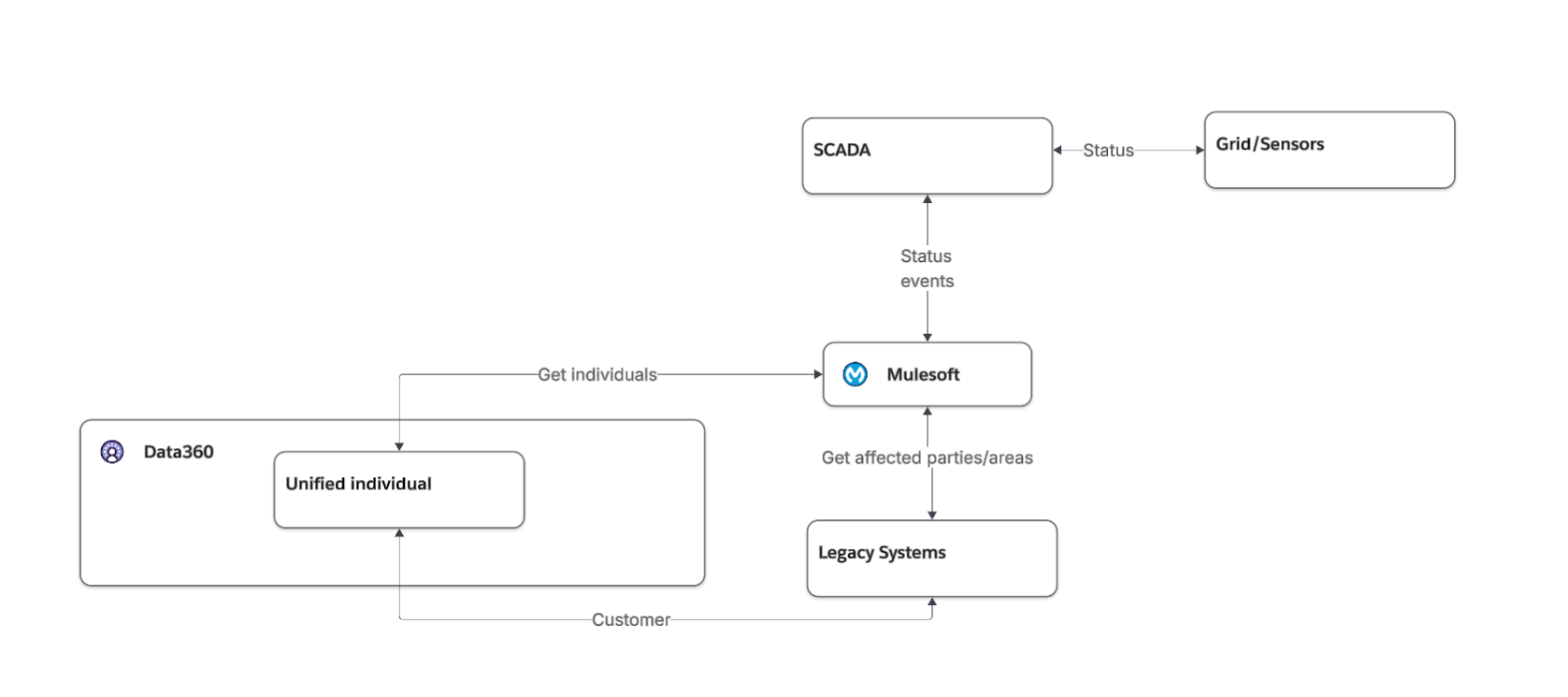
Now that we have the impacted parties, we are ready to send the personalized notifications as part of HLR 3.
Send automated, personalized notifications (based on real-time SCADA data)
To design the notification strategy, we prioritize scalability and future-proofness, leading to the decision to leverage Agentforce Marketing (formerly Marketing Cloud Advanced Edition) with on-demand flows. This feature provides a transactional API path to power high-volume, personalized flows with the low latency required during an emergency. To account for compliance considerations we make the assumption that consent is either not required or captured appropriately in Data 360 depending on local regulations.
While on-demand flow support for WhatsApp is a roadmap item where we personalize the message by passing the values in the API payload, we note that a Data 360 action could trigger these messages in the interim if we were going live today. As we are currently discussing the architecture though, the expectation is that this feature will be GA by the time we implement.
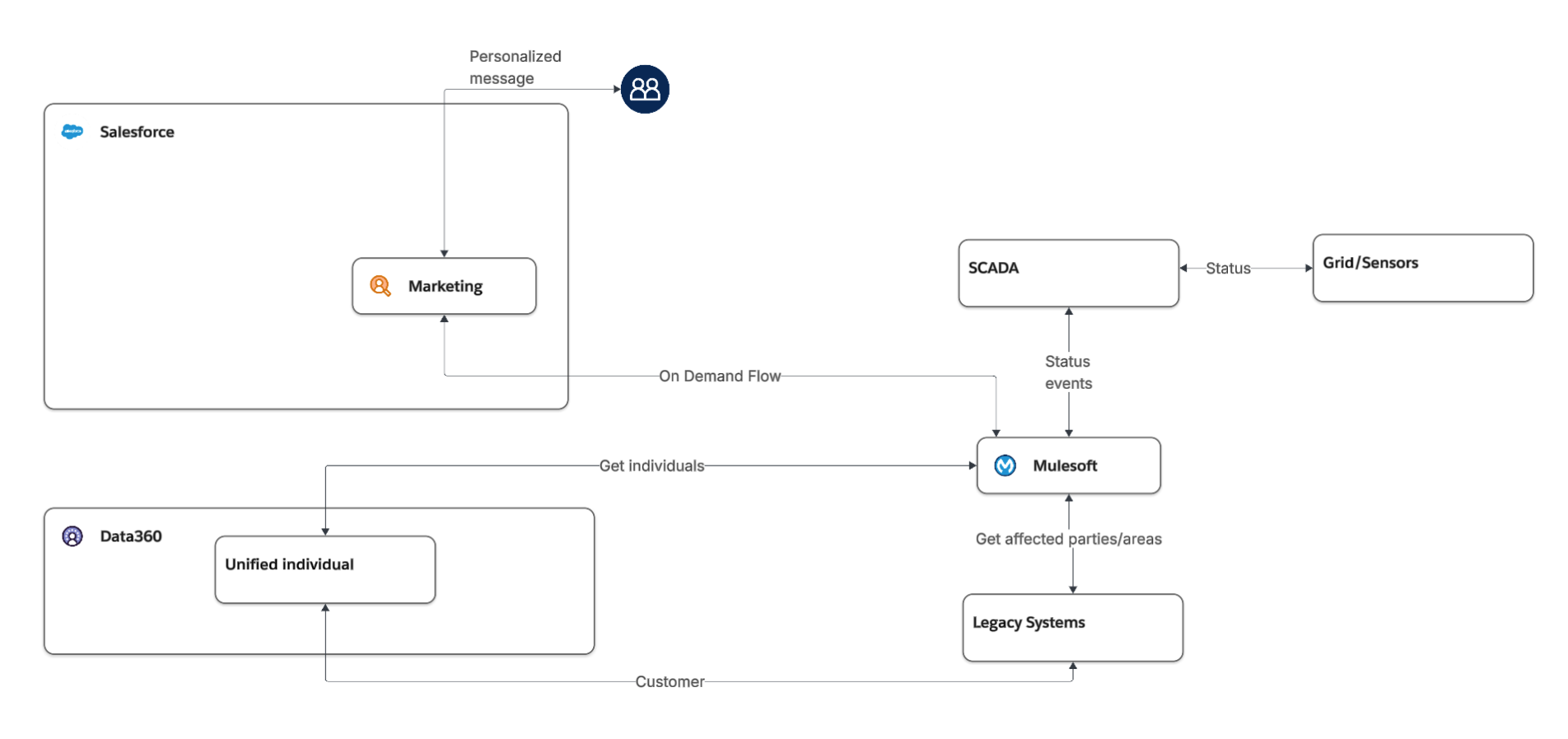
HLRs 4 and 5: Managing the incident lifecycle and customer engagement
For the final pair of requirements, we start with a number of assumptions around using out-of-the-box Salesforce features. This helps us decide to leverage out-of-the-box Incident Management to track the outage, which leads to a decision to create cases for individual customers that reach out as child records to the overarching incident.
When customers reach out for updates, Agentforce handles inbound volumes on WhatsApp and the web. We assume that the Agentforce Service Agent has access to the latest incident status and decide that it can trigger actions to create child cases for personalized, two-way interaction.
This assumption surfaces “hidden” requirements that were not obvious earlier. First, the SCADA-to-MuleSoft integration, initially scoped to publish outage detection events, must be extended to also publish ongoing status change events as grid conditions evolve. Second, a new MuleSoft-to-Salesforce integration must be added to support both the creation of incidents and subsequent status updates to those records.
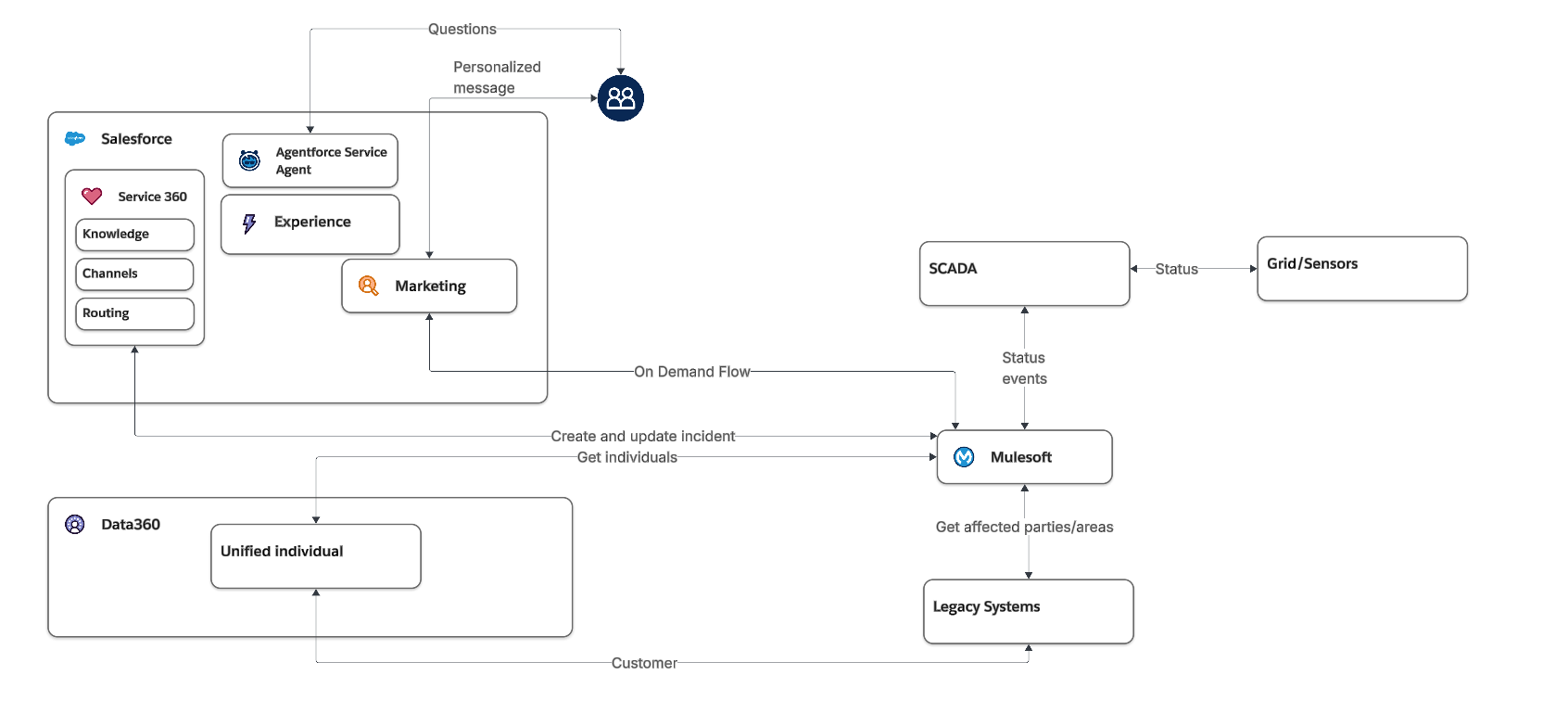
Why: Justify your design with ADRs
In the “Why” step, you justify your solution direction to stakeholders and your future self. During the live stream, we emphasized that an architect’s value is not in the solution, but in the rationale. With the questions, assumptions, limitations, and decisions we captured, we can apply the guidance in the Architectural Decisions: A Human-Led, AI-Powered Approach blog post on how to create an ADR with the help of LLMs. We use the notes we took in the How step to:
- Tie assumptions to decisions: A decision may need to change if an assumption is later proven incorrect. For example, if the SCADA system cannot publish events, our integration pattern must shift from event-driven to polling.
- Document the “thinking work”: Whether you present a complex diagram or a simple slide, the most important part is that the thinking work, including questions, assumptions, and decisions, is documented.




Expert Q&A
During the session, experts Scott Ratliff and Kunal Modi shared critical insights into the technical nuances of this multi-cloud journey:
Methodology and Approach
- Why use an assumption instead of a question during design? An assumption allows you to keep moving when you don’t have immediate access to legacy system owners or the business. It provides a point of view to be verified later without being stuck when you don’t have all the answers.
- What is the primary output of the high-level design (HLD) phase? It depends on the customer and audience. It could be a 40-page document or a “cocktail napkin” diagram, but it must be a formalized record you can refer back to.
- Are all data flows bidirectional back to legacy systems? Not necessarily. While there is often a status acknowledgment, you should not assume every integration requires data to flow back and forth between systems. It was just easier to draw the arrows live, but in practice, use meaningful lines in your diagrams.
Integration and Data
- Why connect to Marketing Cloud via MuleSoft instead of a broadcast flow? MuleSoft is essential when you need to pull context from legacy systems that aren’t “Salesforce-ready”. For example, a sensor might only provide a technical ID; MuleSoft transforms that into a human-readable “affected area” before triggering the notification.
- Why choose WhatsApp over Salesforce Digital Engagement for this use case? Outages require high-volume, outbound broadcast messaging. Agentforce Marketing on-demand flows are built for these transactional, time-sensitive communications at scale.
Performance and Scale
- How do you handle high inbound volumes during an incident? You create parent incidents per logical grouping (for example, by area or region affected) and then when customers reach out, you log cases as children of those parent incidents. In this way, you can keep track of any inbound customer communication and notify customers proactively when the parent incident is resolved. You use Agentforce to manage the communication with customers who reach out with inquiries.
Final wrap-up
An important takeaway for any architect is to attempt to solve the problem with the simplest, most standard tool or functionality first. If that won’t work, prove it before moving to more custom or made-to-measure solutions. In this episode, that meant starting with Incident Management and an Agentforce Service Agent before layering in MuleSoft and Marketing Cloud Advanced.
The other takeaway is one you can apply immediately: the thinking work is the deliverable. Whether you present a 40-page HLD or a sketch on a whiteboard, what matters is that your questions, assumptions, and decisions are documented and traceable. That’s what makes an architectural recommendation something your stakeholders can understand and get behind.
- Next episode: Join us for the next episode on April 30th, where we will apply the What/How/Why approach to a new real-world challenge.
- Vote on future episodes: Help us shape the future of the series. Tell us what topics you want to see and how we can provide more value to you.
Subscribe to the Salesforce Architect Digest on LinkedIn
Get monthly curated content, technical resources, and event updates designed to support your Salesforce Architect journey.