


Code Extension resolves a dilemma an architect faces: the need to operationalize complex data manipulations without leaving the Salesforce trust boundary. Traditionally, handling advanced requirements like parsing complex XML, managing encrypted data, or designing custom AI chunking algorithms, led architects to export data to external systems or rely on unmanaged local scripts.
Moving the data to perform advanced processing on it introduces risks, including rogue code security vulnerabilities, and compliance deviations (for example, GDPR and HIPAA). Code Extension is a game changer by providing a secure, native Python runtime directly all within Data 360.
What is Code Extension?
Code Extension is designed to handle scenarios that no code or low code cannot. They are pro-code capabilities that allow you to transform and process data using native Python execution. As an architect, you must determine the correct execution type based on your specific capabilities and business needs.
There are two primary types of extensions available:
1. Code Extension Script (Transforms):
These are used to create Batch Data Transforms using custom code. They are ideal for cleaning data, advanced string manipulation, or secure in-platform decrypting web engagement data to match with customer profiles.
- You can handle complex computations or parsing that exceed low-code capabilities. For example, a developer can use Python libraries to perform advanced string manipulation to standardize messy data inputs or securely decrypt PII directly within the platform.
2. Code Extension Function (Chunking):
These allow you to customize specific parts of a feature, such as search indexing. They are specifically designed for chunking use cases, allowing you to bring your own Python logic to process unstructured data. While Data 360 offers standard chunking strategies (like passage extraction), complex unstructured data often requires a more nuanced approach. This is where Code Extension Function differentiate themselves from standard chunking.
Standard chunking often splits text based on character counts or simple delimiters. However, Code Extension Function allows you to implement custom algorithms that respect the document’s inherent structure.
- You can chunk based on HTML tags to preserve structural context, ensuring that tables or specific sections aren’t broken in the middle.
- For transcripts, you can chunk based on speaker turns to maintain the flow of dialogue, enabling speaker-level analysis that standard splitters would miss.
Watch Apply an Architect Lens to Code Extension
Explore how to use Data 360 using Code Extensions with an architect’s lens. We’ll cover when to use pro-code, what to consider, and how to align your design with the Well-Architected Framework.



How does Code Extension leverage distributed architecture
Maintaining a secure environment doesn’t mean sacrificing high-performance. In fact, Code Extension Script is built to handle enterprise-scale data volumes by leveraging a highly efficient distributed architecture. The core advantage of this architecture lies in the use of managed Spark processing clusters, which offer significantly faster performance than running Spark in a local IDE or self-managed environment.
By utilizing this distributed architecture, architects can handle massive datasets with ease. In a recent benchmark, we processed 140 million rows, deduplicating them down to 69 million and decrypting the results, in just 17 minutes. This level of throughput demonstrates that Code Extension is not just for simple scripts; they are a robust solution for high-volume enterprise data challenges.
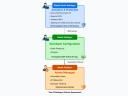
The Python code, developed and debugged in local Integrated Development Environments (IDEs), necessitates an orchestrated migration process for deployment to a Data 360 org. The Code Extension architecture features a series of nested security layers that protect the core system at multiple levels: the code execution environment, the network, and the underlying Salesforce infrastructure. See Figure 1 below.
Note: Python 3.11 is currently the only supported version of Python code. See Data Cloud Custom Code prerequisites.
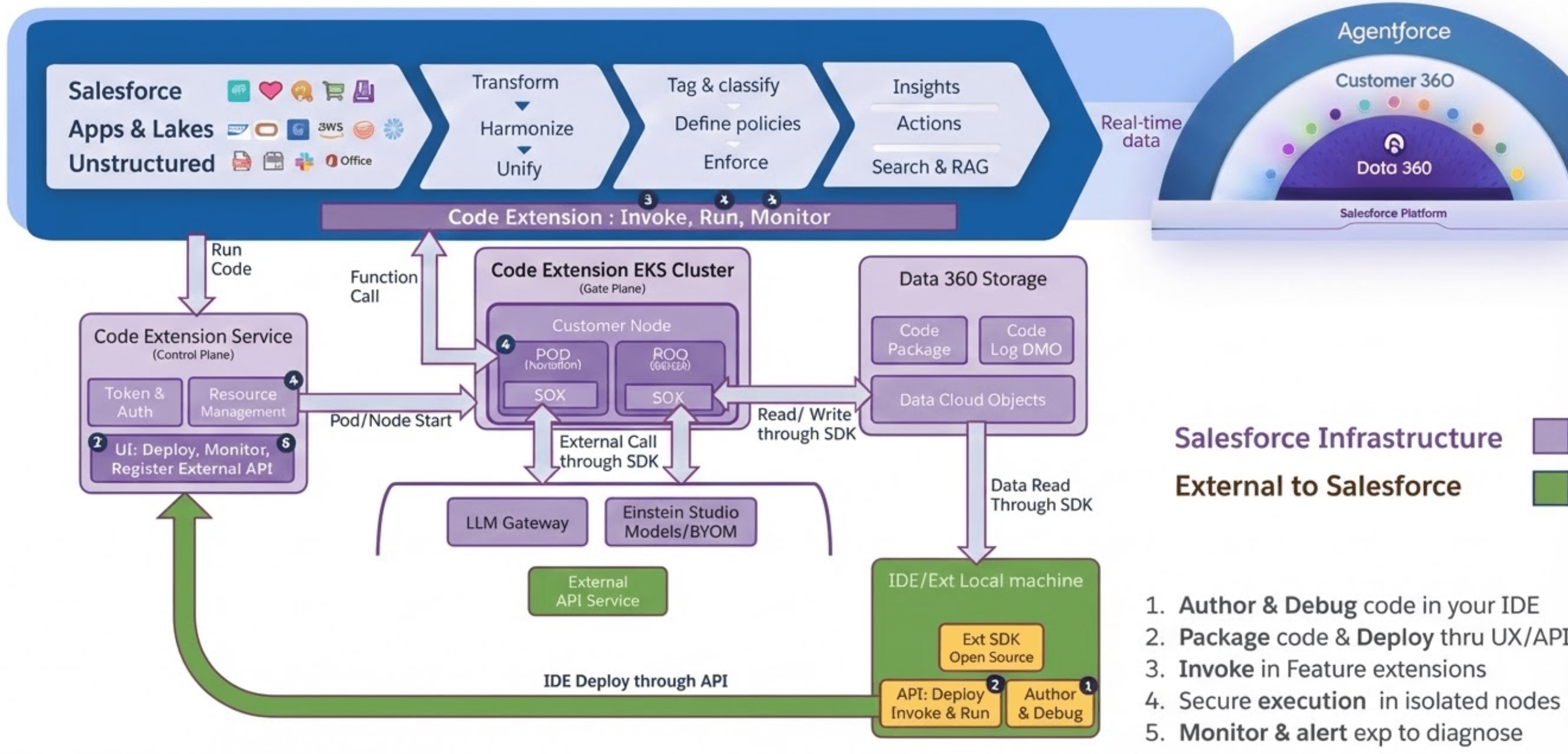
How is Code Extension secured and deployed?
Code Extension is built upon an architectural foundation of security. Custom code, when used instead of standard configuration, often introduces a “trust boundary” issue, as processing data outside of the platform is usually required. Fortunately, Code Extension mitigates this concern by processing custom code natively within the Salesforce infrastructure.
The trust boundary is established by explicit security measures, including IDE restrictions, runtime isolation, and security gates that govern package deployment and migration to Production.
Code Extension local development security
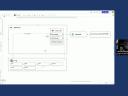
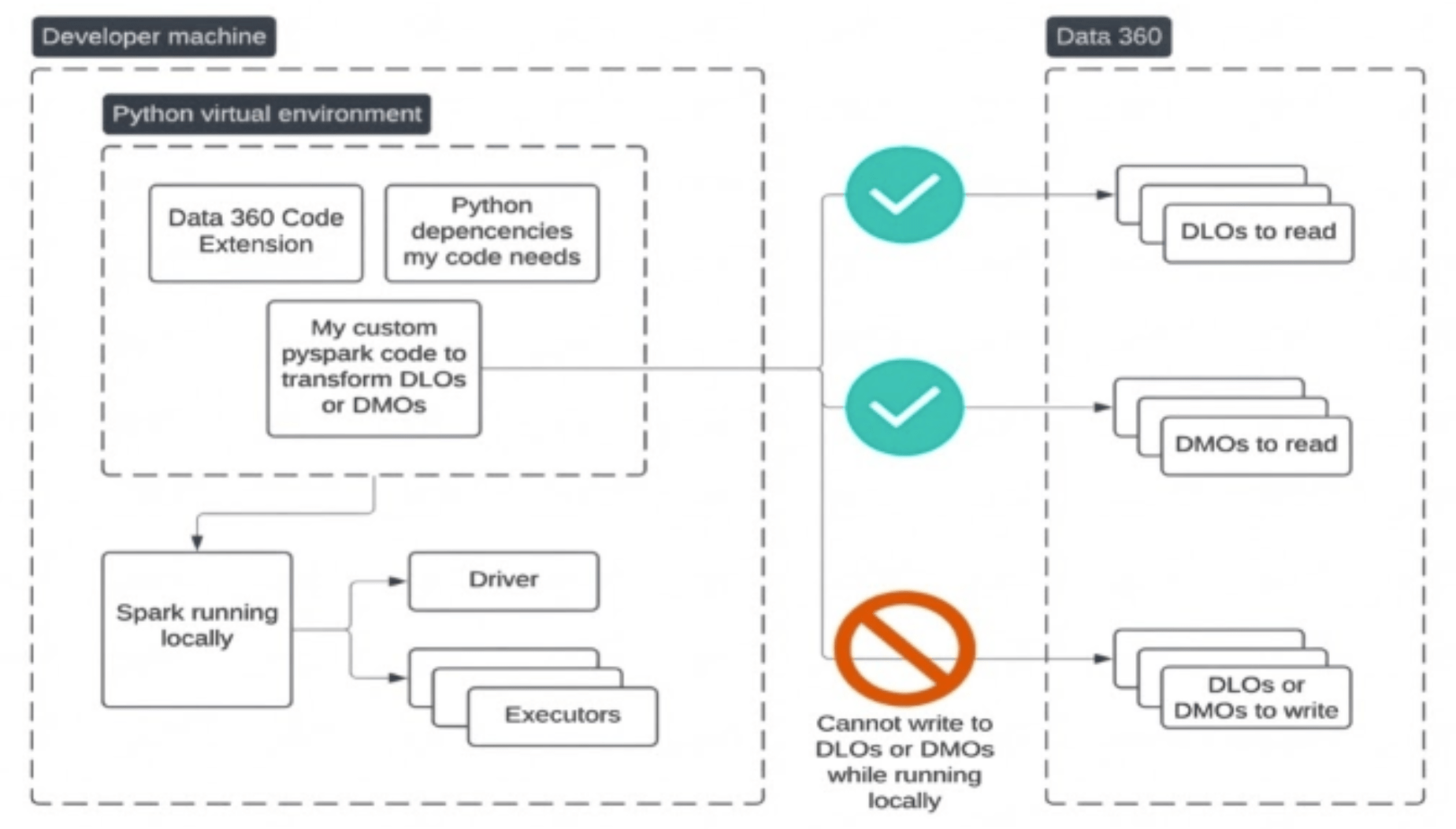
For local IDE testing, developers and data scientists can read a sample of up to 1000 records for rapid logic validation without pulling massive datasets. Importantly, you cannot write from your local IDE to Data 360 objects; writing is restricted to the console for debugging. The SDK allows reading real schema and data but explicitly blocks writing back to prevent accidental production data corruption. This constraint ensures safe iteration and prevents accidental deletion or corruption of production DLOs or DMOs during local debugging. See Figure 2 below.
Code Extension runtime isolation
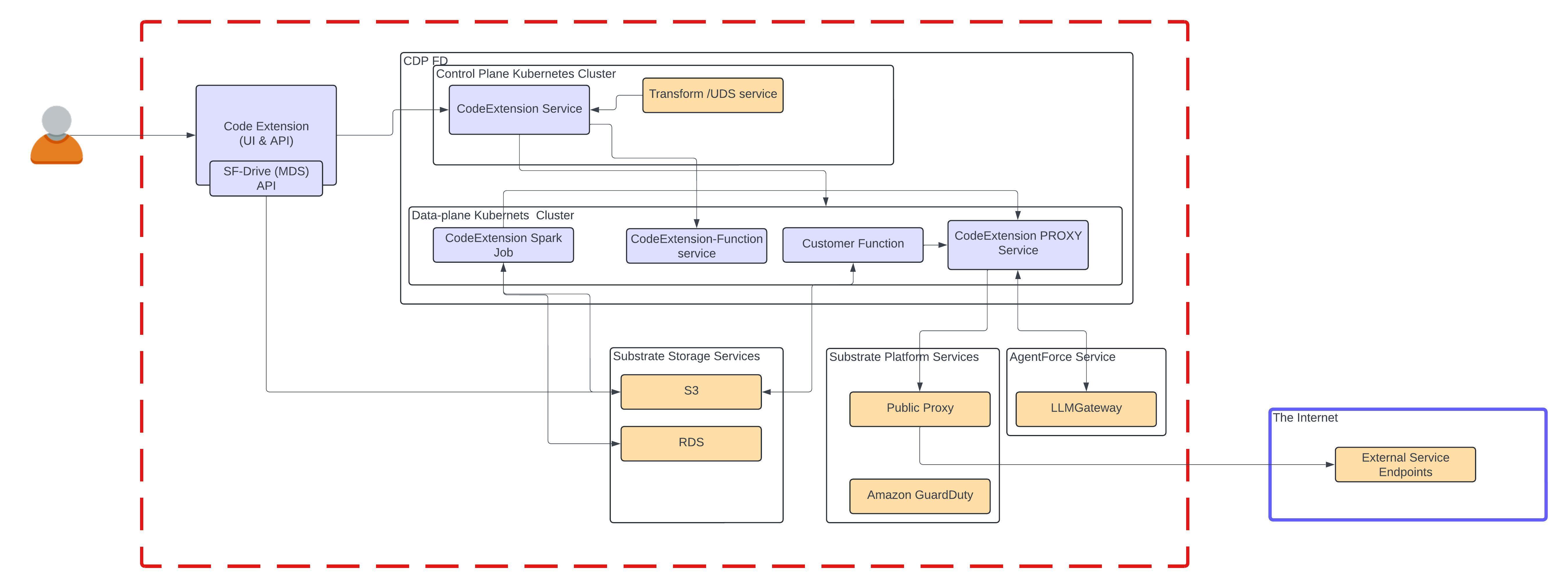
Data 360 utilizes advanced container sandboxing technology to create a strict boundary between your custom code and the underlying infrastructure. See Figure 3.
The architecture employs “Defense in Depth” through strict network segmentation and controls:
- Strict Network Policies: Policies limit lateral movement between containers, stopping code from probing other workloads.
- Private Connectivity: Outbound access is restricted to private IP ranges, blocking connections to the public internet or unauthorized external services.
- Zero-Trust Access: The runtime environment operates with no persistent privileges, meaning the container cannot directly access Salesforce services (e.g.S3 or DynamoDB).
Code Extension deployment security
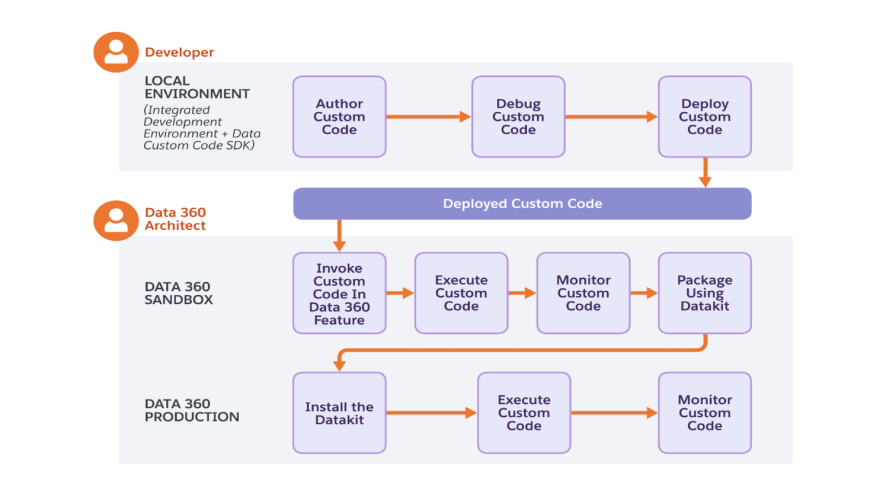
The Data Cloud Custom Code SDK utilizes the SF-Drive API to encrypt and store packages in S3. During package deployment, you consider architectural factors like the data set size and the complexity of the computation algorithm to select the compute size (e.g L, XL, 2XL, 4XL), which can be later modified in Data 360 via the UI’s Custom Code tab. Code migrated from a local Docker environment (e.g. Docker Desktop) must pass a mandatory security gate before running within the Salesforce trust boundary.
- Static Analysis & Scanning: When you upload your zipped code package to a Data 360 Sandbox, it doesn’t run immediately. It is subjected to automated security scans that can take a few minutes to ensure the code doesn’t contain any malware.
- Ephemeral Compute: Upon execution, the code runs in isolated Data 360 compute resources. These are ephemeral, meaning they spin up to execute the task and tear down immediately after, leaving no residual footprint or persistent backdoor access.
- Migration: Architects use Data Kits to package the extensions and migrate them from Sandbox to Production, ensuring a governed release path. See Figure 4 below.
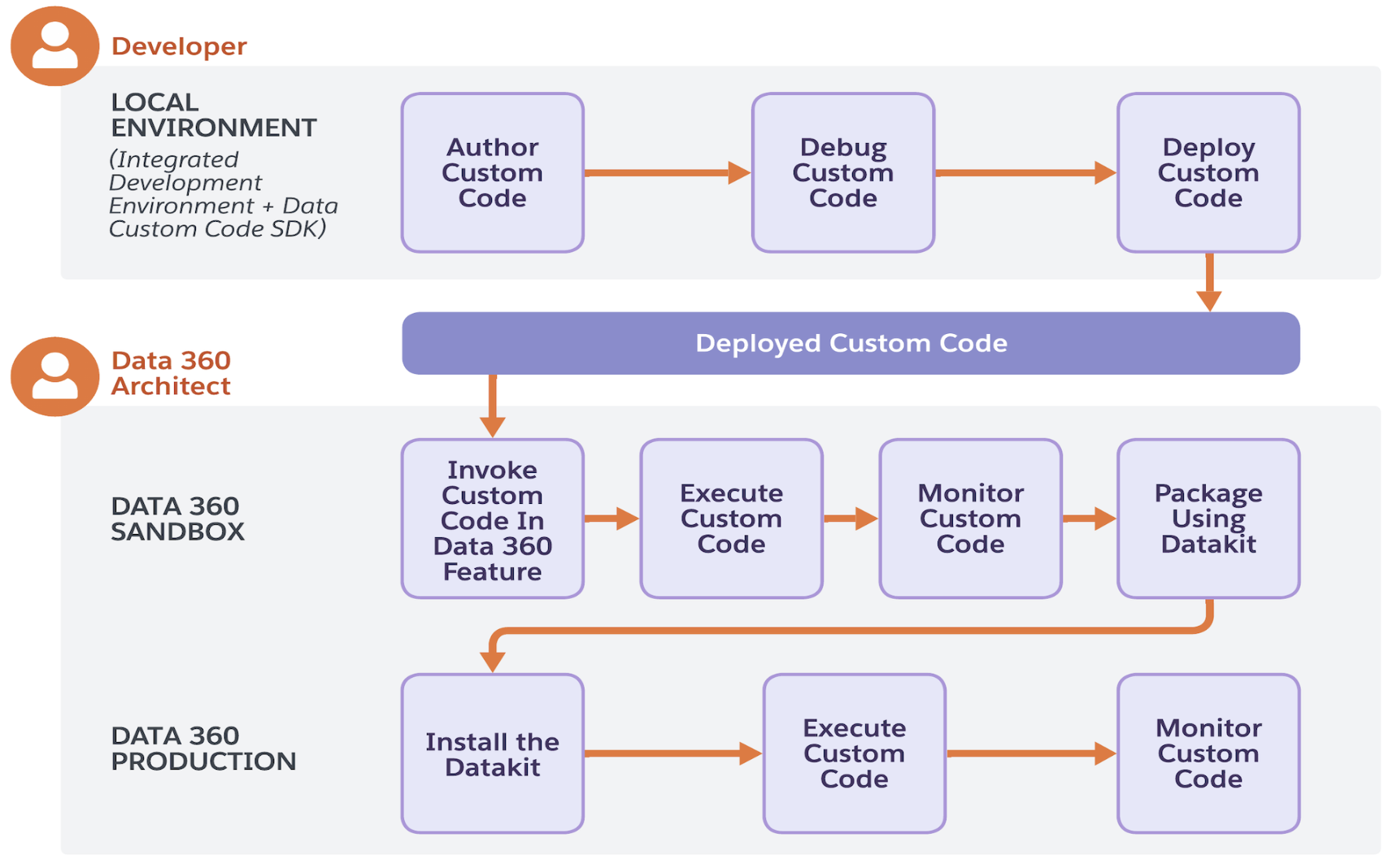
Extend Data 360 by Using Custom Code
With code extension, you can bring your custom Python code into Data 360 to extend Data 360’s native capabilities. If native Data 360 features don’t meet your business requirements, deploy your custom logic across supported Data 360 features such as batch data transforms.
Why is this important to architects?
The relevance of Code Extension extends beyond just “running Python”. For architects, this capability facilitates a move toward a more Trusted and Adaptable architecture, aligning with the Well-Architected Framework.
Key benefits include:
- Enhanced AI Accuracy: Architects can directly improve the accuracy of Vector Search and Retrieval-Augmented Generation (RAG) responses by enabling custom chunking, ensuring AI agents operate with the best possible context.
- Governance within the Trust Boundary: Code Extension addresses data leakage and security concerns by eliminating the need for data pipelines that bypass Salesforce security protocols to execute complex logic.
Start using Code Extension
Bring the power of Python to your data pipelines securely and start solving your most complex data challenges today. Explore these additional resources:
- Salesforce+: “Apply an Architect Lens to Code Extension”
- Salesforce Help: Code Extension (Beta)
- Python Package Index: Salesforce Data Custom Code
Subscribe to Salesforce Architect Digest on LinkedIn
Get monthly curated content, technical resources, and event updates designed to support your Salesforce Architect journey.