
Within your Salesforce org, keeping tabs on security can feel like a full-time job. So, to help you manage security more easily, we’re introducing Security Center Essentials, a foundational version of Security Center available to all Salesforce orgs.
What is Security Center Essentials?
Instead of clicking through individual settings and running manual audits, you now have access to a centralized dashboard to monitor several key security metrics. By surfacing the most important data points in one place, you can spend less time hunting for vulnerabilities and more time driving innovation.
With Security Center Essentials, you can:
- Gather configuration metrics: Get a centralized view of your critical security metrics, including Health Check score, Health Check baselines, connected apps, managed and unmanaged packages, trusted IP ranges, and login IP ranges.
- Retain metric data: Get 30 days of metric retention with weekly automatic metric updates and on-demand updates.
- Easily access Salesforce security resources: Access quick links to Salesforce security best practices and Trailhead content.
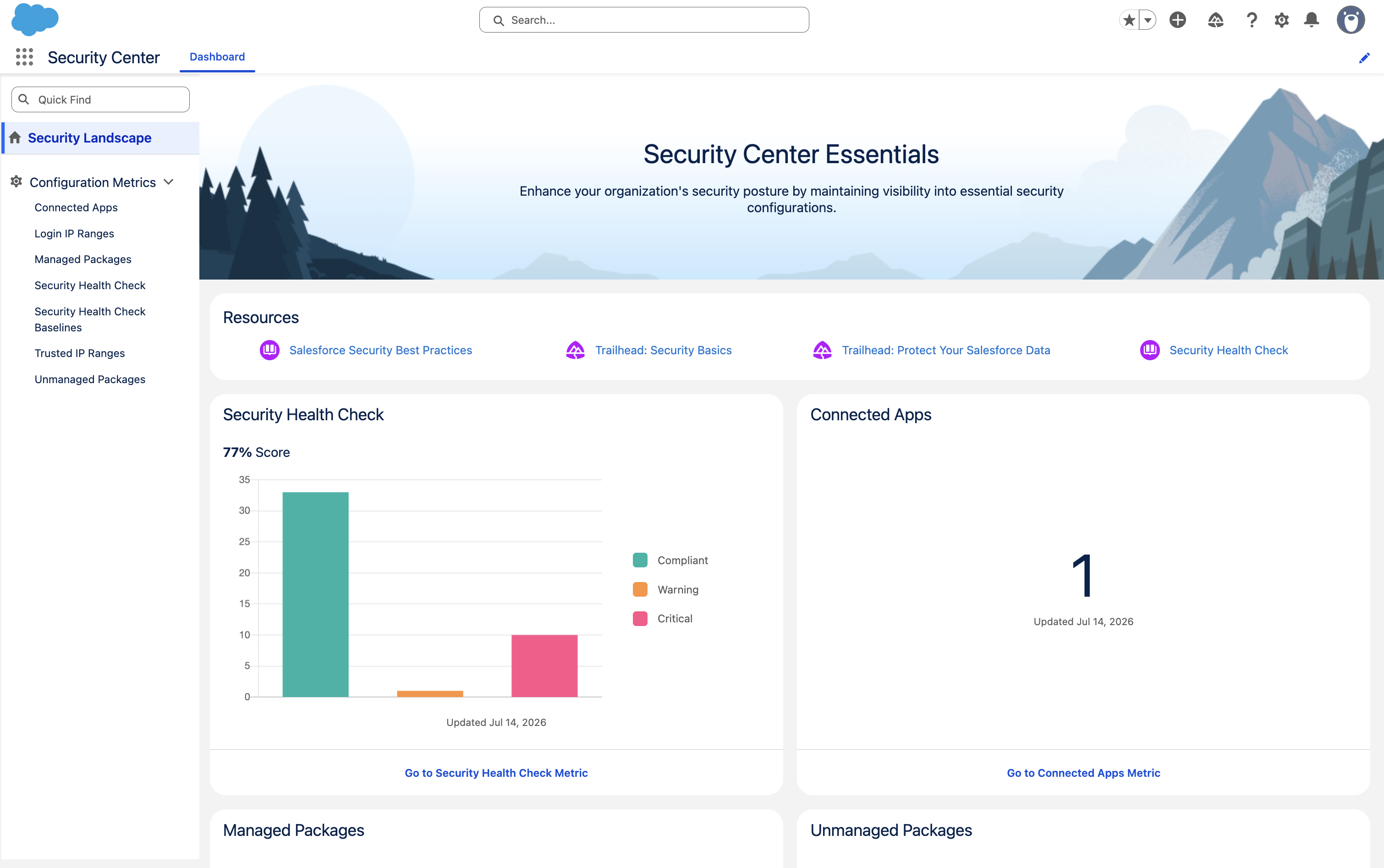
Security Center Essentials Metrics and Use Cases
Security Center Essentials surfaces seven key metrics across three categories, giving you the visibility you need to monitor and strengthen your org’s security posture.
Health Check: Track your org’s Health Check score and baseline configurations over time. Rather than relying on a one-time snapshot, you can monitor trends over 30 days to quickly identify when and why your score changed, allowing you to course-correct before small gaps become bigger risks.
Third-Party Integrations: See every connected app and package (managed or unmanaged) installed in your org, including who installed it and when. Because third-party integrations are a common source of security risk, having this visibility in one place makes it easy to audit what’s connected and catch anything unexpected.
IP Ranges: Review login IP ranges for user profiles and trusted IP ranges set for your org. These settings control who can access your org and from which networks, making them a critical part of your security configuration.
How to Get Started
Security Center Essentials is rolling out now through the end of July and is included in your Enterprise, Unlimited, and Performance Edition licenses.
To get started, ensure you have the View Security Center Pages system permission, then open Security Center from the App Launcher to explore your new dashboard and start strengthening your org!
Looking for even more advanced features like multi-org visibility and custom security policies? Check out the full version of Security Center to take your security management to the next level.
Turn security into your most powerful admin advantage
Learn the Salesforce tools you can use to consistently protect your org against evolving threats.