


Spring ’26 Release alters how your Salesforce environments interact with external systems through infrastructure updates and architectural changes. We’re introducing a new standard for how you design secure, scalable Salesforce architectures. These changes help you mitigate org security risks and improve the stability of your environments.
This release mandates specific updates to security boundaries and integration patterns that serve as the structural support for this Agentic AI era. As architects, we constantly balance maintaining high-availability orgs with planning for future innovation. The Spring ‘26 Release release allows you to establish security controls that not only harden existing environments, but also increase data and integration security.
What are the Spring ‘26 Release changes that are relevant for architects?
The Spring ‘26 release introduces mandatory changes restricting creation of Connected Apps in favor of External Client Apps (ECAs) and deprecating legacy authentication that require the attention of any architect. These shifts enhance security by isolating and clarifying boundaries, avoiding legacy maintenance.
This guide outlines necessary steps to audit legacy integrations, secure boundaries, and govern the safe adoption of next-gen AI.
Secure your integrations by adopting External Client Apps
The Spring ’26 release restricts Connected App creation by default across both the UI and Metadata API, except through package installation. Re-enabling creation now requires a request to Salesforce Support. ECA is fully metadata compliant. New inbound integrations should use ECAs for enhanced security, governance, and management. See figure 1 below:
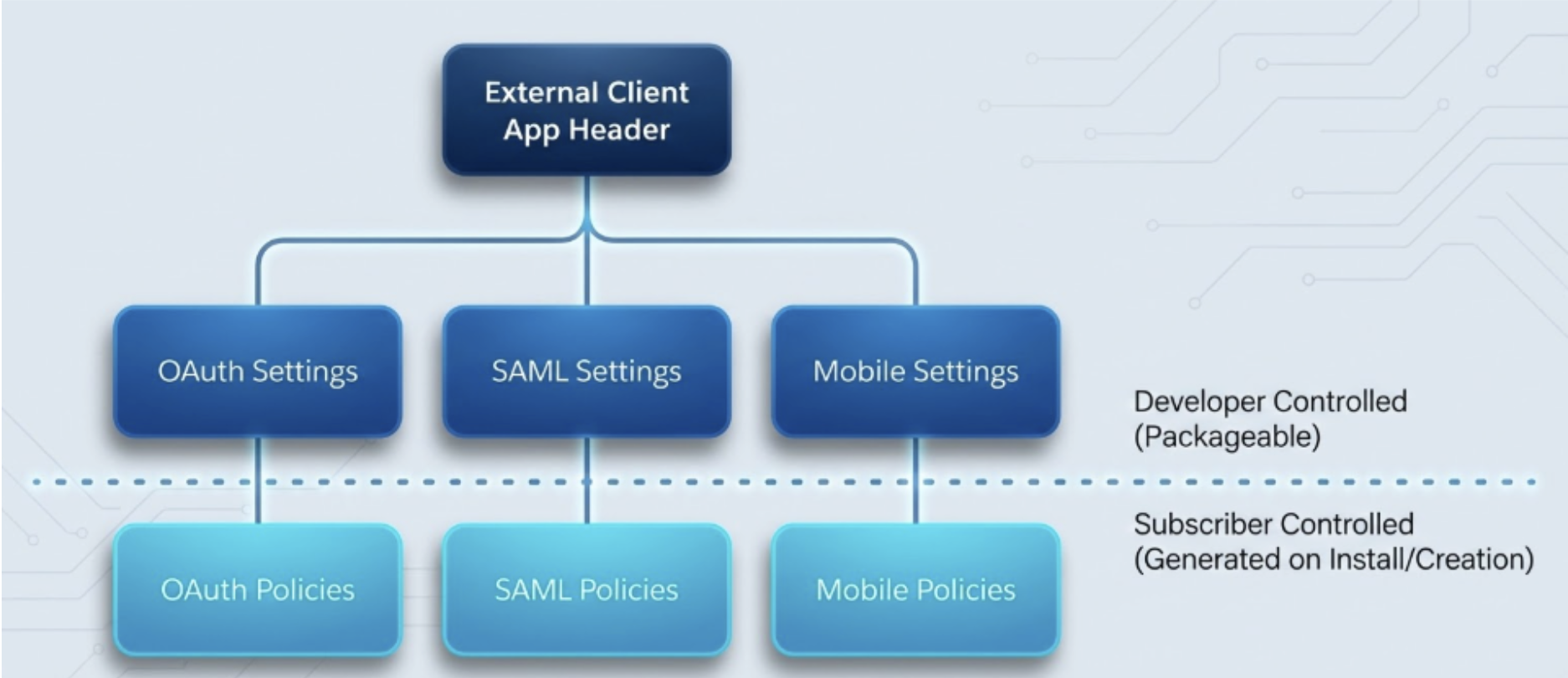
These are some of the benefits :
- Tightened Security: ECAs support only modern OAuth flows, removing support for legacy patterns like the username/password flow used by Connected Apps. This enforces security best practices and aligns with Salesforce’s shift toward modern, standards-based authentication and secure-by-default integration patterns.
- Access Control: ECAs are local and secure by default. They do not exist in a target org until installed. This creates a closed security posture, unlike Connected Apps which are globally defined and can theoretically be used by any org unless restricted.
- DX/Scratch Orgs: For architects designing developer workflows, the ability to create local ECAs in scratch orgs is a quality-of-life improvement. It allows for true “infrastructure as code” development cycles without relying on global DevOps assets for every test.
Architects must take these immediate steps to adapt to changes:
- Plan a formal audit and inventory for existing Connected Apps for your eventual migration.
- Mandate ECAs: Update integration standards to mandate ECAs for new projects to ensure improved security.
- Update CI/CD Pipelines immediately, automated provisioning of Connected Apps via API will now fail, “Create” permission is blocked at the API level.
Architecting Inbound Governance with External Client Apps
By moving to External Client Apps you improve integrations and provide more guardrails in blocking data breaches and security attacks.



Prepare for deprecations of legacy authentication protocols
The Spring ’26 Release continues the phase-out of the legacy Platform SOAP API login() call, disabling it by default in new orgs (including scratch orgs and sandboxes) to prevent direct credential sharing. Scripts using SOAP.login() will fail unless manually, and discouragingly, re-enabled. In Summer ‘27, the SOAP.login() call in API versions 31.0 through 64.0 will no longer be supported and no longer be available.
Session IDs in outbound messages will be deprecated on February 23,, 2026. This further stresses the need for you to transition to ECA and OAuth for authentication for enhanced security.
Certificate lifecycles are shortening due to industry standards. Effective March 2026, new CA-signed certificates will be limited to 6.5 months (200 days), dropping to 100 days in 2027. Self-signed internal SSO certificates are exempt. Review your certificate management strategy and automation for more frequent rotations. You should migrate legacy integrations to secure OAuth-based authentication to avoid service interruptions, promoting stronger security.
What governance strategies must architects implement for Model Context Protocol?
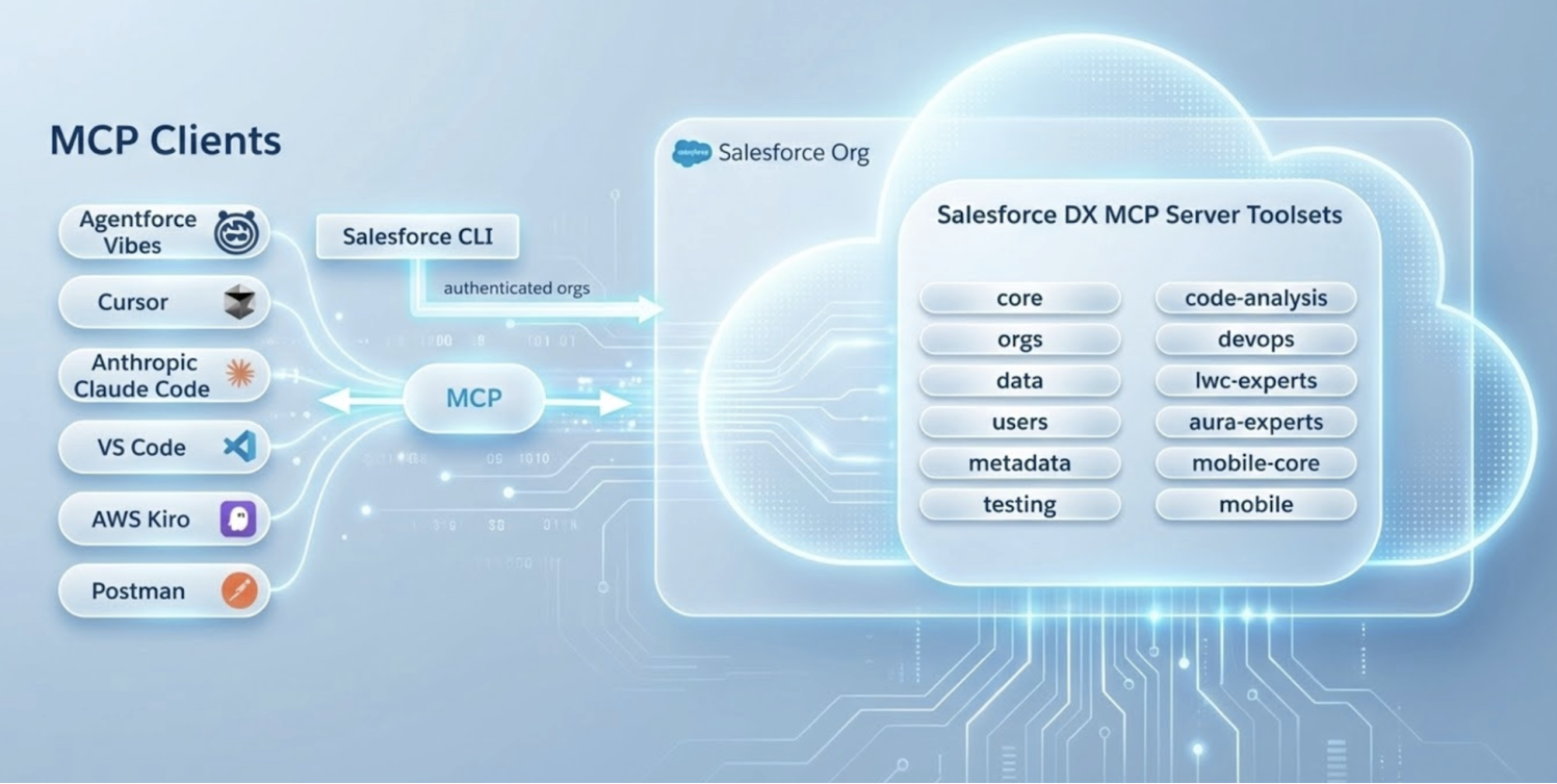
As we move toward an AI-first world, Salesforce is also allowing Agentforce agents to interact with metadata with unprecedented autonomy. We’re powering this shift with the Agentforce DX Model Context Protocol (MCP) Service open standard that enables the agentic capabilities of Agentforce.
MCP is an open protocol defined by Anthropic and standardizes how an agent should access tools, data sources and systems, allowing Agentforce to easily access services (e.g. databases and enterprise tools). See Figure 2:
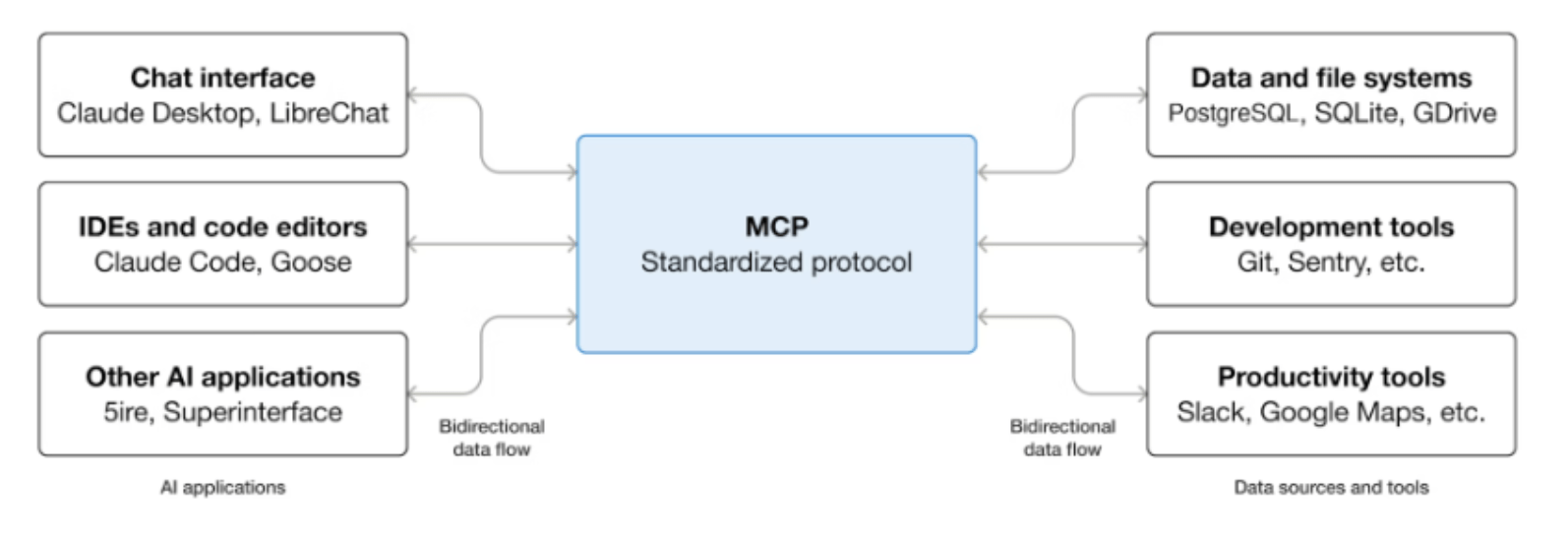
Salesforce has adopted the MCP to standardize AI interactions, introduces two governance layers for architects:
- Integration Layer (runtime): The API Catalog is your new control plane. With the introduction of MuleSoft sync, you can now explicitly activate or deactivate servers to govern agent access to enterprise data.
- These servers inherit user permissions, as an architect enforcing “Least Privilege” is essential to prevent unauthorized data modification.
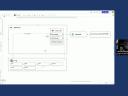
- Build Layer (developer): The new Salesforce DX MCP Server ( See Figure 3 ), enables natural language interaction with org metadata via IDEs.
We’ve enforced a hard guardrail in Spring ’26, be aware that Agentforce Vibes (web-based IDE) will now be available only in Sandboxes, access in production orgs has been turned off.
Architects should actively maintain system integrity by establishing internal governance protocols. We recommend mandating the use of Plan mode for all high-risk modifications, such as Apex logic or complex data triggers to ensure a ‘human-in-the-loop’ validates the architectural blueprint before any code is executed or deployed.
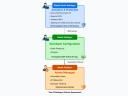
The Agentic Enterprise: IT Architecture for the AI-Powered Future
The Security and Governance Layer embeds trust and safety throughout the architecture by protecting the enterprise’s assets from threats, managing risk, and ensuring compliance with regulatory requirements.
Architecting with Lightning Out 2.0 for high-performance in Spring ‘26
Lightning Out 2.0, now built on the Lightning Web Runtime (LWR), establishes a new standard for embedding Salesforce(LWCs) into external hosts (e.g. SharePoint or portals). Unlike with legacy versions, Lightning Out 2.0 enforces strict iframe isolation and mandates OAuth token exchange, eliminating risky Session ID patterns. This represents a mandatory shift to a zero trust model.
The architecture is now “Deny by default.” You must audit existing integrations and explicitly add host domains to the Trusted Domains allowlist in Session Settings to prevent immediate service interruptions.
Here are some enhancements you should also take into account for improved data processing improvements:
- Apex Cursors (GA): This feature enables server-side chunking for processing large datasets in a single transaction and in manageable parts, replacing the legacy OFFSET clause and improving beyond the 2000 record limit. The PaginationCursor class (for LWC) allows for stateless, server-side pagination, resolving performance issues (e.g.heap errors) in custom UIs with complex, large queries. It’s designed for UI elements such as multipage record lists and you can traverse forwards and backwards through result sets. You should test for performance gains in high-volume, high-resource processing and address complex SOQL governor limits.
- Cursors + Queueable: Beyond UI pagination, Apex Cursors unlock an efficient alternative to Batch Apex for processing large result sets.. By combining Cursors with chained Queueable Apex, you can process massive datasets with dynamic chunk sizes, effectively bypassing the fixed batch size limitations of standard Batch Apex.
As you’re architecting these patterns, remember to factor in , the maximum number of cursor rows per 24-hour period is 100 million.
Hyperforce, Data Residency, Compliance
Hyperforce expands to 17 countries, Japan and India. This expansion allows customers to store data locally and meet local data residency and compliance needs.
In this release, a new Archive App offers zero-configuration authentication, eliminating the need for a manual OAuth 2.0 authorized flow or a Connected App. You no longer have to manage client credentials or certificates for this specific compliance tool.
Because the Archive App runs on the trusted Hyperforce substrate (specifically in new regions like Japan and India), it can leverage internal platform trust. Anything that is not a native app (e.g. your ERP or custom portal), means you must shift towards stricter OAuth governance using ECAs. See Figure 4 below:
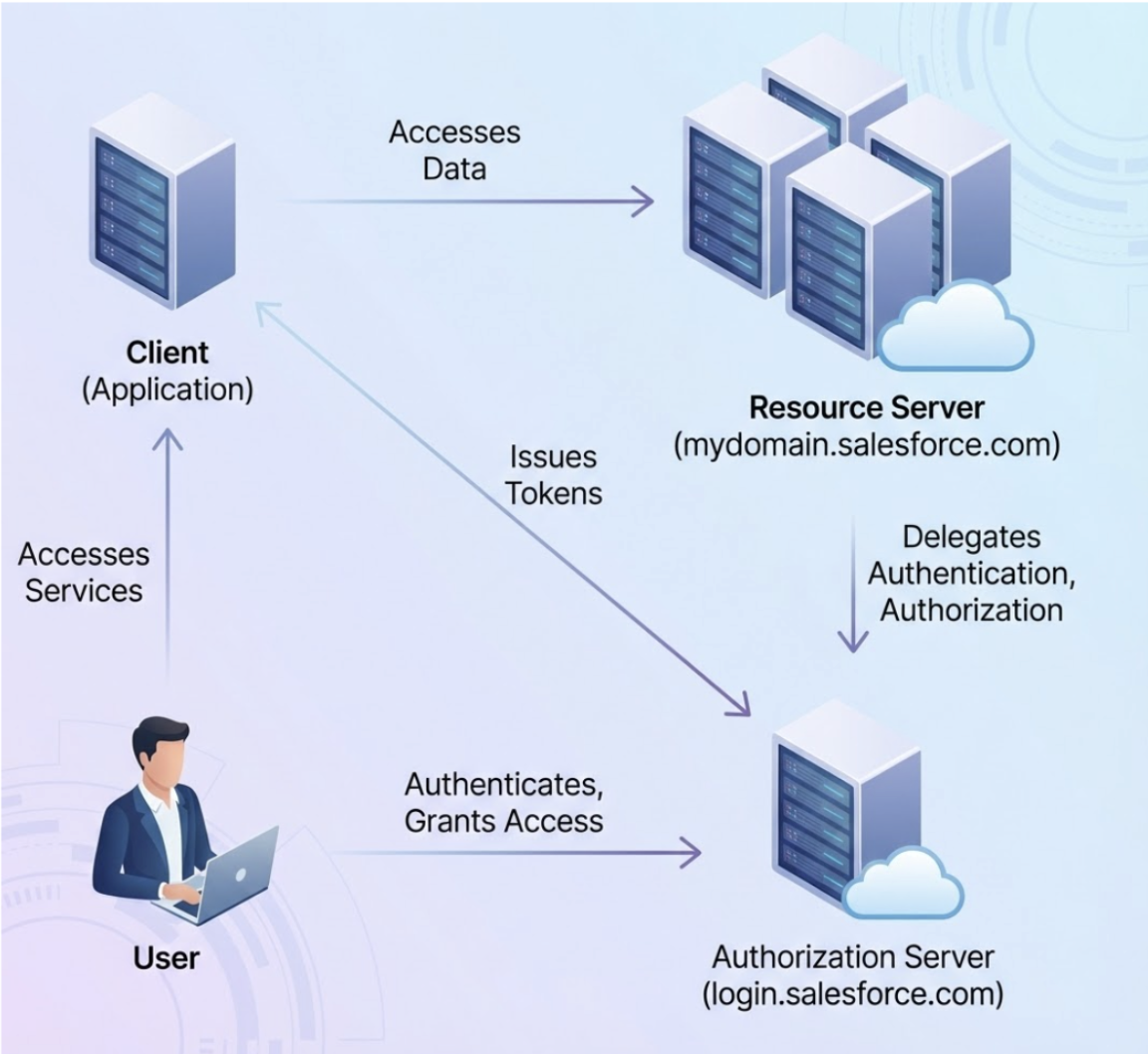
As an architect you should update IP allowlists to include Hyperforce inbound public IP ranges supporting IPv6 to avoid blocking legitimate traffic. Review data retention policies to use Archive App for PII anonymization supporting RTBF and GDPR compliance. Review and shift your current OAuth flows to ECAs.
Why is the Spring ‘26 Release important to architects?
The Spring ’26 Release enhances Salesforce security by restricting Connected Apps creation and by eliminating legacy authentication. In addition, the release introduces exciting innovations around MCP support, Hyperforce and fundamental updates like Apex Cursor that improve system trust, stability and performance.