


A sales qualified lead (SQL) is a way of categorising prospects during the lead lifecycle. It refers to a prospect that has already been deemed a marketing qualified lead (MQL) by meeting your ideal customer profile (ICP) requirements, and has then progressed to show clear buying intent. In B2B SaaS, this often means booking a demo or starting a free trial. In other models, it could be requesting a quote or asking to speak with sales.
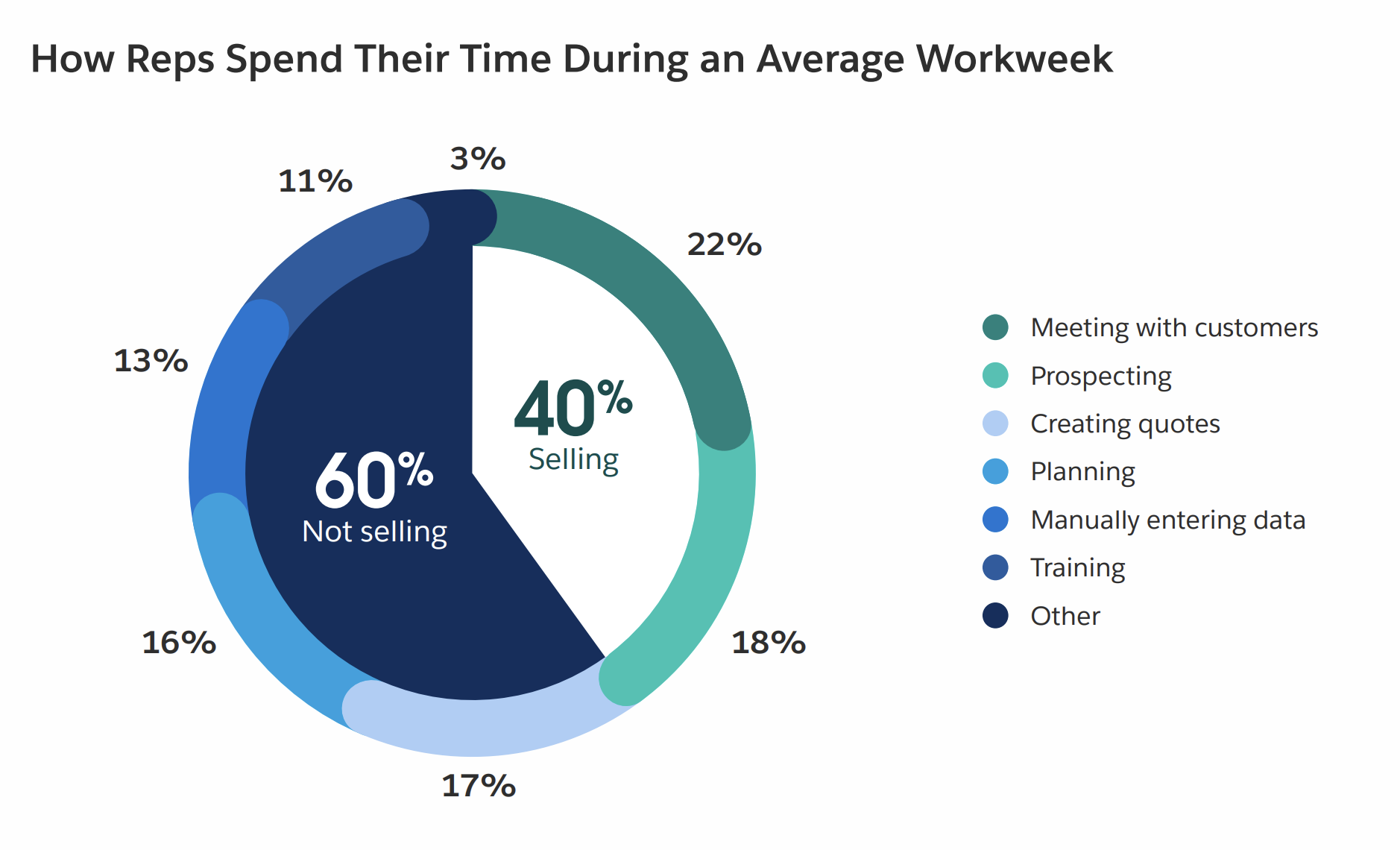
However, identifying and prioritising these leads is becoming more difficult. Buyers expect speed, but reps spend around 60% of their week on non-selling work, making it harder to spot and act on high-value opportunities before they go cold.
This is where AI-powered sales software can help. In this article, we cover what a SQL is, how it fits into the lead lifecycle and differs from a MQL, and how agentic AI is reshaping the qualification process.
Key Takeaways
Discover sales insights from over 4,000 reps, including top AI agent use cases, and new sales strategies to fuel your team’s growth.
What is a sales qualified lead (SQL)?
Let’s start with the basics. Marketing and sales teams gather information on potential customers, who are known as prospects. These prospects come in through a variety of ways, often putting their contact details into a form or sending an enquiry.
The journey from lead to customer is most relevant for businesses with longer buying cycles. It typically looks like this:
- Lead: A known contact who has shown initial interest
- MQL: They fit your ICP and show meaningful engagement
- SQL: They show clear buying intent and are ready for sales engagement
- Opportunity: An active deal being worked on by sales
- Closed Won/Lost: The prospect either converts or does not convert into a customer
- Customer: A successfully closed deal
In a team’s revenue platform, prospects are categorised, often using machine learning, based on the actions they’ve taken.
At each stage, marketing and sales teams act to move them closer to becoming customers. Teams also use AI agents to track more dynamic signals of intent, qualify leads, surface which prospects are most worth sales attention, and suggest next best actions, and in some cases, act on them.
Some examples of what would make someone a SQL in different industries are:
- SaaS: Booking a demo, starting a free trial, or requesting pricing
- Real estate: Requesting a viewing or submitting an enquiry with budget and timeline
- Financial services: Completing a loan application, requesting a consultation, or providing details for an assessment
- Education: Booking a call with admissions, asking about start dates/fees
- Professional services: Requesting a quote/meeting, or sharing details about a project
- Healthcare: Booking a consult or requesting treatment options
How do MQLs and SQLs differ and work together?
As we’ve covered, MQLs sit before a prospect becomes a SQL. Often, prospects become a MQL before they become a SQL. However, if the first time you hear from them is them booking a sales call, they might go straight to SQL.
In practice, someone might fill out a webinar form and become a lead in your system. Then, after a review, they might become an MQL. If they aren’t a good fit, they may stay a lead.
To become an MQL, you need to be actively qualified by a person or agent. This is often done by sales development representatives (SDRs), but this work is increasingly being supported by agents that can autonomously research companies and make decisions about whether or not the customer fits your ICP.
If an SQL comes through but isn’t qualified, sales teams will often still take the call, but quickly identify that they are an unqualified lead. For busier teams, they might reach out over email first to clarify the fit prior to the call.
Here’s a quick comparison table between the two to help your understanding.
Lead vs. MQLs vs. SQLs
| Stage | Team | Key signals | Next actions |
|---|---|---|---|
| Lead | Marketing | Has entered your system (form fill, event signup, content download), but hasn’t been qualified yet | Begin qualification |
| MQL (Marketing Qualified Lead) | Marketing | Has provided their details and fits your ICP | Nurture with targeted campaigns and score for intent |
| SQL (Sales Qualified Lead) | Sales | Clear buying intent (sales call request, pricing enquiry) | Run a discovery call and confirm their fit |
What about MALs and SALs?
Some teams might also add more structure between marketing and sales by categorising prospects into MAL (Marketing Accepted Lead) and SAL (Sales Accepted Lead) categories.
Here’s where they fit in the lead lifecycle and why teams may use them:
- MAL sits before MQL. Its purpose is to place the lead into targeted nurture campaigns and gather more data to build enough intent to qualify them into an MQL.
- SAL sits before SQL. This allows sales to review the lead, make initial contact if needed, and decide whether they’re ready to be treated as an SQL.
As you can see, these added qualifications can be helpful for assessing and warming up prospects between stages and supporting them as they move through the process. However, they aren’t necessary, and many teams opt to keep their process simple.
Lead the way
Need a crash course in lead generation, or just want to brush up on basics? Check out this lesson on Trailhead, the free learning program from Salesforce.


Finding the time to qualify leads
It’s no secret that sales reps are stretched thin. Between outbound cold calls, prepping for demos, meetings with customers, and chasing internal approvals, there is hardly enough time to be combing through leads.
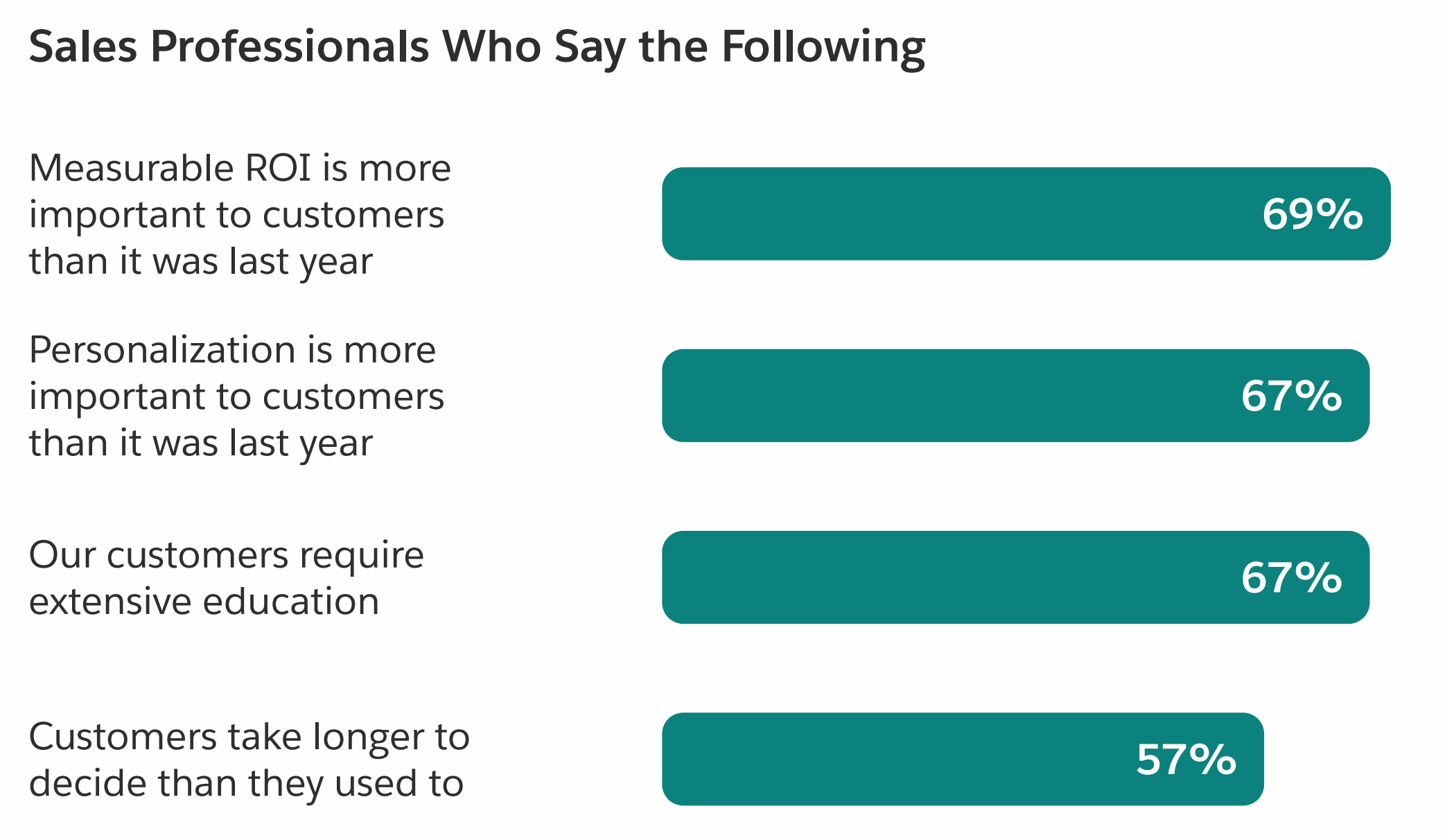
At the same time, prospects’ expectations are rising. As of 2026, sales teams report that 69% of buyers want to understand the clear, measurable ROI for their business, and 57% are taking longer to make decisions.
AI agents are helping reps fill these gaps by keeping leads warm and handling admin work behind the scenes. This includes responding instantly to inbound enquiries, asking qualifying questions, capturing and enriching lead data, logging activity in your software, and identifying high-intent prospects for reps.
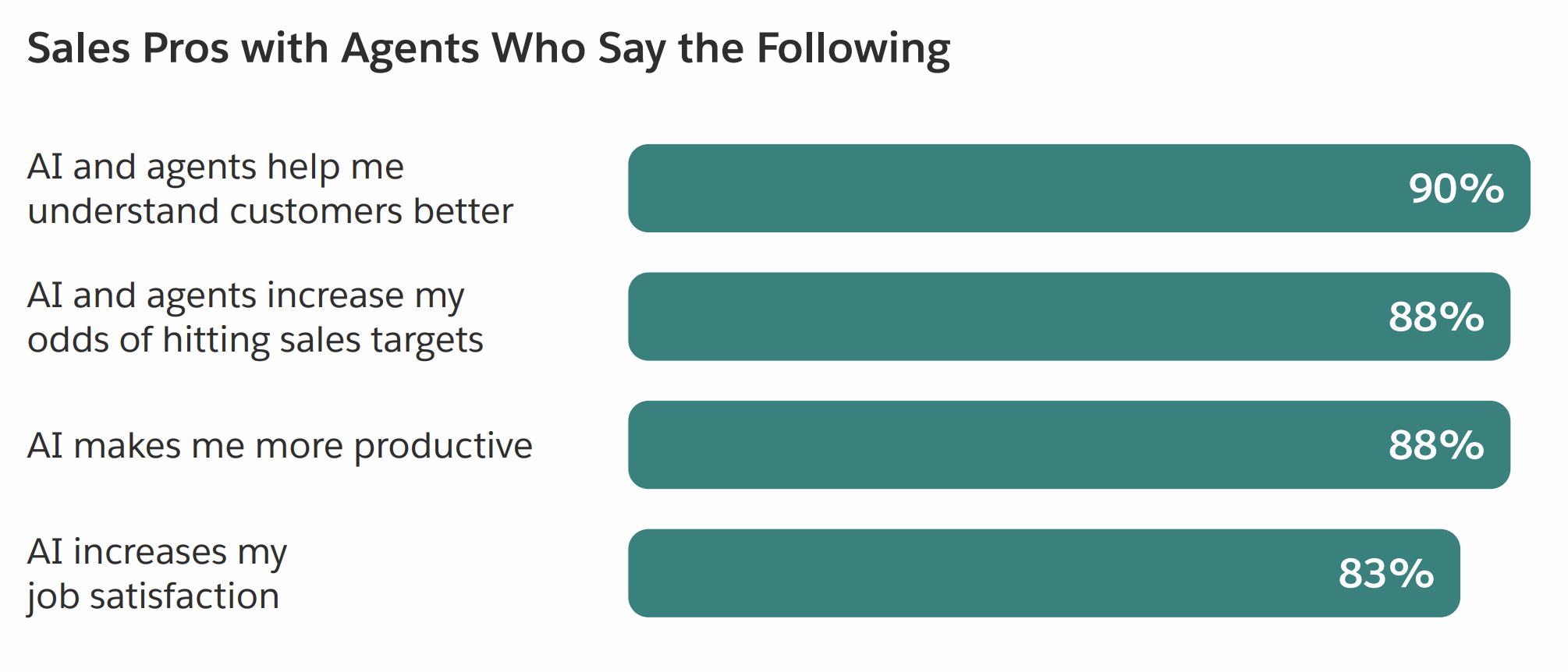
Perhaps this support is why 88% of sales reps say that using AI has increased their chances of hitting targets.
At Salesforce, we can personally attest to the power of using agents to support the sales process. By using agents, our sales team was able to respond to prospects faster and deliver more personalised experiences. As a result, agents were able to support 130,000 leads and create 3,200 opportunities in only four months.
How to go beyond basic lead qualification
So we’ve covered the basic ways that teams qualify their leads, but sometimes that doesn’t give enough information to sales teams, and they still end up wasting time on deals that will never convert. This is why teams are always looking for better ways to qualify leads, which brings us to lead scoring.
Traditionally, lead scoring is rule-based. You assign points to actions and attributes (like job title, company size, or a demo request), and once a lead hits a threshold, it gets passed to sales. However, even with this scoring system, mediocre deals slip through.
This challenge is now being overcome by many teams with the help of predictive AI. Instead of relying on fixed rules, predictive models look at past deals, both won and lost, and identify the patterns that led to conversion.
To do this, AI agents look at a combination of the following signals.
Do they fit your ICP?
This is always your baseline, as a lead must fit your ICP. That includes assessing a deal for its:
- Primary contact role and seniority (are they a decision-maker?)
- Company size, industry, and structure
- Geography
- Use case (will your product solve their problem?)
- Budget range
Without ticking these boxes, even strong signals of intent can lead nowhere. At this stage, a lead might become a SQL, but still have a low lead score.
Are they showing real intent?
If they pass your ICP test, are they showing signs of being genuinely interested in finding a solution or your product/service? AI can scan for signals like:
- Repeated visits to pricing or product pages
- Frequency and recency of engagement
- Specific sequences of actions linked to higher close rates
- Engaging with case studies or comparisons
- Asking direct, product-specific questions in calls or emails
- Actions taken within a free trial
- Engagement from multiple people at the same company
These are the signals that can begin to push lead scores up and signal to your sales teams that they might want to invest more time in a specific deal.
Is the timing right?
If they show intent, the next question is whether they are ready to go forward with a purchase. AI can pick up on timing signals like:
- Talking about urgency or deadlines
- Active projects that need support
- Budget cycles or renewal periods
- Questions around onboarding, rollout, or timelines
These signals help distinguish between leads that are exploring and those that need a solution soon.
How AI helps sales teams nurture leads across touchpoints
Lead nurturing is the process of building a relationship with a potential customer over time by staying in touch and guiding them toward a buying decision. It’s especially important for prospects who aren’t ready to buy yet, as it helps you keep them engaged and your brand top of mind until they are.
However, because nurturing is a long-term play, many sales teams don’t have the time to engage thousands of potential customers while also managing higher-intent deals already in their pipeline. In fact, 47% say they don’t even have the bandwidth for cold outreach, let alone ongoing nurture.
AI helps sales once again, and can plug this gap by staying consistently engaged with leads across key touchpoints. Here are some different places you can use them and ideas for getting started.
Website
This is where most of your prospects will come onto your radar, and where jumping onto the deal matters most. AI agents can respond instantly in chat windows, ask qualifying questions, and nudge prospects towards providing their contact details and booking a call with the sales team.
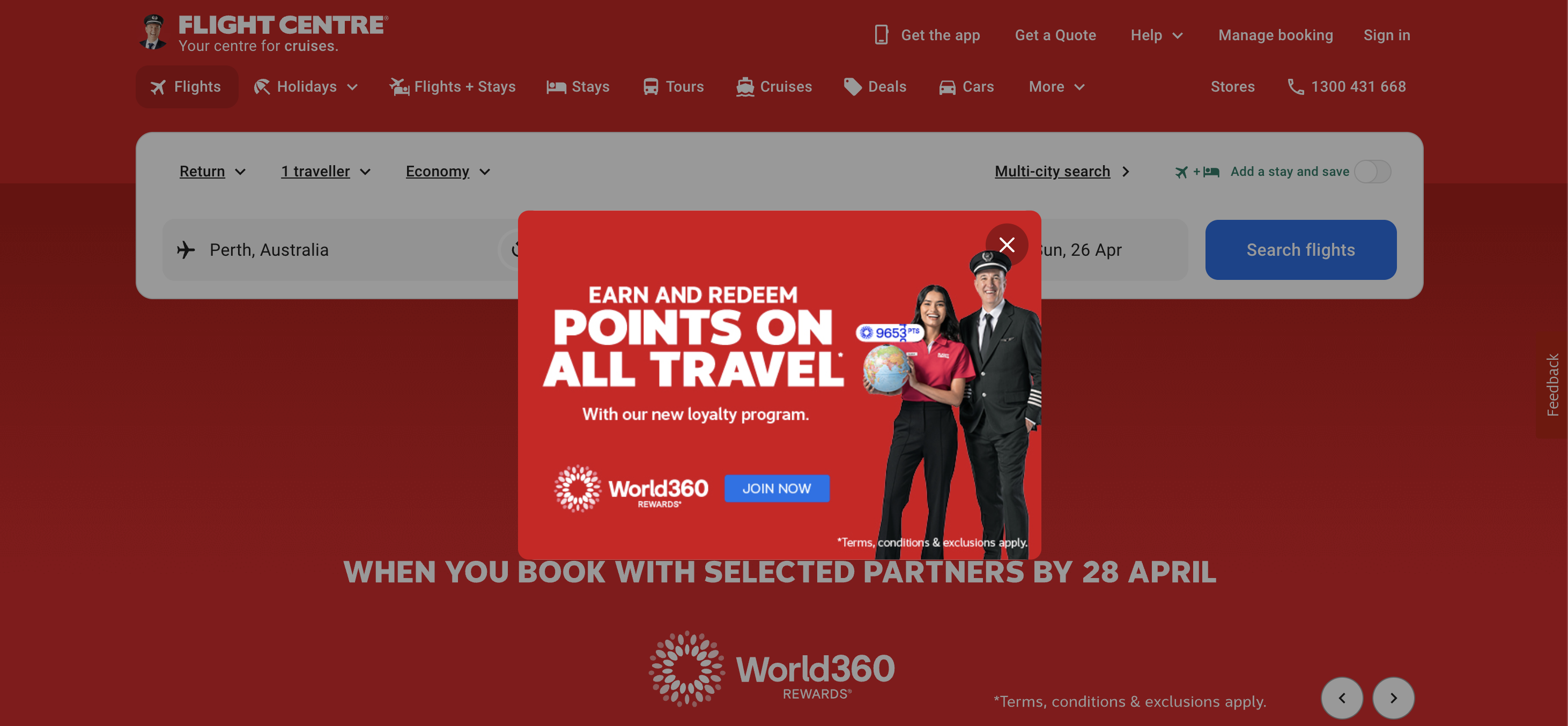
Here’s what this looks like in practice. Flight Centre uses Agentforce Marketing to increase website engagement, including personalised website pop-ups. In one of their past campaigns, they invited visitors to subscribe and go into a draw to win flights or holidays tailored to their browsing history, resulting in a 60% increase in leads.
Email is still a popular way to keep your brand top of mind and re-engage leads that may have gone cold. AI agents can trigger personalised emails based on behaviour and adapt messaging in real-time based on what a prospect has already interacted with.
For example, if someone filtered case studies by their industry but doesn’t convert, they can be sent a follow-up with stats tied to that industry. AI can also respond to emails sent to previously “no-reply” addresses, which all helps keep the conversation going.
Product activity
For SaaS businesses, you can keep the nurturing happening inside the product itself. AI agents can guide users toward key features based on their usage collected in Data 360.
This means that if a prospect starts using the product more heavily or invites other team members, AI can prompt them to book a demo or connect with sales, while alerting your team that they’re showing high intent.
For businesses selling physical products, AI can track when and why customers purchase, and then suggest relevant products or complementary items at the right moment. This keeps customers engaged and creates more opportunities for repeat sales.
How to build a SQL framework in Salesforce
So far, we’ve covered what a SQL is and how teams qualify leads. However, to make this advice helpful, we need to cover how to practically implement it.
Here’s how to set it up and make it all work seamlessly inside Salesforce.
Organising your data
By default in Agentforce Sales, your prospects are categorised by Lead, Contact, and Account.
- Lead: A contact in your system
- Contact: A qualified person linked to a company
- Account: The company that those contacts belong to
Before you do anything else, you’ll want to ensure that those coming in as Leads have enough correct information to categorise them going forward. This means fixing key fields, removing duplicates, and making sure all your data is syncing correctly.
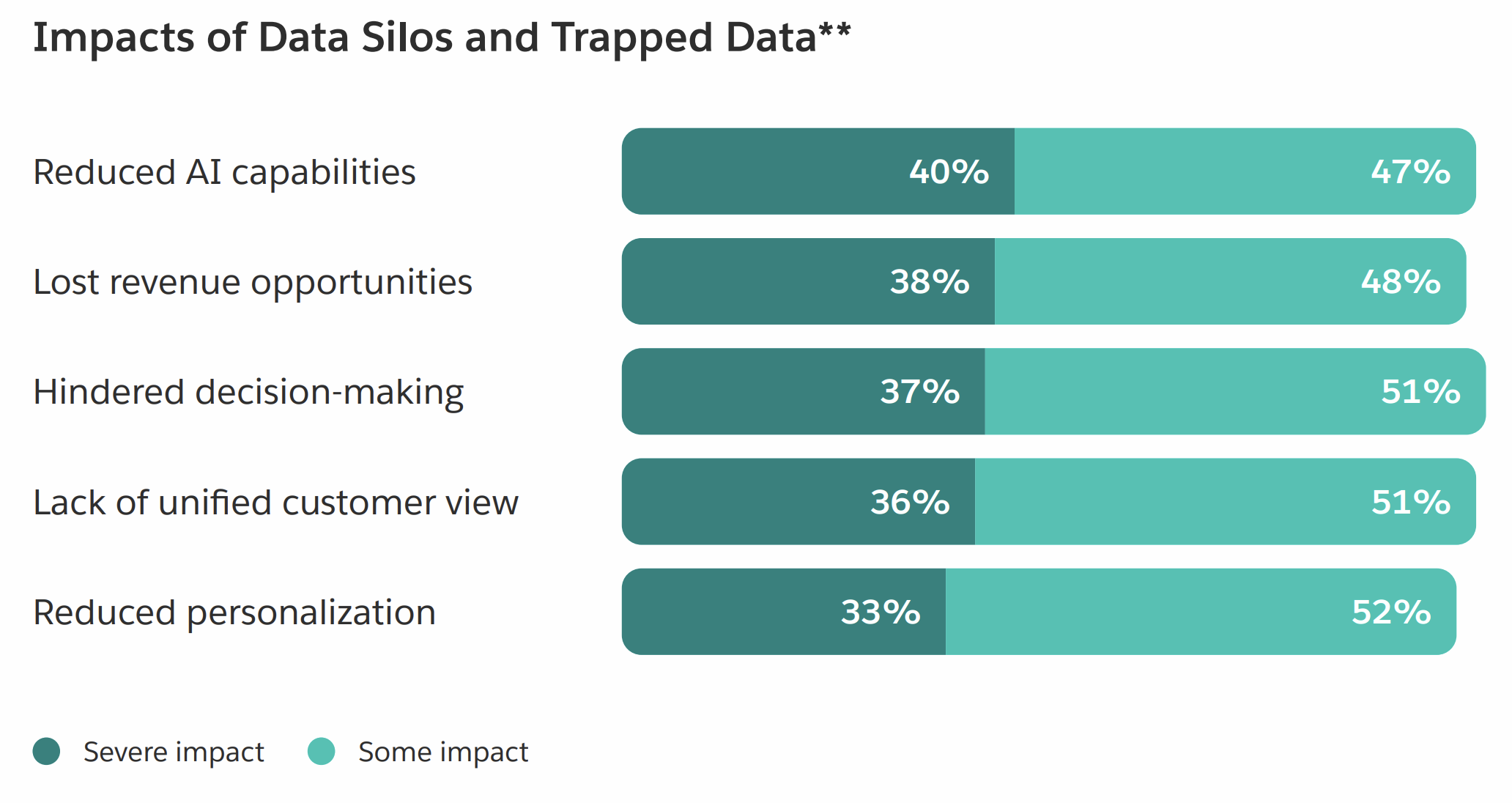
We recommend not skipping this step, as 46% of sales professionals say data quality issues hurt their sales, and 51% of sales leaders say tech silos delay or limit AI initiatives.
Understanding the different stages
In Salesforce, MQLs and SQLs work as Lead Status values during the Lead stage, like setting a tag or category. Don’t worry if that sounds like gibberish; it’s easier to understand when we look at how it works in practice.
If a person fills out a form on your website, they will become a Lead in your system. From there, they enter your automation, which assesses whether they meet your qualification criteria by matching them against your ICP and evaluating their fit for your product. If they meet that threshold, their Lead Status is updated to MQL.
From there, they are marketed to until they take a predetermined action, like booking a sales call or showing strong intent. When that happens, they are moved to the SQL stage. At this point, a sales rep reviews them and confirms if they’re worth pursuing.
They can then select to convert the Lead into a Contact, Account, and an Opportunity. From there, it’s all handled in the sales pipeline, where the sales team works the deal through stages to close.
In short, your prospects will flow through your system like this:
- Lead (Unqualified)
- Lead (MQL)
- Lead (SQL)
- Contact, Account and Opportunity
How to categorise a Lead as an MQL
Before someone becomes a SQL, they must be a MQL. First, you need to define a Flow (our name for automation, sometimes called a workflow).
Go to Setup, Flows, select New Flow and then Record-Triggered Flow (learn more about them here). Next, select Lead as the object and set it to run when a record is created or updated. This way, new leads will enter the flow.
From there, add a Decision element. This is where you define what counts as a MQL based on things like company size, industry, region, and job seniority. You will also have even more options to choose from here if you are using Data 360.
Then add an Action for those who qualify. Select Update Records and set Lead Status to MQL. You can also include additional actions here, like assigning the lead to a salesperson or sending a Slack notification.
The Flow from MQL to SQL
Now create a separate but similar Record-Triggered Flow. Start again by selecting Lead as the object and set it to run when a record is created or updated.
From there, add a Decision step that checks two things:
- The Lead Status is already MQL
- The Lead has taken a predefined high intent action (booked a demo or requested pricing)
Then add an Update Records action to set the Lead Status to SQL when those conditions are met.
From SQL to Opportunity
In the same Flow, add an Action to trigger your AI agent (using Agentforce) once the Lead Status is set to SQL. The agent can summarise the prospect’s activity and recommend whether it looks ready for sales.
Next, add another Action to assign the Lead to a salesperson and notify them with that AI-generated context. From there, the rep reviews the Lead and decides whether to click the Convert button to turn the lead into an Account, Contact, and Opportunity.
Now we could go into the sales pipeline, but that’s a whole different subject.
Please keep in mind that this is just one way that you could get started with MQLs and SQLs in Salesforce. There are other ways to deepen or restructure this Flow as you continue to evolve your processes and find what works best for your team.
If you’d like to learn more about automation in Salesforce, take our free Flow builder course here.
Get the latest sales tips delivered to your inbox.
Sign up for the Salesblazer Highlights newsletter to get the latest sales news, insights, and best practices selected just for you.
Easy mistakes teams make with their lead lifecycle stages
Since there are many different ways to structure your lead lifecycle stages, the main challenge is picking one and sticking to it.
For example, some sales teams like to be more hands-on and assess leads at the MQL stage, and others like to be less involved and wait till after a call to even consider a lead a SQL. No matter the method you choose, keep it consistent.
Here are a few mistakes that are easy to make but can make your process less effective.
Overcomplicating the lifecycle
Adding too many stages (MAL, SAL, etc.) without a clear purpose and person to manage each stage slows things down, while not providing any additional targeted sales or marketing.
When you first start, keep it simple. Add a stage only as you grow and can connect with prospects in that stage in a meaningful way.
Optimising for volume, not quality
Trying to push more leads into the SQL stage that aren’t ready might result in your marketing coming on too strong. From your side, this might look positive, as you are moving people through the stages, but they will be more likely to drop off if they aren’t properly primed for sales.
To avoid this, keep an eye on the Lead to MQL and MQL to SQL rate. There isn’t a single rate to aim for, but it is unlikely that the majority of Leads will make it to the SQL stage. Expect to have this sit around 10% to 40%, not 95%.
Blurry stage definitions
Some teams struggle to define and stick to what makes a MQL or SQL. If they are used interchangeably or are set by individual salespeople, it becomes hard to track and manage your leads.
Instead, work as a team to define clear, objective criteria for each stage and document them. You can also train Agentforce to understand the criteria and recommend stages based on its objective assessment.
Ignoring feedback loops
It’s a common problem that marketing keeps sending leads without understanding why sales rejects them. Sales is then wondering why marketing is sending through bad leads. Instead of continuing to wonder, get together the two teams, capture the disqualification reasons and then add them to your Flow.
Supporting your sales and marketing engine
After investing so much into generating demand, the focus should be on qualifying leads properly and acting at the right moment. With the right setup, you can move leads through your lifecycle in a way that’s consistent and easy to manage.
With Agentforce Sales and Agentforce Marketing, you can build the lifecycle end-to-end. You can define your stages, manage data quality, run targeted nurture campaigns, track intent signals, and automate how leads progress through to SQL. From there, you can introduce AI agents to pull more advanced data and build out more ways to segment and support different leads.
To get started, you sign up for a free trial of Agentforce Sales.
FAQs
A MQL is a lead that you have captured the information from – one that fits your ICP. They are a Marketing Qualified Lead because they qualify as someone who is worth marketing to. A SQL is further along, so they have shown clear buying intent and are ready for sales to step in.
They already meet your ICP and have taken a high intent action, like booking a demo, requesting pricing, or asking to speak with sales.
It’s the process of deciding whether a lead is a good fit and worth pursuing. This usually looks at their company details, role, and level of intent.
Lead scoring is where you assign value to leads based on their fit and behaviour. This can be done with rules or AI agents gathering data and matching it to past closed deals. Tools like Salesforce’s Agentforce Sales can help you track these signals and prioritise better leads.