




AI is changing how we work, fast. With the rise of large language models and agentic tools, anyone can now prompt their way to answers that once required an engineer, an analyst, or a BI team. This shift, often called “vibe coding” (a term coined by Andrej Karpathy in early 2025) is real, powerful, and here to stay.
But there’s a catch.
Vibe coding works great when AI has the right context. When it doesn’t, you don’t get an error message, you get a confident, wrong answer. And in complex enterprise data environments, that’s a serious problem.
In this article we share a concrete example of what goes wrong when AI agents query raw systems without grounding context. We then show how certified data, AI Skills, and Tableau MCP fix the problem.
The Problem: AI Without Context Produces Inconsistent Results
When we ask an AI agent to pull a metric, the agent doesn’t just retrieve data – it generates a probabilistic response. This means that even with the same question, different users can get different answers, depending on which data sources the agent finds, which logic it applies to retrieve data, and what prior context it has that guides its decisions and actions.
In enterprise environments, this problem is amplified. Years of accumulated data, varying degrees of data quality, varying business definitions, and inconsistent data field logic give AI agents plenty of room to go wrong with no built-in way to know they did.
Example: What Goes Wrong — The MQL Reporting Problem
After Q1 FY27 closed, our Marketing team was preparing for a quarterly pipeline review. A simple question came up: “How many marketing qualified leads (MQLs) did we generate last quarter?”
Marketers asked Slackbot this same question two different times. Here’s what happened.
| Description | Slackbot Results 1 | Slackbot Results 2 | Leads Tableau Dashboard |
|---|---|---|---|
| MQLs | 50,000 | 75,000 | 100,000 |
| Data Source | Org62 Lead Object | Org62 Lead Object | Certified dataset in Marketing Data Warehouse (MDW) |
| ‘Behind-the-Scenes’ Logic | MQL Campaign ID is not nullLead Created Date in Q1 FY27 | MQL Date in Q1 FY27 | Snap Type = ‘Quarterly’Funnel Stage Name = ‘leads_qualified’Nonlinear Funnel FYQ = ‘FY2027 Q1’ |
Marketers got two different answers. Same question. Same underlying system (Org62 is Salesforce’s internal instance of Sales Cloud). Neither Slackbot answer matched the value from the authoritative source of truth: the Leads Tableau Dashboard.
Why were the Slackbot results wrong?
Both Slackbot queries found the Org62 Lead object, but neither used the certified MQL definition. The key issues:
MQL Campaign IDandMQL Dateare not aligned with the official MQL definition — they’re related fields, not the correct ones.- Org62 provides real-time data, meaning the Q1 FY27 number can shift retroactively as leads change status as time progresses.
- A lead can move in and out of MQL status, making Lead object queries inherently unreliable for period-over-period comparisons.
Why do we trust Leads Tableau Dashboard?
The Leads Dashboard is the authoritative source for MQL statistics. The dashboard pulls from the Marketing Data Warehouse (MDW) certified dataset, which contains a quarter-end snapshot with explicit business logic that captures the official business definition of MQL:
Snap Type = 'Quarterly'ensures point-in-time accuracy.Funnel Stage Name = 'leads_qualified'uses the governed MQL definition.Nonlinear Funnel FYQ = 'FY2027 Q1'anchors the result to the correct fiscal period.
This query pulls numbers from a data layer built specifically for accurate, consistent reporting.
| Factor | Explanation |
|---|---|
| Non-deterministic AI behavior | Agents generate probabilistic responses, so inherent variability exists even with identical prompts |
| Transient lead data | Leads can change MQL status within or across quarters; real-time data doesn’t reflect period-end reality |
| Different historical context | Prior Slackbot conversations and Slack content influence LLM outputs differently for each user |
| Varying prompt interpretation | Slight differences in phrasing could lead to different logic being applied |
| Different LLMs / Skills | Advanced vs. basic models and which Skills are active produce different results |
The Solution: A Verified AI Skill Grounded in Certified Data with Semantics
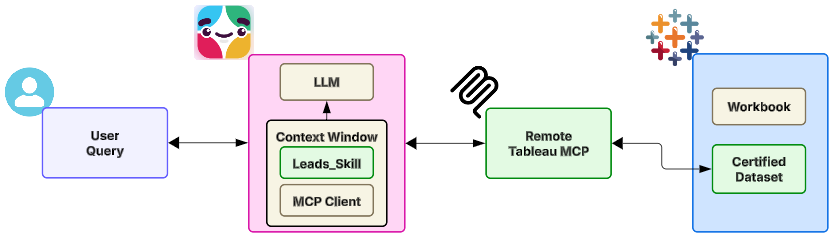
The fix is to ground the Slackbot agent properly. Here’s the three-part approach Salesforce uses to ensure Slackbot returns results that match the authoritative Leads Dashboard every time.
Step 1. AI Skill: Give the Agent the Right Guidance
An AI Skill is a structured set of instructions (i.e., a Markdown file) that tells Slackbot exactly how to answer specific questions. For lead funnel metrics, the Leads_Skill defines:
- Which data source to use – e.g., the MDW certified table, not the raw Lead object
- Which filters to apply – e.g.,
Snap Type,Funnel Stage Name,Nonlinear Funnel FYQ - What business rules govern MQL classification
Without this, Slackbot improvises. With it, Slackbot follows a governed, repeatable path.
Step 2. Tableau MCP: Semantic Models for Machine-Readable Business Logic
A Tableau MCP server connects Slackbot directly to Tableau dashboards and, more importantly, to the semantic models underlying them. The semantic models translate raw data into governed, machine-readable business logic, metric definitions, filter rules, relationship maps, etc.
When Slackbot queries through the MCP, it’s no longer guessing logic – it’s reading it from a certified source. Users can ask questions in plain language and get results that are consistent, accurate, and aligned with what the Tableau dashboard shows. The data is further enriched through integration with our Data 360 instance and Knowledge Graph, transforming isolated data silos into an interconnected, discoverable information network that any business user can navigate through Slackbot, without needing technical expertise.
Step 3. Certified Dataset: The Single Source of Truth
The AI Skill grounds Slackbot in the MDW certified dataset – the same foundation that powers Salesforce’s Leads Dashboard. This dataset is developed, validated, and governed by the Chief Data Office, in close collaboration with Salesforce Marketing.
The result: When a Slackbot user asks about Q1 FY27 MQLs using the Leads_Skill and Tableau MCP, they get 100,000, exactly matching Leads Tableau Dashboard. Every time.
Data-as-a-Product: The Philosophy Behind the Solution
The approach described in this article isn’t a one-time solution – it’s a strategic framework. Data certification and data democratization are core tenets of Salesforce’s Chief Data Office. Certified data establishes the standard layer for enterprise reporting. AI Skills ensure reliable outputs across platforms. MCP connections and Knowledge Graphs make data and insights accessible to everyone, not just analysts who know SQL.
Data-as-a-product is the idea that data should be as discoverable, usable, and reliable as any other product. When AI agents are built on this foundation, vibe coding becomes a feature, not a risk.
The Results: Business Impact
Grounding AI agents in certified data, AI skills, and Tableau MCP doesn’t just fix the accuracy problem; it fundamentally changes how teams interact with data at scale. Here’s what that shift looks like in practice:
- Increased data democratization without sacrificing accuracy. Business users across Marketing, Sales, and Operations can now self-serve complex metrics through natural language queries, expanding data access from a handful of SQL-proficient analysts to hundreds of stakeholders who need insights to drive decisions.
- Enhanced cross-functional alignment on key metrics. When Marketing, Sales, and Finance all reference the same MQL definition through AI-powered queries, pipeline growth discussions become more productive, leading to better resource allocation decisions.
- Improved audit trail and compliance readiness. Every AI-generated metric now traces back to certified datasets with documented business logic and metadata, creating an automatic audit trail that satisfies both internal governance requirements and external compliance frameworks.
- Scaled institutional knowledge beyond individual experts. Business definitions and analytical approaches that previously lived in the heads of senior analysts are now codified in AI Skills, making organizational knowledge resilient to team changes and accessible to new hires from day one.
Together, these outcomes anchor every stakeholder on a consistent, auditable definition of MQL, ensuring that when AI gives you an answer, it’s one you can act on.
Conclusion
Vibe coding unlocks productivity and speed. The ability to ask a question and get an answer without writing SQL, building a dashboard, or filing a ticket is a genuine leap forward for enterprises. But this productivity is only valuable if the answers are right.
The lesson from our MQL example is straightforward: AI agents are only as reliable as the data and context they’re grounded in. Raw data systems, inconsistent logic, and the probabilistic nature of agent behavior produce confident, wrong answers. In enterprise analytics this has real consequences.
The solution is equally straightforward: certified datasets, governed semantic models, and AI Skills that guide agents to generate the correct answers.
To harness the power of agentic AI without sacrificing data integrity, organizations must:
- Certify the data – establish a governed dataset as the single source of truth
- Build AI Skills – provide context-rich instructions for agents to follow
- Connect semantic layers — use Tableau MCP and Knowledge Graphs to make business rules machine-readable
The future belongs to organizations that combine the agility of AI-driven development with the discipline of data governance. Grounded in certified, contextual frameworks, vibe coding becomes an asset instead of a liability.