


Consider a network of independent car service companies using the same B2B Salesforce Experience Cloud portal to schedule maintenance visits; coordinate time-sensitive work; and manage service requests, appointments, vehicles, and locations associated with their organization.
Each company already has its own identity infrastructure and security standards. Some use Okta, others use Microsoft Entra ID or Ping, while a third group may have users who still authenticate directly through Salesforce. From a business perspective, using the portal should feel like accessing any other trusted business application: users should authenticate through their organization’s existing identity provider without having to understand how the Salesforce solution is configured behind the scenes.
Supporting the first company is easy: add a single sign-on (SSO) configuration, create the necessary sharing mechanisms, and move on. The second is manageable too. But what happens when you reach the twentieth? If every new organization introduces another login path, another access exception, and another deployment, onboarding has quietly become a real challenge.
The increasing complexity that often originates from siloed data, access, identity, and onboarding efforts was a recurring pattern I kept seeing across different real-world Experience Cloud implementations. The architectural turning point was realizing that those requirements were all connected by the same anchor. As every external user is associated with the company represented by an Account, that Account could serve as the foundation for authentication routing, data access, and onboarding configuration.
The less obvious insight was recognizing that familiar Salesforce building blocks, like the User → Contact → Account relationship, Login Discovery, and native Account-based and Contact-based sharing, could all be aligned around the same Account context. The three decisions below show how it works.
Decision 1: Make Account the foundation for identity and data access
In Experience Cloud implementations where external users represent business organizations, Account can represent much more than a business record. Unlike internal users, an external user is typically created from a Contact associated with a business Account. In this model, every external user is linked to one Contact and every Contact belongs to one Account. That creates a reliable relationship path: User → Contact → Account.
- User represents the identity that can log in
- Contact represents the individual person
- Account represents the organization whose policies, data, and users must be managed together
Users and Contacts may change as people join or leave the company, but the Account remains the stable anchor. That makes it a natural place to reference decisions that apply to the whole company, such as its preferred identity provider, authentication configuration, and onboarding status.
In practice, choosing Account means designing several parts of the solution around the same relationship:
- Represent each company as a business Account
- Ensure every external user resolves through their Contact to the correct Account
- Associate organization-scoped records with that Account through lookup relationships
- Keep external access restrictive by default and grant it through the appropriate Account-based or Contact-based sharing mechanism
- Store company-level identity and onboarding configuration on the Account
Account does not automatically route authentication simply because an external user is related to it. The architectural decision is to use the resolved Account as an input to the authentication process. Once the system knows which Account the user belongs to, it can read the identity configuration associated with that Account and determine the appropriate identity provider.
Explore the Well-Architected Framework
Go deeper on architecture principles and patterns that can help guide identity, access, and sharing decisions across your Salesforce implementation.



Decision 2: Use Login Discovery to route authentication
Now that we know which authentication method is associated with the end user, the next step is to present it to them. The easy option is to show separate login buttons for each identity provider and the standard Salesforce login, but that is hardly user-friendly and pushes part of the architecture onto the user.
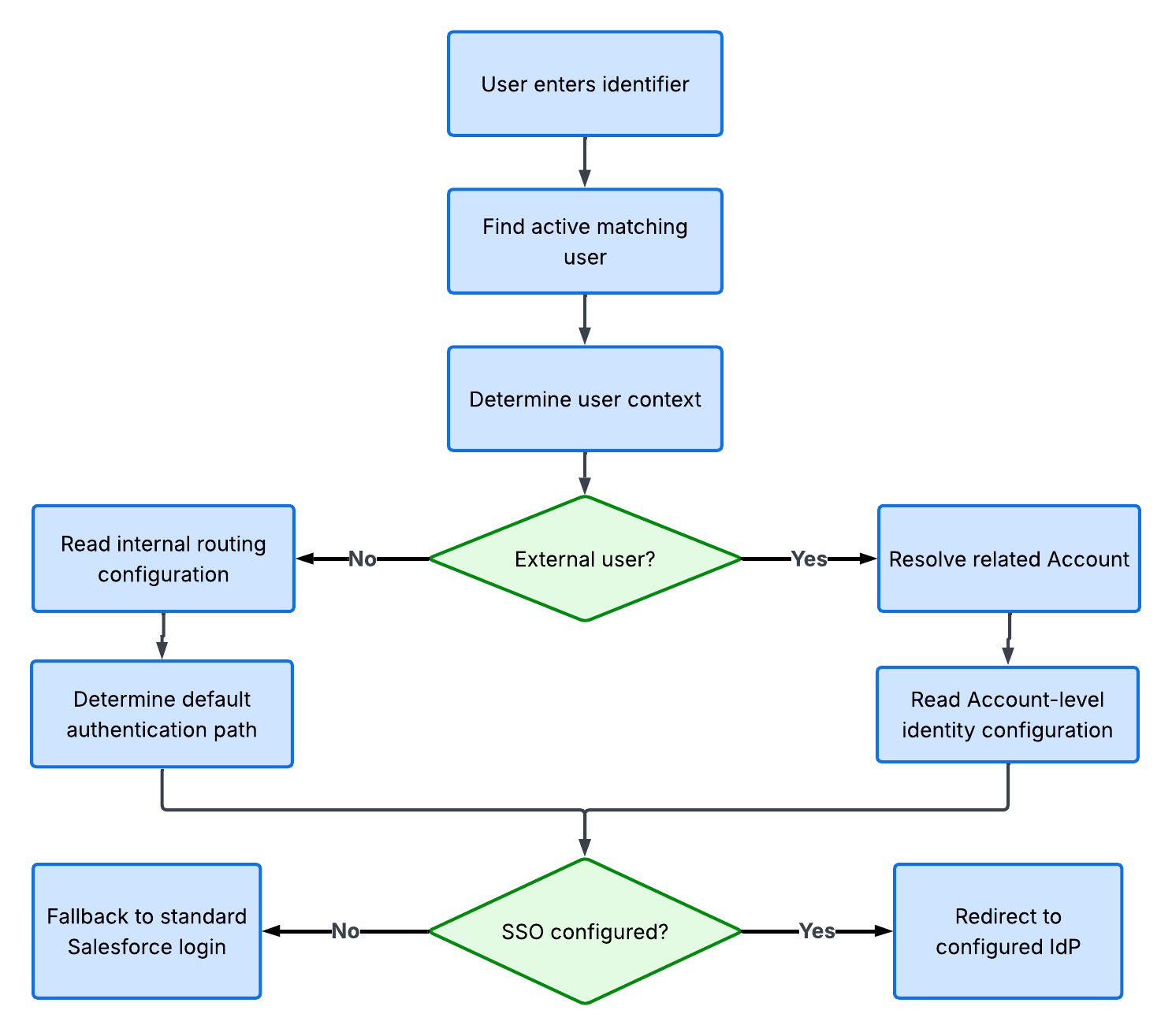
A more seamless option is Login Discovery. Instead of asking users to choose an authentication method, the login experience asks them for something familiar, such as their email address. The Login Discovery handler then identifies the external user, follows the User → Contact → Account relationship, and retrieves the authentication configuration linked to that company. That configuration could live directly on the Account, point to a related configuration record, or be maintained through custom metadata. The key architectural principle remains the same: routing should be driven by Account context and reusable configuration.
This keeps the authentication model flexible without tying the routing logic to a specific vendor. Account-level configuration identifies the authentication path selected for each organization. The Login Discovery handler uses that configuration to resolve the relevant SSO setup and route the user to the correct identity provider. As an example, for a SAML-based authentication path, you can store a provider key on Account, map that key to an existing SSO configuration, and use Auth.AuthConfiguration.getSamlSsoUrl to generate the redirect link dynamically.
At a high level, the routing flow can look like this:
Decision 3: Let access follow identity
Users associated with a business Account should access records that belong to that company. That means service requests, appointments, locations, and other company-scoped records need a direct or indirect relationship to the same Account. Of course, the relationship alone does not grant access. An Account lookup tells Salesforce which company a record belongs to. It does not magically make the record visible. Salesforce still needs an explicit sharing mechanism to open access.
In line with the Well-Architected Framework principle of least privilege, the best starting point is the most restrictive external organization-wide default (OWD), typically Private, with access then granted deliberately through the sharing model that best matches the requirement. The right mechanism depends on how access needs to behave:
| Access Requirement | Sharing Approach | License Implication |
| Every user from a company should see records for their Account | Sharing sets | From a record-sharing perspective, Customer Community is sufficient |
| Users within the same company need different access levels, manager visibility, ownership-based access, criteria-based sharing, or individual exceptions | Standard sharing (role hierarchy, sharing rules, manual sharing) and/or Apex-managed sharing | Requires Customer Community Plus or Partner Community |
| Users associated with one Account need access to selected records belonging to another Account | Account relationship data sharing rules and/or Apex-managed sharing | Requires Customer Community Plus or Partner Community |
Sharing sets can grant access by matching the user’s Account or Contact to a corresponding relationship on the target record. This is a natural fit when everyone from the same company should receive the same relationship-based access. When access must vary within the same Account, for example, among service advisors and diagnostics teams, a more flexible sharing model may be required.
Sharing requirements influence license selection during architecture design. Begin with the functional question: how should access follow the Account context? Then choose the least complex sharing model and license that can support the answer. License selection must also consider the objects, features, and platform capabilities users need, not record sharing alone.
When the relationships are consistent, authentication and data access can follow the same organizational model. The Account identifies the company, provides the context used to select the appropriate authentication path, and establishes the relationship boundary for its data.
Learn with Platform Sharing Architecture Fundamentals
Learn how to design a sharing model that supports secure data access today while adapting to future requirements, with guidance on key components, use cases, real-world solutions, and troubleshooting.
Turn onboarding into a configuration exercise
The real test of this architectural approach comes when the next company needs to be onboarded. This is where the earlier architectural decisions begin to pay off. Does onboarding take a few configuration steps or does it trigger another deployment project?
Login Discovery uses Account-level configuration to route authentication, and data access follows the same Account relationships. A Salesforce Admin only needs the following configuration steps:
- Create (or find) an Account for the new company
- Configure the company-related data
- Specify the preferred authentication method at the Account level
- Configure authentication routing and identity mappings
Onboarding is now more predictable and repeatable for the team setting it up while the experience feels seamless for external users using the portal.
Next steps
On your next Experience Cloud implementation, consider Account first and let identity, data access, and onboarding all follow from it. Center the design on that one relationship, and onboarding the twentieth company becomes a configuration exercise instead of another deployment project.
Explore Salesforce resources:
- Explore the Security pillar of the Salesforce Well-Architected Framework for patterns and anti-patterns spanning organizational, session, and data security
- See the Platform Sharing Architecture guide for a deeper look at how Salesforce manages record-level access and sharing at scale
- Review upcoming Security-Related Product Updates to the Salesforce Platform: User Identity, Data Protection, and Access Controls to minimize security risks in your org and better understand evolving identity assurance requirements
- Complete the Identity for Customers Trailhead module to explore how customer identity can be customized and aligned with different authentication patterns
- Explore examples of extending and customizing a LoginDiscoveryHandler to align authentication routing with your org’s needs
- Complete the Engage with Your Partners Trailhead challenge to get hands-on experience with site-specific sharing and sharing set concepts
Subscribe to the Salesforce Architect Digest on LinkedIn
Get monthly curated content, technical resources, and event updates designed to support your Salesforce Architect journey.