How to Align Integration Patterns to Use Cases


A recap of episode two of the Think Like an Architect series, breaking down a real-world scenario for data virtualization and fire and forget synchronization.

A common challenge for architects is to design solutions for complex requirements where data is scattered across legacy on-premises databases and modern cloud platforms. As an architect, the value you bring isn’t just in finding an answer, but in breaking down the problem, validating assumptions, and justifying the direction you take.
In the second episode of Think Like an Architect, we looked at aligning integration patterns to use cases. Much like our first episode — where we deconstructed how to connect Agentforce to external files — we focused on the process in addition to the final product. Rather than presenting a completed solution, we deconstructed the architectural thinking process in real time. This transparency helps you build the mental muscles needed to solve similar challenges in your own architecture landscapes.
Use the “What, How, and Why” Approach
To design scalable solutions and guide us through the thinking steps, we use a repeatable three-step method to move from a business requirement to justified architectural decisions:
- What: Highlight key phrases in business requirements to help paraphrase the essence of the problem into concise High Level Requirements (HLRs). This ensures you are solving the right problem from the start.
- How: Align technical solution options directly to your HLRs. We use live diagramming to visualize options and digital sticky notes to capture questions, assumptions/limitations, and decisions. It is vital to tie your assumptions to your decisions, as a decision may need to change if an assumption is later proven incorrect.
- Why: Capture questions, assumptions and decisions in the How-step to create an Architectural Decision Record (ADR). Having such a record ensures that stakeholders, and your future self, understand the rationale behind a specific direction.
Think Like an Architect: Aligning Integration Patterns to Use Cases
In this interactive episode, experts apply the What/How/Why approach to design a solution that exposes millions of on-premise records in Salesforce without replicating data and consider the best approach to send updates to an external system.



What: From Business Requirements to High-Level Requirements (HLRs)
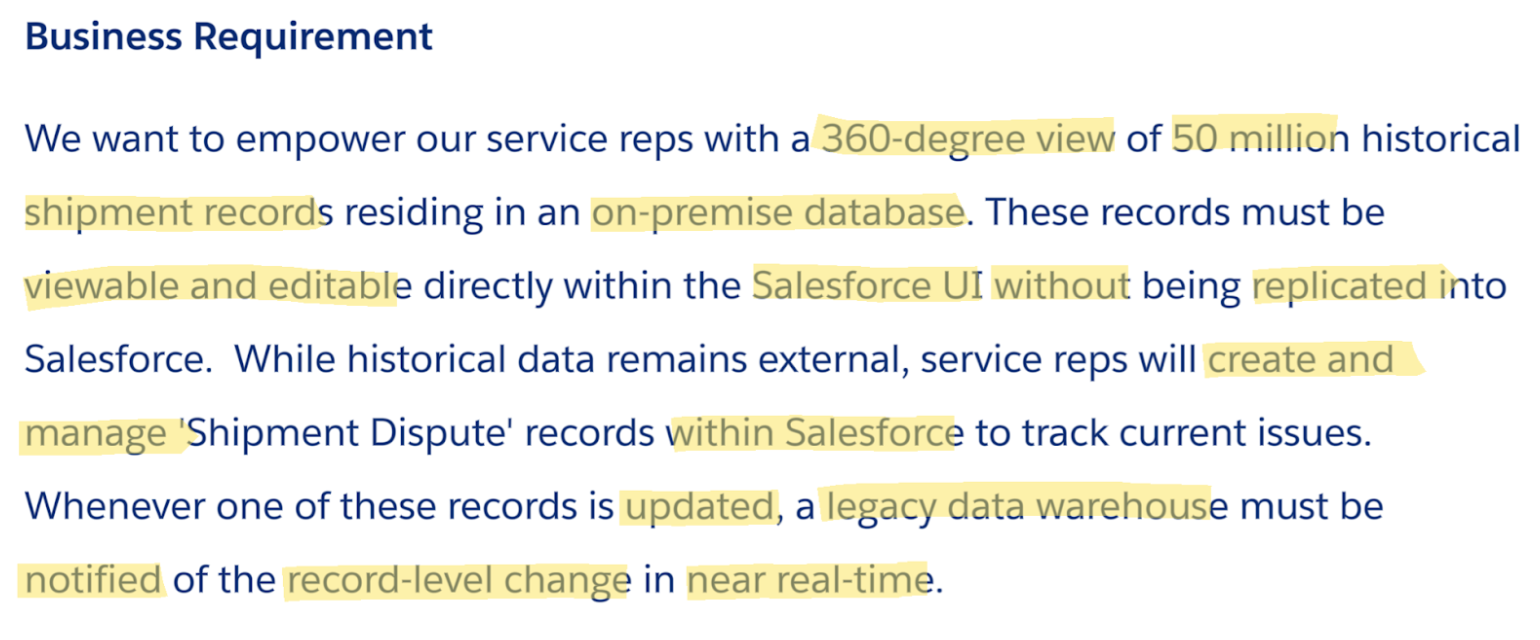
In the “What” step, let’s look at the specific challenge from episode two. We start with a raw business requirement and use highlighting to indicate the key parts, as shown below.
Paraphrase into HLRs
By stripping away the narrative, you arrive at three clear High-Level Requirements:
- Expose 50 million Shipment records from on-premise database in Salesforce without replication
- The 50 million Shipment records that are exposed require read/write access from the Salesforce UI
- Updates to Shipment Dispute records in Salesforce require a notification of what has changed to be sent to DWH in near real time
Note that the HLRs paraphrase rather than use the exact words from the business requirement. This is essential in validating with the business stakeholders that you understood the intention of their requirement. To show you how to evaluate solution options, we move into the “How” step by following the trail of questions, assumptions, and decisions captured during our live session.
How: Aligning solutions to your HLRs
In the “How” step, we evaluate solution options against your HLRs. To keep your thinking organized, track your Questions, Assumptions, and Decisions alongside your technical diagram.
Evaluating HLR 1 and 2: Options for the data virtualization integration pattern
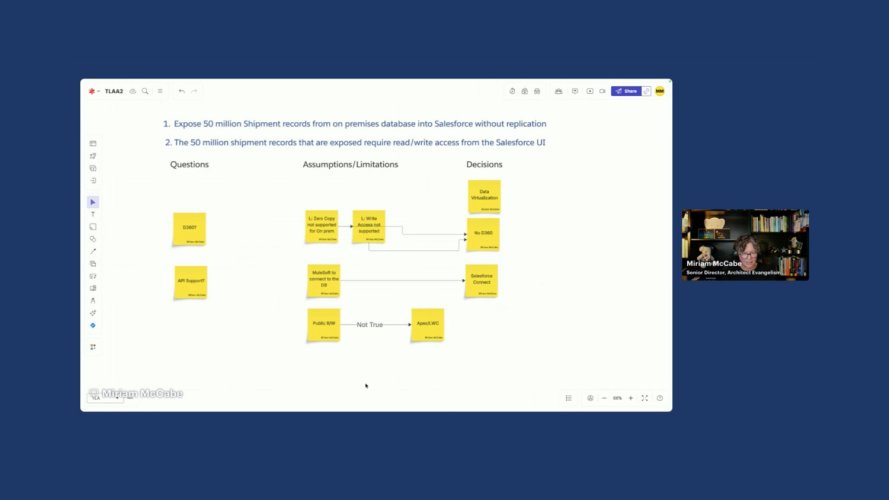
We group HLR 1 and 2 together as they are closely related requirements both dealing with the 50 million Shipment records. We decide to focus on the Data Virtualization pattern because of the requirement to realize a solution “without replication” of data.
Exploring Data 360 zero copy as virtualization pattern
The first solution direction we explore leads to questions about the rest of the landscape. We decide to think through whether Data 360, if present in the landscape, would be a good option leveraging its zero copy abilities together with Data Cloud One as a virtualization strategy.
There are two main drivers that make use decide against this option:
- Zero Copy does not support on-premises databases at this stage and
- Data Cloud One does not support write back.
Because of these factors we decide to rule out Data 360 even if it turns out that it is part of the application landscape.
Solving for read-write access through the Salesforce UI
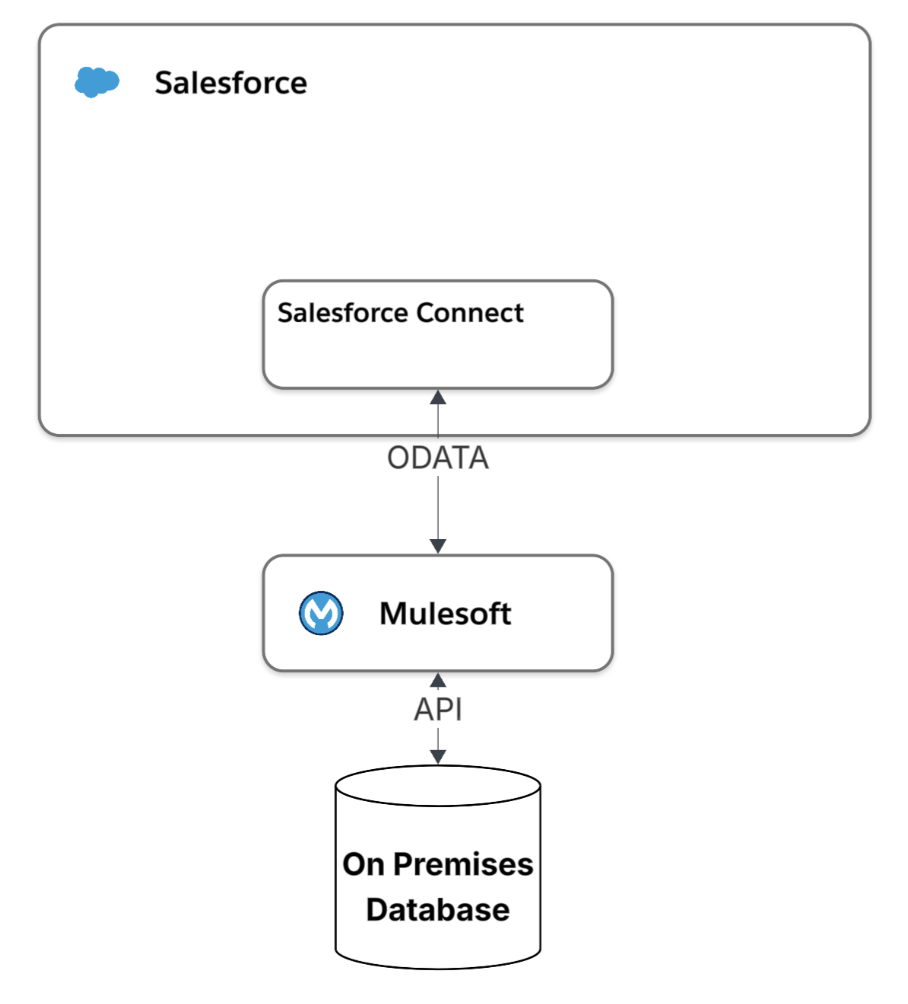
We now want to find the best solution for providing a 360-degree view with read-write access with the least amount of build effort involved. Salesforce Connect seems like a promising candidate.
- API connection: We first assume that there is a way to connect to the on-premise database as otherwise virtualization would not be an option. We also assume that MuleSoft can use one of its many features to connect whether through API or older protocols such as JDBC or ODBC.
- Salesforce Connect: There are a few drivers that support a decision to go for Salesforce Connect:
- We assume that we want to benefit from the out of the box UI components to build out the 360-view of the customer rather than build our own
- We know that MuleSoft can transform the data from the on-premises database and expose as ODATA 4.0, supporting a read and a write option in line with the requirements without having to create separate API calls for read and write actions.
- Org-wide default (OWD) of Public R/W is acceptable: We assume Public Read/Write OWD is acceptable for Shipment records in External Objects, as record-level sharing is limited. If you need to control access to specific external records, you must implement custom LWCs and Apex controllers, as standard sharing rules do not apply to Salesforce Connect.
Because of these factors, we are confident that Salesforce connect is the best fit resulting in this architecture picture.
HLR 3: Notifying the legacy data warehouse of data updates
In the third and final HLR, we again start with a decision, this time to use the fire and forget integration pattern. This decision is driven by the words “near real-time” in the requirement that point away from Batch synchronization. As there is no end use that is waiting for the notification to be sent from Salesforce there is also no need for a request and reply integration pattern.
When deciding which Fire and Forget, pattern to use, the first question is what the nature of the payload, or message content needs to be:
- Snapshot or Delta: Given that the requirement makes mention of sending across ‘what has been changed’ we assume that sending the Delta is the right decision. This drives us towards using CDC, or change data capture as this will manage both the trigger (when the data is updated) and the message payload (what has been changed)
- CDC vs Platform Events: We briefly consider platform events as they are a powerful tool as well, but because we assume there is no need for a payload that could vary depending on logic we consider CDC a better fit. Had we used platform events we would have had to manage the triggering flow or apex to send the event as well.
As we already have MuleSoft in the landscape from the previous requirement, we decide that MuleSoft will subscribe to the events and manage the updates into the Data Warehouse or DWH.
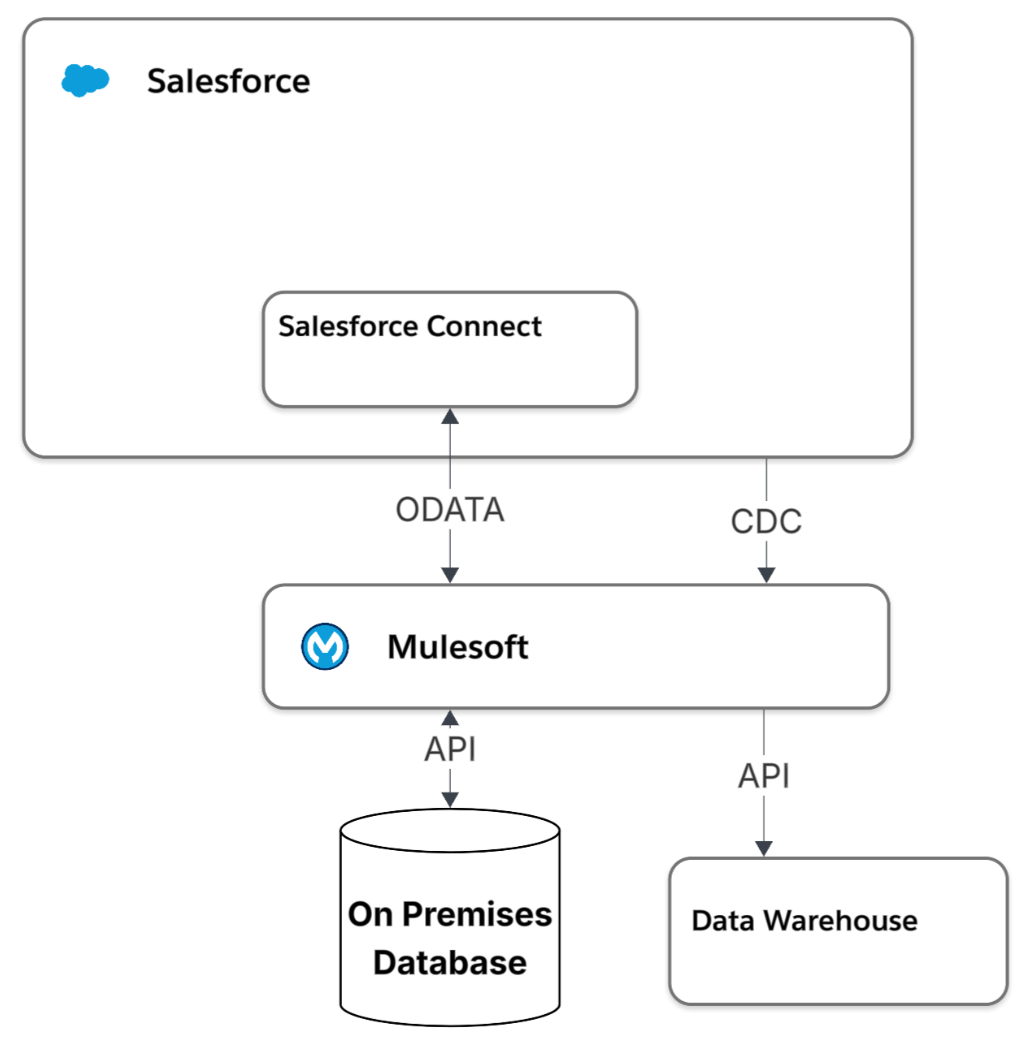
For both requirements we discard the option to build our own APIs in favor of OOB solutions that have been built and designed to address the pattern they are solving for.
Why: Architectural Decision Records (ADRs)
In the “Why” step you justify your direction to stakeholders and your future self. During the live stream, we emphasized that an architect’s value is not in the solution, but in the rationale. With the questions, assumptions/limitations and decisions we captured, we can leverage the instructions in this blog on how to create an Architectural Decision Record (ADR) with the help of LLMs.
Expert Q&A: Deep dives into patterns
During the session, Gulal Kumar from the Office of the Chief Architect joined us to dive deeper into the technical nuances.
- Q: Why recommend the Pub/Sub API over the traditional Streaming API?
- A: The Pub/Sub API uses gRPC and HTTP/2. This allows for multiplexing, meaning you can publish and subscribe over the same connection. It is significantly more performant and is the modern standard for Salesforce eventing.
- Q: Can we use a Canvas App or IFrame for virtualization instead?
- A: An IFrame requires an existing web front-end for the database, which legacy systems often lack. A Canvas App is a request-and-reply pattern that would require custom UI changes on the legacy side, making it a poor fit for a simple 360-degree view.
- Q: How do we handle “Event Sequencing” in the Fire-and-Forget pattern?
- A: When sending updates to a Data Warehouse, the order matters. CDC provides a
changeEventHeaderwith a sequence number. We recommended handling the re-sequencing logic within MuleSoft to ensure the DWH doesn’t process an “update” before a “create.”
- A: When sending updates to a Data Warehouse, the order matters. CDC provides a
- Q: What happens if the Data Warehouse is down?
- A: This is why we use an intermediate layer like MuleSoft. It can store the event, attempt retries, and manage idempotency so that the same update isn’t applied twice once the system comes back online.
- Q: Can we use a hybrid approach for multiple subscribers?
- A: Yes. To avoid hitting Salesforce subscriber limits, MuleSoft can consume the Salesforce event once and publish it to a secondary bus like Kafka, where multiple back-end systems can listen without further impacting Salesforce.
There was one question that was not completely answered in the session, and we are providing the full answer below.
- Q: Is EventBridge a good option to use here?
- A: Yes. Salesforce has a feature called Salesforce Event Relays which provide a serverless, low-code, real-time integration to stream Salesforce Platform Events and Change Data Capture (CDC) events directly to Amazon EventBridge. Salesforce Event Relays send these events from Salesforce to Amazon Web Services (AWS), and achieve end-to-end event flow by sending events back to Salesforce. With Event Relay, we can stream events to AWS natively without writing an integration app.
Save the Date: Think Like an Architect Episode 3
Join us for the third episode of Think Like an Architect on March 26, 10:00 a.m. ET / 15:00 CET. Speaker and topic details coming soon.
Final Wrap-Up
An important takeaway for any architect is to attempt to solve the problem with the simplest, most standard tool or functionality first, then prove why it won’t work to move to more custom or made to measure solutions.
- Next Episode: Join us for the next episode on March 26th, where we will apply the What/How/Why to a new real-world challenge.
- Vote on future episodes: Help us shape the future of the series. Tell us what topics you want to see and how we can provide more value to you.
Subscribe to the Salesforce Architect Digest on LinkedIn
Get monthly curated content, technical resources, and event updates designed to support your Salesforce Architect journey.