



Every time the business changes an approval rule, someone has to change the automation behind it. A threshold moves, or an approver chain gains a step, and the request lands on your team’s backlog: open the flow, add the branch, create a new version, regression-test, deploy. From a business perspective, approval rules are inherently dynamic.
Traditional approval processes are poorly equipped to meet the demands of change. They work better with a more static version of this problem: entry criteria, steps, and approvers are set per object at design time. Keeping one aligned with a volatile matrix means multiplying process versions or hardcoding approver logic into criteria. Both drift out of sync with the business.
Flow Approval Processes modernize the mechanics, but the rules themselves still reside in flow logic. As a result, the dynamic nature is still not completely addressed and every business change remains a technical change.
A metadata-driven approvals architecture does provide the flexibility required. The rules live in custom metadata, the matching and resolution in one generic Apex engine, and the approval lifecycle in Flow Orchestration. The result is a system where adding a new approval rule can be done by creating a single metadata record with zero code changes. This post describes how it works.
Recognize when approval logic outgrows Flow
The following conditions are cost indicators, not a hard checklist. They help you evaluate whether implementing the metadata engine is worth the effort.
- Multiple levels per process that are dynamic in nature. A quote approval may depend on discount percentage, currency, and sales region. The approval chain may route through a sales manager, regional VP, Chief Revenue Officer (CRO), and Chief Financial Officer (CFO), depending on the threshold band.
- Reuse across processes. Quote approvals, risk acceptance, and change control often share the same shape, which is “determine who must approve and who must be informed from the record’s context,” but with different triggering objects and chain lengths.
Reach for the metadata engine when you can trace the ongoing cost of keeping up with rule changes: deployment time, regression testing, versioning overhead. The combination of all three factors makes that cost obvious; fewer than three means the case is real but context-dependent. The critical question then becomes how expensive a rule change actually is in your org, and whether the change can wait for a full release cycle before landing in production.
Split the work into configuration, resolution, and orchestration
The architecture of this solution pattern based on custom metadata, Flow, and an Apex engine keeps each concern in the part of the platform best suited for it.
Assign configuration to a custom metadata type
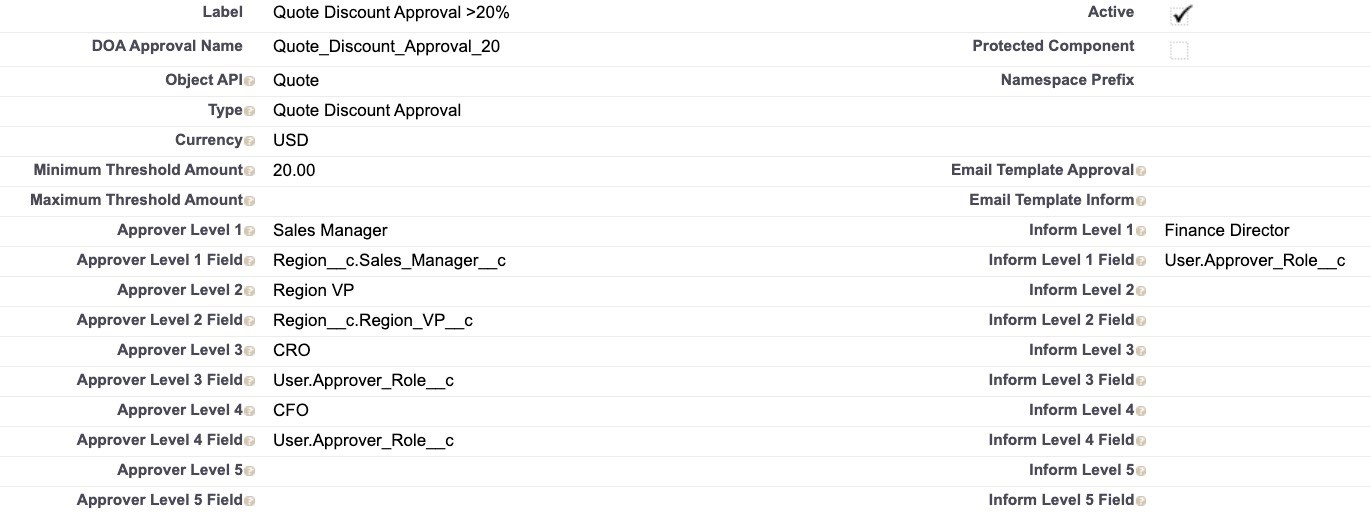
Each record of an approval-rule custom metadata type encodes one rule for one process: its scope (object, process type, currency), its activation band (minimum and maximum threshold), and its outcome (up to five approvers and five informed parties).
Each approver slot is an addressing pair: one field says where to look, the other says what to match. This pair mechanism is what makes the engine generic, because the Apex never hardcodes a field name; it resolves whatever the pair describes.
The pair takes one of three forms:
- A field-path pair, which uses only the first field of the pair, points at a related record:
Region__c.Vice_President__cmeans read the User Id on the Vice President field of the quote’s related Region record. - A User-attribute pair uses both fields:
User.Approver_Role__cin one field and CRO in the other means find the user whose approver-role field equals CRO. - A Queue pair holds the literal
Queuein one field and a queue API name in the other, routing that approval step to the queue instead of a person.
Using a dedicated attribute such as User.Approver_Role__c, rather than the standard role hierarchy, keeps approval routing decoupled from sharing and reporting structures that change for unrelated reasons.
The approval matrix emerges from the combination of records, like this slice of a quote discount approval:
| Discount band | Approver chain | Informed |
| 5 to 10% | Sales Manager | Sales Operations |
| 10 to 20% | Sales Manager, Regional VP, CRO | Finance Director |
| 20% and up | Sales Manager, Regional VP, CRO, CFO | Finance Director |
Using the 20% and up discount band as an example, this is how a custom metadata record would look with this approach:
Assign resolution to one shared flow and one generic Apex invocable.
A shared autolaunched flow finds the matching custom metadata record. It receives the Id of the record being evaluated, process type, object, currency, and the value to evaluate. A Get Records element queries the approval custom metadata type on those scope fields and the flow then filters to the record whose threshold band contains the value. It then passes the matched rule’s Id plus up to four context-record Ids to the Apex invocable (one per related object the rule reads from, matched to field paths by object type). For most use cases, up to four context variables are enough; adapt that number to your implementation.
The flow never tells Apex what object those Ids belong to: the class derives each record’s sObject type from its Id, which is part of what keeps the engine generic.
Here is the resolution logic, generalized from the production class:
// Pass 1: read the matched rule; each slot is an addressing pair
// (Approver_Level_N_Field__c says where to look, Approver_Level_N__c what to match)

// Pass 2: group field paths by object, then one query per related object,
// selecting every field the rule references
String soql = 'SELECT Id, ' + String.join(fieldNames, ', ') +
              ' FROM ' + objectApiName + ' WHERE Id IN :contextIds';
Map<Id, SObject> contextRecords = new Map<Id, SObject>(Database.query(soql));

// Pass 3: resolve each slot according to its form
if (fieldPath == 'Queue') {
    // queue form: the configured queue API name is the assignee
    assignee = fieldValue;

} else if (fieldPath.startsWith('User.')) {
    // User-attribute form: field name escaped, match value bound
    String userField = String.escapeSingleQuotes(fieldPath.substringAfter('.'));
    List<User> matches = Database.query(
        'SELECT Id FROM User WHERE ' + userField + ' = :fieldValue LIMIT 1');
    assignee = matches.isEmpty() ? null : matches[0].Id;

} else {
    // field-path form: read the User Id off the already-queried related record
    SObject record = contextRecords.get(contextIdFor(fieldPath));
    String fieldName = fieldPath.substringAfter('.');
    assignee = (Id) record.get(fieldName);
}
Invocable Apex is required because the rule references fields as strings in configuration. Flow can’t resolve those at runtime, but Apex can via dynamic SOQL and record.get(fieldName).
The same applies to querying the User object by an arbitrary attribute chosen in the configuration, like Approver_Role__c.
Apex or Flow? Decide with confidence
A practical guide to deciding when to use Flow versus Apex, including why this pattern’s resolution logic is best suited for Apex.



Assign lifecycle management to Flow Orchestration
One record-triggered orchestration per business process calls the shared flow once at the start, then drives multistage approval steps using the returned usernames or queues as assignees. A decision element performs the null check after each stage. It evaluates the next approver variable, and if empty, routes past the remaining approval stages directly to the final stage, which updates the record and sends notifications.
Follow an approval request end-to-end
Here is the pattern on one page:
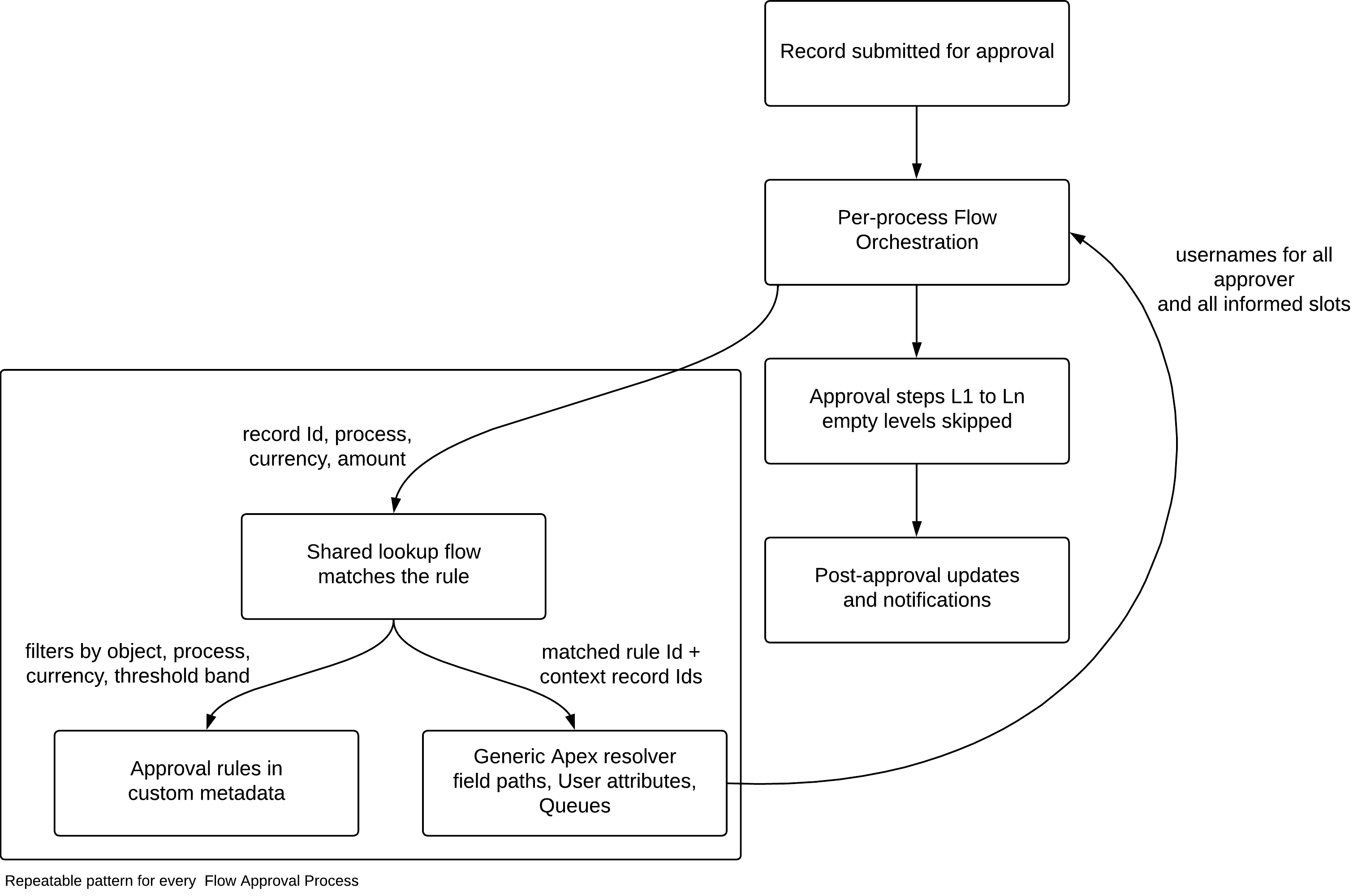
This is how one request would flow through it:
- A sales rep submits a quote carrying an 18% discount in USD. The orchestration’s first step invokes the shared flow with the Id of the record being evaluated, the process type, the object, the currency, and the value 18.
- The flow queries the metadata type for rules matching that object, process type, and currency, and gets back all three rules represented by the bands from the table above. A threshold filter leaves exactly one match: the 10-to-20% rule.
- Apex then resolves the matched rule. The first two levels are field paths read from the quote’s related records in a single query per object. The third level is a User-attribute lookup for the CRO role. The informed slot resolves the same way. Ten username/queue slots come back, with three approvers populated.
- The orchestration assigns level one to the sales manager, advances through the regional VP and CRO, sees that level four is empty, and jumps straight to the final stage, which updates the record and sends notifications.
The engine issued a handful of queries, each following the custom metadata record rather than what the class hardcoded.
Extend the rules without touching code
Adding a new band to an existing process is an admin task: create one metadata record, set the scope and thresholds, fill the approver and informed slots, and save. The rule is live on the next transaction with no deployment, no flow change, and no Apex change.
Onboarding an entirely new business process takes a Flow author but still no Apex: create the new metadata rows under a new process type, add a context-lookup branch to the shared flow if the new process reads from a related object that the flow does not already handle, and clone an existing orchestration with a new entry filter and process-type value.
Onboarding a new process should require zero changes to the Apex engine; if it does require them, process-specific logic is leaking into the layer that was supposed to stay generic.
Plan for missing rules and ambiguous approvers
Any team adopting the design should plan for rules that don’t cover a submitted value, and approver lookups that can resolve to the wrong user.
- Guard the no-match path. If no rule covers a submitted value, the engine returns null approvers, and the approval step fails at runtime with a null assignee. Treat full coverage as a hard design requirement: every process’s rule set must cover its entire value range, with no gaps between bands and a defined top band that covers all remaining values. Add an explicit decision after resolution: if no rule matches, route to a controlled “configuration missing” path that alerts an admin instead of failing mid-orchestration.
- Enforce uniqueness on attribute lookups. Resolving an approver by User attribute uses a single-row query, which silently returns an arbitrary matching user if the attribute lacks uniqueness. In the quote approval example, if two users carry the CRO role value, the approval routes to whichever one the query returns. Unlike the no-match path, this failure doesn’t expose an error, but the approval routes to the wrong person. Treat one-per-org as a requirement for any attribute used in a rule: enforce it with a validation rule, unique field, or code validation if needed.
Pressure-test your architecture decisions
The Well-Architected Framework gives a structured way to evaluate a pattern like this before committing to it.
Start with your most volatile approval process
Take the approval process that changes most often in your org and write its rules as a table: scope, threshold band, approver chain, informed parties.
Then check the table against the following three fit criteria: the scope takes more than one column (multidimensional), the rows changed more than once in the past year (volatile), and at least one other process fits the same columns (shared). Use these criteria alongside the ongoing maintenance cost (deployment time, regression testing, and versioning overhead) to determine if the expense is worth the work of implementing the engine before proceeding.
If it is, you have already done the hard part. The table is the rule set; the metadata type holds it, the Apex class resolves it, and the orchestration runs it. Rather than forcing a deployment every time a threshold moves, treat the approval process rules as data, making the next change a record instead of a release.