


Almost every successful Salesforce implementation reaches a point where the development patterns that worked on day one start to break down. What began as a nimble environment eventually grows into a large, complex org (or set of orgs), often containing thousands of Apex classes and complex business logic. At that point, a once-straightforward “Run All Tests” deployment can balloon into a multi-hour process that grinds development to a halt.
When this deployment tax becomes a burden, it changes the team’s relationship with the codebase. Maintaining high velocity requires architecting for deployment efficiency.
Apex unit tests are commonly among the biggest bottlenecks in deployment. First, they take a long time to run. And second, tests that nondeterministically switch between passing and failing (sometimes called “flappers”) can cause deployments to fail hours into execution.
This post describes three practical techniques for making deployment test runs both faster and more reliable:
- Write faster, more reliable unit tests with database mocking
- Execute the right tests using
RunRelevantTests - Execute tests more efficiently post-deployment
Write faster, more reliable unit tests with database mocking
When your application code makes a callout to other services, tests must provide mocks of the services’ responses to use instead of genuinely executing the callout. This is for two reasons:
- Callouts may be long-running because they wait on an external server’s response: a REST API that takes multiple seconds under normal load can push a test run well past timeout thresholds.
- Executing callouts in tests creates flappers because the external server introduces variables your test can’t control: the endpoint is temporarily unreachable, the sandbox IP is blocked by a firewall rule, or the third-party API returns a 429 during a rate-limit window.
Mocks, by contrast, can respond to requests in a way that is both immediate and deterministic.
Callouts, however, are not the only operation that can be slow or non-deterministic. For example, database calls (SELECT statements and DML) take considerably longer than in-memory code execution. They can also fail unpredictably because of row lock contentions, which cause UNABLE_TO_LOCK_ROW exceptions.
Fortunately, you can mock many long-running or unpredictable operations in Apex tests with clever class design. The first step is to isolate your calls to the operation into methods in a separate class. These methods should be non-static because later you will use polymorphism to apply alternative implementations. For example, consider the following class:
public class OpportunityService {
  public void createDiscountedOpp(Id accId, Decimal amount) {
    Account acc = [SELECT Rating FROM Account WHERE Id = :accId];
    Decimal discount = (acc.Rating == 'Hot') ? 0.20 : 0.10;
    Opportunity opp = new Opportunity( AccountId = accId,
                                       Amount = amount * (1 - discount),
                                       StageName = 'Prospecting' );
    insert opp;
  }
}
This class is tightly coupled to the database. As written, it’s impossible to test it without accessing the database twice: once in the SELECT statement and once in the insert operation. This not only slows down any test of the code, but also introduces the risk of row lock contention during test runs due to the insert operation.
This is a basic architectural problem: business logic and database interfacing should be separate concerns, but the OpportunityService class tries to handle both. You can maintain proper separation of concerns by refactoring the database operations into a separate class as follows:
public class OpportunityServiceDbHandlerImpl {
    public Account getAccountWithRatingById(Id accId) {
        return [SELECT Rating FROM Account WHERE Id = :accId];
    }

    public void insertOpp(Opportunity opp) {
        insert opp;
Then OpportunityService becomes:
public class OpportunityService {
    private OpportunityServiceDbHandlerImpl dbHandler;

    public OpportunityService() {
        dbHandler = new OpportunityServiceDbHandlerImpl();
    }

    public void createDiscountedOpp(Id accId, Decimal amount) {
        Account acc = dbHandler.getAccountWithRatingById(accId);
        Decimal discount = (acc.Rating == 'Hot') ? 0.20 : 0.10;
        Opportunity opp = new Opportunity( AccountId = accId,
                                           Amount = amount * (1 - discount),
                                           StageName = 'Prospecting' );
        dbHandler.insertOpp(opp);
    }
}
Now that you’ve separated concerns, tests can more easily verify the business logic in createDiscountedOpp() without actually accessing the database. Start by abstracting an interface from OpportunityServiceDbHandlerImpl and making the class implement it. Here’s the interface:
public interface OpportunityServiceDbHandler {
    Account getAccountWithRatingById(Id accId);
    void insertOpp(Opportunity opp);
}
Use this interface wherever possible in OpportunityService, and give tests a chance to inject an alternate implementation:
public class OpportunityService {
    private OpportunityServiceDbHandler dbHandler;

    public OpportunityService() {
        this(new OpportunityServiceDbHandlerImpl());
    }

    @TestVisible private OpportunityService(
            OpportunityServiceDbHandler dbHandler) {
        this.dbHandler = dbHandler;
    }

    public void createDiscountedOpp(Id accId, Decimal amount) {
        /* Same implementation as before */
    }
}
When testing OpportunityService, inject an alternative, trivial implementation of OpportunityServiceDbHandler:
@IsTest
private class OpportunityServiceTest {
    private class MockOpportunityServiceDbHandler
            implements OpportunityServiceDbHandler {
        public Opportunity lastInsertedOpp;

        public Account getAccountWithRatingById(Id accId) {
            return new Account (Id = accId,
                                Rating = 'Hot');
        }

        public void insertOpp(Opportunity opp) {
            lastInsertedOpp = opp;
        }
    }

    @IsTest
    static void shouldCalculateGoldDiscount() {
        // SET UP
        MockOpportunityServiceDbHandler mockHandler =
                new MockOpportunityServiceDbHandler();
        OpportunityService service = new OpportunityService(
                mockHandler);
        Decimal inputAmount = 100.00;
        Id fakeAccId = (Id)'001000000000000AAA';
        Decimal expectedAmount = 80.00; // 20% discount

        // EXECUTE
        service.createDiscountedOpp(fakeAccId, inputAmount);

        // CHECK RESULTS
        Opportunity inserted = mockHandler.lastInsertedOpp;
        Assert.isNotNull(inserted, 'No Opportunity inserted');
        Assert.areEqual(expectedAmount,
                        inserted.Amount,
                        'Incorrect discount applied');
    }
}
This test validates the business logic in the OpportunityService implementation without testing the database. The code that instantiates OpportunityService determines which specific implementation of OpportunityServiceDbHandler the instance uses, a pattern known as dependency injection. Injecting a test implementation of database handling operations is efficient because the purpose of the test is to validate the business logic in OpportunityService rather than the Salesforce implementation of standard database operations.
Mock dependencies with the Apex Stub API
Rather than writing a concrete test implementation of your interface, the Apex Stub API lets you generate a mock object at runtime and define its behavior inline. It’s a lighter-weight alternative when you don’t need the full control of a hand-written mock class.



Database isolation is not a universal mandate. Testing triggers, for example, requires real DML execution, as there is no substitute for validating the execution order. Beyond triggers, you must use tests to verify system boundaries; relying on assumptions is no substitute for actual database testing. Such tests aren’t unit tests; they’re integration or functional tests. Use them sparingly: only when you need to test a trigger or a particularly important or complex integration flow. The vast majority of your tests should be true unit tests. Adhering to this standard accelerates test execution and simplifies deployments.
Execute the right tests using RunRelevantTests
For a production release, running every test is essential. A class that passes its own tests in isolation can still break a process three layers away; full regression testing helps expose these hidden failures.
However, in an organization with a mature pipeline, running all tests at every stage can become costly. A single code change goes through multiple deployments before reaching production. Even minor test inefficiencies compound, so this extra pipeline time can add up quickly.
At the other extreme, bypassing tests in lower environments is self-defeating. Omitting these checks can corrupt your integration, UAT, and staging environments with defects that mask the original source of failure. A stable pipeline must validate changes at every stage to prevent defects from propagating into downstream environments.
While running selected tests represents a balance between these extremes, relying on manual test selection is an inefficient deployment strategy. This approach introduces administrative overhead that stalls the pipeline and creates a new failure mode: selecting the wrong tests. The integrity of the release should not depend on a deployer’s ability to choose which tests matter. An automated, objective standard is needed.
Spring ’26 introduces RunRelevantTests. This test level increases deployment velocity by selecting only tests relevant to your deployed changes.
Note: Because this feature is in beta, it should not yet be integrated into production pipelines.
RunRelevantTests relies on the compile-time dependency graph; it can’t detect dependencies introduced through dynamic dispatch or dependency injection patterns.When a class holds a variable typed directly as DelegateImpl and calls doSomething() on it, the dependency graph can identify a compile-time relationship between the caller and DelegateImpl. Runtime dynamic dispatch introduces a dependency that exists at runtime but is not visible to the dependency graph.
Consider the following example:
public interface Delegate {
    public void doSomething();
}

public class DelegateImpl implements Delegate {
    public void doSomething() {
        // some code
    }
}

public class Caller {
    public void makeCall(String delegateImplementationName) {
        Type delegateImplementation =
                Type.forName(delegateImplementationName);
        Delegate delegate = (Delegate) delegateImplementation.newInstance();
        delegate.doSomething();
    }
}
The dependency structure above creates a blind spot: while Caller depends on Delegate at compile time, it has no compile-time link to DelegateImpl. The dependency graph cannot track the runtime resolution of DelegateImpl into Caller.makeCall(). RunRelevantTests may omit a test required to validate the change. You can close this gap by declaring the dependency explicitly in the @IsTest annotation. The testFor parameter, illustrated below, causes CallerTest to be included whenever DelegateImpl changes.
@IsTest(testFor="ApexClass:DelegateImpl")
public class CallerTest {
    // tests
}
If you have a class with many dynamic dependencies, rather than listing them all in the testFor attribute, you can specify that the test should always be run during RunRelevantTests deployments. The critical parameter, illustrated below, causes CallerTest to be included whenever any Apex code changes:
@IsTest(critical=true)
public class CallerTest {
    // tests
}
Be sparing with critical=true, however. Using it where it’s not needed reduces the time savings afforded by RunRelevantTests.




Execute tests more efficiently post-deployment
At some stages of delivery, there is an option generally faster than running tests during deployment. That option involves deferring most or all test execution until after deployment completes. This is appropriate for deployment to scratch orgs, such as you might do as a first step of pull request validation before the code is merged to a source-of-truth branch. Note that you will still need to perform integration testing, generally in sandbox environments, later in your pipeline, but running tests before code even enters the codebase will catch some bugs at the easiest time to diagnose them.
A test run that is part of a deployment can be much slower than a run (even of the same tests) that is not part of the deployment. Understanding why requires insight into the deployment process itself.
When you run tests as part of a deployment, the deployment is not committed until the tests complete successfully. So during deployment test runs, the tests need to be able to see the changed metadata, but those changes aren’t yet committed to the database. This means that the tests need to run in the same database transaction as the deployment, which in turn means that they have to run in the same database transaction as each other.
Before each test runs, Salesforce places a database savepoint, which Salesforce rolls back to at the end of the test. This prevents a test that inserts or modifies data from affecting tests that run after it. But when two tests share a database transaction, they can’t run simultaneously, or they would affect one another. For this reason, Salesforce does not parallelize test runs that happen as part of a deployment.
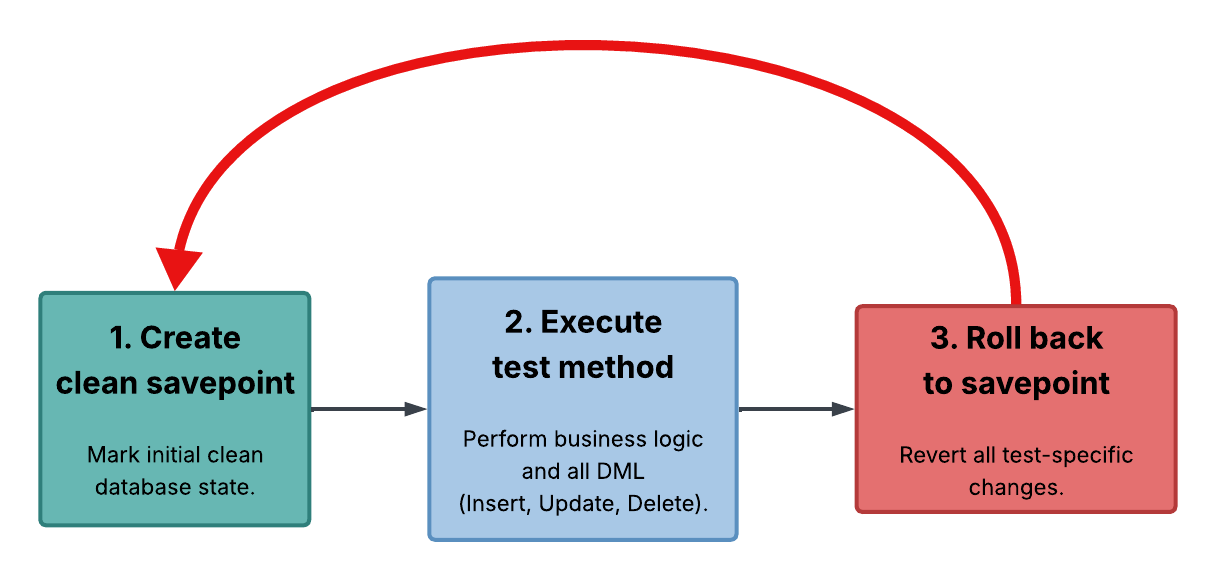
A test run that is not part of a deployment is different. Multiple tests can run simultaneously without affecting each other as long as they’re in different database transactions. Unless you’ve specifically selected “Disable Parallel Apex Testing,” Salesforce takes advantage of this fact and uses multiple threads to run non-deployment tests.
Doing this means you risk committing metadata that will make your tests fail and won’t find out until the test run completes. But if you’re deploying to a disposable organization such as a scratch org spun up for pull-request-time testing, this is fine; if the tests fail, you can reject the pull request and delete the org.
Start with one fix and build from there
Adopt the patterns outlined in this post incrementally to align your organization with the Reliable and Composable capabilities of the Well-Architected Framework.
Start by identifying your most-deployed classes and decoupling business logic from DML or SOQL calls. Use the Dependency Injection pattern to extract the database operations behind an interface; this allows your unit tests to run without touching the org. Next, add @IsTest(testFor=...) annotations to the corresponding test classes to ensure RunRelevantTests can select them correctly. Finally, for scratch org pull request validation, move your test execution to a post-deploy step to enable automatic parallelization without any additional pipeline overhead.
These optimizations will improve your pipeline, but they work within your existing deployment model. To move more of the deployment tax out of your release window, you’ll need to optimize delivery processes and modernize the underlying architecture.
Subscribe to the Salesforce Architect Digest on LinkedIn
Get monthly curated content, technical resources, and event updates designed to support your Salesforce Architect journey.