How to Reduce AI-Generated Code Failures With Governor Limit Testing



Build automated guardrails that treat governor limits as architectural contracts rather than platform nuances.

Most teams treat AI-generated code the same way they treat human-written code. Test the code for correctness, ship it, move on. That works until the code is technically correct and fully covered by unit tests, yet still brings down a transaction. “Working” means functionally correct: tests pass, records update, requirements are met. It does not mean that the code is efficient.
Well-prompted AI agents avoid obvious coding mistakes. However, their rapid development speed causes an invisible buildup of seemingly harmless features or technically correct code. Over time, they can drain shared transaction budgets without providing corresponding business value. In multi-tenant platforms like Salesforce, governor limits are strict platform capacity ceilings, not arbitrary rules. As AI accelerates code generation, hitting these capacity ceilings is inevitable unless it is actively prevented.
To prevent needless governor limit exceptions, you can build a closed-loop feedback system that automatically rejects inefficient code and guides AI agents to optimize their work. This helps ensure your autonomous pipelines respect the enforced resource limits of a shared platform. This post covers how to do that.
Guide agents when they generate their tests
To ensure agent-generated test suites enforce your architectural contract, you need to do the following:
- Provide a snapshot class as immutable infrastructure: Deploy a snapshot class (referred to as GovernorLimitSnapshot in this post) as standard shared tooling. The agent must consume this utility, never alter or redefine it.
- Constrain the agent’s test prompting pattern: Add testing standards directly into your repository rules (such as .cursor/rules, CLAUDE.md, or your orchestrator prompt templates):
“When writing tests for triggers, service methods, or batch classes, always generate a bulk test method that inserts 200 records. You must capture before and after GovernorLimitSnapshot instances and assert consumption against the designated transaction threshold.”
- Validate test anatomy in CI: If the agent generates tests on the fly, automated validation should verify that bulk test methods actually insert 200 records and contain the snapshot assertions before accepting the test as valid verification.
Understand how AI agents compound governor limit consumption
AI agents excel at solving isolated coding problems, but they optimize for the task in front of them, not the transaction in which that task’s code executes. Even an agent skilled enough to avoid an obvious Salesforce Object Query Language (SOQL) query inside a loop still writes each feature in isolation, without accounting for the resources consumed by other automation triggered by the same event.
Standard testing often misses any inefficiency that slips through, because test datasets are typically too small to trigger a governor limit exception.
To catch this compounding cost before production, the transaction’s total budget must be reviewed at every merge, not just the diff.
Think of each governor limit as a bucket that fills to 100%:
- Sprint 1: An agent adds account validation logic. The transaction consumes 15% of the SOQL query limit.
- Sprint 2: An agent adds enrichment logic to the same trigger. Now, the transaction consumes 32%.
- Sprint 3: An agent adds a related contact lookup, bringing the transaction to 51%.
- Sprint 4: An agent adds a duplicate check worth 8% on its own, pushing the total to 59%.
No single addition is bad in its own right. Each of these features passes its tests independently, but the cumulative resource consumption keeps rising until one innocent-looking change breaches the limit.
In traditional development, this accumulation unfolds over months, which gives teams time to notice the degradation. Agents can compress that timeline into a single afternoon of merged pull requests.
Most limits are hard boundaries, so the 101st SOQL query in a synchronous transaction always throws a System.LimitException. The platform checks CPU time at intervals rather than continuously, which means a transaction can overshoot slightly before the platform terminates it.
Environment differences matter too. Salesforce CPU accounting is designed to exclude database wait states, but index contention and row locking under production concurrency can still surface. Code that runs comfortably in a sandbox can behave very differently under real load, and diagnosing that gap can be costly when relying on an AI agent.
Because sandbox tests may not reproduce production concurrency and isolated pull requests may not reveal the cumulative resource consumption of all automation sharing a transaction, you cannot budget for your code in isolation. You have to account for every piece of automation sharing the transaction, treating governor limits not as isolated constraints, but as shared architectural contracts.
Reframe governor limits as architectural contracts
Because agents write code incrementally and in isolation, prompt instructions alone cannot guarantee they will respect governor limits. To prevent transactions from failing in production, you need an automated testing framework to enforce these budget contracts before code ever merges.
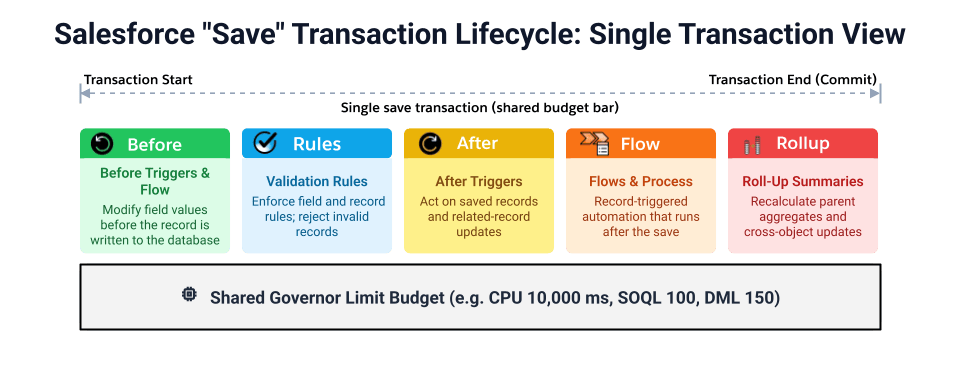
Enforcing this contract successfully requires recognizing that not all execution contexts are created equal.
Compare synchronous and asynchronous limits
The platform enforces different limits depending on execution context.
| Limit | Synchronous | Asynchronous |
|---|---|---|
| CPU time | 10,000 ms | 60,000 ms |
| SOQL queries | 100 | 200 |
| Data Manipulation Language (DML) statements | 150 | 150 |
| SOQL rows returned | 50,000 | 50,000 |
| Heap size | 6 MB | 12 MB |
Allocate a limit budget per context
The limits in the table above provide the baseline for testing: each test in the framework below asserts against the number for its execution context. To select defensible thresholds, think in terms of budget allocation. These values are starting points based on significant delivery experience, and you should tune them to the automation density of your org.
| Execution context | Recommended threshold (Apply the percentage range to every limit in the table above) | Rationale |
|---|---|---|
| Trigger (shared event) | 40 to 50% | Leaves budget for other triggers, flows, and validation rules in the same transaction |
| Service class (single responsibility) | 60 to 70% | Assumes moderate sharing within a transaction |
| Queueable, Future, Batch Apex (isolated) | 80 to 85% | Allows a higher budget when little other automation runs in the same transaction |
| Scheduled Apex (lightweight) | 20 to 30% | Should orchestrate, not compute |
Note: Although Scheduled Apex runs asynchronously, it uses synchronous Apex governor limits.
These budgets are not additive. A service class called from a trigger draws from the trigger’s budget and has none of its own, so apply the service class threshold only to tests that call the service directly.
Architectural standards must graduate from static wiki pages to strict pipeline guardrails that actively block the agent from merging inefficient code. To transform these budgets from aspirational guidelines into enforceable gates, you must measure consumption programmatically within your automated testing suite.
Implement a limit measurement framework
Salesforce Code Analyzer flags SOQL inside loops and similar static inefficiencies at pull request time, and Event Monitoring surfaces real CPU and query consumption from production traffic, but neither measures limit consumption inside your tests. For that, use the Limits class in the System namespace, which lets you inspect resource allocation and consumption programmatically.
Understand the Apex Limits class
See every programmatic method and return value the Limits class supports, so you know exactly what to assert against in your tests.



Understand Test.startTest() and Test.stopTest() isolation
Calling Test.startTest() resets governor limits to a fresh set for the code that follows, so the platform already isolates your feature from test setup overhead. Your framework adds threshold enforcement on top of that built-in isolation rather than creating the isolation itself.
Any asynchronous work queued by your code executes when you invoke Test.stopTest(). Capture your snapshot immediately before Test.stopTest() to measure the pure synchronous footprint. Asynchronous work runs in its own limit context, so a snapshot taken after Test.stopTest() does not include it. Test the asynchronous class directly in its own test method and apply the asynchronous threshold there: 80 to 85% for Batch Apex, Queueable or Future, or 20 to 30% for Scheduled Apex.
Capture limits with a snapshot object
Use a snapshot object to support multiple measurements in one test class, and keep threshold logic in a single place so your agents cannot scatter it across the codebase. The GovernorLimitSnapshot class (annotated @IsTest so it is test-only code and does not count against your org’s Apex code size limit) gives every test the same pattern, shown here:
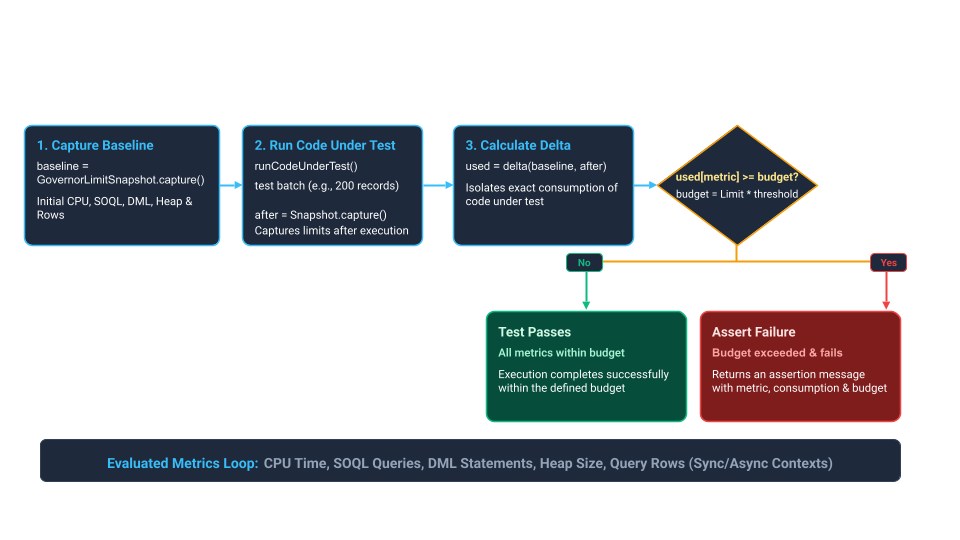
The assertion message names the metric, the consumption, and the budget, because that string becomes the input to your agent feedback prompt later. Using the Assert class rather than System.assert keeps the framework aligned with current Apex testing guidance.
Test with realistic bulk volume
Always test triggers at the maximum trigger batch size of 200 records, because that is the most records the platform passes to a trigger in a single invocation. The threshold in the feedback prompt below is 0.50 (50%, the top of the trigger range), which suits a trigger sharing its transaction with other automation.




Build the agent feedback loop
Integrating the measurement framework into continuous integration and continuous delivery (CI/CD) is what turns the measurement into a loop, where violations guide agents toward optimization without human involvement.
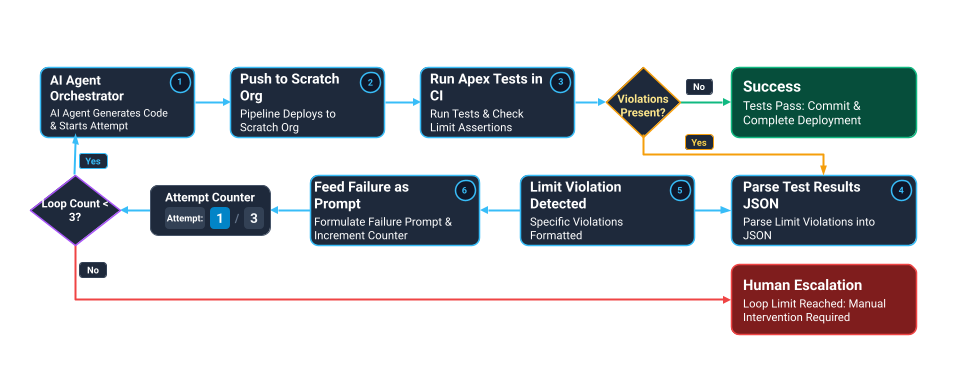
Define retry and escalation boundaries
- Attempt 1 (Initial generation): The update from your CI job to the agent sends the violation details, budget thresholds, and optimization hints. The agent refactors the method while strictly preserving the story context and functional requirements, then pushes a new commit to the branch.
- Attempts 2 and 3 (Refactor): If the second CI run still breaches limits, feed back the delta: what improved, which metric remains over budget, and the diff between both attempts. The agent uses this feedback to attempt one final targeted fix.
- Human escalation: If the third push fails, the pipeline halts the loop, blocks the pull request merge, and opens a review task for a human architect with the full run history.
This three-strike boundary routes fundamentally architectural issues, such as a feature that simply cannot fit into a synchronous transaction, to a human architect who can decide whether to move the logic to an asynchronous Queueable or adjust the transaction budget.
Structure the feedback prompt for the agent
Core patterns like bulkifying code and caching query results in Map collections belong up front in your agent’s system prompt during initial code generation. But when subtle limit creep still slips through, a generic build failure tells the agent nothing.
Feed the runtime failure back with the relevant context to the agent using this template:
The transaction involving {ClassName}.{MethodName} is FUNCTIONALLY CORRECT but EXCEEDS THE RECOMMENDED RESOURCE BUDGET

VIOLATION DETAILS:
- Threshold exceeded: {Example: SOQL queries}
- Consumed: {Example: 78 of 100 allowed (78%)}
- Threshold: {Example: 50% (50 queries max for trigger context)}
- Test method: {Example: testAccountTrigger_BulkInsert (200 records)}

REQUIRED ACTION:
(Project-specific template inside assertion class, e.g.)
{Example: Refactor to reduce SOQL consumption below 50 queries for 200 records.
1. Bulkify: move queries outside of loops
2. Cache: store results in a Map for repeated lookups
3. Consolidate: combine queries using relationship fields }

Resubmit when optimized. Attempt 1 of 3 before human escalation.
Guard against agent circumvention
An agent stuck in a feedback loop will look for the cheapest path to a green build. That can mean shrinking the test data array, commenting out assertions, wrapping code in try-catch blocks that swallow errors, or simply editing the threshold.
Restrict the agent’s write permissions to implementation source only. The GovernorLimitSnapshot utility and the threshold metadata records should be immutable infrastructure the agent must satisfy rather than modify.
Design for the contract
Some limits resist meaningful unit testing: callouts need mocks that do not reflect real latency, platform event publish limits behave differently under test isolation, and asynchronous job limits are hard to simulate at scale. Cover these with production monitoring in addition to test-time assertions.
Overly aggressive thresholds can be a source of team friction, because they fail builds on false positives rather than real logic errors. Mitigate this by starting generous and tightening against historical data, splitting thresholds into a warning tier that logs the overage and a violation tier that fails the build, and documenting why each number was chosen.
Governor limits are not platform constraints to work around. They are an architectural contract to design for from the start. Put that contract into your pipeline this week:
- Add the GovernorLimitSnapshot utility to your codebase and wire assertWithinThresholds into one high-traffic trigger.
- Set a starting threshold for that execution context using the budget-allocation table, and mark the test class and threshold records as agent-immutable.
- Add the limit-check and feedback steps to your CI/CD pipeline so a violation blocks the merge and returns a structured prompt to the agent.
- Roll the pattern out to your remaining triggers and service classes, tightening thresholds as you gather historical data.
Subscribe to the Salesforce Architect Digest
The Salesforce Architect Digest is your monthly roundup of curated content, events, and resources to support your Salesforce architecture journey.