How to Ground Agentforce in External Documentation


A recap of episode one of the Think Like an Architect series, breaking down a real-world scenario for grounding Agentforce in evolving external unstructured data.

Architects are often asked to design solutions for complex requirements, with critical data points living outside the systems where workflow intelligence is required. As an architect, the challenge isn’t to find an answer, but in breaking down the problem, validating assumptions, and justifying the direction you take.
Think Like an Architect is a new livestream series that illustrates how architects approach exactly these kinds of challenges. Each episode focuses on a specific business scenario and uses a clear, three-step approach to walk through the thinking, decisions, and trade-offs behind a solution.
In our first episode, we tackled a common hurdle: connecting Agentforce to large sets of external files while maintaining data freshness. Rather than presenting a completed solution, we deconstructed the architectural thinking process in real time. By live-diagramming and breaking down each decision, we show not just what to build, but how you, as an architect, can evaluate requirements, weigh options, and justify a solution direction. This transparency helps you build the mental muscles needed to solve similar challenges in your own org.
Use the “What, How, and Why” Approach
To design scalable solutions, it helps to have a repeatable approach. In episode one we introduced a deceptively simple three-step approach to move from a business requirement to a justified architectural decision:
- What: Focus on the “what” by highlighting key phrases in business requirements. You then paraphrase the essence of the problem into concise High Level Requirements (HLRs). This ensures you are solving the right problem from the start.
- How: Align technical solution options directly to your HLRs. We use live diagramming to visualize options and digital sticky notes to capture questions, assumptions, and decisions. It is vital to tie your assumptions to your decisions, as a decision may need to change if an assumption is later proven incorrect.
- Why: Document your justifications. Creating an Architectural Decision Record (ADR) ensures that stakeholders, and your future self, understand the rationale behind a specific direction.
Think Like an Architect: Aligning Integration Patterns to Use Cases
In this interactive episode, experts apply the What/How/Why approach to design a solution that exposes millions of on-premise records in Salesforce without replicating data and consider the best approach to send updates to an external system.



What: From Business Requirement to High-Level Requirements (HLRs)
In the “What” step, let’s look at the specific challenge from episode one. We start with a raw business requirement and use highlighting to indicate the key parts, as shown below.
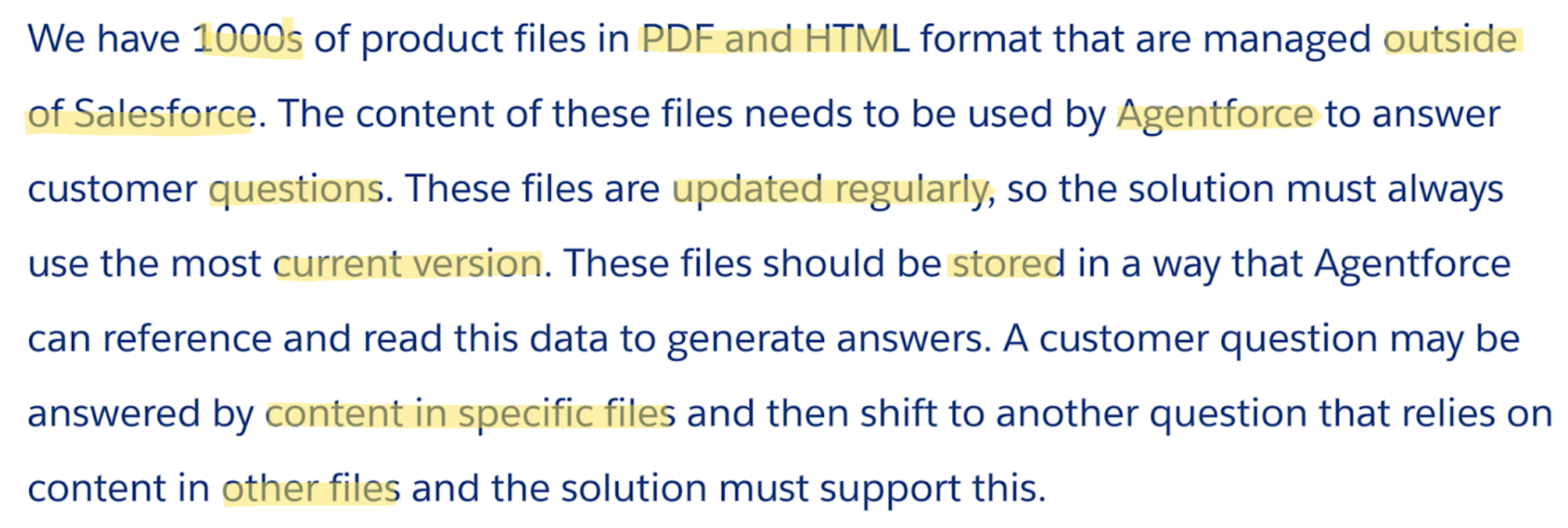
Paraphrase into HLRs
By stripping away the narrative, you arrive at three clear High-Level Requirements:
- Agentforce must be able to access unstructured data (PDF/HTML) managed outside of Salesforce.
- Updates to the data need to be immediately reflected in the answers the agent provides.
- Agentforce agent must be able to answer questions using the relevant data across all the files in a single conversation.
To show you how to evaluate solution options, we move into the “How” step by following the trail of questions, assumptions, and decisions captured during our live session.
How: Aligning Solutions to your HLRs
In the “How” step, we evaluate solution options against your HLRs. To keep your thinking organized, track your Questions, Assumptions, and Decisions alongside your technical diagram.
Evaluating HLR 1 and 2: Considering Salesforce Knowledge
We group HLR 1 and 2 together as they are closely related requirements. When dealing with documentation, our first instinct might be to migrate everything to Salesforce Knowledge.
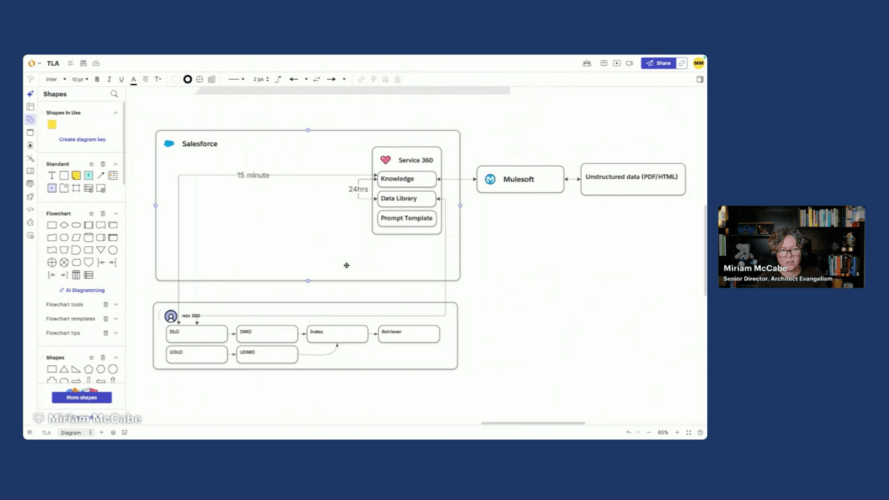
When you ask yourself: “Could we use Knowledge or a Data Library?” several assumptions quickly challenge this direction:
- Data Residency: We assume the files needed to remain in their source CMS.
- Refresh Latency: We assume that a 24-hour refresh (via Data Library) or a 15-minute refresh (via CRM Connector) would not be enough to satisfy the “immediate” requirement.
- Citation Integrity: Citations—the links the agent provides to support its answers—should ideally point back to the source of truth, not a migrated copy in Knowledge.
Because of these factors, we decide not to migrate to Knowledge and to avoid manual uploads via Data Libraries.
Data Freshness Requirement
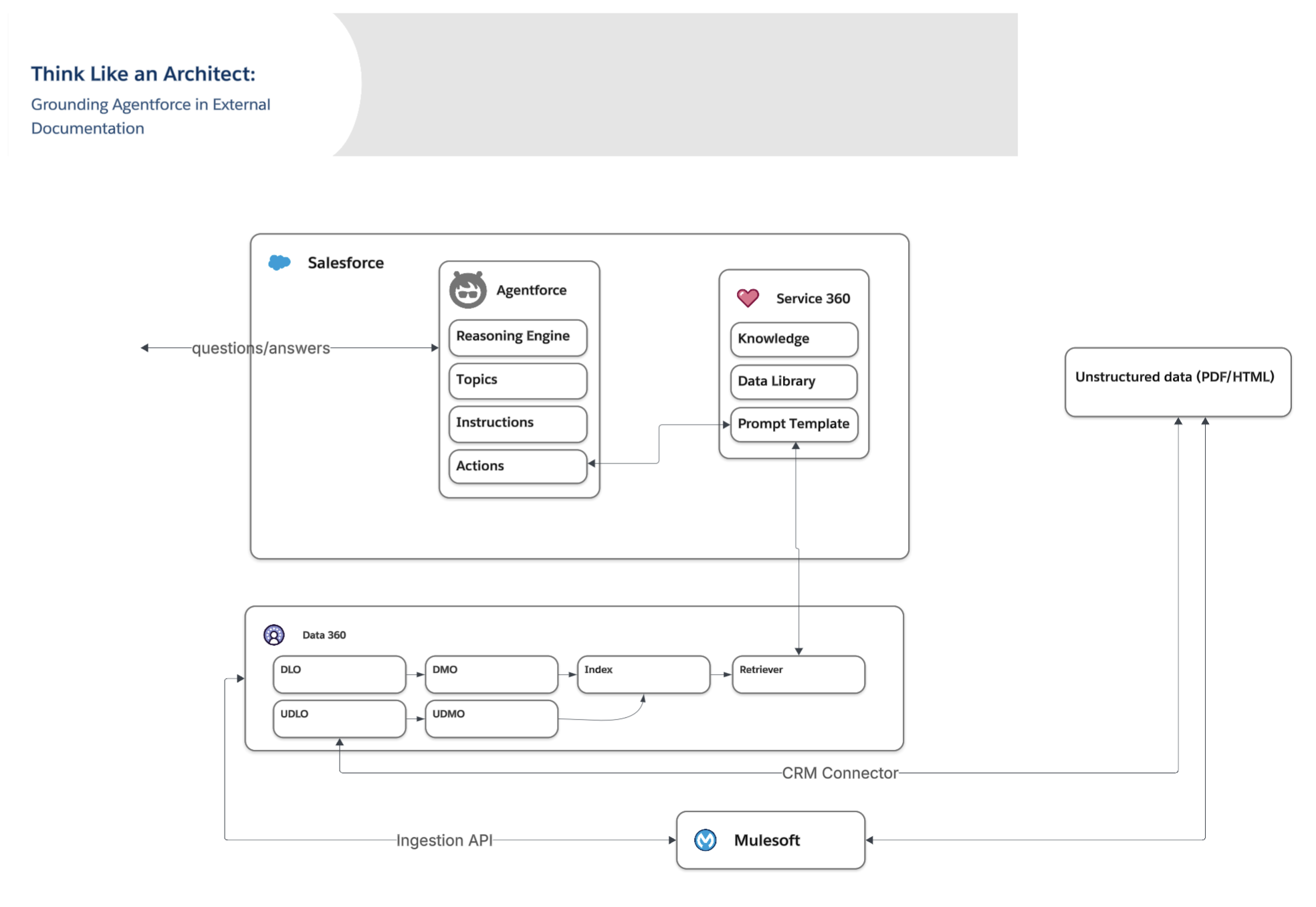
With Knowledge ruled out, the focus shifted to direct ingestion into Data 360. A good question to ask at this moment is: “What is the source system and does it have a pre-built connector?” Since we don’t know the answer to this question, we can initially decide to go with MuleSoft as that offers more flexibility. Whether the source system supports a connector or not is captured as a decision driver.
- Decision: Use MuleSoft via the Ingestion API.
- Reasoning: MuleSoft provides the most flexibility to pick up “on-file-added” or “on-updated” events from systems like Google Drive or SharePoint. This setup achieves a refresh rate of approximately three minutes, which is the closest viable option to real-time.
HLR 3: Connecting the Data to Agentforce
In the final HLR, the solution options are clear as Agentforce is a given. Now that we have the data in Data 360, we need to make that data available to the agent.
- Decision: We expose the Unstructured Data Lake Object (UDLO) or DLO from Data 360 into Agentforce using a Retriever. This allows the agent to perform a vector search against the documentation to find the most relevant “chunks” of information to answer the question.
- Reasoning: This is Out of the Box if there are no specific visibility requirements that would point to a custom retriever.
Why: Architectural Decision Records (ADRs)
In the “Why” step you justify your direction to stakeholders and your future self. During the live stream, we emphasized that an architect’s value is not in the solution, but in the rationale. With the questions, decisions, and assumptions we captured, we can leverage the instructions in this blog on leveraging LLMs to create an Architectural Decision Record.
Expert Q&A
As part of the Q&A, some key questions were asked and answered by Scott Ratliff, Technical Architect Director.
Agentforce Features & Intelligent Context
- Could we use Intelligent Context? While Intelligent Context does a better job than straight unstructured data because you can provide “intelligence” to filter data, it has significant restrictions. It currently only supports PDFs and images and has strict size limitations. If the data is more than just images or simple PDFs, it may not work.
- What type of agent should we use? The choice between an employee agent (e.g., for Slack) and a service agent (for external websites) depends on the use case. Service agents are often better for external customers because they use a service account rather than depending on specific Salesforce backend users.
Data Ingestion & Integration
- How to detect that the source files were changed? For Google Drive, MuleSoft can use APIs or pre-built modules with “on new file” or “on updated file” triggers to detect changes. For systems without real-time API triggers, a batch job can be used to check for changes.
- How to handle multiple data sources? If you have both Knowledge and unstructured files, the Ensemble Retriever is highly recommended. It allows a single call to search multiple indexes, making it appear as one cohesive dataset to the agent.
Advanced Architectural Considerations
- What if we wanted to expose Customer-Specific procedures? This is challenging because unstructured data connectors have limited filtering capabilities. Scott suggested that MuleSoft provides the most flexibility here through preprocessing—ingesting data via the Ingest API to add structure and intelligence (like customer-specific metadata) that allows for dynamic filtering later.
- File Deletions: Not every connector supports automatic deletion in the UDLO when a source file is removed. Scott recommended a weekly batch process to reconcile file links between the source repository and Salesforce to identify differences and run deletes.
Methodology & Tools
- Would this be enough to present to stakeholders? Whether a Lucidchart is enough to present to the business depends on the company and stakeholder expectations. While additional slides or “nice pictures” might be needed for some, the most important part is that the “thinking work” (assumptions, questions, decisions) is done and documented.
- Lucidchart Shapes: The diagrams used standard Salesforce diagram shapes imported directly into Lucidchart.
Final Wrap-Up
An important takeaway for any architect is to try to “prove yourself wrong.” Always attempt to solve the problem with the simplest, most standard tool or functionality first, then prove why it won’t work to move to more custom or made to measure solutions.
- Next Episode: Join us for the next episode on March 26th, where we will apply the What/How/Why to a new real-world challenge.
- Vote on future episodes: Help us shape the future of the series. Tell us what topics you want to see and how we can provide more value to you.
Subscribe to the Salesforce Architect Digest on LinkedIn
Get monthly curated content, technical resources, and event updates designed to support your Salesforce Architect journey.