Introducing the New Salesforce Decision Guide Format


Understand the evolution of the Salesforce Decision Guides and how the redesigned structure guides better architecture decisions.


As an architect, your primary responsibility is to make the right technical decisions by weighing complex tradeoffs against specific business requirements. However, with the breadth of the Salesforce platform, it’s easy to face analysis paralysis when choosing between multiple solutions that seem to solve the same problem.
We’re excited to introduce a refreshed format for Salesforce Decision Guides, designed to help you move faster with greater clarity and confidence. The newly updated Record-Triggered Automation Decision Guide is the first place you’ll see it in action, with more guides following soon.
Here’s what prompted the evolution, how the format works, and what it means for you.
Why our guidance is evolving and why it matters to architects
This new approach reflects an extensive assessment and direct feedback from Salesforce Architects. By evolving the format, we’re making sure that the decision guides will help you:
- Support all experience levels: These guides are now designed to serve a wide range of architects, from those just starting out to the most experienced veterans.
- Navigate logically: We’re delivering a logical content path that moves you from rolled-up takeaways, key concepts, and applicable use cases, into deeper technical details.
- Find answers faster: Predictably placed, easy-to-locate content ensures you spend less time searching and more time designing.
- Connect the dots: New resource sections point you to related content and diagrams without overwhelming you with unnecessary information.
Standardize your decision-making process
As an architect, your time is best spent solving complex business problems, not hunting for the right documentation. With access to a consistent format, you’ll always know exactly where to find the performance tradeoffs, the product or feature comparisons, and the most impactful guiding principles, regardless of whether you are looking at automation, data, or security. This consistency allows you to:
- Accelerate review cycles: Quickly scan easily digestible comparison matrices and tables to validate your technical choices.
- Reduce onboarding time: Help junior architects or new team members understand the “why” behind any Salesforce technology choice using a familiar framework.
- Ensure design integrity: By following a repeatable set of “Non-Functional Considerations,” you ensure that non-functional requirements like scalability and maintainability are never overlooked.
What has changed?
We have reimagined the anatomy of a Salesforce Decision Guide to ensure every section provides maximum value. Here is how the new format compares to what you’ve seen in the past:
What we’ve added:
- Products (or Features) in Scope: This new section initiates a simple “ramp-up” by providing a brief list of products or features, their descriptions, and direct documentation links.
- Key Concepts (or Decision Points): The new format introduces foundational factors early on—especially beneficial for less experienced architects—to help you start thinking about tradeoffs and overarching principles before diving into the details.
- Non-Functional Considerations: We’ve added a dedicated space to ensure every guide ties into Well-Architected pillars and addresses “ilities” like Complexity, Performance, and Adaptability, among other considerations
What we’ve refined:
- Product Comparison: This has replaced the “Overall Product Comparison Table” to give authors more flexibility to show head-to-head capabilities or specific tradeoffs that benefit the reader.
- Use Cases: We have separated “Scenarios” into distinct Use Case guidance. This keeps feature-specific advice focused and separate from non-functional technical concerns.
What we’ve removed:
- Additional Considerations & Closing Remarks: To keep the guides lean and actionable, we’ve removed these superfluous sections. Any critical information previously found here is now integrated into the Key Concepts/Decision Points, Use Cases, or Non-Functional sections.
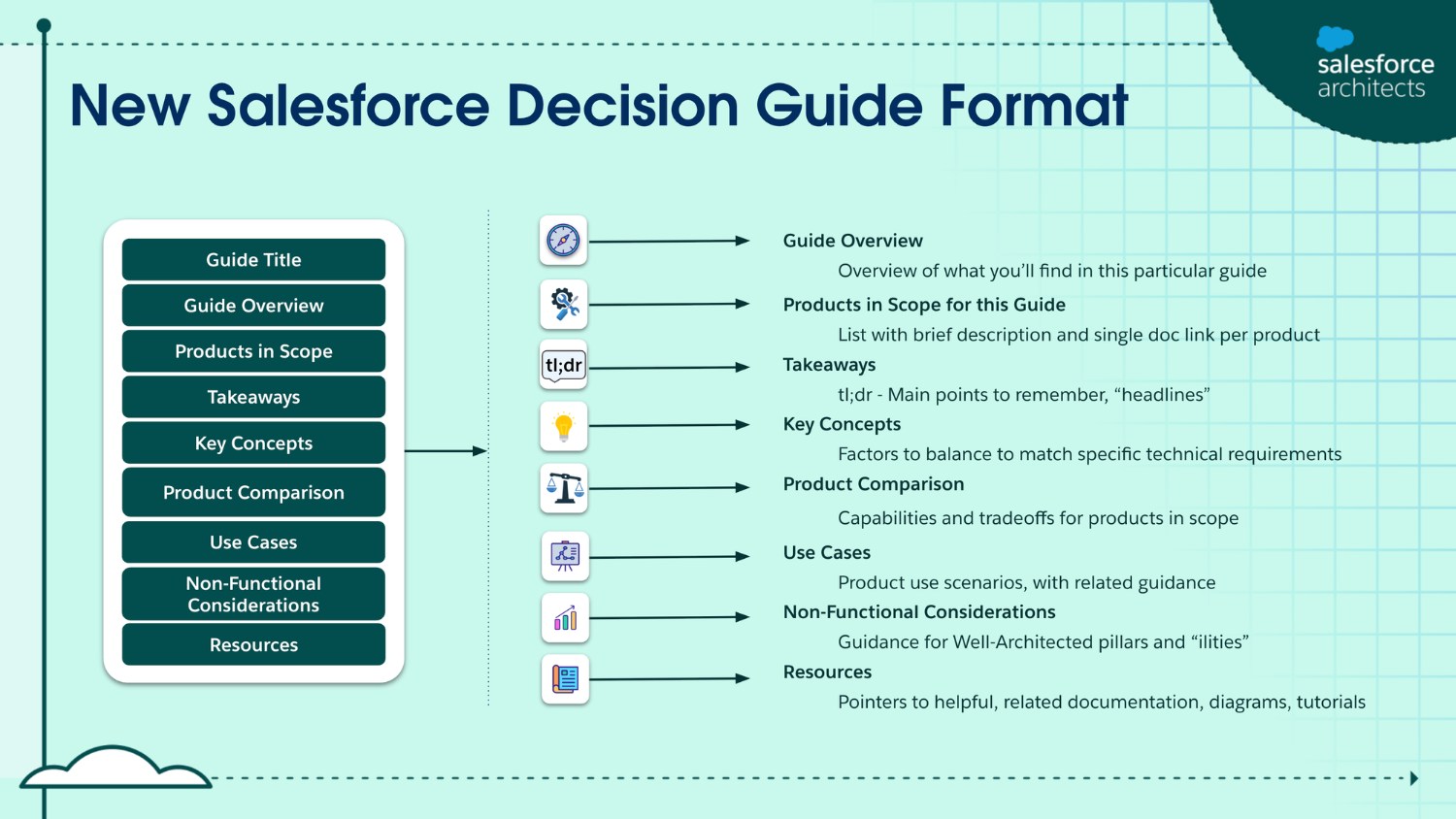
What to expect in the new Salesforce Decision Guide format
Every refreshed guide, as well as new guides moving forward will follow a purposeful structure designed to move you from high-level discovery to technical execution:
- Guide Overview & Products in Scope: A succinct summary and a list of products with brief descriptions and direct documentation links.
- Takeaways (tl;dr): A “headlines” section capturing the essential “must-remembers” for quick consumption.
- Decision Points/Key Concepts: Foundational factors—such as automation density or other technical considerations—that you must keep in mind as you use the document’s architectural guidance to produce a successful design.
- Product Comparison: A side-by-side look at product intentions and a head-to-head capabilities matrix.
- Use Cases: Focused guidance on what the products or features in scope are intended to do, illustrated through real-world scenarios.
- Non-Functional Considerations: Discussion of the “ilities”—Scalability, Performance, Adaptability, and other considerations—tied to Well-Architected pillars.
- Resources: A curated “mini-hub” of related content, such as product documentation, architecture deep dives, diagrams, tutorials, and developer documentation.
During a transitional period, as existing content is updated to the new format, some decision guides will have a Related Best Practices section that provides specific implementation guidance. Moving forward, however, newly created content of this type will live in best practices documents or in other, more appropriate documentation outside of decision guides. The Related Best Practices section will then be discontinued.
After the initial refresh of existing content, authors of new decision guides will write according to prescribed principles to make the most of each section. Guides will become even more effective as new content is created – they’ll be more specific and more quickly digestible. Monolithic documentation will become more succinct over time, as we focus on creating the right guidance for the right situation. Deep dives and developer-oriented content will live elsewhere, referenced by the decision guides themselves.
Now Live: Record-Triggered Automation
You’ll see the new format in action first in our refresh of the Record-Triggered Automation Decision Guide. This decision guide will help you navigate the specific tradeoffs between Salesforce Flow and Apex by providing guidance in each section of the new document structure.
Get ready for the next releases
While we put the finishing touches on these resources, there are several ways you can prepare:
- Follow the Salesforce Architects LinkedIn page: We’ll announce each guide as it goes live so you can be the first to use the new comparison matrices.
- Join the Trailblazer Community: Head over to the Salesforce Architect Community Group to discuss the architectural tradeoffs you’re currently facing.
- Explore existing patterns: Visit the Salesforce Architecture Center.
New Record-Triggered Automation Decision Guide
This guide provides a framework for determining and applying Salesforce Flow and Apex patterns based on automation density, performance requirements, and long-term maintainability.