



For a long time, Salesforce guidance on deciding a record-triggered automation pattern focused on the builder. If you were a declarative builder, you used Flow; if you were a developer, you used Apex. This served as a practical rule of thumb for many teams, but as orgs grow, the “who” matters less than the “what.” The newly updated Record-Triggered Automation Decision Guide reflects how our architectural standards have evolved to meet increasing enterprise scalability needs.
This evolution brings automation density to the center of your decision-making process. Instead of focusing primarily on who is building the solution, we are now evaluating the cumulative impact of every rule, trigger, and background process firing on a single object. By analyzing density first, you can make objective choices that balance the speed of no/low-code delivery with the rigorous execution control required for enterprise-scale performance.
Introducing automation density
Automation density is the cumulative result of how many business rules are firing, how often they are triggered by massive data sets, and how deeply they are intertwined with other processes. Think of it as the total “weight” an object carries during the save operation.
The Record-Triggered Automation Decision Guide treats this density as the primary indicator for governance risk. As an object’s density increases, so does the probability of re-entering the save order, exhausting CPU limits, or creating fragmentation of logic that might introduce an unpredictable order of execution. Understanding your automation density allows you to decide when an object can safely remain declarative-first and when it must transition to a code-based framework to protect transactional integrity.
Understand the three dimensions of automation density
Before choosing between Flow and Apex, you must first assess the technical conditions and scale requirements of the object you are automating. The guide breaks density down into three specific dimensions of quantity, volume and dependency sprawl:
- Automation Quantity: This is the raw count of unique metadata entries, like Flows, Apex trigger actions, and legacy process builders and workflows that execute during a single Database Manipulation Language (DML) event. While the guide notes that multiple Flows with precise entry conditions are performant, your orchestration risk rises with every new entry point.
- Record Volume: On the volume dimension, density is about the number of records moving through an object at a given time. The guide explicitly differentiates between user interface scale (individual edits) and batch scale (mass updates). To process high volumes efficiently, use Before-Save updates; they optimize performance by executing before the record is committed to the database, meaning they don’t consume additional DML operations or re-trigger the save order of execution.
- Dependency Sprawl: This measures the ripple effect of your automation. When a record is saved, how many updates does it trigger in related objects? If one update triggers a cascade across five or more related objects, you are in a high-density environment that requires stricter control to avoid recursion and maintain a performant system.
New Record-Triggered Automation Decision Guide
This guide provides a framework for determining and applying Salesforce Flow and Apex patterns based on automation density, performance requirements, and long-term maintainability.



Determine your level of automation density
The new guide introduces a framework to help you decide which pattern to adopt based on your object’s density. But to use that framework, you first have to know how to measure the three dimensions of quantity, volume and dependency within your own org. Below you’ll find concrete steps on how to assess your org’s automation density for each of the three dimensions.
Assess the automation quantity
To assess the automation quantity, we want to understand the quantity of operations that happen on a given record in an object. To investigate, you can use any tool of choice from Setup to Agentforce Vibes to give you a count that you can use in the Density Selection Matrix table in the guide.
How to do this: For new custom objects, associated user stories and process flows can be a good indicator of expected complexity. For standard or existing objects, Agentforce Vibes can analyze code and metadata to detail existing object automations, providing a rich source of complexity data.
Sample prompt that you can use:
Analyze all automations on the {object} object.Find all triggers, flows, process builders, workflow rules, and validation rules. Summarize the complexity.
What to look for: Count the active record-triggered flows across all three categories (Fast Field Updates, Actions and Related Records, and Run Asynchronously). Also check your codebase for an Apex Trigger or a Trigger Framework on the same object.
Pro Tip from the Guide: If there is only one very big flow on an object, this might still indicate that something is off. One “Monster Flow” could be doing a lot of things. This is a big indication of complexity, and ideally should be converted to Apex or broken into subflows.
Assess the record volume
This dimension measures the impact based on the quantity of records hitting your automation at any given time
How to do this: Forecasting data volumes presents a challenge. While various options exist for projecting data volume, Event Log Objects is the optimal method, provided you have the appropriate licensing.
- Querying Object Counts: This is the simplest approach, involving queries on the object for record counts over time using CreatedDate and LastModifiedDate. While this accurately captures insert counts, it is unreliable for update counts, as a single record may be modified numerous times. If update counts are critical, enabling history tracking or creating a field for update counts is necessary.
- Event Log Objects: This method requires Salesforce Shield or Event Monitoring add-on subscriptions. The event data can be pulled with a query to the DatabaseSaveEventLog with the object’s key prefix. Here is an example query for the Account object:
SELECT DmlType, COUNT(Timestamp) FROM DatabaseSaveEventLog WHERE KeyPrefix = '001' GROUP BY DmlType ORDER BY COUNT(Timestamp) DESC
What to look for: Does or will this object primarily handle manual edits by users, or is it a landing zone for high-concurrency integrations, nightly ERP syncs, or massive data imports?
Pro Tip from the Guide: High-volume API integrations act as a density multiplier. Even a small number of flows on objects that support high data volume integrations, can lead to CPU timeouts.
Assess the dependency sprawl
The most invisible part of density is how one save operation cascades through your entire data model. To trace this, you need to look at the Save Order of Execution.
How to do this: For new custom objects, the best place to start is your design documentation. For standard and existing objects, using the Apex Debug Log to see exactly what happens is an option. However, every user type and scenario (for conditional logic) would be needed to view the full picture. Agentforce Vibes is another great tool for static analysis. The following prompt is a good start:
When an {object} object is created or updated, what other objects get created, updated or deleted as a downstream result, and what other activities are triggered?
Check Apex triggers, record-triggered flows, process builders, and workflow rules. Follow any async paths.
For each downstream object affected tell me the object name, what dml action occurred, the triggering condition, and component used. Then check those downstream objects triggers and flows that create further downstream effects. Follow it until the chain ends.
Render the output as a tree with the following format:
[OBJECT_NAME] created/updated ->
Creates [Object] condition via [Component]
-> [Object] creation triggers [Component] -> affects [Object]
Updates [Object] (condition) via [Component]
What to look for: When you perform a single record update in the UI and open the resulting log in the Developer Console or execute an Agentforce Vibes prompt to create the execution tree. The Execution Tree view will show you every trigger, flow, and validation rule that is fired. If you see a tree that is dozens of branches deep, or if you see the same object appearing multiple times (a sign of Recursion), you have high Dependency Sprawl.
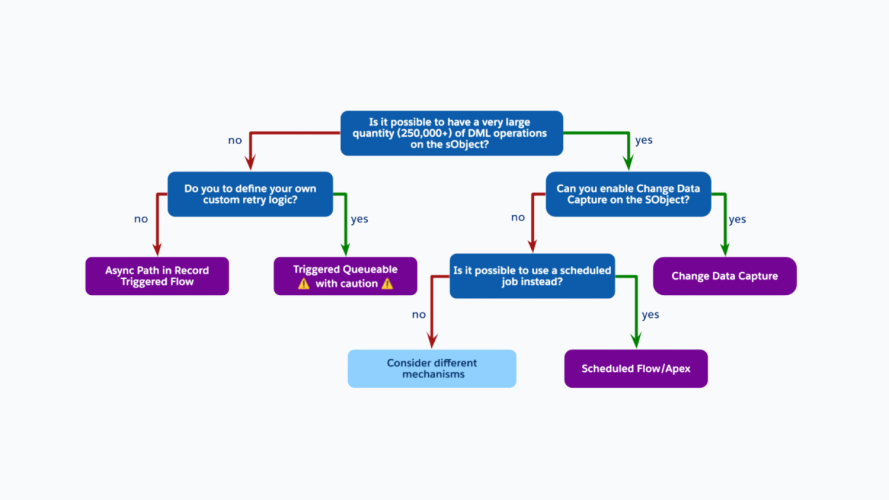
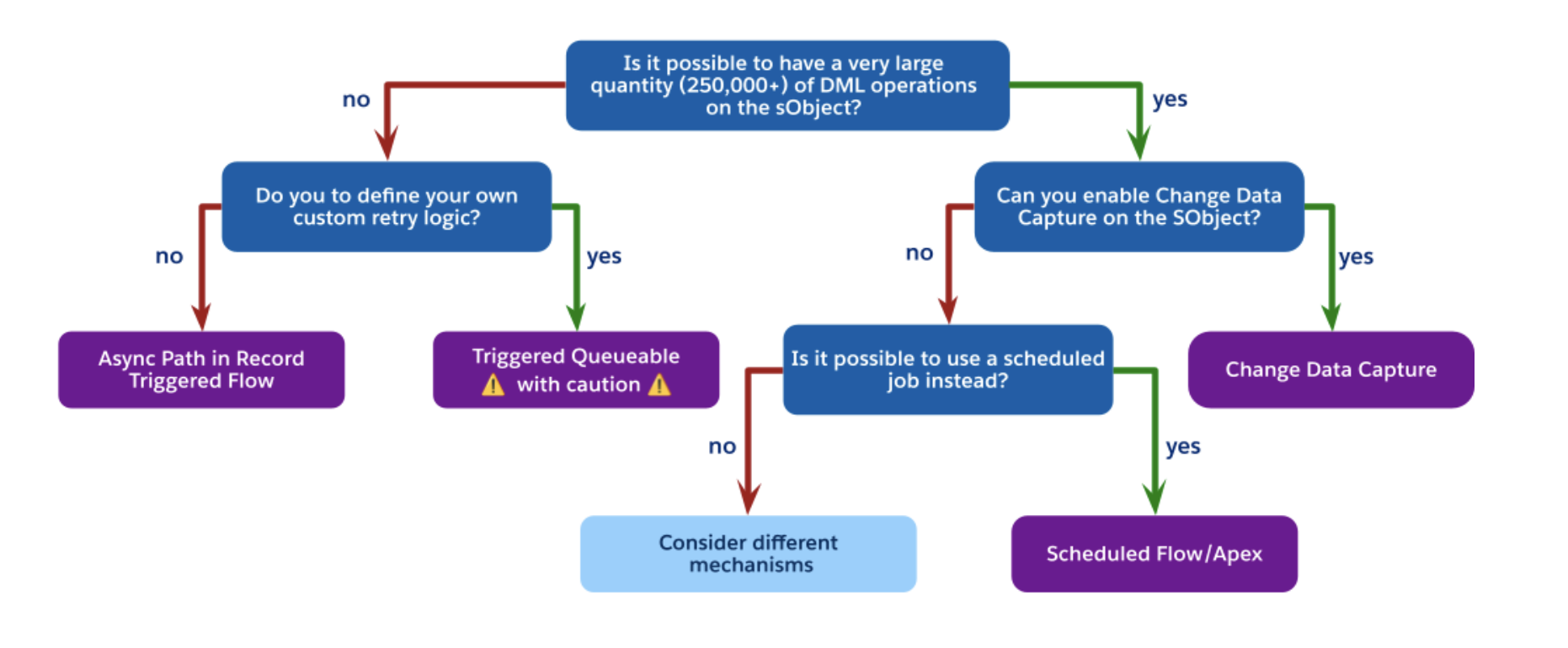
Pro Tip from the Guide: If an update to a Lead triggers an update to an Account, which then triggers a calculation on five Opportunities, you have moved beyond simple automation. At this level, the guide recommends Decoupling: moving non-critical logic to asynchronous paths like Change Data Capture (CDC) or Asynchronous Paths in Flow to protect the end-user’s transaction time.
Use automation density to drive your automation strategy
By using automation density as your North Star to decide whether to design your record triggered automation using Apex of Flow, you are future-proofing your architecture. The tangible results will make your architecture more scalable, performant and reliable. You are ensuring that the “Save” button stays fast, your execution order stays predictable, and your org stays ready for whatever the business (or AI) throws at it next.
Next steps:
- Perform a density assessment on your most heavily trafficked objects (eg Account, Case, Lead).
- Consolidate your record triggered automation on the best approach
- Read the Record-Triggered Automation Decision Guide to dive deeper.