


Imagine you and your team designed and built new features for Salesforce over the past several months. The release goes live this weekend, but when users log into the system on Monday, they cannot do their jobs. Sales reps cannot edit Opportunities they own, Sales Managers cannot see their team’s pipeline, and Administrators do not know how to fix it. Even with well-developed features, the implementation failed because users lacked access.
Unfortunately, this is more common than it should be. For experienced Salesforce Architects, especially those who have worked across multiple Salesforce orgs, it is not shocking to see a security model that is a fragmented patchwork of different ideas and concepts. The reason could be multiple companies over time implementing features, different architects prescribing different approaches, or even junior team members not understanding all available solution options and best practices. Whatever the cause, the end result can be impossible to manage.
Consistency in the design is not enough on its own.
Implementations routinely fail without a shared understanding between information technology (IT) and the business on how access is provided. The approach outlined below has been implemented at several Fortune 500 companies, on different Salesforce clouds and across industries. In each implementation, building the security model on personas enabled IT to give users the access they needed in the initial releases and to use the same framework to provide access for capabilities introduced in subsequent releases.
This post covers defining personas, mapping the persona for users to Permission Set Groups and Permission Sets for access, and automating the assignment so access stays consistent as you add features.
Use personas as the foundation for your security design
So how do we do this? Within user experience design, there is a key concept called personas. A persona is a group of users who perform the same functional role and need the same baseline access. For example, organizations that have Salesforce Sales Cloud and Service Cloud typically have personas for Sales Managers, Sales Representatives, Service Managers, and Service Representatives. Depending on your organization, you may also need more specific personas, such as Claims Representative, Repair Analyst, Sales Support Representative, and other roles.
Personas should be defined and modeled by the actual roles within your organization. Avoid combining separate organizational roles into one persona simply because they share some access. Keeping the roles distinct gives each persona a clear baseline that the business can approve and IT can implement consistently.
For a security model, those personas serve as the foundation to align access with user needs. The business identifies which persona needs what access (create, read, edit, or delete) for a feature, and IT implements that access according to the personas. Every user assigned to that persona receives that access. Delivering functionality based on those personas ensures the users who benefit from the feature receive the access they need.
Implement personas in a security model
How do you use this concept within a Salesforce security model? The sections below outline the approach with five key pieces:
- A persona field on the User record
- A Custom Metadata Type that maps each persona to its access
- One Permission Set Group per persona
- Permission Sets that grant the actual access
- Apex automation that assigns all access when the persona is set
This diagram shows how the pieces work together:

Storing the persona on the User record
Once personas are defined, store each user’s persona in a picklist field on the User record. For example, Joe Smith, a Sales Manager at Acme, should have “Sales Manager” selected in that field. Strictly limit who can update the field, typically to only administrators, because it drives significant access. Business and IT leadership, as part of a strong governance strategy, should jointly manage and approve changes to the list of personas.
When a user takes on responsibilities beyond their persona, there are two recommended ways of handling it. If the company establishes a permanent role to handle the combined responsibilities, create a new persona. If it is an exception, such as someone temporarily covering two roles, leadership should submit the request through an approved exception process, such as an IT Service Management (ITSM) process that captures the approvals and tracks them automatically.
As an example, if Jim Johnson, a Sales Manager, is expected to support Service Operations as a manager because of an unexpected retirement, someone in leadership should officially request his access. Once approved, Jim’s Service Manager access can be assigned via the appropriate Permission Set Group for that persona. In this way, even though Jim’s persona is still a Sales Manager, he has the access needed to support the business temporarily.
Mapping personas to access via Custom Metadata Types
A Custom Metadata Type is a back-end table, typically accessible to only administrators, that stores business logic that can be used for system rules and automation. It is a maintainable way to configure rules for system logic and design. This allows mapping persona values directly to the user’s required access. Automation will fail and users will not be set up appropriately if each persona does not have a corresponding Custom Metadata Type record. Typically, you create fields on the Custom Metadata Type for the persona and the other details needed for user setup. Most access comes from the Permission Sets assigned to the persona’s Permission Set Group, but each user needs a profile and typically a role, so the Custom Metadata Type includes fields for both. It may also include fields for public groups, whose membership can drive queue membership and record or folder access.
Aligning Permission Set Groups to personas
Permission Set Groups are a way of organizing Permission Sets into a collection of permissions that provides access the user needs. They can be used in a variety of ways, but for this design, each persona has one Permission Set Group. You can understand a persona’s access by examining the access provided within the respective Permission Set Group. A Permission Set Group has no access of its own. All of its access comes from the assigned Permission Sets. As such, to change a persona’s access, update the relevant Permission Set in that persona’s Permission Set Group.




Granting access through Permission Sets
Permission Sets are where access is actually granted to the users and personas. The different Permission Set Groups contain the Permission Sets where access is assigned and granted. There are two approaches, and either can work, depending on your scenario and use case.
Option 1: Permission Sets defined by functional access
For most implementations, Permission Sets are defined by the functional access needed. Grouping access by capability makes it easy to assign and update access for the functions the business performs. Especially when you are dealing with functionality that has a variety of objects where access is implicitly needed to perform that function, defining Permission Sets by functional area ensures that you do not get too granular with your Permission Sets.
As an example, in a prior Salesforce Field Service implementation that I led, we defined Permission Sets by the functional access provided. For anyone who has implemented Salesforce Field Service, there are many different objects that are needed to perform functions like Work Management and Resource Management. By defining access through those functional capabilities, we were able to easily communicate to the business the types of access each persona had as a result of the security model design.
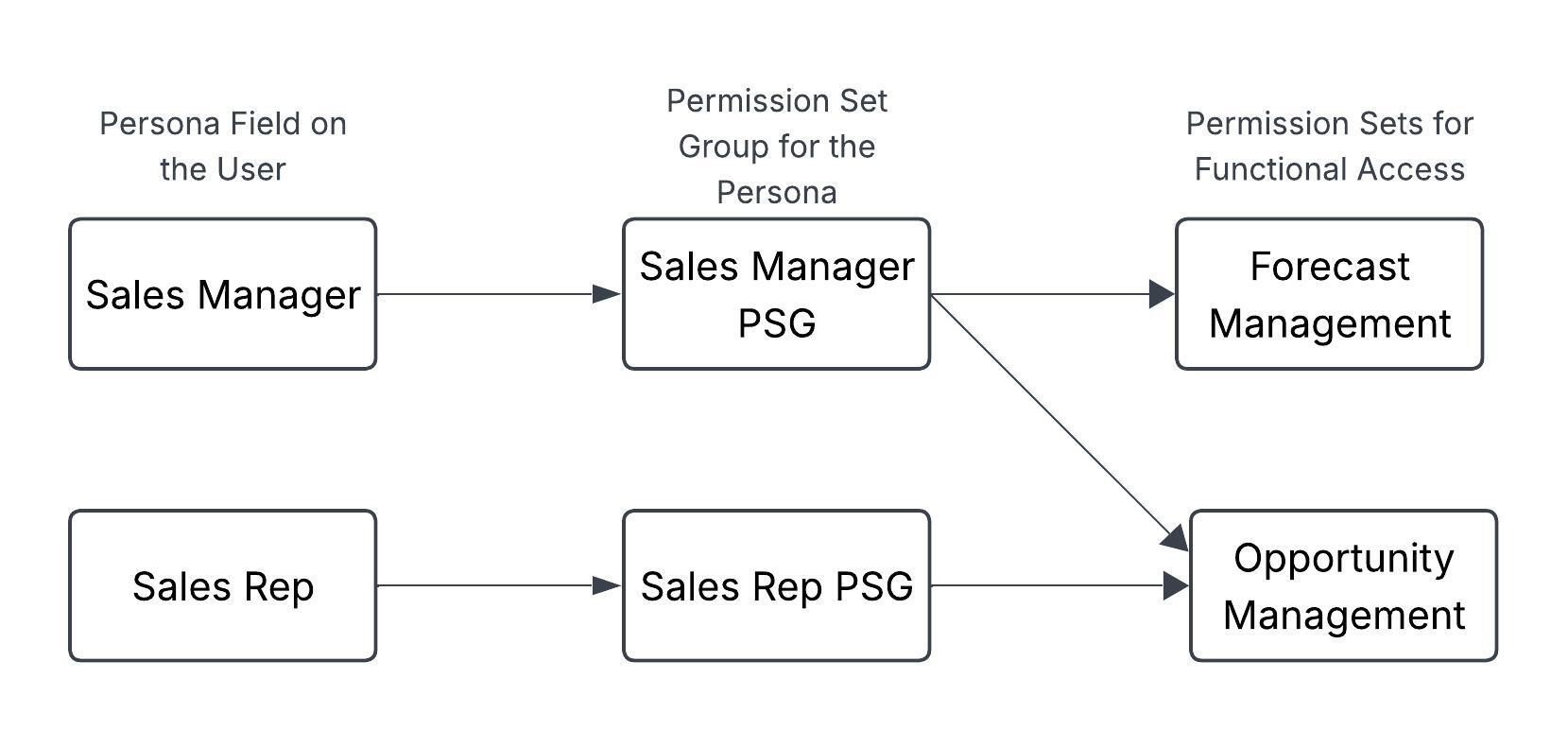
The following diagram shows how Permission Sets can be used, and reused, to provide functional access for personas.
Option 2: Permission Sets defined by persona
For other implementations, it may make sense to have a Permission Set defined by the persona itself, to store the permissions needed by that persona in the Permission Set. Depending on the way that functional capabilities are designed, if they are not easily abstracted out of the objects and system permissions provided, it can be easier to assign access to a Permission Set defined by the persona. If this approach is adopted, it is easy to update the access needed for the persona.
In a few of my prior implementations of a Partner Relationship Management Experience Cloud site, we established Permission Set Groups for Partner Standard Users and Partner Administrators (among a few other persona-based Permission Set Groups). Instead of attempting to break out their functions into capability-based Permission Sets (of which there would be 10+), we knew that there would be only a few personas for their partners. By adopting persona-based Permission Sets, we limited the number of Permission Sets needed. This made the system easier to maintain and update, as when a persona needed enhanced access or their access to be updated, the Permission Set aligned to that persona was the only metadata that had to change.
Keeping profiles minimal
This approach adopts the best practice design of minimizing access provided via profiles. Profiles historically were how permissions were assigned to users. However, Salesforce recommends migrating from profiles to Permission Sets and Permission Set Groups for providing access. While edge cases like page layout assignment, login hours, and IP ranges still require profiles, assign the vast majority of permissions via Permission Sets (aligning with the above strategy) and set up every user with a custom “Minimum Access” profile, one per license type. Assigning the “Minimum Access” profile to users satisfies the requirement that every user have a profile, which also determines the user’s license, while shifting operational access management to the persona-based design.
Move permissions from profiles to Permission Sets
Salesforce still supports permissions in profiles, but recommends a model led by Permission Sets. See what should stay in profiles, what should be in Permission Sets, and the steps to migrate.



Automating assignment through Apex
With the structures mentioned above that define the user’s access in a clear and understandable manner, automation is needed to tie it all together. Without setting up system automation to assign the access, it would not be worth setting up the framework for the design. This is the key component that unlocks the design to work together and provide users the access they need.
Automate this design with Apex. Even with the built-in benefits that flows offer (including automated bulkification and faster speed-to-market), Apex can be significantly more performant and provide a more reliable backbone for the automation involved at higher volumes. For example, even though flows have some bulkification automatically built into them, the degree of bulkification possible when using Apex is much higher than with flows. Apex is a better choice than flows because the automation must perform accurately and consistently at any scale. Implement the automation according to your organization’s trigger framework with Apex trigger and handler, service, and helper classes.
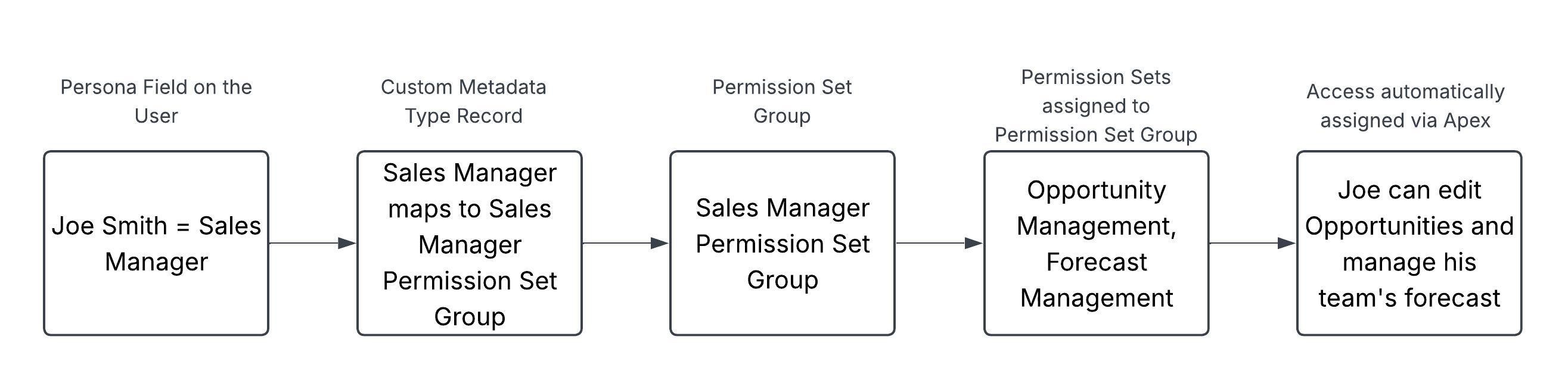
This diagram shows how all the pieces work together for Joe Smith, a Sales Manager:
Make personas a key part of your next design
If you develop or maintain technology for a business, rethink access as a design decision rather than a configuration task. A persona-based security model consistently provides access to those who need it, so when the requirements are captured, access is not missed. It provides a framework that allows the business to communicate access needed by users in a way that developers and architects can reliably incorporate into the permissioning approach. Personas, a foundational concept of user experience, should be adopted in all parts of the design, including the security model. For features developed, access is automatically assigned through Permission Set Groups aligned to the personas, with the Permission Sets providing the relevant access. The approach also aligns with the Salesforce Well-Architected Framework by promoting a scalable, predictable approach to security model design.
If you are designing solutions on Salesforce, try this approach on your next feature or cloud. If you are implementing a new cloud in Salesforce (such as Sales Cloud or Service Cloud), build the full design from the start. Define the personas and build the Custom Metadata Type for access mappings, Permission Set Groups, Permission Sets, and automation as part of the security design. If the next major feature you are implementing does not warrant the full design and automation, consider starting smaller. Identify the personas that apply not just to the upcoming feature but also to subsequent similar features, create a Permission Set Group for each persona, and create the Permission Sets that grant the access the feature requires. Assign the Permission Set Groups to users manually at first, and add the persona field and automation when you are ready.
In either case, establishing personas as the foundation gives you a security model that will be maintainable, scalable, and flexible enough to meet the business’s needs consistently.
Design with the Well-Architected Framework
Explore the Salesforce Well-Architected Framework, its five pillars, and the trade-offs to weigh when you design and review a solution.