

The right invoicing tools do more than send bills. They connect your customer data, your payment history, and your cash flow in one place — so your team always has the full picture, follow-ups happen automatically, and money moves faster without anyone having to chase it down. For a business running lean, that’s not a nice-to-have, it’s your bread and butter.
We’ll walk you through the invoicing tools built for small and medium businesses (SMBs) like yourself, that want to get paid faster and spend less time on admin — so you can stay focused on the work that actually grows your business.
What is invoicing software?
Invoicing software is a digital billing solution that uses professional templates to automate the creation, sending, and tracking of invoices. For growing businesses, it simplifies financial operations by automating billing, tracking payments, and integrating with accounting systems. This helps you improve cash flow and reduce administrative problems, allowing smaller teams to focus on growth.
What to look for in small business invoicing software
Not all invoicing tools are created equal. In fact, if they aren’t embedded into your business management tools like customer relationship management (CRM), you may struggle to connect the dots between your pricing and their payment. Here are the key features that matter most when you’re evaluating small business invoicing software:
- Automated billing: Automated invoicing reduces manual follow-ups, cuts down on late payments, and keeps your cash flow steady without you having to lift a finger each billing cycle.
- Multiple payment options: The easier you make it for clients to pay, the faster you get paid. Look for tools that support credit cards, bank transfers, digital wallets, and online payment systems — giving customers a seamless experience that reduces friction at the finish line.
- CRM integration: A unified invoice processing solution that connects your billing data to your sales pipeline (in your CRM tool) means you can move from lead to payment efficiently, with a full view of your customer throughout their journey.
- Expense reporting: Built-in reporting gives you real-time visibility into cash flow, outstanding invoices, and revenue trends. This invoicing data helps you make smarter decisions — and makes tax season a whole lot less painful.
- Mobile accessibility: Cloud-based, mobile-friendly invoicing means you can create, send, and track invoices from anywhere — whether you’re onsite with a client or working remotely across time zones.
Why the right invoicing tools matter for SMB growth
According to the latest Small and Medium Business Trends Report, 76% of small businesses that increased their tech spending are growing. Investing in the right digital tools for SMBs — including invoicing software — is one of the best ways SMBs are staying competitive.
The best invoicing tools don’t just send bills. They help you build a more professional brand, and maintain better client relationships. They can also help you gain the financial visibility you need to plan ahead. When your invoicing system talks to your CRM, your marketing tools, and your payment processing — the way it does inside Salesforce for small business — you’re not just automating billing. You’re building a connected business.
Best 5 invoicing tools for small businesses and startups
Several dedicated invoicing and accounting tools stand out for their specific features among startups and lean teams. We researched a few to recommend, based on quality, integration, and cost. Here are a few to consider:
1. Salesforce Suites
Salesforce Suites features native, built-in invoicing functionality which allows users to generate and share professional invoice PDFs directly from opportunities and quotes, connecting billing directly to CRM data to provide a complete view of customer payment and revenue tracking. Both tiers include embedded artificial intelligence (AI) powered by Agentforce, built directly into the platform. AI automatically summarizes customer records and drafts personalized follow-up emails — so if a payment is overdue, your team can respond quickly and professionally without starting from scratch.
Salesforce Suites comes in two tiers, both including invoicing capabilities:
Starter Suite provides native invoicing functionality alongside marketing, sales, service, and commerce tools in one easy-to-use platform, perfect for small teams just getting started with integrated billing. This plan starts at $25/month and has a free trial for 30 days.
Pro Suite enhances the core invoicing features with advanced customization and automation for billing workflows, ideal for businesses scaling fast and needing deeper control over their financial operations. This plan starts at $100/month and has a free trial for 30 days.
Here’s an example of an invoice generated by Salesforce Suites:
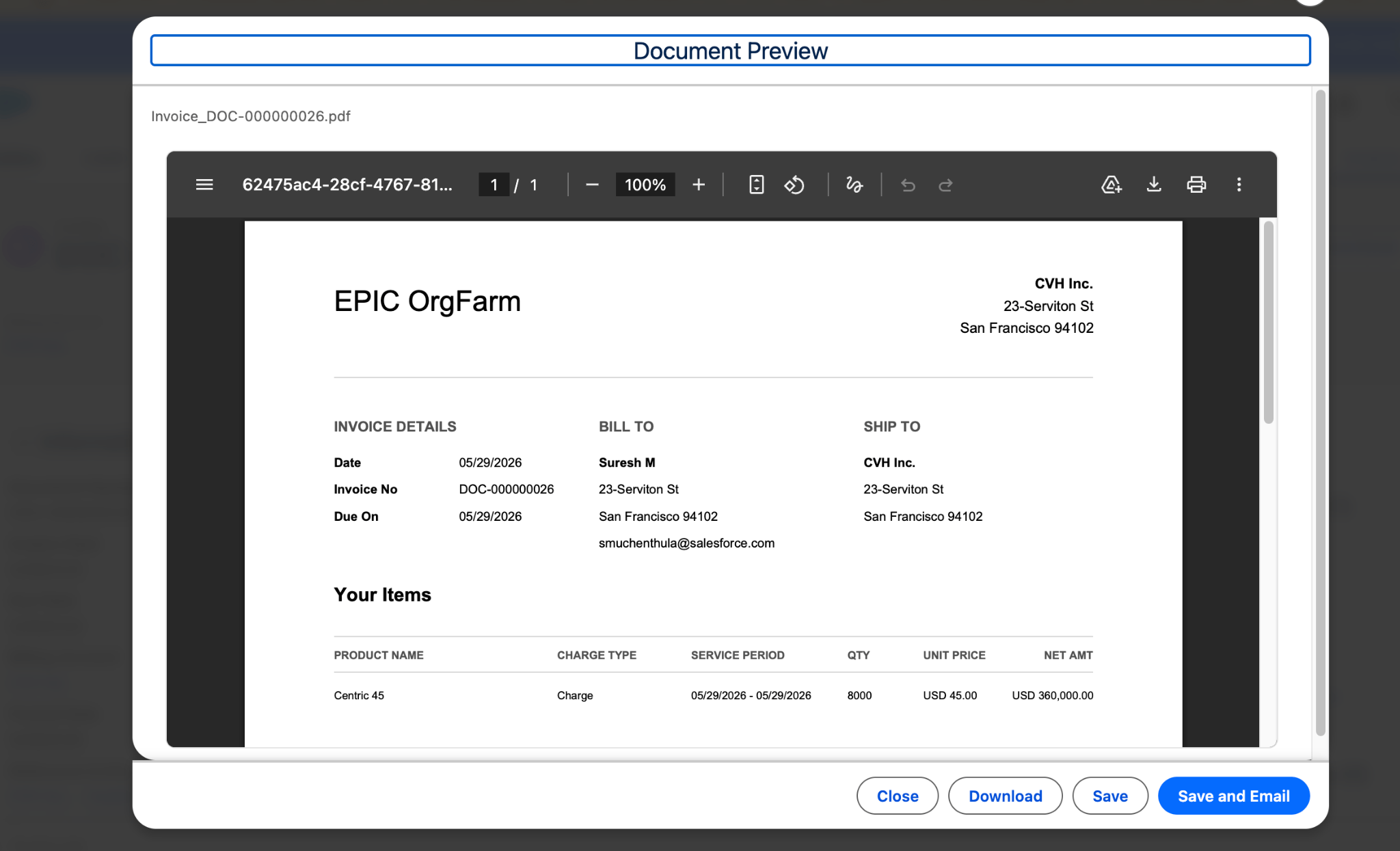
Pro tip: Through the AgentExchange, you can connect Pro Suite with invoicing apps to handle billing directly inside your Salesforce environment — no copy-pasting between tools, no duplicate data entry.
Get Salesforce free for 30 days.
No credit card required, no software to install.

2. QuickBooks Online
QuickBooks Online provides accounting, bookkeeping, and payroll management for small businesses and growing teams. Its integration with Salesforce CRM through AgentExchange allows for seamless data sharing between sales and accounting — including customer information, sales orders, and expenses. This integration enables you to automatically sync closed deals in Salesforce to generate invoices without manual data entry, helping you manage financial health and tax preparation accurately and efficiently.
It offers connectivity with CRM and other business tools to synchronize sales data and automate invoicing. Their plans start at $30/month with Simple Start.
3. FreshBooks
FreshBooks is a cloud-based solution offering invoicing, time tracking, expense management, and basic accounting, designed specifically for service-based small businesses and freelancers. During a free trial, you get access to all FreshBooks features except Advanced Payments (like FreshBooks invoicing, time tracking, and expensing).
It’s known for its user-friendly interface and strong focus on time tracking, which simplifies the process of billing clients for billable hours and ensures quick payment processing. Its Lite plan starts at $17/month.
4. Wave
Wave offers free accounting, invoicing, and receipt tracking software for solo entrepreneurs, freelancers, and small businesses with basic financial needs. The primary appeal of Wave is that its core double-entry accounting software is free, allowing small teams to manage general ledgers and handle basic financial reporting without a monthly subscription fee.
Wave enables users to generate professional invoices and track receipts for all expenses and income. While the software is free, Wave monetizes through its integrated services, such as payment processing. Users can accept credit cards and bank payments on their invoices, with a processing fee of 2.9% + $0.60 per transaction.
5. Invoice Ninja
Invoice Ninja is an open-source invoicing platform designed specifically for tech-savvy freelancers, agencies, and small businesses who require professional invoicing and proposal tools. It offers core features such as a secure client portal for streamlined customer interactions and the option for self-hosting, which provides businesses with complete control over their sensitive financial data.
By connecting with multiple payment gateways, Invoice Ninja allows users to accept various payment methods efficiently. The service follows a freemium model, providing a free plan for those starting out, with Ninja Pro plans starting at $10 per month for users needing advanced functions.
Invoicing tool comparison: Key features for SMBs
| Automated Billing | Multiple Payment Options | CRM Integration | Expense Reporting | Mobile Accessibility | |
|---|---|---|---|---|---|
| Salesforce Suites | ✓ | ✓ | ✓ | ✓ | ✓ |
| QuickBooks Online | ✓ | ✓ | Limited | ✓ | ✓ |
| FreshBooks | ✓ | ✓ | Limited | ✓ | ✓ |
| Wave | ✓ | ✓ | Not Available | ✓ | ✓ |
| Invoice Ninja | ✓ | ✓ | Not Available | Limited | ✓ |
AI is changing small business invoicing
AI is already reshaping how small businesses handle financial operations, and invoicing is no exception. AI-powered small business billing software can flag unusual billing patterns before invoices go out, draft personalized payment reminder emails, and surface insights from your invoicing data that would take hours to compile manually.
With Agentforce powering Salesforce, small businesses get AI that’s connected to their actual customer data that understands your pipeline, your clients, and your billing history. Agentforce adapts to your business needs wherever you are in your growth journey, helping lean teams move faster without sacrificing accuracy or professionalism.
Ready to connect your invoicing tools?
If you’re ready to stop chasing invoices and start getting paid faster, there’s no better time to explore what an AI-powered CRM can do for your billing.
Get your invoices created with Salesforce for free or activate Foundations to try out Agentforce today.
AI supported the writers and editors who created this article.
What are invoicing solutions for small businesses?
Invoicing tools for small business are digital platforms that help you create, send, track, and manage invoices from one place. They automate billing workflows, reduce manual errors, and give you real-time visibility into who’s paid and who hasn’t.
How does invoicing software help small businesses get paid faster?
By enabling quick invoice creation, automated payment reminders, and multiple online payment options, invoicing software reduces the delays that come with manual processes. Clients can pay in just a few clicks, and automated follow-ups handle the awkward reminder conversations for you.
Can I connect invoicing tools to my existing CRM?
Yes — modern invoice software integrates seamlessly with CRM platforms like Salesforce, preventing data silos and giving you a unified view of your customers’ billing and relationship history.
Do I need paid invoicing software, or will a free tool work?
Free tools are a solid starting point for freelancers and early-stage businesses, but growing SMBs typically benefit from paid solutions that offer automation, integrations, scalability, and better security. The right fit depends on your current needs and where you’re heading.
What’s the difference between Starter Suite and Pro Suite for invoicing?
Starter Suite is designed for small teams just getting started — it includes CRM, marketing, sales, service, and commerce tools in one easy platform. Pro Suite adds advanced customization and deeper integrations, including third-party invoicing apps through AgentExchange, making it ideal for businesses that need more control as they scale.