



If you build on Salesforce as an ISV partner, you’ve poured years into the IP you ship: the Apex, Flows, and experiences your customers rely on every day. Agent harnesses like Claude, ChatGPT, and Slack are changing how people reach that value, and that’s a genuine opportunity for you to lead. This post is for you. We’ll skip the groundwork, Mohith Shrivastava’s post Expose Custom Apex as a Hosted MCP Tool for Agents is a great introduction to the topic. We are going to jump right in and get straight to the partner’s part of the story: what to do with your packaged IP, and how you can help your customers meet this agent-first moment.
What’s below is a practical, four-part playbook. We’ll start with the headless experience layer: how to think about your IP as agent-callable capabilities plus the widgets that distill their results. Then we’ll cover the readiness work (evaluating your package, decomposing large functions, and uplifting Apex), how to bring it to your customers while they stay in control of their own security. Finally, we’ll close with the road ahead: where Salesforce’s platform roadmap is headed through Dreamforce and beyond, and what that means for how you should be shaping your own roadmap now. Throughout, the team from Appiphony, a Partner Development Outsourcer (PDO), will share examples of how they are doing this work today.
Part 1 — The headless experience layer, built on your IP
Partners have spent years building intellectual property on Salesforce: Apex business logic, Autolaunched Flows, data models, and rich Lightning UIs. Until now, customers reached all of that value through screens. But users are increasingly conducting their work inside an agent (Slack, Claude, Cursor, Agentforce), and not inside your app. The question for every partner becomes: what does your IP look like when consumed through an agent?
That’s the headless experience layer: the surface where your packaged IP meets the agent. It has two halves:
- Capabilities as tools. The logic you’ve already built (Apex, Flows) becomes a set of discoverable, agent-callable MCP tools. The agent, not a menu or sequence of clicks, decides when to invoke them, always as the signed-in user.
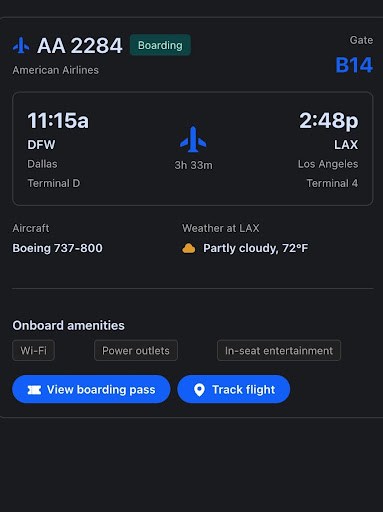
- Distillation as widgets. When a capability returns a result, lightweight widgets can distill the answer, making it easier for users to comprehend the information and act upon it at a glance.
So the mental model shifts from “how do users navigate my app?” to “which capabilities do I expose, and how do I present their results?” The rest of this post is about getting your IP and your customers ready for that world.
Part 2 — Getting ready: what partners must do first
The readiness work is mostly partner-side, and it’s easier to picture with a real example in view. Throughout this section, we’ll draw on the work Appiphony has done making its own AgentExchange apps headless-ready, to show what each move looks like in practice. There are four moves:
- Evaluate your package. Inventory what you ship. Which capabilities are already one step from being MCP tools (@InvocableMethod, @AuraEnabled, @RestResource, Flows) and which are locked behind UI-only code paths?
- Decompose larger functions into finite pieces. A monolithic “do everything” method is hard for an agent to use well. Break broad functions into granular, single-purpose tools the agent can compose — each with a clear job, clear inputs, and a clear result.
- Uplift functionality to be headless-ready — especially Apex. Annotate with @InvocableMethod / @InvocableVariable, use global with sharing, tighten and type the inputs/outputs so the auto-generated inputSchema / outputSchema are clean. Ensure methods, inputs, and outputs have strong descriptions which will aid the agent when picking your tools.
- Design the headless experience layer and its widgets. Decide how each capability’s output is distilled and presented so you’re not hitting the user with a wall of text.
Appiphony’s Take: Serve the Developer First. When we considered developing MCP tools for our Parse Connect app, we realized that we had an opportunity to serve both developers and agents. Like a lot of ISVs, we had shipped a few invocables for Flow and called it a day. Nobody had asked us for more than that. This time we went further and built a versioned Apex SDK first, with global methods, a pinned contract, strict validation on every call, and errors that come back as documented codes instead of exceptions. Our agent tools are built on top of that same foundation. What we learned is that a contract clean enough for a developer is the same thing an agent needs. Our SDK includes a describeMethod call that returns each method’s contract at runtime, so an agent can look up the parameters on its own. When a call is malformed, the response lists the valid parameter names, and the agent corrects itself on the next try. If you serve the developer well, the agent work is mostly done for you.
Part 3 — Bringing it to the customer
Readiness on the partner side isn’t enough — the customer has to see the value before they’ll stand up a server and connect an agent. Two things follow from that. First, make the agent experience a core part of the demo you already give: show it off live and explain the value it unlocks both across your app as well as other capabilities in their org. Second, make standing it up as close to turnkey as you can — do the heavy lifting for them while leaving the customer in control of their own security and which tools they choose to expose.
Demo Headless
This isn’t a special showcase you dust off once — going forward, the agent experience belongs in every demo, right alongside your usual UI walkthrough. Present an MCP client (Claude, ChatGPT) alongside your demo org and begin asking in plain language for something your app does, then watch the agent discover the right capability, run it as the signed-in user within their permissions, and hand back a clean, distilled result. Showing your app working the way customers increasingly want to work — through the agent they already use — turns “MCP-ready” from a spec line into something concrete.
Turnkey Implementation
Ship example metadata that scaffolds the MCP server definition. Give the customer a starting McpServerDefinition, via unmanaged package, so they aren’t authoring it from scratch. At the end of the day, customers will have individualized preferences for what standard, customer built, and partner provided tools to expose.
You might also consider writing a custom SKILL.md. This is a skill built to run on a local coding agent like Claude, ChatGPT, or Agentforce Vibes, and it walks the customer through creating the necessary metadata in their org. Instead of a multi-click process in Setup, the admin runs the skill, answers a few questions, and the agent does the rest.
Let customers own their ECAs. Default to letting your customers own their ECAs. It’s their org and their security posture, and ownership belongs with them. But don’t treat that as one-size-fits-all. Small and medium-sized business customers often lack the in-house expertise to stand up an ECA and connect it to an agentic harness like Claude or OpenAI on their own. That setup gap can be enough to stall adoption entirely. Be ready to help them get connected to the client of their choice — through clearer documentation, implementation or pro-serve support, or a packaged ECA when that’s genuinely the right call.
The exception, if you operate the MCP client yourself, package the ECA by default. That configuration is repeatable and entirely within your control, so there’s no reason to push the setup burden onto the customer.
Be ready to have a conversation to help the customer get headless ready, and guide their exposure choices. Talk the customer through the decisions they’ll make when exposing functionality through MCP: which tools to expose, read-only vs. mutating, how to scope to a given persona.
Check Out Our Most Expansive ISV Product Release To Date
Discover how Salesforce’s largest ISV product release to date enables partners to offload core infrastructure, clear engineering backlogs, and rapidly expand into high-value industries.



Part 4 — The road ahead
The two patterns above are what’s available to you today as we lead into Dreamforce. But it’s worth naming the bigger shift underneath them: headless changes the ISV playbook, not just the delivery mechanism.
It’s tempting to treat this as a retrofit exercise where you take your existing app(s) and figure out how to make it “work with headless.” While that is a necessary first first step, the more valuable exercise is planning and envisioning use cases where the agent itself is the primary persona, not a new surface bolted onto an existing one. A headless agent is an ultra-intelligent user that doesn’t get overwhelmed the way a human does — it can hold more context, chain more steps, and handle more ambiguity in a single interaction. That changes what’s worth building. Treat it as a new kind of user you’re designing *for*, and you’ll find use cases you wouldn’t have shipped otherwise.
In the months ahead we are working to make HXL widgets and MCP Server Definitions packageable by partners.
Join the Partnerblazer Community


Keep going: key articles for partners
A short reading list to help you take the next step:
- Expose Custom Apex as a Hosted MCP Tool for Agents
- Hosted MCP Servers — developer guide — the official documentation for setup, custom servers, and client connection.
- Best Practices for Using Global Apex in Managed Packages
- Announcing the Headless 360 MCP Server (Beta) — deeper detail on the four-tool, discovery-first model.
Stay in the Loop with Partner Marketing
Get the latest event invitations, product releases, and more delivered straight to your inbox. Stay connected, get ahead, and maximize your partnership.