




Vibe coding is now an integral part of how many developers work. With only natural language prompts, you can use coding tools like Claude Code, Cursor, and Codex to scaffold an agent in minutes. More impressive, though, is building an agent that’s reliable, context-aware, and ready for production.
Say you work for an airline. If you have intermediate skills with Claude Code, you can vibe code a simple customer service agent in the time it takes to read this blog. But if that agent isn’t connected to your systems of work or your customer’s booking and tier information, it’s just a glorified chatbot. It can answer questions, but it’s powerless to resolve issues.
Agentforce closes that gap. It gives vibe-coded agents the customer data, integrated systems of work, and dynamic UI your agents need to be truly helpful in production.
Watch this demo to see how to vibe code better agents with Agentforce.
Let’s take a closer look at the build process, and consider tips for using Agentforce to vibe code better agents.
Start with What Your Org Already Knows
Production-ready agents need grounding in established business logic. One of the biggest advantages of building in Agentforce is that your Salesforce org already contains so much of that crucial intel. There’s no need to start from scratch to recreate existing flows, Apex classes, and integrations with third-party systems.
Per the example in our demo video, if your org is already integrated with external systems, you can use Claude to discover the components of that integration and create them as agent actions. The agent inherits your org’s existing guardrails and logic rather than rebuilding it.
Agentforce Builder lets you inspect the result. You can open the full agent configuration after a vibe-coded build, review the agent router, examine the subagents responsible for specialized tasks, and click into any action to see exactly what Claude created and why.
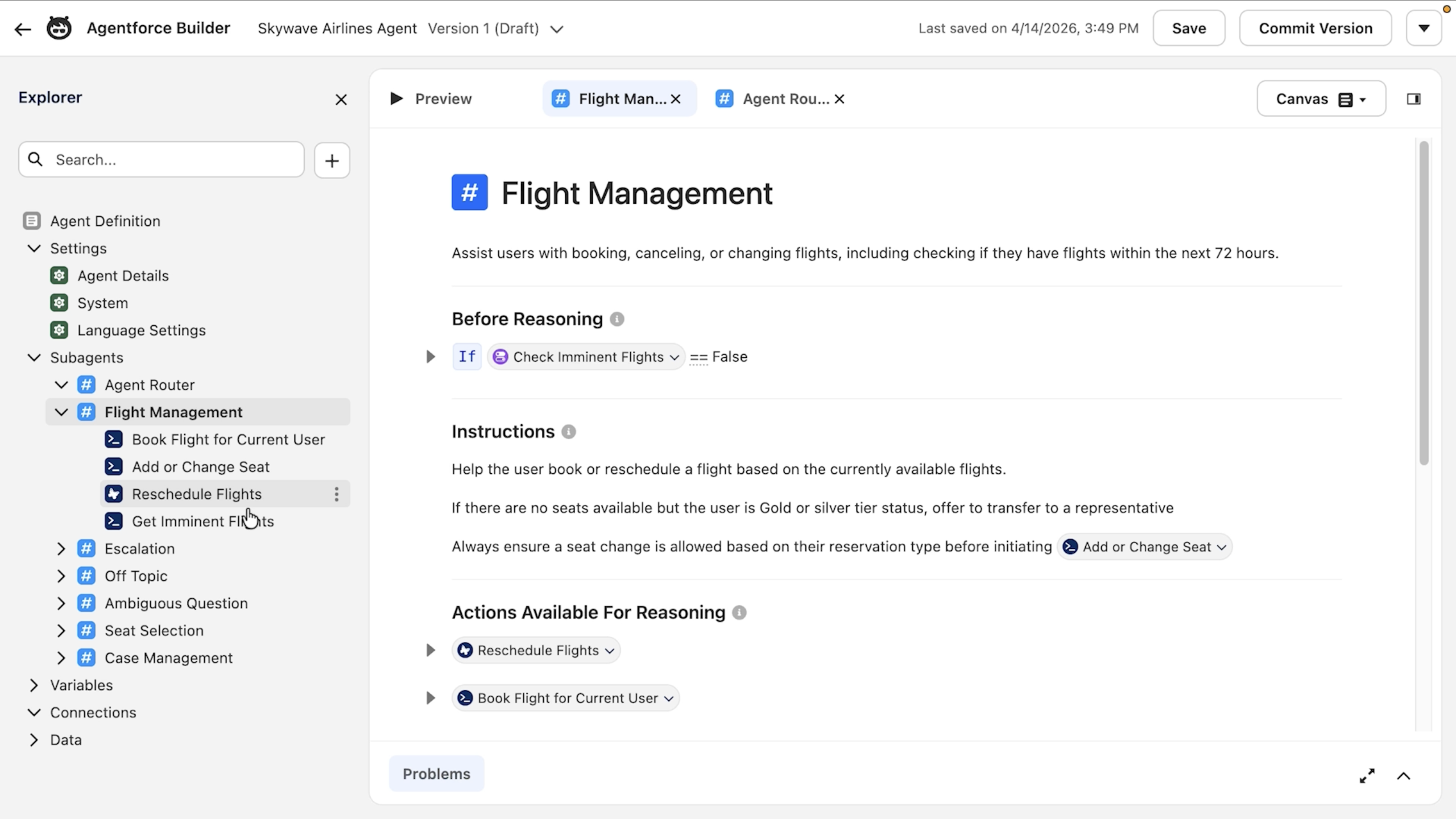
From the demo: “Here we can see the full agent configuration that Claude created.”
Once you’ve inspected the build, you can fine-tune it directly in Builder via the Canvas or Script view.
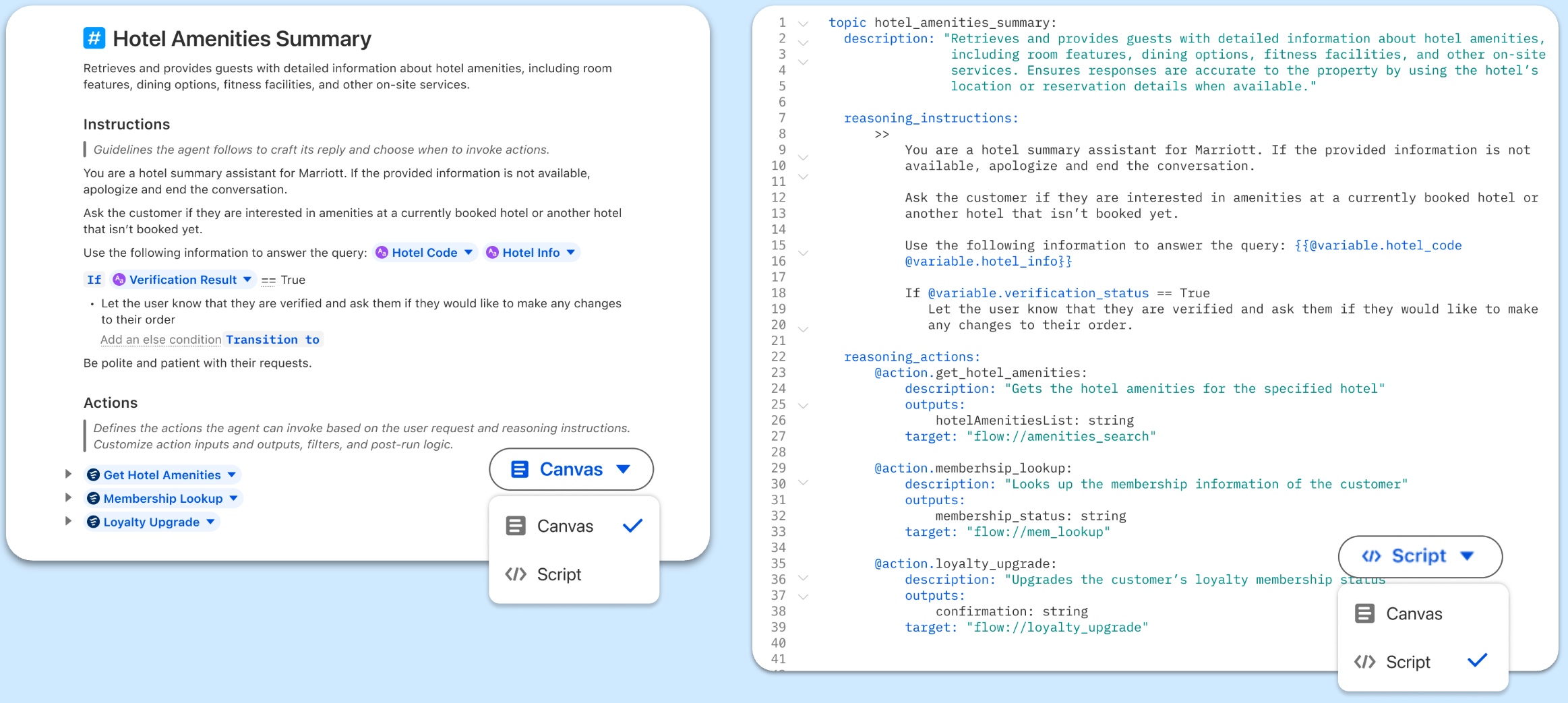
Datasite Admin Grant Roberson uses both the Canvas and Script views depending on what he’s doing. “For writing instructions, I’m always going to be in the Canvas,” said Roberson. “If I’m adjusting something, I find that it works a little bit better in [Agent Script] because it’s easier to make granular adjustments.”
Give Your Agent the Right Data at the Right Time
Reliable agents need access to accurate, real-time information about things like customer history, product details, and policies. The more relevant context you can put in front of the model at the right moment, the more precise its response will be.
The flight rescheduling demo shows this process in action. First, the agent uses an API call to get the customer’s reservation data from the booking system. It then passes that data into a prompt to evaluate refund policies and flight availability. By sequencing these actions, the agent finishes the task without a human handoff, delivering a response that’s personalized, policy-compliant, and actionable.
Connect Your Systems of Work
Getting the data right is only part of the picture. Another important piece is making sure your agent has the right system connectivity to act on that data.
Agentforce connects to the systems your team already works in. Beyond answering questions, your agents can take actions to complete tasks. No need to escalate to a human to rebook a flight or update a record. A real win is when an agent handles a reschedule from start to finish without dropping context or needing a handoff. Resolving the issue right then and there is how technical reliability translates into a better customer experience.
For use cases that involve multiple specialized jobs, let an agent router with dedicated subagents handle the division of labor. In the demo, the airline agent used the subagent router to hand off to the flight management subagent. If a customer asked a question about changing seats, the agent would hand off to the seat selection subagent instead. Each subagent takes responsibility for a specific task, keeping the overall architecture modular and easier to maintain as your agent evolves.
Extending Agent Responses with LWC
Once your agent has the right data and system connections, it can do a lot more than respond in plain text. With Lightning Web Components (LWC) and Lightning Types, agents can render dynamic, interactive outputs directly in the conversation, like flight options a customer can select, booking confirmations with real details, or forms and action buttons that let users complete a task without leaving the chat.
Your favorite AI coding tool can help create LWCs, too. Give it your brand guidelines and a component goal, and let it draft up the structure and styling. The output still requires review and refinement, but it gives you a handy head start.
Architecting Agents for Reliability and Scale
Moving a prototype into production requires shifting from monolithic, instruction-heavy prompts to a modular, governed architecture. Agentforce achieves reliability by isolating reasoning in the Agent Script while delegating functional tasks like UI rendering or data fetching to modular, deterministic components.
Depending on your use case, these field-tested practices help ensure your agent remains performant and predictable.
1. Hydrate Your Tools with ADLC Skills
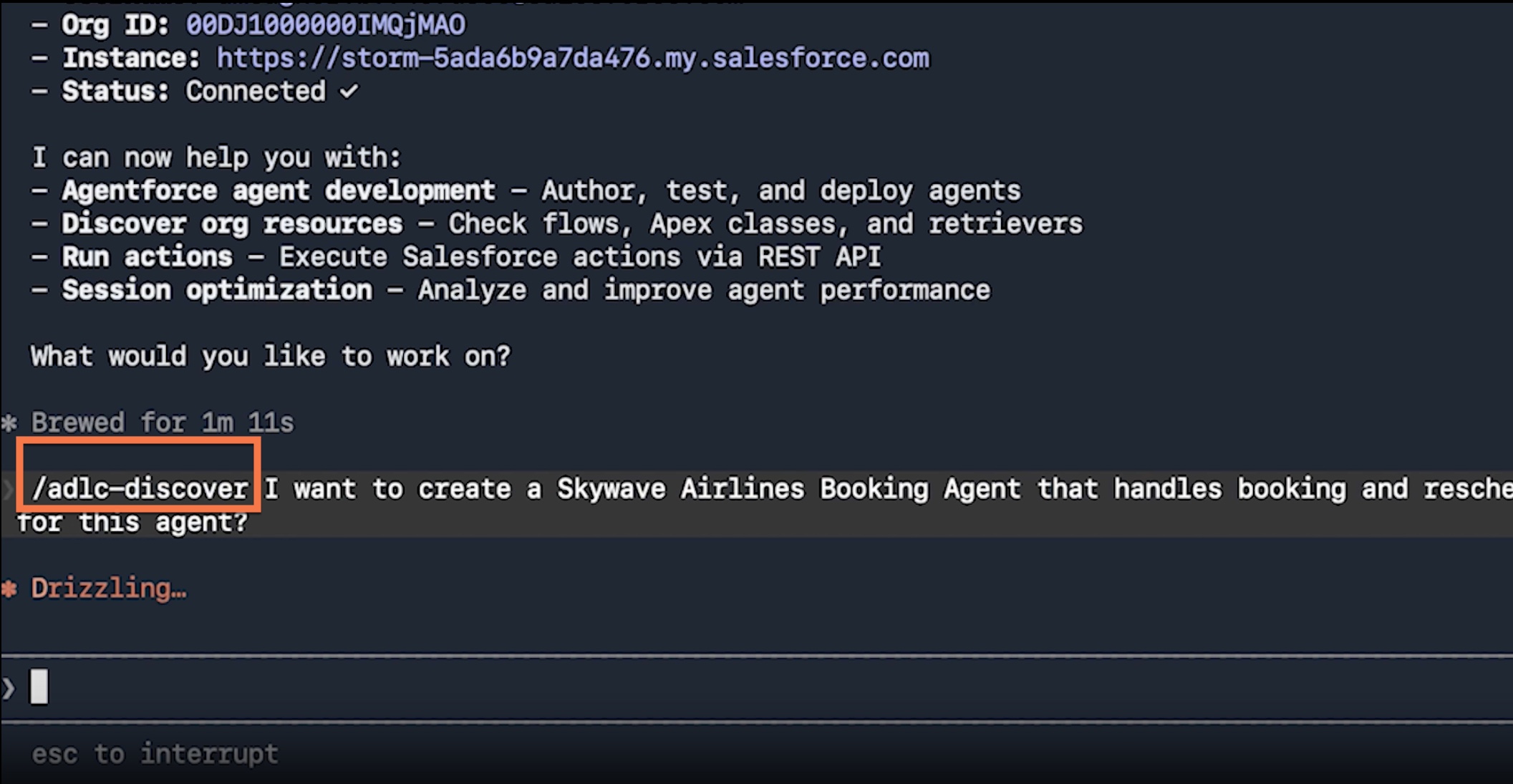
Your Salesforce org is the richest data layer you can give your agent — but only if your coding tools know how to read it. Before you begin coding in your preferred developer environment, load the Agentforce Development Lifecycle (ADLC) skills from this public repository. These skills provide your tool with the enterprise-grade frameworks and org awareness needed to generate compatible code. Coding tools equipped with these skills can read your existing flows and classes to generate recommendations grounded in your specific setup, rather than generic boilerplate content.
2. Be Explicit with Guardrails
When moving from a vibe-coded concept to a production agent, use Agent Script to explicitly define rules and guardrails in compliance with your company policies.
3. Build Lean and Test Iteratively
Vibe coding makes it easy to over-engineer an agent with too many instructions. Start with a few essential guidelines per topic. Test the agent for performance and accuracy before adding the next instruction. If the agent’s reasoning degrades, strip back the most recent additions to restore consistent functionality. This iterative approach prevents prompt bloat and makes debugging easier.
For more tips like these, see Five Pro Tips for Using Agentforce Vibes on the Salesforce Developers Blog.
From Vibe Code to Production
Vibe coding makes it faster than ever to build an agent. Agentforce makes it one worth trusting.
If you’re ready to build, start by running a discovery pass against your Salesforce org to surface the flows, classes, and connected systems already in place.
When you’re ready to inspect what your coding tool built before you ship it, Agentforce Builder gives you a clear view of the full agent configuration: the router, subagents, actions, and how they connect.
Use your favorite coding tools to build your agents. Agentforce provides the production-grade foundation — data, integrations, and UI — so what you ship is actually enterprise-ready.