

Key Takeaways
Organizational charts have been around forever, but they’re no longer the dull wall posters they once were. The old boxes and lines have evolved into digital, online tools that show how your team works — anywhere in the world. Modern org charts are showing how teams collaborate and share responsibility across the business. Technology has transformed them from simple reporting maps into tools that reflect how work actually happens.
Building an org chart today may mean something entirely different than it did years ago. In this guide, we’ll walk you through how to create one organizational chart that’s simple, functional, and built to grow with your business. Let’s jump in.
What is an organizational chart?
An organizational chart is a visual map of your business showing people, teams, and roles connected to get work done. It includes team names, titles, departments, and reporting relationships laid out in a way that makes sense for growth. The layout of the org chart will show workflows and where collaboration happens across the business.
Here’s what a typical org chart shows:
- Teams and titles that define ownership.
- Reporting lines that show who leads whom.
- Departments grouped by role or function.
- Decision makers visible at a glance.
- Cross-team links that reveal collaboration paths.
Together, these elements paint a clear picture of how your organization operates. When built thoughtfully, an org chart becomes a shared reference point that helps people see how your business truly works.
Start with Small Business Basics




Why an organizational chart matters for your team
Having an organizational chart helps to see where teams sit and who is designated for certain roles and responsibilities. When everyone understands that picture, business can flow in the right direction.
Hiring benefits: Teams can onboard faster because new hires know the flow of the organization by the chart.
Better forecasting: As a leader, you can see capacity and spot gaps before they become problems, allowing you to plan appropriately. You can collaborate with more confidence because roles and responsibilities are clear. Clarity saves time and builds trust with your team.
Accountability improvement: A clear chart brings accountability into focus. When people can see how their work connects to others, they take ownership naturally. Managers delegate with confidence. Team members know where to go for support. The org chart becomes a quiet form of structure that keeps the team steady while you grow.
When a chart can be harmful
An org chart can backfire when it stops reflecting how your team truly works. Maybe roles changed, but the chart didn’t. Maybe your structure became too layered, too rigid. That’s when confusion creeps in. People hesitate to act and collaboration slows down. The fix isn’t to scrap the chart, it’s to keep it alive by reviewing it — often. Treat it as a living document that adapts with your small and medium-sized business (SMB).
What to include in an organizational chart
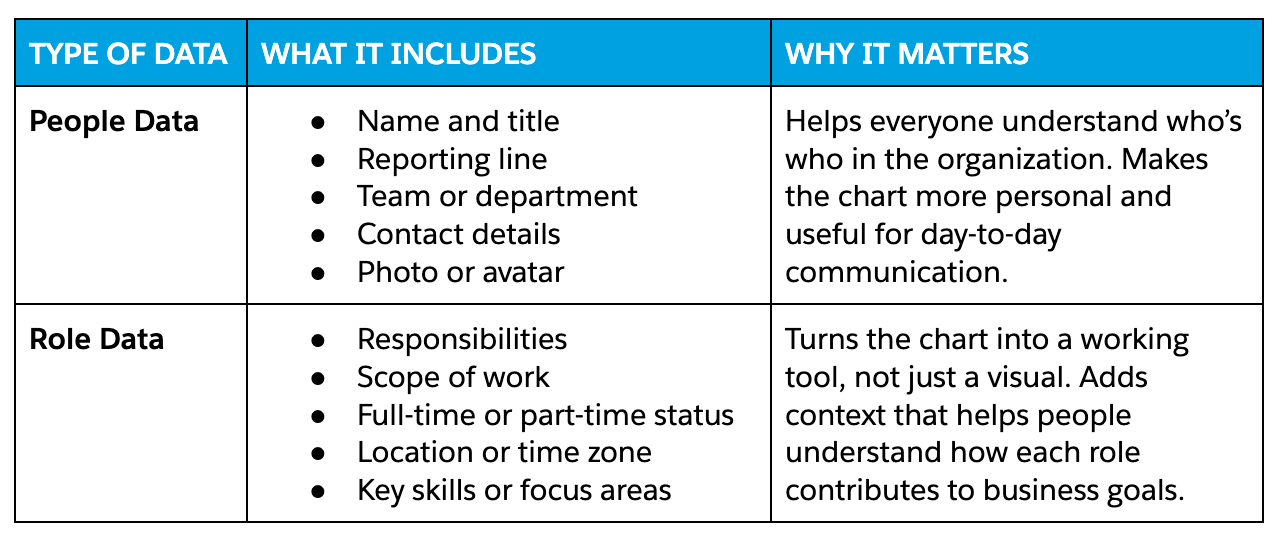
When it comes time to build your own organizational chart, you can choose whichever format suits you best. Here are a few things to include and why it matters:
Types of organizational charts
Before you start building your org chart, it helps to know what structure actually fits your team. The right chart depends on how your people collaborate and plan growth. Most organizations use one of a few common types that balance clarity with flexibility. These include:
Hierarchical charts
A hierarchical chart shows a clear top-down structure where each employee reports to one manager. You’ll see executives at the top, managers in the middle and individual contributors at the base. For small teams, this setup keeps decision-making simple and responsibilities clear.
Divisional charts
A divisional chart organizes people based on products, regions, or customer segments. This model helps growing teams manage multiple product lines or markets independently. It gives each group autonomy to move fast while still aligning with overall company goals. Small businesses often adopt this once they expand into new markets or service categories.
Matrix charts
A matrix chart allows employees to report to more than one manager, often a functional lead and a project lead. This setup works well for teams that handle cross-functional projects or collaborate across departments. For smaller teams planning to scale, the matrix model can introduce flexibility early while keeping collaboration at the center.
Flat charts
A flat chart reduces hierarchy altogether. Everyone sits on nearly the same level, and collaboration happens directly without layers of management. This type suits startups and small teams that thrive on agility and open communication. Decisions happen fast. Roles shift as the business evolves.
Accelerate your startup success with Salesforce Launchpad



Step-by-step guide to build an org chart
An org chart looks simple from the outside, but creating one that actually works takes a bit of thought. Here are six simple steps to get started:
Step 1: Choose the structure type
Decide what you want the chart to show and how people will use it. Do you need a simple top-down view to show reporting? A matrix to reflect project teams? Or a flat map for a small, nimble crew? Pick the structure that answers those questions.
Quick test: if someone asks, “who do I go to for approvals,” it should reflect easily in your org chart.
Step 2: Decide on your data source
Figure out where the people and role data live. For many teams, a single source of truth makes updates less stressful. That might be an HR system or your customer relationship management (CRM). For example, if your team already tracks people and roles in Salesforce CRM, you can easily pull details such as names, titles, and reporting relationships from there. That keeps the chart current and tied to the systems your teams already use.
Step 3: Use a template or start from scratch
Templatizing your org chart gives you a scalable way to move forward with team growth. Include columns to fill: name, title, manager, team, responsibilities, location, status (full-time or part-time). Templates work well for small teams that need a clean first version fast. Start from scratch when your org has unusual reporting or you want custom role fields. Either way, export a comma separated values (CSV) sheet so you can update the chart programmatically later if needed.
Step 4: Create the chart
Depending on the size of your team, the business industry and the volume in which you work, here are a few ways to create a chart. Choose a creation method based on how often you’ll update the chart.
- Manual: Use drag-and-drop editors like Google Slides when changes are occasional. This helps you quickly edit and have visual control. This is good for small teams with low churn.
- Automated: Import a CSV or connect directly to your data source when changes happen frequently. Automated methods reduce errors and save time. For teams on Salesforce, AppExchange apps make this seamless. You can build visual maps and update the chart without re-exporting files. Pick automation when you want the chart to reflect live data, not a snapshot.
Step 5: Review with stakeholders and adjust
Managers, HR, and team leads should scan the chart for accuracy. Look for overlapping responsibilities, missing roles, and ambiguous titles. Resolve those quickly. Make small edits now rather than debating them forever. Lock in a single owner for updates so changes don’t slip through the cracks.
Step 6: Publish and update regularly
Decide where the chart lives so people actually use it. Embed it in your collaboration tools (like Slack) or your intranet. Attach it to the CRM account or a shared drive. Export a PDF for board meetings. Then set a review cadence. Try monthly for high-change teams and quarterly for steadier teams.
Be sure to assign a team member to own the org chart maintenance. If you use automation, set the sync frequency and check logs when fields change. And finally, communicate updates to the company so people treat the chart as the live reference it should be.
Try the AI CRM for SMBs. See what’s possible.
Get started with Salesforce Suites — the AI-powered CRM made to grow your ambition.

Why connecting your org chart to your CRM matters
When your org chart connects to your CRM, your team finally works from one source of truth. No more guessing who reports to whom or chasing down role updates in old files. Every title and reporting line stays accurate because it updates in real time. When someone joins, changes roles, or moves teams, the chart reflects it instantly. That saves hours of manual edits and keeps your internal systems clean.
A connected chart also helps teams collaborate better. You can quickly find the right person for a project, see who’s managing a customer relationship, or check which department owns a process. Work stops getting lost in silos. People can make faster decisions and stay aligned without long threads or extra meetings.
It also supports stronger planning and onboarding. Here’s how:
- For managers: It clarifies capacity, structure, and reporting so they can balance workloads and plan headcount.
- For new hires: Shortens the ramp-up time by showing who does what and how teams connect.
- For leadership and HR: It makes reviews, reorganizations, and approvals more transparent.
Maximize Your CRM Productivity
Learn how small and growing businesses are taking productivity to new levels with Salesforce CRM in this free e-book.
Thank you for downloading the free e-book!
Here's your free e-book!Three AppExchange tools to build org charts
You need a tool that helps you keep org charts accurate, visible, and useful. Using a native app that plugs into your CRM means updates, structure and roles stay in sync. Below are a few options worth exploring.
- Org Chart – Lightning Ready : A simple, lightweight component that shows reporting lines directly inside Salesforce. It works seamlessly in Lightning on both desktop and mobile. Perfect for small teams that need a clear, reliable view of their hierarchy.
- OrgChartPlus: A flexible tool that lets you build charts from contacts, accounts, or custom objects. You can drag, drop, and customize layouts to match your structure. Great for teams with layered roles or cross-functional collaboration.
- DemandFarm: An advanced tool that uses artificial intelligence (AI) to create org charts and relationship maps from Data 360. It identifies decision makers, champions, and influencers across your org. It’s best suited for growing businesses managing complex internal relationships.
Bonus: Slack Atlas is a handy tool that brings your org chart right into Slack. You can view roles, teams, and reporting lines without leaving your workspace. It’s ideal for distributed or Slack-first teams that want quick access to people info.
Slack is where business gets done.
Bring your team, your customers, and your tools together to take your business to the next level with Slack — where business gets done.

Making your org chart work for you
An org chart only creates value when people actually use it. Its real strength isn’t in how polished it looks but in how clearly it helps you understand your business. The best org charts grow with your team, adapting as roles shift and new connections form. When you connect your chart to your CRM, that evolution happens naturally. Keep your org chart current and reliable so it always supports your business in the background.
Start your journey with the Free or Starter Suite today. Looking for more customization? Explore Pro Suite. Already a Salesforce customer? Activate Foundations to try out Agentforce 360 today.
AI supported the writers and editors who created this article.
Frequently Asked Questions (FAQs)
An organizational chart is a visual map that shows how your company is structured. It highlights roles, reporting lines, and relationships between teams. It helps everyone understand who does what and how work flows across the business.
An org chart brings clarity to your team structure. It makes it easier to manage roles, track changes, and onboard new employees. It also helps leaders plan growth and make smarter staffing decisions.
Start by listing every role in your company, along with reporting lines. Then choose a tool or template to visualize the structure. You can use CRM-connected tools from Salesforce AppExchange to keep it updated automatically.
Include people data such as names, titles, and teams. Add role details like responsibilities, scope, and location. The goal is to make the chart both accurate and useful for day-to-day collaboration.
You should update your org chart whenever there’s a new hire, role change, or team restructure. If it’s connected to your CRM, updates happen automatically so the chart always stays current.