
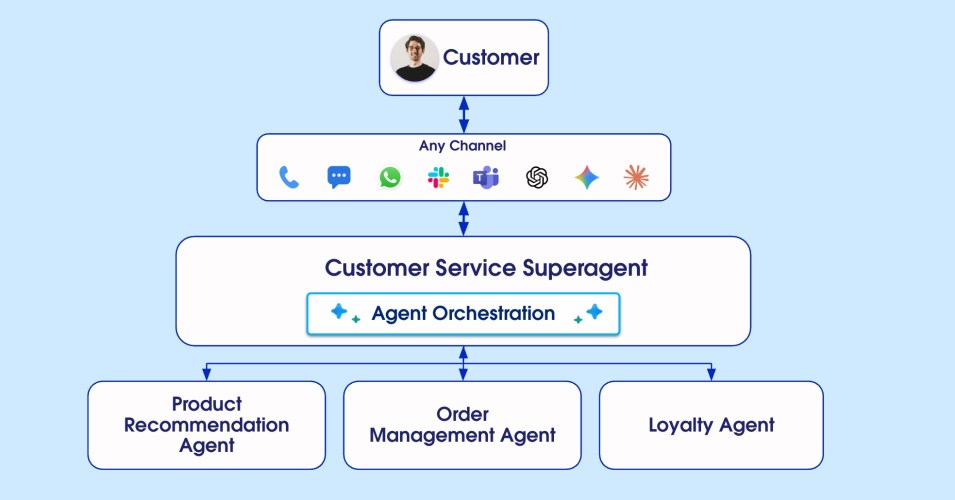



Most Agentforce deployments start the same way. A single agent takes on one job, like handling order lookups and status questions. It does that job well, so more capabilities get added to it over time. New responsibilities like returns, product recommendations, and loyalty get layered on top of the original scope.
As you add new capabilities to your agent, you see a shift start to occur. An order-status question routes to returns. A rule the agent used to follow every time now only works most of the time. You tighten the instructions, and it solves one problem, but not the underlying root cause. When your agent’s capabilities scale beyond a certain threshold, its reasoning starts to break down and your results deteriorate.
That’s why our team built Agentforce with native multi-agent orchestration, now generally available, to help your agents scale along with your organization. Multi-agent orchestration is the coordinated collaboration of two or more specialized AI agents to complete tasks that no single agent could handle well alone. Not every deployment needs multiple agents, but it’s the pattern most teams reach for when their first agent starts to strain.
Below are three signs it might be time for multi-agent orchestration. If you recognize any of the signs, our new Architect’s Guide to Agentforce Interoperability can help you plan what’s next.
Sign 1: Your agent is trying to do too much
As you add subagents and actions to handle more use cases, two things start to happen.
First, your agent’s context window fills up with instructions, outputs, and conversation history. The reasoning engine starts ignoring core rules, mixing up topics, or applying the wrong logic to the wrong request.
This is called intent collision, and you’ll experience it as regression. Behavior that was reliable last month becomes inconsistent this month, and no single change explains it. It’s like having 30+ tabs open in your browser. Finding the one you need takes longer, and you’ll open some wrong ones first.
Second, the description block the Reasoning Engine uses to route requests keeps expanding. The larger it gets, the more the router hesitates or misfires. A billing question ends up in returns. A technical request lands in sales. The description is doing work the design should do, and no amount of description-tuning fully solves it.
What to consider next:
Splitting one overgrown agent into multiple specialized agents gives each one a smaller instruction set, cleaner context, and a clearer routing signal. A Superagent that routes to scoped Connected Subagents restores accuracy, and lets you scale capabilities without scaling complexity for your customers.
Sign 2: Your data lives in places your agent can’t reach
A single Agentforce agent operates within a Salesforce org. If the workflow you’re trying to automate depends on data, permissions, or systems that live somewhere else, a single agent will hit a wall it can’t design its way around.
The fix requires an architectural change. No amount of prompt engineering will give a single agent access to something outside its own trust boundary.
What to consider next:
The right solution depends on which direction the work needs to move across that boundary.
- When Agentforce needs to reach an external tool or system, like Jira, Box, or a database, the MCP Client lets Agentforce use that capability as a tool while staying the central orchestrator.
- When Agentforce needs to hand off to an external agent, like a Google or AWS agent that owns part of the reasoning, Outbound A2A lets Agentforce delegate to a third-party agent.
- When an external system needs to invoke Agentforce, like a custom portal or Microsoft Copilot that needs Salesforce execution, Inbound A2A or Agentforce as MCP Server lets external platforms tap Agentforce expertise without rebuilding it.
Sign 3: Different teams need to own different parts of your agent
You built one agent and handed it to the whole company. Now Legal wants to update their policy logic, Finance needs to change their approval rules, and Marketing wants to tune their recommendation flow, and every change is a negotiation over a shared instruction block. Teams can’t move independently. Innovation bottlenecks at whoever owns the single agent’s configuration.
What to consider next:
Multi-agent orchestration lets each department build and test their own agent independently, without touching the customer-facing experience. When it’s ready, it connects to the Superagent with zero disruption to what’s already live. Each team ships on its own schedule, without waiting on the others.
Four paths forward
Once you’ve identified the sign, the next question is which architecture fits. The guide covers seven interoperability scenarios in detail. Here are the four most common scenarios to consider as you plan your path from a single agent to something more.
- Stay with a single agent: A single-agent architecture is valid and likely most efficient when your workflow lives inside a Salesforce org, uses one data model, keeps to a limited number of subagents, and delivers quality results.
- Multi-agent orchestration: Best when your problem spans multiple lines of business, like billing, support, and refunds, but the data, permissions, and users all live in a Salesforce instance. It’s also the right move when a single agent grows past seven subagents or its results start deteriorating as you add capabilities. Both are signs of intent collision.
- Third-party multi-agent orchestration (A2A): Best when Agentforce needs to collaborate with a third-party agent that owns part of the reasoning or workflow.
- MCP connection to external tools: Best when Agentforce should stay in charge, but needs to reach an external tool, API, or workflow to complete its job.
Are you ready to make the move?
Diagnosing the problem is the easy part. Before you commit to a new architecture, a few readiness questions will save weeks of rework.
- How many subagents do I currently have connected to my agent? During internal testing, intent collision and result deterioration most commonly occur at more than seven subagents.
- Do I want to use different models or different temperature settings for my agent’s different functions? In a multi-agent architecture, each agent can have its own settings for routing, creativity (via temperature), and more. Agents can use more complex models for high-value tasks, or cheaper and faster models for low-priority tasks.
- Do different business units need to build functionality for my agent? Multi-agent architectures allow for line of business control.
- Is your data model consistent enough across boundaries for one agent to hand context to another cleanly? When customer IDs, product SKUs, or case records don’t match cleanly across systems, one agent’s output becomes another agent’s guesswork.
If you’re not sure how to answer any of these, the guide walks through each in detail.