




Context rot is one of the most common failure modes in production-grade AI agents across every platform. Every multi-turn agent faces the same constraint: conversation history, retrieved knowledge from RAG (retrieval-augmented generation, where the agent pulls in relevant content to ground its responses), and action outputs all compete for a finite context window.
As a conversation grows, newer content retrieved by the agent crowds out information from earlier turns. The agent starts reasoning over an increasingly stale, incomplete picture of what the user needs. You’ll recognize this issue when resolution rates drop in longer conversations, when escalations spike unexpectedly, or when the agent re-asks questions the user already answered.
Salesforce gives you the architectural levers to solve this. Everything you need to manage context budget and keep agents reliable across long sessions is natively available with Agentforce. But before we unpack that, here’s how to tell if context rot is affecting your agent.
How to tell if you have context rot
Before diving into fixes, here are the production signals to watch for:
- Resolution rate drops in longer conversations. The agent handled the pilot fine but degrades in real sessions where paths aren’t scripted.
- Escalation rate is higher than expected. Especially when users haven’t asked to escalate.
- Agent re-asks questions already answered. The agent forgets earlier turns.
- Groundedness retries are spiking. Usually means retrieval is pulling in unfocused, multi-topic content.
- Turns to resolution are higher than the pilot suggested. The agent needs more back-and-forth to close things out.
If you’re seeing two or more of these, context rot is likely the root cause. With that diagnostic picture in mind, here are five ways to fix context rot in Agentforce.
5 Ways to Fix It
1. Redesign your knowledge articles
Long, multi-topic knowledge articles are one of the most common causes of context rot in production. Agentforce retrieves content as chunks from your knowledge base. It relies on a parameter that tells your retrieval system how many chunks of knowledge to inject into each prompt. This is often configured via prompt templates, flows, or Apex actions that utilize a retriever. When those chunks come from long, unfocused articles, they pull in content that mostly doesn’t answer the current question, and that content takes up context budget that could carry conversation history.
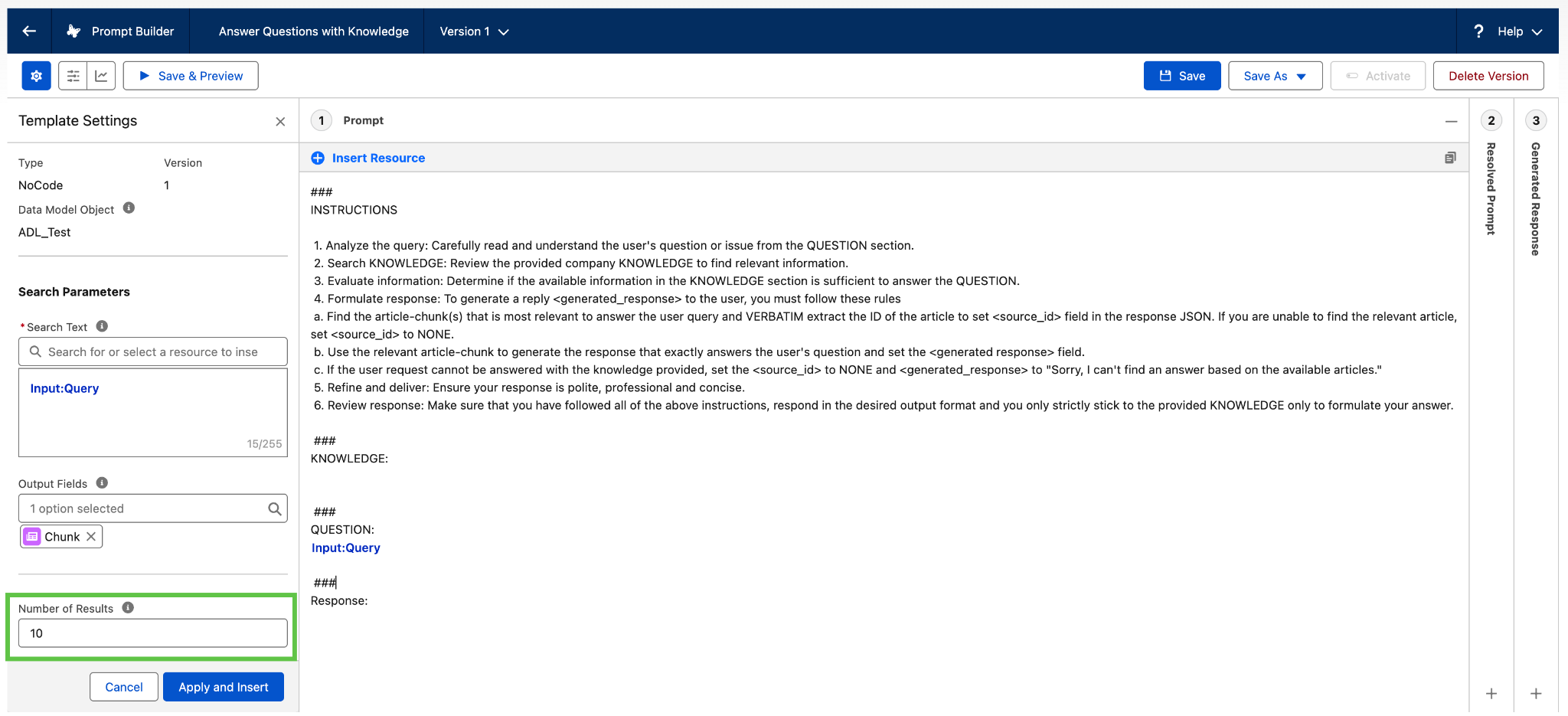
The solution? Split long articles into focused, single-topic pieces. Front-load them with the real words users say (“refund,” “dispute,” “returned payment”) rather than internal taxonomy. Agentforce retrieval runs against your knowledge base using semantic similarity, so article design directly shapes what gets retrieved and how much window space each chunk consumes.
The benefits here extend beyond your agent. Claude Sutterlin, RVP of Forward Deployed Engineering at Salesforce, has seen this pattern play out across enterprise deployments. “Sprawling, multi-topic articles are just as frustrating for human readers,” said Sutterlin. “When I’m reading your help portal, I want a quick answer on how to get a refund, not a 10-page article on all of your billing practices. This type of knowledge curation is a best practice that helps humans and agents alike.”
When retrieval quality is poor, the instinct is to raise the number of returned chunks. It’s understandable, but it usually makes coherence worse. More chunks means more content in the window and less room for conversation history, so if the top results aren’t answering the question, pulling more rarely fixes it. The fix is better articles. Aim for tighter, single-topic content that retrieves cleanly. Raising the number of returned chunks should be a last resort, not a first instinct.
Measure success using task resolution metrics across multi-turn conversations. This is a more effective measure than analyzing retrieval recall scores in isolation. That’s the signal that tells you whether your agent is working in production.
The bottom line | Quick win: tighter articles, cleaner retrieval.
Start with content redesign if your retrieval quality is poor and you haven’t touched your knowledge articles since launch. Redesigning your top 10 most-retrieved articles may take only an afternoon, and it directly reduces how much irrelevant content enters the context window each turn.
2. Shape your action outputs
Agentforce action outputs can return up to ~65,000 characters. Unfiltered responses flood the context window and push out conversation history fast. The fix is filtering.
“Think of your response filter like it’s a bouncer at the door of the context window,” said Sutterlin. “The underlying API still does its heavy lifting, but the LLM only reads a clean, curated summary.”
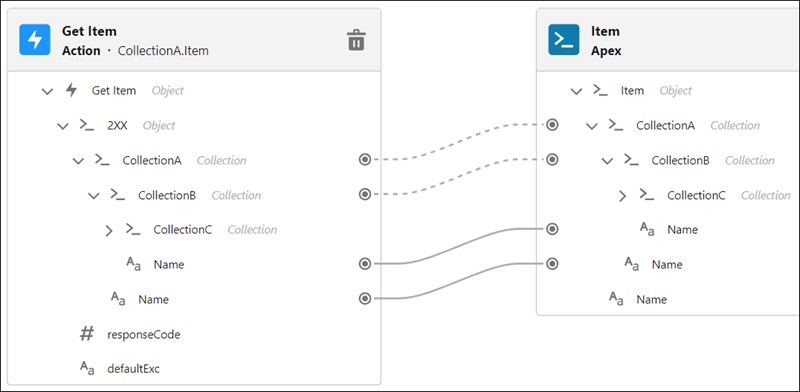
Wrap every action in a response filter that returns only the fields the agent truly needs. Dropping average action output from thousands of characters to a few hundred frees up a meaningful share of the window per turn. Luckily, Agentforce’s Flow-based action architecture makes this straightforward. By adding a Transform element or a short Apex action, we can shape the output before it reaches the agent without changing the underlying API or data source. This step is crucial so the total information returned to the agent is restricted to only the valuable or required data points, resulting in the context window not being flooded with irrelevant details.
The bottom line | Quick win: less data per action, more room for conversation.
Start with output filtering if your agents return full API responses without shaping them. Adding a Transform element or Apex filter to your heaviest actions frees up context budget immediately. This is one of the highest-ROI changes in the list.
3. Use context variables for durable state
Context rot gets worse when users shift intent mid-conversation. “I want to cancel” becomes “just pause it” becomes “wait, what are my options?” Each correction adds a new signal without removing the old one. As earlier turns fall out of the window, the agent may act on intent the user already walked back. The fix is to give your agent explicit, overwritable state that doesn’t depend on conversation history.
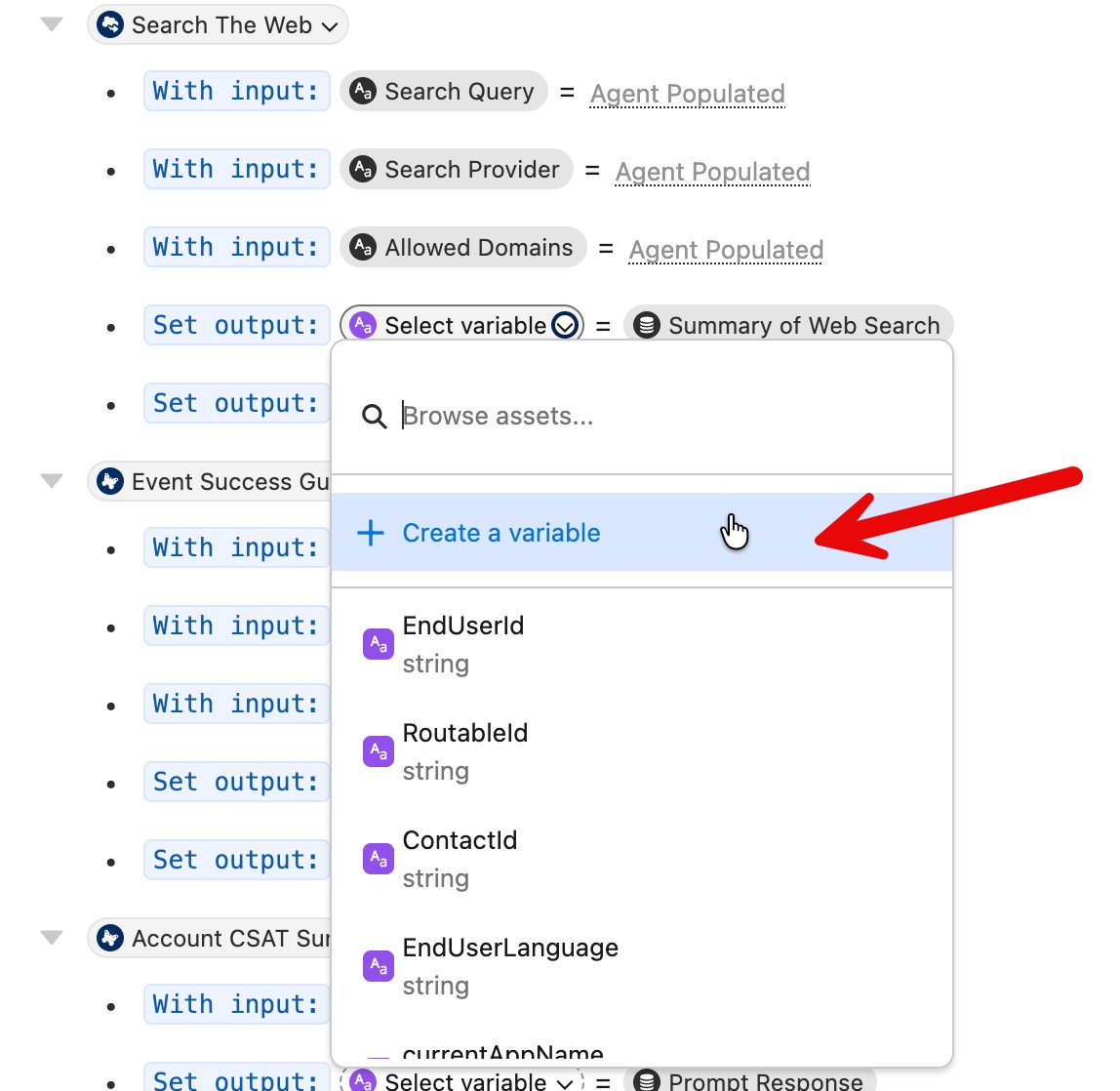
Agentforce passes conversation history to the LLM on each turn, but that history has a finite budget. As retrieved chunks and action outputs accumulate, earlier turns fall out of the window. Most pilots don’t account for this, and it’s one of the main reasons conversations fall apart in longer sessions. Agent Script provides a declarative way to define structured conversational paths in Agentforce. It makes defining, linking, and setting context variables straightforward.
Context variables are where durable state actually lives in Agentforce. Unlike conversation history, they persist across the session regardless of conversation length. Capture key details early – like user intent, account ID, case summary, and last-action result — and store them as context variables. Don’t rely on conversation history to carry them: Strict deterministic flows can only be defined if you have the required variables.
“The real solution is explicitly overwriting stale state,” said Sutterlin. “An agent designed to dynamically refresh its understanding of the user is far more resilient than one designed to hoard every word spoken.”
Context variables also handle the intent-shift problem. When a user changes direction mid-conversation, overwrite the relevant context variable rather than letting the old intent sit alongside the new one. Agentforce’s variable model is built for exactly this pattern.
The bottom line | Bigger lift: plan this at design time.
Invest in context variables if you’re building a new agent or have the budget to rework your flow architecture. They give your agent memory that outlasts the conversation window, making them the highest-leverage long-term investment.
4. Add escalation guardrails
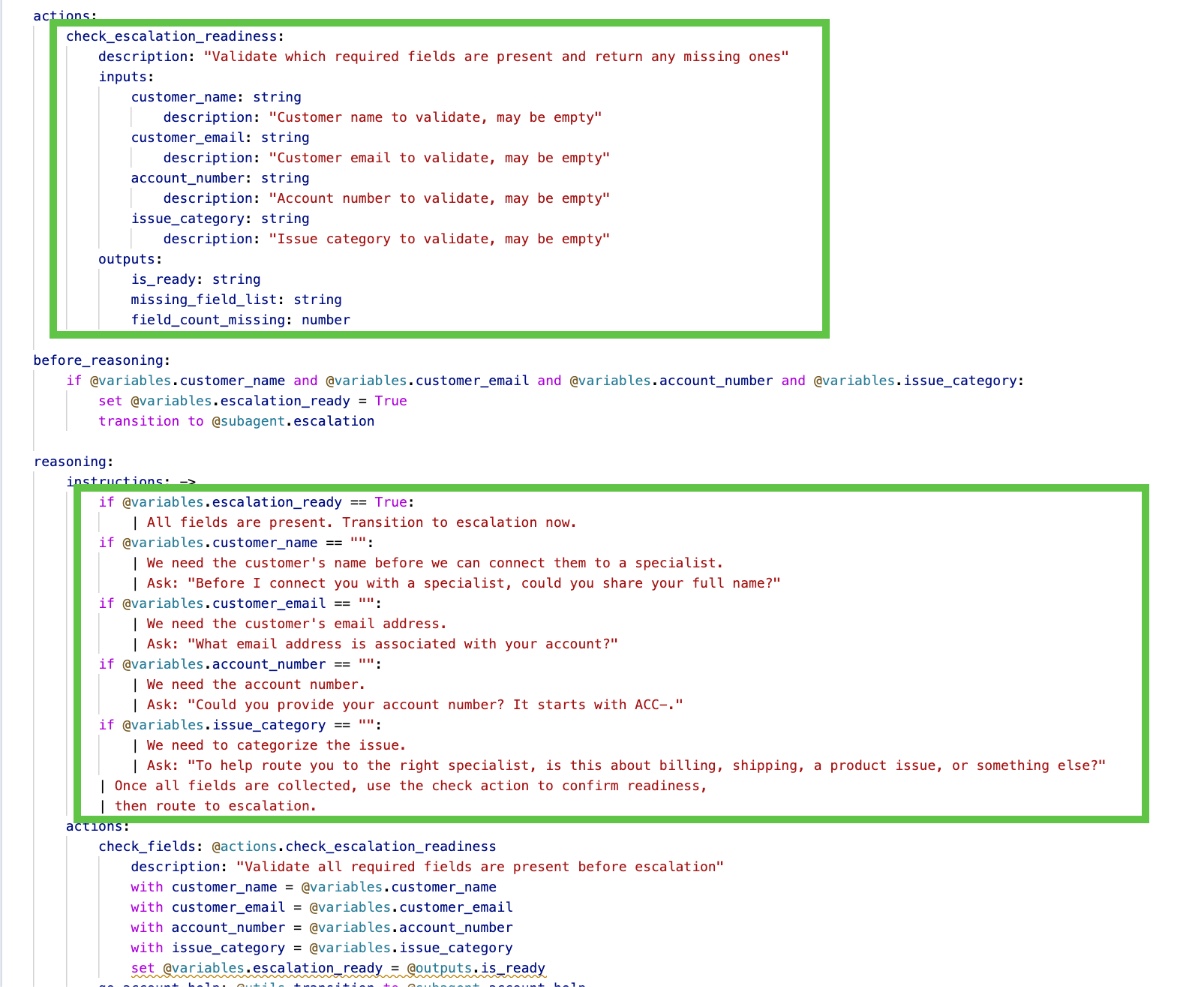
Agentforce can trigger escalation when action calls fail. If you don’t validate action outputs before the agent processes them, unexpected API responses can push a session into an escalation state you didn’t intend.
Add action-output validation to your flows. Check that the response includes the expected fields before the agent tries to use them. A short Agent Script logical path, Apex validation action, or a Decision element in Flow catches this before the LLM tries to reason over it. It’s a small addition, but it accounts for a disproportionate share of unexpected escalations in production.
The bottom line | Quick win: catch bad data before it reaches the agent.
Add action-output validation if your escalation rate is higher than expected and you’re not checking API responses before the agent processes them. A single validation step in your flow keeps malformed responses from corrupting the context window and triggering false escalations.
5. Use Data Graphs to constrain what reaches the agent
Every enterprise agent operates against a data model that could include accounts, cases, orders, entitlements, products, and more. Without constraints, an action call can return an entire object graph with every field, every related record, and every nested association the API exposes. Most of it has nothing to do with the current turn.
Data Graphs let you define a curated view of your Salesforce data, scoped to what a given agent needs. Instead of retrieving a full Account record with 80 fields and a dozen related lists, you define exactly which fields and relationships are returned to the agent. Agentforce enforces that scope at the platform level, so each retrieval is leaner by default.
This matters most in long conversations where users keep asking new questions. Each action call pulls more data, and without curation, the window fills with overlapping, redundant, or irrelevant fields from successive retrievals. Unorganized context leads to misclassified intent and weaker responses. Keeping retrievals lean prevents that, and the leanest setups stack two layers of curation. Pair Data Graphs with the output shaping from Tip 2 for the most headroom: Data Graphs control what the platform exposes, and output filters control what the agent sees.
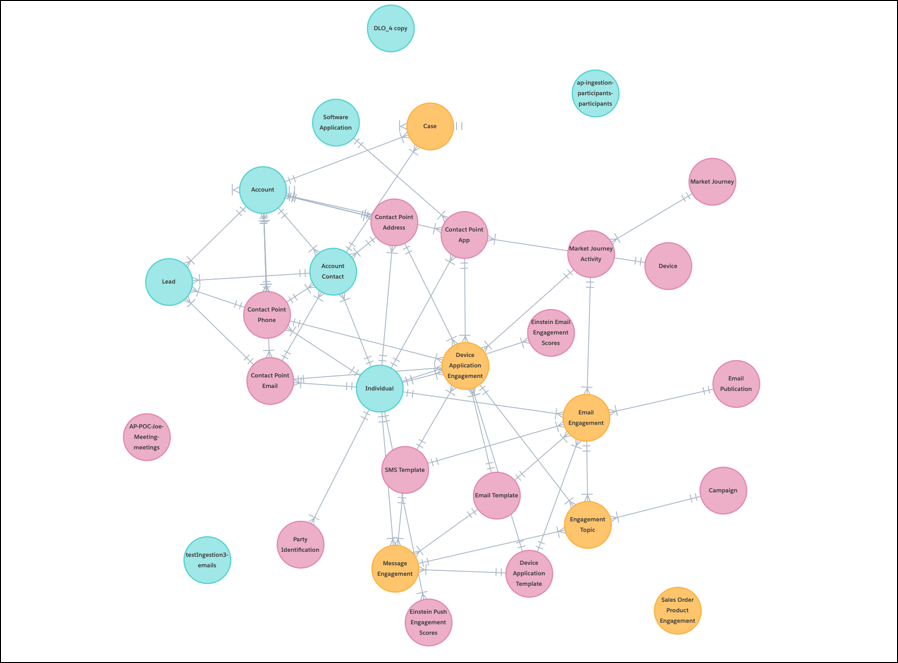
The bottom line | Bigger lift, high payoff: leaner data from the platform level.
Invest in Data Graphs if you’re running multi-object queries against a complex data model. They restrict which fields and relationships reach your agent, preventing successive retrievals from flooding the window. Best set up at data model design time, but worth retrofitting for complex agents.
Where to invest first
Not every agent needs the same balance. Here’s a quick reference:
| Scenario | Start here |
| Short conversations, high query variance | Tip 1: article redesign |
| Long conversations, low query variance | Tip 3: context variables |
| Long conversations, high query variance | Tip 1, then tip 3 |
| High escalation rate | Tip 4: guardrails first, then diagnose root cause |
| Groundedness retries spiking | Tip 2: shape action outputs |
| Multi-object queries, complex data model | Tip 5: Data Graphs |
| Users refining or reversing intent mid-conversation | Tip 3: overwrite context variables on intent shift |
How to know the fixes worked
Test task resolution rate in longer conversations, not just overall averages.
“Don’t rely on average resolution rates across all turns. That’s a vanity metric that actively masks context rot,” said Sutterlin. “A healthy agent holds its task resolution rate steady even as the conversation stretches from one turn to five to ten.”
If this resolution rate drops in longer sessions, revisit tips 1 through 3 first: leaner knowledge articles, shaped action outputs, and context variables that refresh on intent shift will recover the most context and reduce conflict.
The short version
RAG and context memory compete for the same budget. The agents that hold up in long conversations are the ones designed around a finite context window.
“I think of the context window like a carry-on suitcase,” said Sutterlin. “By the time you reach turn 7 or 8, the LLM is trying to reason over a slice of the conversation that is entirely stale. We have to stop thinking about adding more context to solve a problem and start thinking about curating better, leaner context.”
“The underlying large language model is a pretty sound piece of technology,” he added. “When it starts failing in longer conversations, that’s a design problem. The good news is that we can fix it.”
Ready to put these fixes to the test? See how Agentforce Observability helps you track agent performance in production.