


For years, “Email-to-Case” has been the backbone of customer service. But as any developer who has managed a high-volume support org knows, raw inbound text is a double-edged sword. Without metadata, your support queue is just a wall of unstructured data that requires manual hours to sort, tag, and route.
In the era of the AI Enterprise, we don’t have to settle for manual triage. Today, we’re looking at how to combine Data 360 Vector Databases, and Foundational LLMs to turn unstructured emails into actionable CRM records in near real-time.
The Challenge: The “Metadata Gap” in Support
Traditional email rules are brittle. They rely on “if-contains” logic that fails to capture the nuances of human language. If a customer writes, “My system is unresponsive after the latest patch,” a keyword rule might miss the urgency or fail to categorize it as a “Technical Bug.”
This lack of structure creates a massive bottleneck:
- Manual Triage: Agents spend time tagging cases instead of solving them.
- Delayed Routing: Critical issues sit in a general queue.
- Lack of Context: No immediate link to relevant knowledge base articles.
The Modern Support Stack
To solve this, we’ve moved beyond standard Apex triggers. We are leveraging a multi-layered AI architecture:
- Salesforce Platform: The core UI where agents live.
- Data 360 & Search Indexes: The high-scale engine for ingesting and retrieving unstructured data.
- Vector Databases: The key to Semantic Search, allowing us to understand intent rather than just keywords.
- Foundational LLMs: The intelligence layer that classifies content and suggests resolutions.
The Automated Transformation Workflow
The goal is a seamless pipeline that enriches a Case record before it even hits an agent’s view. Here is the technical breakdown:
1. Inbound Ingestion & Intent Analysis
As emails stream into Data 360, they are instantly analyzed for intent. Unlike standard processing, the system looks at the semantic meaning of the body.
2. Automated Classification
Using LLM-based inference, the system maps the unstructured text to your specific Data Model Objects (DMOs).
- Intent: Feature Request vs. Critical Outage.
- Reason: Complex functionality vs. Billing error.
3. Knowledge Grounding & Enrichment
By vectorizing the inbound case, the system performs a search against your Knowledge DMO. It doesn’t just find articles; it provides recommendations with confidence scores, attaching them directly to the record.
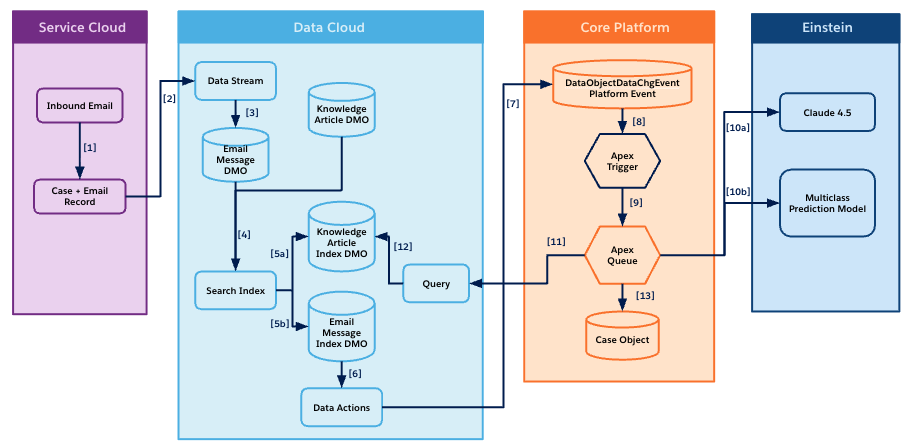
Here is the end to end workflow of how each Salesforce product integrates together to solve the issue.
Technical Deep Dive: The “Data Action” Bridge
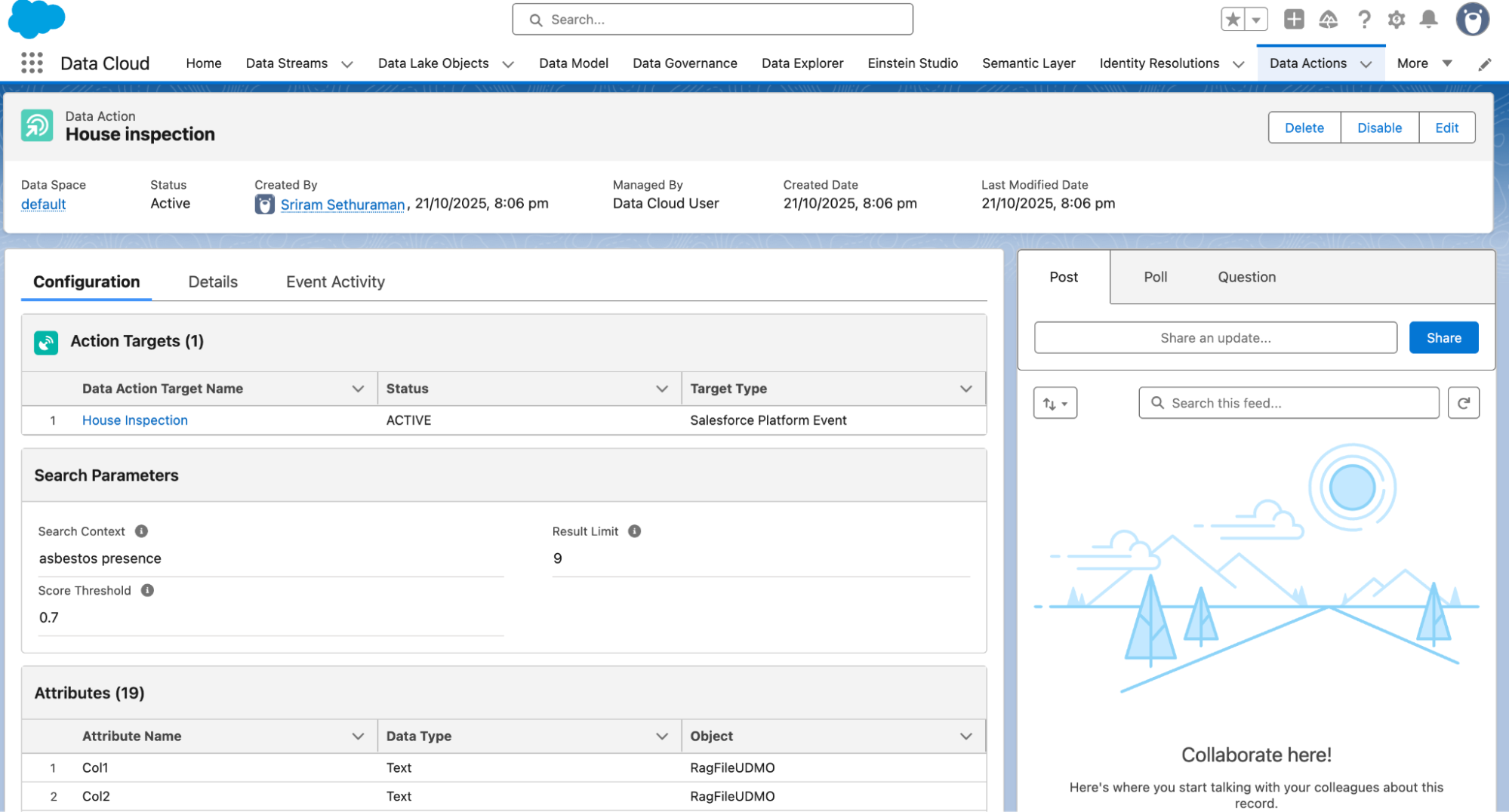
The most powerful feature in this architecture is the Data Action on the Search Index. In a traditional setup, you might be tempted to run an LLM call via Apex. However, by using Data Actions, you offload the heavy lifting to Data 360. When a Search Index identifies a specific pattern (like “High-Severity Technical Issue”), it triggers an automated action.
Here are the core steps involved.
- Fire a Platform Event to Core Salesforce to change Case ownership using Data action
- Platform consumes the event from Data 360 and Apex trigger calls LLM and Prediction classification model and determine the priority, owner and queue
- Update Field Values on the Case record from the results of LLM and prediction model response
Conclusion: Turning Insights into Action
By moving from manual triage to an automated, vector-based workflow, you aren’t just saving time—you’re increasing accuracy. You’re ensuring the right agent gets the right context at exactly the right time.
Ready to get started? Check out our help site for more information