


The best AI search engines (updated for 2026)
Google AI Mode leads everyday search, while Perplexity excels at in-depth research. For businesses, nothing beats Agentforce Coworker, which turns search insights into action wherever you work.


Google AI Mode leads everyday search, while Perplexity excels at in-depth research. For businesses, nothing beats Agentforce Coworker, which turns search insights into action wherever you work.


Scrolling past ads and spammy sites to find high-quality content can be a time sink at best and a major frustration at worst. This raises two important questions: Is browsing the SERPs becoming more effort than it’s worth, and can artificial intelligence (AI) do it better?
AI search engines aren’t the new kids on the block in 2026, but they’re still finding new ways to innovate. Just recently, Google upgraded Search Live , making voice search feel more like a human conversation. Meanwhile, Salesforce debuted Agentforce Coworker, an AI teammate that turns your prompts into coordinated action wherever your business works.
That competition gives you more options than ever to find one that meets your needs. Whether you’re a student, freelancer, academic, or business leader looking for a more effective way to gather insights, a solution built to meet your needs is on the market.
To help you find the right fit, we tested the best options on the market to see where each one shines. Here’s what we found.
Want to get straight into our top picks? Click the links below to navigate to the reviews.
An AI search engine is a search tool that uses AI tech, such as natural language processing (NLP) and large language models (LLMs), to provide context-aware answers in response to prompts. It’s a bit like having a research assistant who can do the digging for you and pull together the key findings — no keywords required.
That can save you a lot of time. Rather than providing you with a list of links you have to sift through yourself, AI search technology automatically summarises the most valuable info. Many tools also link to their sources, so you can dive deeper if needed.
AI-powered search is also big news for businesses. While LLMs have changed how companies need to make themselves visible online, businesses are also seeing the benefits. In our 2026 State of Commerce report , 79% of commerce organisations worldwide reported increased traffic from LLM-powered search.
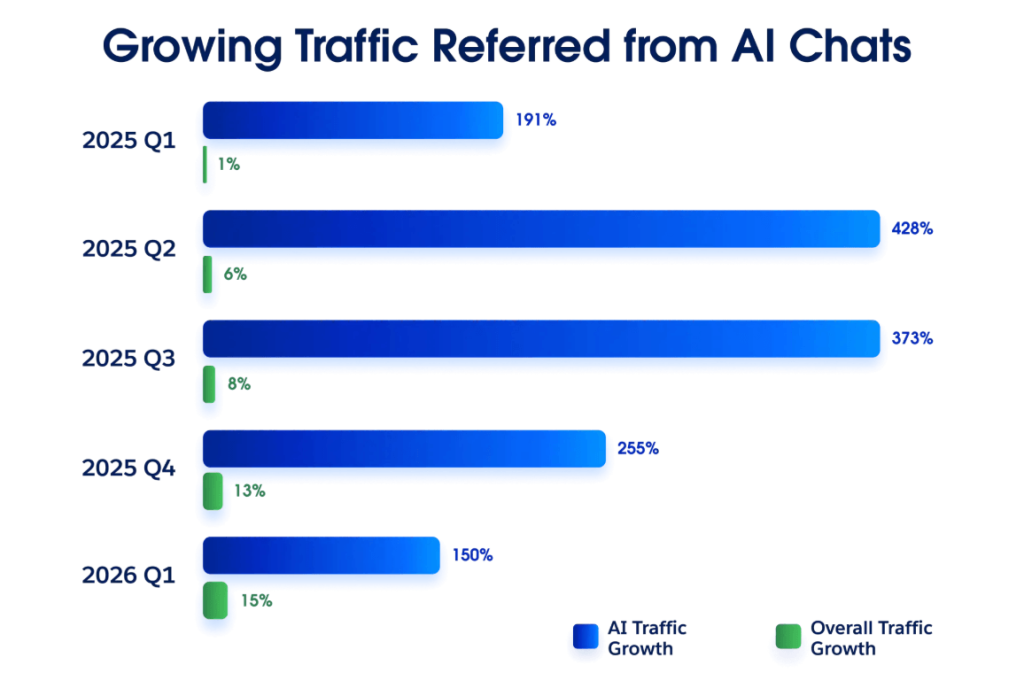
Source: Salesforce, State of Commerce (Fourth Edition)
At their core, AI-powered search engines turn plain-English queries into direct, sourced answers. You ask a question; they understand it, respond to it, and remember the context for future interactions. This is made possible through a collection of intelligent technologies:
All of this results in three significant benefits: improved speed, less manual effort, and increased productivity when uncovering information.
While AI search engines work on the same tech, this doesn’t mean they’re all the same. Each applies the fundamentals differently, shaping the end results and the value they deliver.
So, how do you separate the good from the great? We’ve narrowed down our assessment criteria to seven core elements:
With these metrics in mind, here’s how our top five picks stack up:
Out of all the tools we tested, here are the five AI-powered search engines that stood out.
Google AI Mode brings conversational search into the Google Search interface you’re already familiar with. Powered by Gemini 3.5 Flash , it can break down complex, conversational queries and pull findings from across the web into one answer. You can then ask a follow-up question without starting your research from scratch.
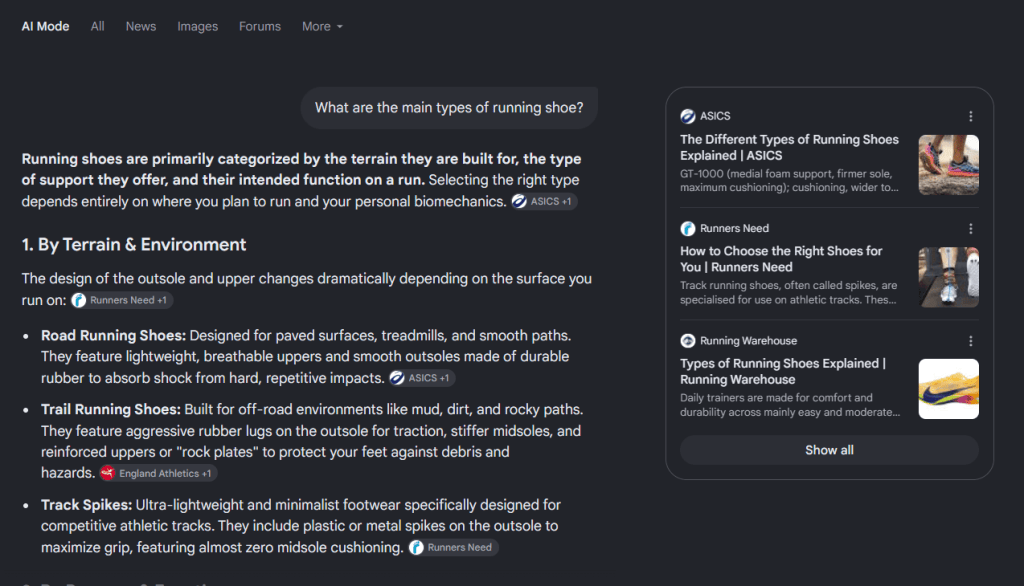
Source: Google
The USP of AI Mode is that it’s grounded in the existing Google ecosystem. It can draw on Google’s search index to compare products, explore destinations, or find local recommendations without you having to leave the main interface.
With the new Search Live update, you can also talk through questions and even share a live camera view for help with the problem in front of you. If you choose to connect Gmail and Google Photos, AI Mode can also draw on those apps for personalised answers.
AI Mode is ideal for everyday tasks and broad web-based queries, but it isn’t ideal for business-specific tasks. For internal workflows like analysing your sales pipeline, personalising customer messages, or updating customer records, you’ll want a tool that’s grounded in your business data and logic.
Pros:
Cons:
Pricing:
Perplexity was one of the first independent generative AI search tools built exclusively for advanced AI search functionalities, and it’s still a strong contender today. Its strength is helping you investigate a topic, follow the chain of evidence, and build on what you’ve found. It will also suggest related queries to help you sharpen your search.
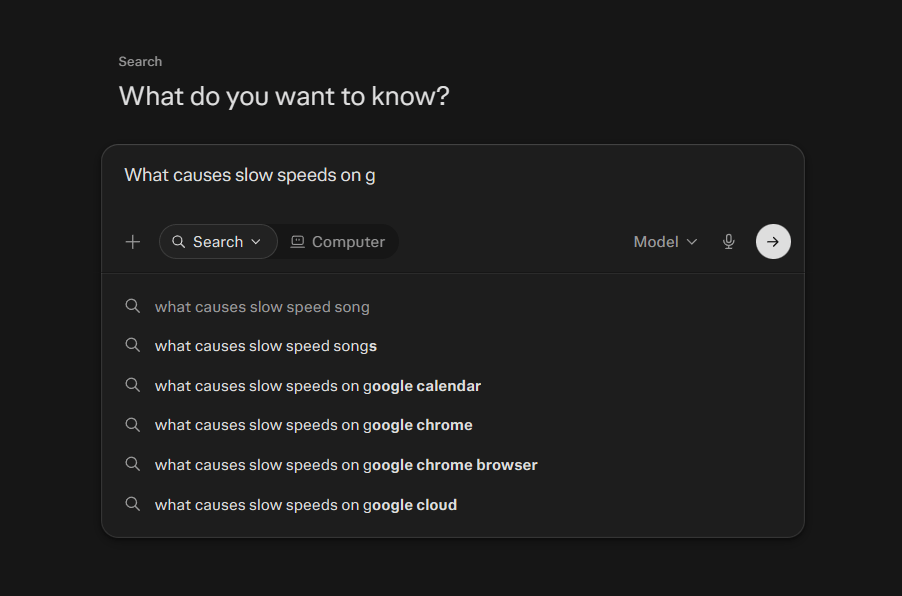
Source: Perplexity
A standout feature is that you can tailor your searches to the focus areas that matter to your query. You can ask it to search only scientific journals, social media sites, or a competitor’s website instead of combing the wider web for information. This gives you closer control over the information you receive.
Perplexity also lets you export responses, save conversation threads for later, and even scan in your documents for the AI tool to summarise. The business offering extends those capabilities to your internal files, letting you bring company documents into your research.
Accuracy is the biggest concern here. Perplexity is usually reliable, but it has been criticised in the past for providing inaccurate information, so it’s worth checking answers before using them to make decisions. Its citations do make it easier to verify claims, but they don’t remove the need for scrutiny.
Pros:
Cons:
Pricing
Agentforce Coworker lets you search your business and deploy a team of AI agents to work on what you find. You can investigate why a deal has stalled, pull together a customer’s history, and then have it draft a personalised follow-up, all from the same conversation.
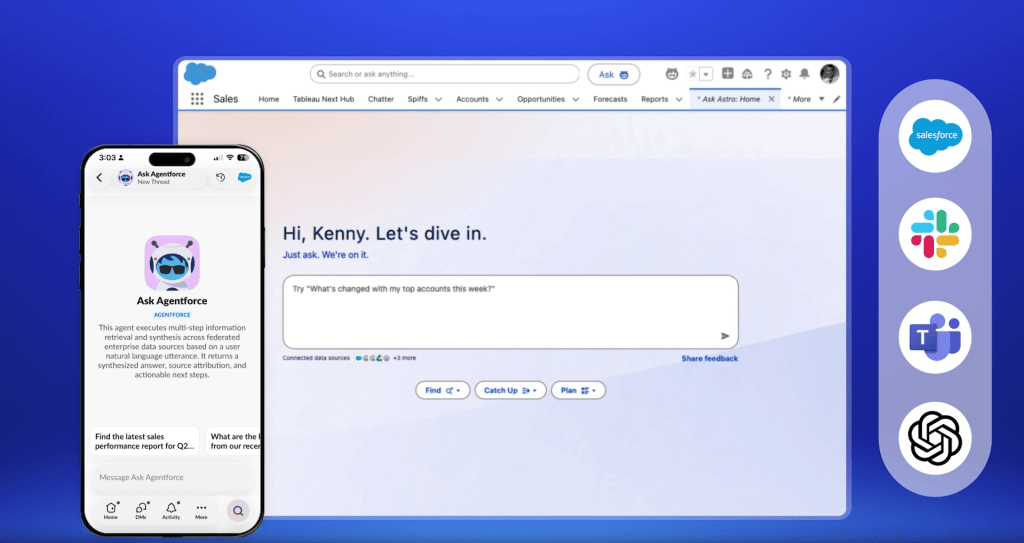
Source: Salesforce
Agentforce Coworker’s biggest strength is just how much ground one question can cover. You can ask which accounts have unresolved support cases and renewals approaching, get a concise summary, then dig into the issues affecting each customer at a granular level. Coworker draws on your Salesforce records and connected sources, so you can investigate a business question across your entire ecosystem without piecing together context.
The standout feature is what Coworker can do with those findings. You can ask it to draft an on-brand follow-up, update a record in your CRM or sales pipeline, generate an interactive chart, or trigger a workflow to escalate a service issue. It can also hand off requests to specialised agents from the same conversation, giving your team one place to coordinate tasks that would normally require separate tools.
These capabilities aren’t limited to the Salesforce Platform, either. The recently launched AIforce extends Agentforce Coworker to all of the other apps where you get work done. You can bring it into Slack to investigate an account’s support history or use it in Claude to prepare for a sales call. Because these experiences use your Salesforce rules, your team can use business data safely without bypassing your existing permissions.
The trade-off is that Coworker is native to Salesforce. It’s a stronger fit for businesses that want a search experience built on their data in a dedicated platform. You’ll also need to connect your data and integrate your systems — Coworker is extremely powerful, but it can’t work with business knowledge that isn’t there. Fortunately, Salesforce’s native data layer, powered by Data 360 and MuleSoft, can help with this process.
Pros:
Cons:
Pricing:
Arc Search takes a unique approach to AI search by embedding it directly into a mobile browser. Rather than just acting like a search bar, its Browse for Me feature uses AI to condense and organise web content directly on a single page for you to explore. It’s also completely free.
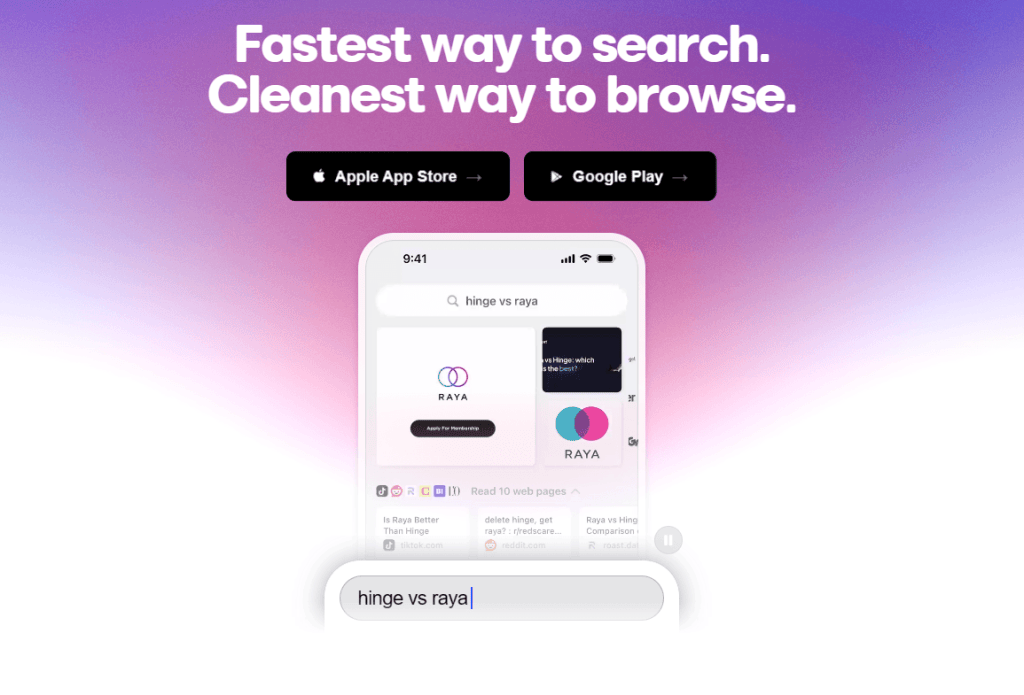
Source: Arc
Think of it like an automated mobile browsing experience. Rather than searching for a keyword, scouring through the links and gathering information yourself, Arc takes your query, browses the web for you, and presents all of the information it discovers in one place.
The caveat here is that Arc is only available on mobile through iOS, iPadOS or Android. You can access a version of the platform on Windows or macOS through the Arc Browser , but the search functionality isn’t as intuitive. Accuracy is another concern; summaries can miss important context, so it’s worth checking the original sources.
The Browser Company has also shifted its development focus to Dia, its new AI browser. While Arc Search is still available and The Browser Company is still maintaining the tool, updates now focus on bug fixes and security rather than new features.
Pros:
Cons:
Pricing
Komo.ai is a simple search engine designed for those who want to get AI-generated answers quickly without any of the extra frills.
Komo’s selling point is its simplicity. It features a distraction-free, ad-free layout. The platform also makes it easy to customise the way you query, from web and news searches to more targeted academic and video searches. We’re also a big fan of the new People feature, which lets you search specifically for experts who can answer the questions that AI can’t.
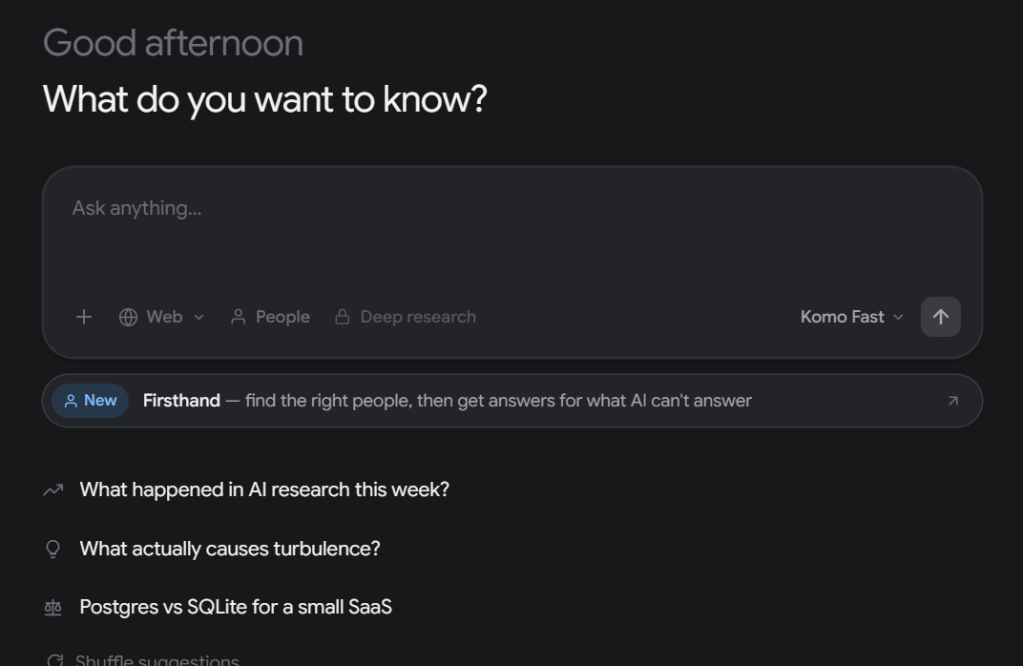
Source: Komo
On paid plans, Komo also lets you choose models from providers such as Anthropic, OpenAI, Google, and xAI, which is handy if you want to see how different models tackle the same question. That said, Komo’s available models seem to be a few iterations behind their providers’ latest releases.
Komo can sometimes feel less intuitive than Google or Perplexity. You’ll get ad-free answers, but they may not always be as context-aware or tailored to your previous activity. But for those who want a straightforward browsing experience, Komo offers a compelling alternative to the clutter of traditional search results.
Pros:
Cons:
Pricing:
For businesses, enterprise AI search can help teams get more value from the information they already have. Grounding results in enterprise data and surfacing contextual insights can transform how employees work, make decisions, and serve customers.
In our 2026 State of Agentic AI in the Enterprise report, 94% of surveyed AI-agent decision-makers agreed that embedding AI into core workflows provides more value than using it as a standalone tool. Here’s how AI search can deliver results for your organisation:
Searching for information and switching between tools can eat up time your team could spend on more valuable work.
AI search tools tackle both of these problems. First, they help employees find information instantly, saving them from scouring knowledge bases and customer records. Second, teams can do this directly in the CRM, meaning there’s no need to hop between apps. This results in faster workflows and greater day-to-day productivity.
Some platforms take that flexibility even further. For instance, Agentforce Coworker capabilities can extend to Slack, Claude, Teams, and more, so your team can search your business and act on the results without leaving the apps they already use.
The more your team knows about a customer, the easier it is to make their next interaction relevant. AI search can help employees find that context when they need it.
In Salesforce, for instance, you can unify your customer data through Data 360, then search across it using plain-English questions. From there, Agentforce Coworker can use that shared context to personalise customer interactions, bring a service rep up to speed on an ongoing issue, answer service queries directly, or brief a sales rep before a call.
In our 2026 State of Marketing Report , 63% of marketers told us they find extracting insights from unstructured data difficult. And that makes sense — trying to compile context from emails, call transcripts, and customer feedback can quickly become a job in itself.
AI search helps you make sense of that confusion. Agentforce Coworker can scour through enormous amounts of business data, identify the insights that answer your question, and summarise the evidence so you can weigh up your options. It can then turn the key findings into an interactive chart so your team can see exactly what to do next.
Getting value from AI search starts with the foundations beneath it. Your data needs to be accessible, your systems connected, and your people confident using the tools. Here’s how Salesforce helps you lay that groundwork:
Salesforce brings these foundations together so your team can spend less time chasing information and more time putting it to work. With Agentforce Coworker, finding an answer can lead straight into the next task, from updating a customer record to drafting a follow-up.
AI search has transformed the way we find information. Instead of scouring web pages for a reliable source, users can simply ask their favourite tool a question and get a direct answer — no more sifting through a wall of links.
But as we’ve discussed, not all AI search engines are created equal. Some are better suited to everyday queries, others to more in-depth research. Then there’s the divide between consumer tools and those truly fit for enterprise. That’s where Salesforce slots in.
Agentforce Coworker connects business search with day-to-day work, helping your team investigate a question and then act on the information they find in the same conversation. Explore Agentforce today, or talk to an expert to see how our AI search tool shortens the gap from insight to action.


Take a closer look at how agent building works in our library.
Launch Agentforce with speed, confidence, and ROI you can measure.
Tell us about your business needs and we’ll help you to find answers.
Conversational search lets users ask questions in everyday language and refine the results through follow-up questions. It combines natural language search with the ability to retain context within a conversation, so users don’t need to repeat their full request each time.
For example, you could ask for a comparison of two products, then follow up with “Which is better for a small business?” The tool uses the earlier exchange to understand which products you mean.
Conversational search is also a popular tool for businesses. In Salesforce’s Agentforce Coworker, for instance, an employee can ask which accounts have renewals approaching, then follow up with “Which of those have unresolved support cases?” to narrow the investigation.
AI search engine answers can be useful, but they aren’t guaranteed to be accurate, even when they include citations. A tool can misinterpret a source or overlook important context, leading it to the wrong outcome. Before relying on an answer:
For businesses, a good option is to choose an AI search tool that’s tied to your business data. Salesforce’s Agentforce Coworker draws on your connected business context to surface trusted insights. Employees can then review the findings and take action on them.
Yes, some AI search engines can search internal business data when connected to approved company sources. Depending on the tool and its configuration, this can include customer records, internal documents, and knowledge articles. A public web search alone won’t provide access to that information.
Salesforce’s Agentforce Coworker searches Salesforce records and connected enterprise sources, helping employees investigate questions that span different parts of the business. For example, a sales rep could bring together an account’s renewal details and outstanding service issues before contacting the customer.
Access controls matter as much as connectivity. Coworker inherits Salesforce governance and sharing rules, so connecting a source doesn’t automatically make its information available to every employee.
Other AI search engines that didn’t make the cut in our top five include ChatGPT search, Microsoft Bing and Brave Search. While all of these tools have their own benefits and drawbacks, we felt they lagged behind the other available options in terms of accuracy, usability and features.


