



Let’s step back in time for a minute. It’s 2015. Slack is a new product, but already making people’s working lives more productive and pleasant. And Slackbot, a helpful little bot, is here to help with automated messages and notifications.
Now, flash forward to 2025. Generative AI is radically changing people’s day-to-day work, and their expectations for what it means for a bot to be “helpful” are rising.
At Slack, we knew that Slackbot had the opportunity to meet people where they are with a new, AI-driven experience built right into Slack, no setup required. Internally, we were already seeing the potential benefits of this product. We had been “dogfooding” (using an early iteration internally) a new AI version of Slackbot, and people loved it. They were using it to prepare for meetings, summarize information, and find conversations in Slack. Slackbot was so popular that people even started a fan art channel.
What exactly made Slackbot successful? While AI is changing many things about how we work, we found that the core principles of design still matter. Effective AI agent design isn’t just about making agents more capable. It’s about making them more useful, understandable, and trustworthy. Five design principles guided our decision-making.
Here’s what we learned:
Solve real problems
Consider context
Keep things simple
Stay on brand
Build trust
Solve real problems
One of the most common challenges people face in Slack is finding information when they need it. Internally, we call this the “can’t find stuff” problem. People remember they had a conversation, but they can’t remember if it was in a direct message, a canvas comment, or a channel.
Enter, Slackbot.
Search is one of Slackbot’s superpowers. It can look across all the sources you have access to, scan for multiple phrases or synonyms simultaneously, and give you a summarized result. With Slackbot, you no longer have to remember whether that conversation with a coworker is in a direct message or a channel, or which channel that document was posted in. Just ask, and Slackbot can find it for you.
To build trust, we also make it easy for you to verify the accuracy of Slackbot’s results, providing previews and in-line citations.
The lesson for AI design is simple: look beyond where the technology can fit and focus on where it should fit. Prioritize existing problems your users have identified to find specific moments where AI genuinely improves the outcome.




Consider context
One of the core value propositions of Slackbot is that it knows your Slack. It has access to all the things you do, and none of the things you don’t. In other words, it understands your unique context.
Traditionally, users provide context by navigating to a specific screen or applying filters. With an AI-powered experience, the system should anticipate that context, removing that burden.
We focused on three ways for Slackbot to understand context:
1. Personalize the first touch
When you first open Slackbot, there’s an initial set of prompts to help you get oriented, or what we call the “welcome mat.” Here, we started with static suggestions but have moved toward dynamic prompts shaped by your activity, upcoming meetings, and responsibilities, so you can get started with built-in context.
2. Anchor to what’s open
Slackbot is aware of what you are currently viewing. Whether it’s a channel, a project thread, or a long Canvas, it understands what’s open and references it as needed when responding. You don’t have to explain your screen, because Slackbot is already working alongside you.
3. Connect to the broader ecosystem
Context lives in more than one place. With integrations like Salesforce, Slackbot can pull in key account details or draft updates using live CRM data. It can also coordinate with calendars to find meeting times. This cross-system awareness transforms the agent from a chat interface into a bridge between tools.
Designing for context means understanding the unique needs your users have and using AI to simplify existing workflows rather than adding new ones.
Keep things simple
One of the best things about AI experiences is when they just work. You don’t have to understand all of the technical details to benefit from the power of the tool.
As we continue to add functionality to Slackbot, we’re always working to ensure using it feels simple and pleasant. One example of how we have evolved our approach to simplify the experience is what we call the “thinking steps,” the descriptions of what Slackbot is doing.
Early on, we got feedback that the thinking steps were very helpful for troubleshooting problems and transparency. But people also thought they took up too much space and distracted from the main answer.
Stay on brand
Slack’s brand voice is, above all, clear, concise and human. This voice typically plays out in the UX writing you encounter across the product. With an AI experience, crafting brand voice means putting together a little bit of the new with a little bit of the tried-and-true.
First, there’s the new: the system prompt. This is the core set of instructions that shape Slackbot’s personality, and most people will never see it. But we knew that we needed to make sure these instructions addressed our content design principles, like making sure to consider different perspectives and not get in the way of people accomplishing a goal.
Second, there’s the tried-and-true: the UX writing. While most interactions with AI experiences are generative and conversational, some parts of the experience are more traditional. We look at these moments like icing on the cake, an opportunity to provide a little bit of delight in things like welcome messages or loading states, or to make sure an error message is easy to understand and actionable.
As you design AI experiences, consider how your voice will stay the same, and where the experience may require something new.
Build trust
Trust is tricky in the world of generative AI, where responses are non-deterministic. No matter how much fine-tuning of the Large Language Model, we know that sometimes Slackbot will get things wrong.
Yet without trust, even the best AI agent design efforts fail to gain traction. With Slackbot, we knew we needed to build trust with both end-users and admins to be successful.
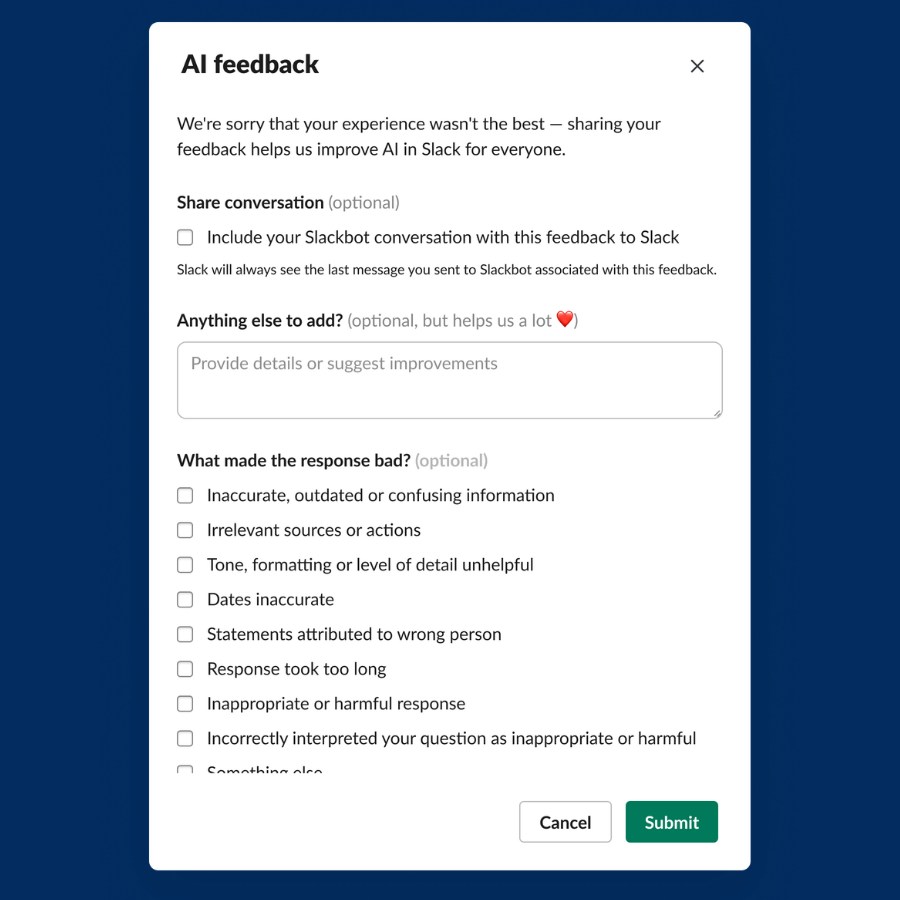
For end users, trust starts with transparency.
- Surface potential issues when Slackbot may be generating inaccurate information.
- Collect and review user feedback on every response.
- Continuously evaluate and improve response quality.
For admins, trust starts with security and control.
- Protect AI interactions with Slack AI guardrails.
- Give admins time to prepare before rollout.
- Provide controls for managing how content is used by AI.
Trust looks different for different audiences. End users need transparency and confidence in the experience. Admins need security, control, and visibility. Designing for trust means understanding both.
What’s next for you?

Designing for generative AI experiences may require different skills and approaches, but the fundamental principles of what makes a good user experience remain. By focusing on real problems, considering context, keeping things simple, staying on brand, and building trust, we’ve taken Slackbot from a friendly bot to a powerful AI teammate. As you build your own AI experiences, we hope these strategies help you feel confident that you can create good outcomes.